React: More helpful interaction for "React does not recognize the 'propName' prop on a DOM Element"
Do you want to request a feature or report a bug?
Feature
What is the current behavior?
When you pass a unknown prop to a DOM element - common when you pass {...props} to something that turns out to be a div/span/any other DOM element rather than a composite component - you get a warning like so:
Warning: React does not recognize the `propName` prop on a DOM element. ....
If the tree is pretty complicated, especially if you're using HOCs, it can be very hard to find where this prop has been passed and to which DOM element.
What is the expected behavior?
We had a quick muck around with react-dom and logging the DOM element that triggers this warning allows you to see the element in the DOM and makes it much easier to work out where the prop is being accidentally passed. You can even use the react dev tools to work out exactly which line the component is defined in the code.
Simply logging the element is obviously not the most elegant way of showing the user where the mistake is, but would it be possible to do _something_ in order to make it quicker to fix mistaken prop passing like this?
Which versions of React, and which browser / OS are affected by this issue? Did this work in previous versions of React?
All.
 James-E-Adams
All 9 comments
I think this could also extend to a few other errors such as
Received 'true/false' for a non-boolean attribute 'propName'.
James-E-Adams
on 26 Oct 2018
It's not very clear to me what your exact proposal is. If you send a PR or describe it in more detail (e.g. with screenshots) I can take a look.
 gaearon
on 1 Nov 2018
gaearon
on 1 Nov 2018
Sure thing. I didn't want to make a PR until I was vaguely sure that it would be accepted and helpful to other people. I'll get some screenshots up in the coming days.
James-E-Adams
on 2 Nov 2018
Sorry for only getting to this now.
This is what I meant by it being difficult to diagnose in complicated trees using HOCs.
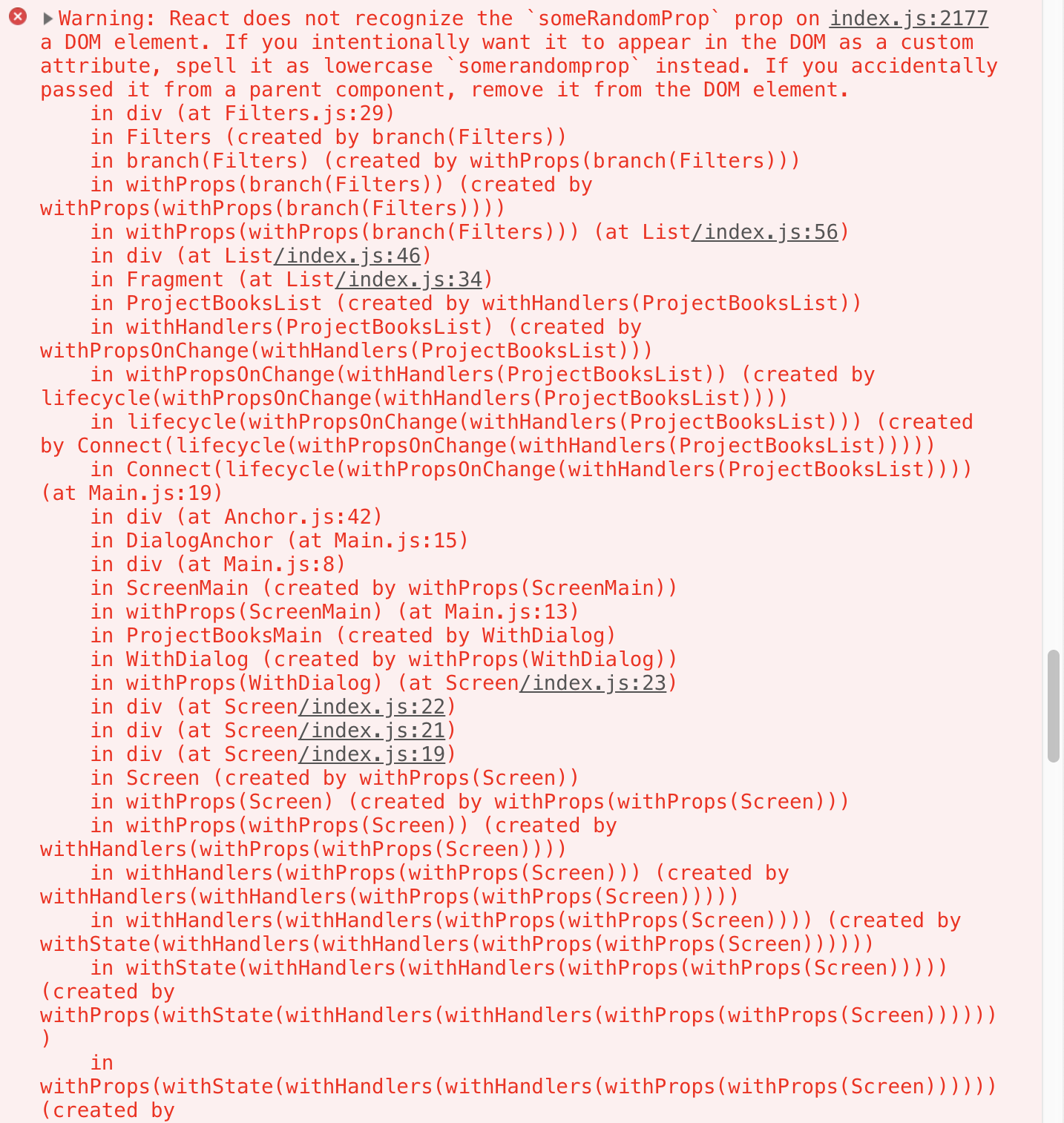
And my proposal is to find a better way to indicate to the user from which DOM element/ React element the error stems.
For example, I just logged the element in
I had to pass it from further up the call stack of course.
This logs the DOM node in the console:

If you right click, there's a Reveal in Element Panel in the context menu. You can then switch to the React DevTools and it will be at the correct element.
This isn't the flow I'm proposing - given it's a bit roundabout - but I think it's feasible to give the user an easier way to find the offending element.
James-E-Adams
on 19 Nov 2018
Does anyone know the rationale for forcing all lowercase attributes with this warning?
Here is a use case involving styled-components where it's quite common to pass custom attributes since styled-components acts a wrapper that applies the appropriate CSS styles.
These warnings flood the console and it would be nice to be able to either disable them or add logic to make sure camelCase props don't throw this warning.
 otech47
on 4 Dec 2018
otech47
on 4 Dec 2018
Forcing all lowercase is to support use cases with Custom Elements, as attributes are not case-sensitive.
styled-components (v4) will automatically filter out props that React would have warned about.
 Jessidhia
on 5 Dec 2018
Jessidhia
on 5 Dec 2018
This issue has been automatically marked as stale because it has not had recent activity. It will be closed if no further activity occurs. Thank you for your contribution.
![stale[bot] picture](https://avatars3.githubusercontent.com/in/1724?v=4&s=40) stale[bot]
on 10 Jan 2020
stale[bot]
on 10 Jan 2020
Closing this issue after a prolonged period of inactivity. If this issue is still present in the latest release, please create a new issue with up-to-date information. Thank you!
stale[bot]
on 17 Jan 2020
Does anybody know why are those warnings displayed with console.error instead of console.warn?
 gpawlik
on 3 Jun 2020
gpawlik
on 3 Jun 2020
Related issues
 h1orz
·
3Comments
h1orz
·
3Comments
 jimfb
·
3Comments
jimfb
·
3Comments
 kocokolo
·
3Comments
kocokolo
·
3Comments
 trusktr
·
3Comments
trusktr
·
3Comments
 jmullo
·
3Comments
jmullo
·
3Comments
Most helpful comment
Does anybody know why are those warnings displayed with
console.errorinstead ofconsole.warn?