React: Adding an image tag inside a react component throws error.
While working on an app, I was trying to use an image tag, I thought it was something with my setup, but I stripped everything down to zero, as below.
index.html
<!DOCTYPE html>
<html lang="en">
  <head>
  </head>
  <body>
    <div id="app"></div>
  </body>
  <script src="./index_bundle.js"></script>
</html>
index.js
import React from 'react';
import ReactDOM from 'react-dom';

ReactDOM.render(<img src={'/img/logo.png'} alt="vb" />, document.getElementById('app'));
The image renders properly, but I get an error in console that reads
index_bundle.js:659 Uncaught TypeError: Cannot read property '__reactInternalInstance$oz59ctes8c' of null
    at Object.getClosestInstanceFromNode (index_bundle.js:659)
    at findParent (index_bundle.js:19989)
    at handleTopLevelImpl (index_bundle.js:20018)
    at ReactDefaultBatchingStrategyTransaction.perform (index_bundle.js:4017)
    at Object.batchedUpdates (index_bundle.js:19940)
    at Object.batchedUpdates (index_bundle.js:1382)
    at dispatchEvent (index_bundle.js:20098)
Digging into the source, the error is thrown from the following function inside src/renderers/dom/shared/ReactDOMComponentTree.js
/**
 * Given a DOM node, return the closest ReactDOMComponent or
 * ReactDOMTextComponent instance ancestor.
 */
function getClosestInstanceFromNode(node) {
  if (node[internalInstanceKey]) {
    return node[internalInstanceKey];
  }

  // Walk up the tree until we find an ancestor whose instance we have cached.
  var parents = [];
  while (!node[internalInstanceKey]) {
    parents.push(node);
    if (node.parentNode) {
      node = node.parentNode;
    } else {
      // Top of the tree. This node must not be part of a React tree (or is
      // unmounted, potentially).
      return null;
    }
  }

  var closest;
  var inst;
  for (; node && (inst = node[internalInstanceKey]); node = parents.pop()) {
    closest = inst;
    if (parents.length) {
      precacheChildNodes(inst, node);
    }
  }

  return closest;
}
It doesn't matter where I put the image, inside a component, surrounded by divs, with siblings, alone. Nothing gets rid of this error.
 victorbello
All 24 comments
Can you create a minimal reproducing case that’s ready to run? So that we can exclude bundling issues etc.
 gaearon
on 3 Aug 2017
gaearon
on 3 Aug 2017
OK, so here we go. I created two files now.
index.html
<!DOCTYPE HTML>
<html>
  <head>
    <meta charset="utf-8">
    <title>React Hello World</title>
  </head>
  <body>
    <div id='root'></div>
    <script src="https://unpkg.com/[email protected]/dist/react.js"></script>
    <script src="https://unpkg.com/[email protected]/dist/react-dom.js"></script>
    <script src="https://cdnjs.cloudflare.com/ajax/libs/babel-core/5.8.23/browser.min.js"></script>
    <script src="scripts.js" type="text/babel"></script>
  </body>
</html>
scripts.js
ReactDOM.render(<img src={'/img/logo.png'} alt="vb" />, document.getElementById('root'));
Started the server with python -m SimpleHTTPServer 8000
Image renders, No error.
Using React,React DOM 15.6.1. Chrome Version 59.0.3071.115. OSX 10.12.5 (16F73).
On my old setup, I have Webpack with the following babel loader
{
    test: /\.js?$/,
    loader: 'babel-loader',
    exclude: '/node_modules/',
    query: { presets: ['es2015', 'react', 'stage-2', 'flow']}
}
Where should I look next?
victorbello
on 3 Aug 2017
I would suggest posting your webpack'd bundle somewhere. I can look what's up with it.
gaearon
on 3 Aug 2017
Here it is.
webpack.config.js
const path = require('path');
const HtmlWebpackPlugin = require('html-webpack-plugin');
const webpack = require('webpack');

const config = {
  entry: './client/index.js',
  output: {
    path: path.resolve(__dirname, 'dist'),
    filename: 'index_bundle.js',
    publicPath: '/'
  },
  devtool: 'inline-source-map',
  module: {
    loaders: [
      {
        test: /\.js?$/,
        loader: 'babel-loader',
        exclude: '/node_modules/',
        query: { presets: ['es2015', 'react', 'stage-2']}
      },
      {
        test: /\.css$/,
        loaders: ['style-loader', 'css-loader?module&localIdentName=[local]']
      },
      {
        test: /\.scss$/,
        use: ['style-loader', 'css-loader', 'sass-loader']
      }
    ]
  },
  plugins: [
    new HtmlWebpackPlugin({
      template: 'client/index.html'
    })
  ]
};

if (process.env.NODE_ENV === 'production') {
  config.plugins.push(
    new webpack.DefinePlugin({
      'process.env': {
        NODE_ENV: JSON.stringify(process.env.NODE_ENV)
      }
    }),
    new webpack.optimize.UglifyJsPlugin({
      beautify: false,
      mangle: {
        screw_ie8: true,
        keep_fnames: true
      },
      compress: {
        screw_ie8: true
      },
      comments: false
    })
  );
}

module.exports = config;
Do you mind creating a repo so I can just pull?
gaearon
on 3 Aug 2017
@gaearon, added you as a collaborator on the repo. You should be able to fork it. It's a work in progress, and a bit messy right now.
victorbello
on 3 Aug 2017
Add this file on the repo once you clone it.
.env
DB_USER=testing
DB_PASS=123456
DB_URL=ds145292.mlab.com
DB_PORT=45292
DB_NAME=auth
SESSION_SECRET=SO_SECRET
ENABLE_GRAPHIQL=true
Can you also post exact instructions to reproduce?
gaearon
on 3 Aug 2017
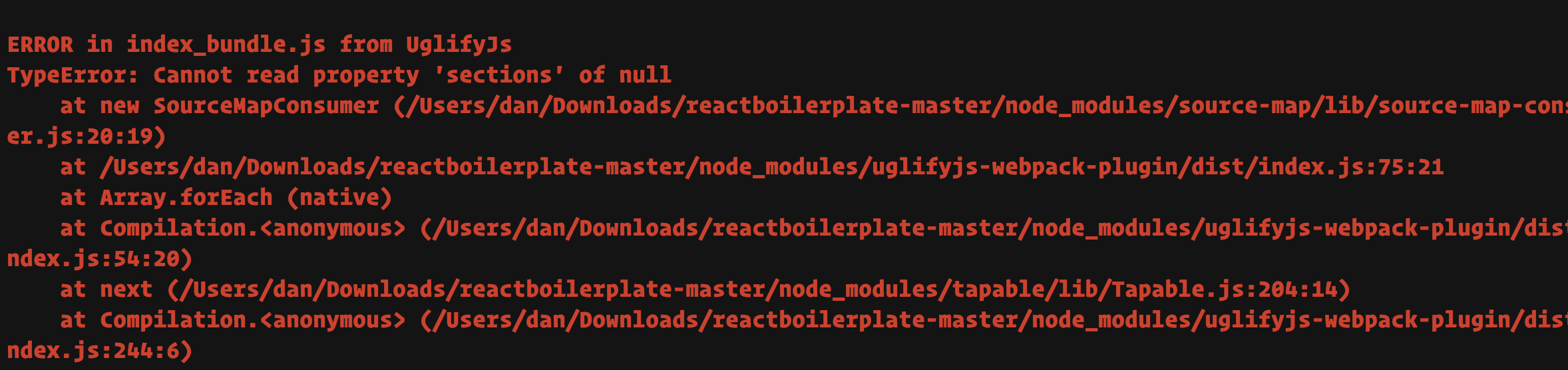
Project doesn't build for me.
gaearon
on 3 Aug 2017
The error should come up in the console when you open localhost:8080 on your browser.
Let me check if I messed up the packages.json file. It should install everything with npm install then run with npm run dev
victorbello
on 3 Aug 2017
OK @gaearon, I messed up the postinstall stuff, I'll fix that, but even though that breaks on npm install you should be able to run npm run dev and run the application. Open the browser and check the console.
victorbello
on 3 Aug 2017
I can reproduce. Will tag as a bug for now.
gaearon
on 3 Aug 2017
I just checked, and dropping 16 beta in the project fixes the issue. Since the part that crashes is 15-specific, and it’s not very clear where the bug is (but it’s solved in 16), I’ll close this.
gaearon
on 3 Aug 2017
OK, thanks @gaearon. I'll wait for 16 to get released.
victorbello
on 3 Aug 2017
Hi @gaearon I am having a similar issue. Can you suggest a work-around for those who cannot wait for 16 or can't adopt a new version due to company constraints?
 Qlwentt
on 15 Aug 2017
Qlwentt
on 15 Aug 2017
@Qlwentt could you provide a reproduction of your issue using this JSFiddle as a starting point? I can try to verify it and see if there's any potential workaround.
 aweary
on 15 Aug 2017
aweary
on 15 Aug 2017
I couldn't figure out how to repro the error in a JSFiddle -- looked fine when I simply put an img tag in a component.
For anyone who finds this page and has a similar problem, my (hacky) workaround was to replace the img tag with a div and style it to give it a background image.
Qlwentt
on 15 Aug 2017
I did the same as a workaround.
victorbello
on 15 Aug 2017
@Qlwentt Could you clarify what sort of company constraints you are referring to? Since even if we fix it in 15.x we'd still have to release a new version with the fix. Would you be able to adopt it?
gaearon
on 16 Aug 2017
@gaearon, thanks for following up. I just meant that I can't unilaterally decide to adopt another version -- there would be discussions about it and then it would be a process, so it wouldn't be a quick thing. Plus I have some dependencies that aren't compatible with 16 yet. Honestly, if you fixed it in 15.x we'd adopt it but probably not immediately, especially since we now have a workaround and there are other projects that need more attention.
Qlwentt
on 16 Aug 2017
Fair enough.
@victorbello If you could let @aweary look at the example you shared with me, that would be great. I'm on vacation now and can't look into it again.
I wouldn't say it's a priority for us to fix but if @aweary finds time I can't stop him. :P
gaearon
on 16 Aug 2017
@aweary, I sent you an invite into the repo. The issue was fixed on this repo by upgrading to 16 beta, but if you checkout faecd2bd67766faca582b6eefdc2b0ff149fad32 from that repo, and build that one, you should be able to see the issue. On that commit, there's an issue with postinstall, referenced above by @gaearon, it's fine, just run npm run dev after the UglifyJS error and it should still run.
victorbello
on 16 Aug 2017
Thanks @victorbello, I was able to reproduce the issue intermittently. It looks like some kind of race condition between the load event for the image and the DOM tree being appended to the container. When it attempts to find the container element it finds null, because the root element is not yet connected (isConnected is false). I'm not exactly sure why this happens yet, but as @gaearon mentioned this isn't high priority right now and I unfortunately don't have much time to investigate.
aweary
on 16 Aug 2017
Ok what actually is the fix when images are not displayed in react component using img src tag
 Kapil-Vermani
on 13 Feb 2018
Kapil-Vermani
on 13 Feb 2018
Related issues
 varghesep
·
3Comments
varghesep
·
3Comments
 jmullo
·
3Comments
jmullo
·
3Comments
 zpao
·
3Comments
zpao
·
3Comments
zpao
·
3Comments
zpao
·
3Comments
 trusktr
·
3Comments
trusktr
·
3Comments
Most helpful comment
I couldn't figure out how to repro the error in a JSFiddle -- looked fine when I simply put an img tag in a component.
For anyone who finds this page and has a similar problem, my (hacky) workaround was to replace the img tag with a div and style it to give it a background image.