React: Minified Version of React's CDN Throws Errors, but Unminified CDN Works Fine
Using React's official CDNs, minified version throws Uncaught TypeError, but unminified (dev version) does not.
CDNs used:
My Code:
<!-- **minified** throws Uncaught TypeError -->
    <script src="https://unpkg.com/[email protected]/dist/react.min.js"></script>
    <script src="https://unpkg.com/[email protected]/dist/react-dom.min.js"></script>

<!-- **unminified** works fine
    <script src="https://unpkg.com/[email protected]/dist/react.js"></script>
    <script src="https://unpkg.com/[email protected]/dist/react-dom.js"></script>
-->


 //jsx
 var ParentComponent = React.createClass({
        handleSearchFieldChange: function(value){
            //search code
        },
        render: function() {
            return (
            <SearchField searchCallback={
                 function(queryTerms)
                    {self.handleSearchFieldChange(queryTerms)}} />
            );
        }
});

//child jsx component
var SearchField = React.createClass({
    onChangeHandler: function(event) {
        this.props.searchCallback(this.state.value);
    },
    render: function(){
        <FormControl type="text" onChange={this.onChangeHandler} />
    }
});
Results
- Unminified version works without any errors
- Minified version results in the following error:
Uncaught TypeError: self.props.searchCallback is not a function
This is an error with the react's official minified CDN version.
 jason-cf
All 16 comments
@jason-cramfighter can you please provide an example reproducing your issue? You can use this JSFiddle as a template. It's hard to help if we don't have enough information, such as what FormControl is. There also appear to be errors in your provided examples, such as SearchField not actually returning FormControl from the render method.
I tried to take your example, adjust it so it runs, and reproduce your issue but it appears to be working for me: Example. If you can provide an example that reproduces your issue we'd be happy to help identify if this is an issue with React or not.
 aweary
on 19 Jun 2017
aweary
on 19 Jun 2017
Hey @aweary, thanks for the fast response! Apologies for not having enough information. I created a fiddle using your template, and I removed the reference to FormControl to avoid confusion.
The issue still appears if you switch between minified and non-minified. The good part is is the issue seems to be a line of code that I had mistakenly forgotten to remove (line 25). I never noticed it, because in the non-minified version, it somehow still works, but it should fail like the minified version. Either way, I think the behavior seems inconsistent.
This is the fiddle: https://jsfiddle.net/x29z0mx0/18/
The CDNs I used were:
https://unpkg.com/[email protected]/dist/react.js
https://unpkg.com/[email protected]/dist/react-dom.js
https://unpkg.com/[email protected]/dist/react.min.js
https://unpkg.com/[email protected]/dist/react-dom.min.js
jason-cf
on 19 Jun 2017
@jason-cramfighter thanks for clarifying! The reason this happens is because in the development (un-minified) build, props are frozen. So when you do delete this.props.searchCallback in dev, it's not actually deleted. In production, props are not frozen. So searchCallback gets deleted and you get that error.
In strict mode deleting a property from a frozen object throws a TypeError. It looks like components using createClass are not rendered in strict mode. If you use ES6 class components, you'll see that your example throws an error in dev.
I wasn't aware of this discrepancy, cc @gaearon is this intended?
aweary
on 23 Jun 2017
Just adding 'use strict' to fiddle code seems to make it throw with createClass too.
https://jsfiddle.net/w7yg2zmq/
I'm not sure why ES6 classes change anything here though.
 gaearon
on 24 Jun 2017
gaearon
on 24 Jun 2017
Right, explicitly using strict mode resolves this, but it's strange that createClass isn't strict by default.
aweary
on 24 Jun 2017
No activity in a while, but I'm assuming this is low priority since createClass has deprecation warnings, so I just wanted to circle back and thank you for investigating this issue for me. Thanks @aweary and @gaearon!
jason-cf
on 5 Jul 2017
@jason-cramfighter sorry for the lack of activity, I'm not exactly sure what we want to do here. If you can reproduce the issue using create-react-class then we can potentially address this by ensuring that it's running in strict mode like class components do.
aweary
on 5 Jul 2017
@aweary, no worries, I wasn't sure what the path forward was either, so I waited a bit. Given the future direction that v16 will be heading, a fix would be great, but I wouldn't expect it. I think just having your explanation on 6/23/2017 noted somewhere will help anyone else in the future who encounters the same issue. Thanks again for your help!
jason-cf
on 6 Jul 2017
I did some reading, and this is expected behavior:
https://developer.mozilla.org/en/docs/Web/JavaScript/Reference/Classes#Strict_mode
The bodies of class declarations and class expressions are executed in strict mode i.e. constructor, static and prototype methods, getter and setter functions are executed in strict mode.
So render() in the ES6 class example surfaces the error even if you don’t 'use strict' manually, but in createClass() example you have to do it yourself.
There’s nothing React could (or should) do here. Seems like everything works as intended.
gaearon
on 11 Jul 2017
@gaearon, @aweary, you guys rock!!
jason-cf
on 11 Jul 2017
@gaearon maybe it would be worth documenting this on the "React Without ES6" page since it's not obvious that mutating props when using create-react-class will silently fail.
aweary
on 11 Jul 2017
It’s not just mutating props. A lot of other things forbidden in strict mode, like using an undeclared variable, would silently fail. This doesn’t sound specific to React or createClass. I guess we could add a section that recommends to add 'use strict' to the top of your file.
gaearon
on 11 Jul 2017
@gaearon right, using an undeclared variable isn't specific to React in any way. We explicitly freeze this.props, with the intention that it enforces immutability for props. This is very specific to React.
We've introduced a case where an action that you wouldn't expect to fail outside of strict mode (mutating an object) _is_ failing, and doing so silently.
aweary
on 11 Jul 2017
Fair enough. Want to send a PR?
gaearon
on 11 Jul 2017
Minified version is not working for me, too.
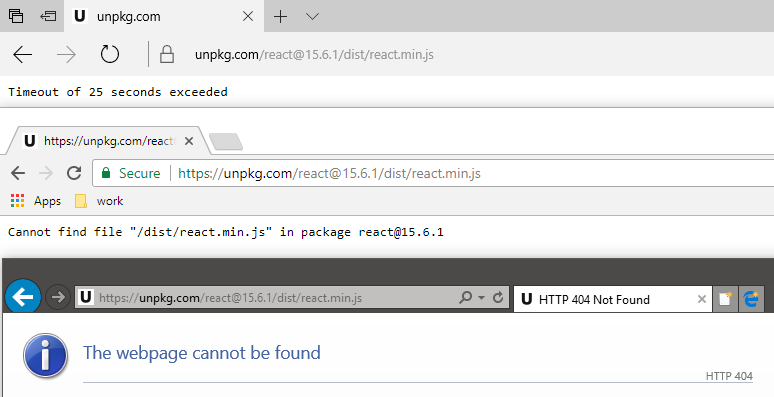
Anything I'm missing?
 exbarboss
on 16 Aug 2017
exbarboss
on 16 Aug 2017
Yes, but this is unrelated to React. The CDN in question (unpkg) seems to be having issues. I hope they'll be able to resolve them soon.
gaearon
on 16 Aug 2017
Related issues
 framerate
·
3Comments
framerate
·
3Comments
 trusktr
·
3Comments
trusktr
·
3Comments
 varghesep
·
3Comments
varghesep
·
3Comments
 h1orz
·
3Comments
h1orz
·
3Comments
 DimitarChristoff
·
3Comments
DimitarChristoff
·
3Comments
Most helpful comment
Fair enough. Want to send a PR?