React-styleguidist: support on-the-fly css classes
I have a component that takes in className as props. I want to be able to define a css classname within the markdown
// this is inside my MyComponents.md
<style>
  .myClass{
    width: 400px;
}
</style>

<MyComponent className="myClass" />
Is it even possible?
Note: there are 2 walk arounds
- use
styles - define a css file in a file and do a
requireinside the markdown
 bochen2014
All 6 comments
I guess you can create a Style component that would attach styles to the page. I don’t think the style tag would work in React.
 sapegin
on 30 Dec 2017
sapegin
on 30 Dec 2017
you are right.
react (or jsx to be more specific) doesn't understand what a <style> tag means, but html does.
I think the issue is that styleguidist only allow defines JSX inside markdown, which rules out the possibility of defining inline css classNames -- Is it a common requirement? I'm not sure.
If we take a look at the markdown engine part of the source code, we may be able to find the answer and 'inject' css support to styleguidist. make sense?
bochen2014
on 30 Dec 2017
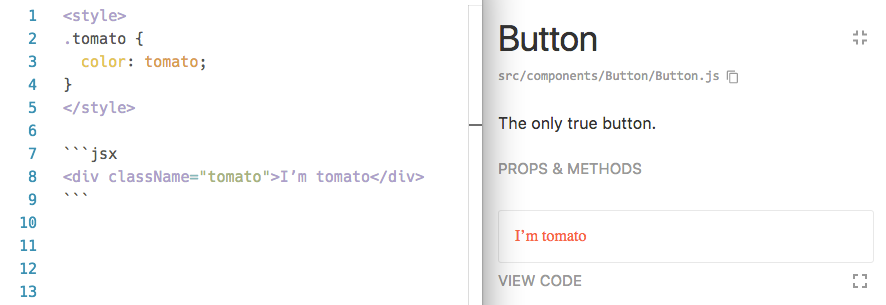
It actually works right now:
sapegin
on 30 Dec 2017
wonderful!!!
bochen2014
on 30 Dec 2017
Hi, is this not working anymore?
I've tried add <style /> tag in .md, but its content turns out to be converted to <p /> in <style /> tag, which block the style inject.
any idea?
current version: 7.0.9
 elsefalse
on 4 May 2018
elsefalse
on 4 May 2018
Yeah not working for me either. FWIW, I am currently more-or-less doing this:
    const globalStyle = 'globalOverrides';
    const css = document.querySelector(`#${globalStyle}`) || document.createElement('style');
    css.id = globalStyle;
    css.textContent = `
        .search-icon-example {
        width: 80px;
        }`;
    document.head.append(css);

<SearchIcon className="search-icon-example" />
The possibility of bleed being opened up to the playground is troubling though...
 gibbitz
on 12 Dec 2018
gibbitz
on 12 Dec 2018
Related issues
 stcherenkov
·
3Comments
stcherenkov
·
3Comments
 gscottolson
·
3Comments
gscottolson
·
3Comments
 vslinko
·
3Comments
vslinko
·
3Comments
 crobinson42
·
3Comments
sapegin
·
3Comments
crobinson42
·
3Comments
sapegin
·
3Comments
Most helpful comment
Hi, is this not working anymore?
I've tried add
<style />tag in.md, but its content turns out to be converted to<p />in<style />tag, which block the style inject.any idea?
current version: 7.0.9