React-styleguidist: Styleguide previews have extra unstyled wrappers
Thanks for working so hard on React Styleguidist. I am loving what I am seeing.
I want to know if there is a quick fix to this issue. I am happy to open a PR with solution, but maybe I am missing something obvious.
I want to style a preview to be a specific height. My embedded React component usesheight: 100%, which means it relies on the parent element’s height. I can style the example wrapper as noted in the docs:
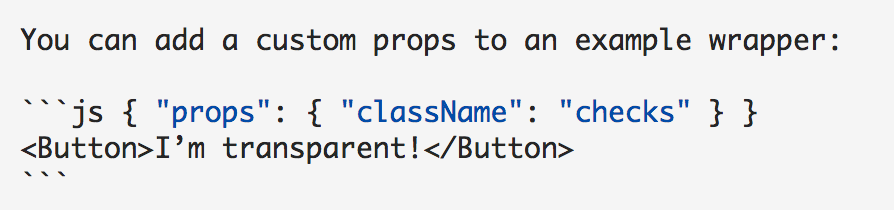
My custom styles look like:
```jsx { "props": { "style": { "height": "80vh" } } } ...
This works as noted, but there are two nested <div>s inside of the <div class="rsg--preview"> container. Since neither of these <div>s provide height styles (e.g. height: inherit;), the preview’s height is different than the components. Here is a screenshot from Chrome Dev Tools:

It seems like a tough problem to solve, but maybe there is a quick win here. Like passing the styles to the preview wrapper to each of the nested child elements. Or maybe setting the child elements to height: inherit if height is set on the preview.
Thoughts?
 gscottolson
All 3 comments
Yeah, it won’t be easy. These two divs are rendered here:
This is also connected to a new plugin API — I may have made it worth with the new Container component — #505.
For your use case I’d suggest to try to replace the Wrapper component — it’s rendered inside these two empty divs.
Any ideas how to solve it in a generic way would be super cool! I’m not sure I know any good solutions now.
 sapegin
on 11 Nov 2017
sapegin
on 11 Nov 2017
Documenting my fix for others…
I was able to style these wrapper <div>s using JSS nested syntax:
module.exports = {
  ...
  styles: {
    Playground: {
      preview: {
        '& > div, & > div > div': {
          height: '100%'
        }
      }
    }
  }
  ...
}
I think we can close this.
sapegin
on 16 Nov 2017
Related issues
 avaly
·
3Comments
avaly
·
3Comments
 vslinko
·
3Comments
vslinko
·
3Comments
 dzimmerman902
·
3Comments
sapegin
·
3Comments
dzimmerman902
·
3Comments
sapegin
·
3Comments
 ZwaarContrast
·
4Comments
ZwaarContrast
·
4Comments
Most helpful comment
Documenting my fix for others…
I was able to style these wrapper
<div>s using JSS nested syntax: