React-redux-firebase: firebaseAuthIsReady is undefined
Do you want to request a feature or report a bug?
A bug, firebaseAuthIsReady is undefined.
What is the current behavior?
After setting the react-redux-firebase config for attachAuthIsReady to true, the firebaseAuthIsReady property of the store remains undefined.
What is the expected behavior?
I assume that the expected behaviour is that the authIsReady promise should be attached to the property firebaseAuthIsReady which can be used to check asynchronously for when the firebase auth module is ready to be used.
Which versions of dependencies, and which browser and OS are affected by this issue? Did this work in previous versions or setups?
I am using:
Node: v10.15.3
React: 16.8.4
React Redux Firebase: 3.0.0-alpha.10
React Firestore: 0.7.2
React Redux: 6.0.1
I suspect OS and browser don't matter but just in case:
Windows 10
Google Chrome
 wen-l
wen-l
All 12 comments
@wen-l What are you attempting to use authIsReady for? It was originally added as an aide for SSR, but it seems that some folks have been using it instead of waiting for data to load. If you use authIsReady then you could be preventing your application store from correctly being created until after auth has loaded, which can cause an excessively long time before something is shown to the user on app boot up.
 prescottprue
on 9 Apr 2019
prescottprue
on 9 Apr 2019
@wen-l What are you attempting to use
authIsReadyfor? It was originally added as an aide for SSR, but it seems that some folks have been using it instead of waiting for data to load. If you useauthIsReadythen you could be preventing your application store from correctly being created until after auth has loaded, which can cause an excessively long time before something is shown to the user on app boot up.
I'm using authIsReady to delay the loading of the app. This is because for example if a component of the app lets say the navbar has different links for logged in and logged out users, then on initial loading of the app (whilst auth is not loaded), it would briefly display the logged out links, and then after the auth is loaded and the stored session data recognises that the user is actually still logged in, the navbar would change to show links for logged in users. This type of behaviour is undesirable. Hence with authIsReady, I am able to defer the loading of the entire app and avoid such quirky behaviour.
I wasn't aware that a waiting for data to load (helper) existed and can it be used to wait on auth?
wen-l
on 9 Apr 2019
@wen-l Yes it can - and it is preferred to handle what you are describing. To handle auth loading, you get it from the store - that way you can actually handle data persistence at that level for things.
prescottprue
on 9 Apr 2019
How would I get it from the store? Do you mean fetch where the user data is stored?
wen-l
on 9 Apr 2019
The auth recipes section of the docs shows how you can wait for auth to load after getting it from the store.
prescottprue
on 10 Apr 2019
The auth recipes section of the docs shows how you can wait for auth to load after getting it from the store.
Can the isLoaded function be used like a promise?
wen-l
on 10 Apr 2019
@wen-l No - it is for checking props loaded from state as per how redux state connection to props works. You can use the onAuthStateChanged to add promise based handling, but I am not really sure what you are asking.
For issues, we ask that there is an explanation of things not working as expected and preferably code to reproduce an issue. Since this is more usage questions than an issue, you may want to head over to gitter.
prescottprue
on 10 Apr 2019
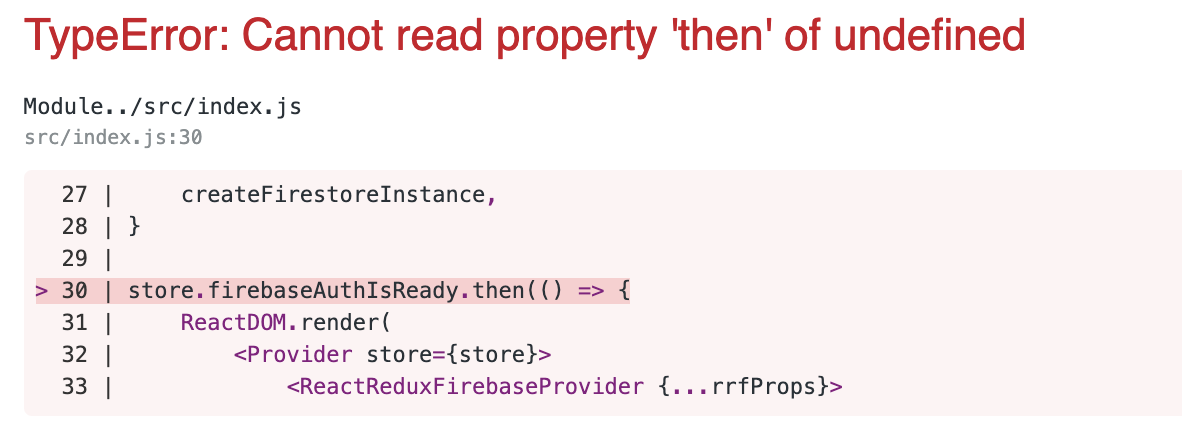
I am experiencing this same issue, while I followed the docs auth recipes section as described.
 quickresolve
on 17 Apr 2019
quickresolve
on 17 Apr 2019
@quickresolve firebaseAuthIsReady was made for SSR only, and is not currently supported for v3. As mentioned above, if you are waiting for auth to load you should use auth state - otherwise it could be a long time to meaningful paint in a browser since you are waiting for auth before rendering anything. The plan is to be removing this from the docs.
If you feel that you still need it, please open a new issue a description of your use case.
prescottprue
on 18 Apr 2019
@prescottprue How to use auth state?
 sklaghari
on 26 Aug 2019
sklaghari
on 26 Aug 2019
@sklaghari as mentioned above the auth docs cover using auth state and waiting for state to load. If you are not able to get things working as expected please open an new issue with a codebase to replicate your issue
prescottprue
on 27 Aug 2019
I am new for React-Redux-Firebase so correct me if i am wrong, but if it helps this works for me...
it is based on auth docs
 //For React Redux Firebase v3.0.*
        import React from 'react';
        import ReactDOM from 'react-dom';
        import App from './App';
        import { createStore, applyMiddleware, compose } from 'redux';
        import { Provider, useSelector } from 'react-redux';
        import thunk from 'redux-thunk';
        import rootReducer from './myproject/rootReducer';
        import { createFirestoreInstance } from 'redux-firestore';
        import { ReactReduxFirebaseProvider, isLoaded } from 'react-redux-firebase';
        import firebase from './myproject/config/fbConfig';

           const rrfConfig = {}

           const store = createStore(
               rootReducer,
                compose(
                 applyMiddleware(thunk)   // if you are using thunk
                  )
            )

            const rrfProps = {
                  firebase,
                  config: rrfConfig,
                  dispatch: store.dispatch,
                  createFirestoreInstance
               }

           function AuthIsLoaded({ children }) {
                    const auth = useSelector(state => state.firebase.auth)
                    if (!isLoaded(auth)) return <div>Loading Screen...</div>;
                        return children
                }

    ReactDOM.render(<Provider store={store}><ReactReduxFirebaseProvider {...rrfProps}>
                     <AuthIsLoaded><App /> </AuthIsLoaded></ReactReduxFirebaseProvider>
            </Provider>, document.getElementById('root'));
 john1914
on 16 Dec 2019
john1914
on 16 Dec 2019
Related issues
 katha247
·
4Comments
katha247
·
4Comments
 nasimoyz
·
4Comments
nasimoyz
·
4Comments
 sdacunha
·
4Comments
sdacunha
·
4Comments
 optimistiks
·
5Comments
optimistiks
·
5Comments
 NirLud
·
3Comments
NirLud
·
3Comments
Most helpful comment
I am experiencing this same issue, while I followed the docs auth recipes section as described.