React-pdf: Issue with flexbox under page with wrap
Hi React PDF,
I am noticing some issues with flexbox after applying the wrap flag to the parent page. For example, I cannot get a component to wrap in a flex row. What happens visually is the second nested component (in this case the red box) simply disappears. The component below is a simple example:
const styles = StyleSheet.create({
  main: {
    flexDirection: 'row',
    justifyContent: 'space-between',
    backgroundColor: 'green',
  },
  blue: {
    width: 200,
    height: 200,
    backgroundColor: 'blue',
  },
  red: {
    width: 200,
    height: 200,
    backgroundColor: 'red',
  },
});

const Info: React.StatelessComponent = () => {
  return (
    <View>
      <View style={styles.main}>
        <View style={styles.blue} />
        <View style={styles.red} />
      </View>
    </View>
  );
};
And I try to render it like so:
  return (
    <Document title={copy.documentTitle}>
      <Page size="A4" style={styles.page} wrap>
        <View style={styles.container}>
          <Info  />
        </View>
      </Page>
    </Document>
  );
Please let me know how to fix this? Thanks!
Sincerely,
Laura
 flaurida
All 35 comments
Note that I am also happy to pursue an alternate solution, as long as I can get two columns. Please let me know!
flaurida
on 1 Mar 2018
Isolating this issue, it is generally when there are nested elements with flex display.
flaurida
on 1 Mar 2018
I am also having issues where the content is overflowing the page a bit, even after adding padding to the container View. Thanks again for all the help!
flaurida
on 1 Mar 2018
Update - I realized I needed to add the padding to the page itself. My last major issues are nested flex and the fact that extra pages are rendered at the end. Thanks so much for the help!
flaurida
on 1 Mar 2018
Unrelated, but does the lineHeight property work on Text elements?
flaurida
on 1 Mar 2018
No. It's not supported yet
 diegomura
on 1 Mar 2018
diegomura
on 1 Mar 2018
OK, no worries. My biggest question now is how to remove the extra 1-2 pages I am seeing. Thanks so much again Diego. The flex stuff works OK so long as I use percentage widths and don't use more than two children elements.
flaurida
on 2 Mar 2018
Currently I don’t think there is any way of removing those while using the wrap feature with 2 columns. It’s just not the way it’s working right now. Sorry.
There is an ongoing effort of changin the text layout algorithm, which will have impact on the wrapping feature as well
diegomura
on 2 Mar 2018
No worries - I really appreciate all you've done, and if I can help with some stuff please let me know. Will keep updating the library as well :) Thanks again and have a great weekend 🎉
flaurida
on 2 Mar 2018
Quick question - when do you think will be possible to do page numbers, even if it is just Page 1 not Page 1 of 4? Thanks again so much, this is looking awesome 🔥 💯
flaurida
on 6 Mar 2018
Yes. It would. Here I shared with you the API I would like to see, but not sure if it's possible. Would you like to tackle this?
diegomura
on 6 Mar 2018
Hi, thanks for the good work, however this bug (which you are talking about on top of this page) is totally blocking us !
We want to display some kind of tables using flexbox, but we are seeing wildly incorrect results, it's so bad it's even fun !
Example
The goal of the example is to display a table with 4 columns, and a varying number of rows... However:
- The number of columns that actually gets displayed varies depending on the number of rows !?!
- For each additional row, an additional empty page is appended after the current page
We use these styles:
export default StyleSheet.create({
  page: { flexDirection: "column", padding: 25 },
  table: {
    fontSize: 10,
    width: 550,
    display: "flex",
    flexDirection: "column",
    justifyContent: "flex-start",
    alignContent: "stretch",
    flexWrap: "nowrap",
    alignItems: "stretch"
  },
  row: {
    display: "flex",
    flexDirection: "row",
    justifyContent: "space-around",
    alignContent: "stretch",
    flexWrap: "nowrap",
    alignItems: "stretch",
    flexGrow: 0,
    flexShrink: 0,
    flexBasis: 35
  },
  cell: {
    borderColor: "#cc0000",
    borderStyle: "solid",
    borderWidth: 2,
    flexGrow: 1,
    flexShrink: 1,
    flexBasis: "auto",
    alignSelf: "stretch"
  },
  header: {
    backgroundColor: "#eee"
  },
  headerText: {
    fontSize: 11,
    fontWeight: 1200,
    color: "#1a245c",
    margin: 8
  },
  tableText: {
    margin: 10,
    fontSize: 10,
    color: neutralDark
  }
});
Case 1 (empty table)
Now here is an example of an empty table:
<Page style={styles.page} size="A4" wrap>
    <View style={styles.table}>
          <View style={[styles.row, styles.header]}>
              <Text style={[styles.headerText, styles.cell]}>Column 1 Header</Text>
              <Text style={[styles.headerText, styles.cell]}>Column 2 Header</Text>
              <Text style={[styles.headerText, styles.cell]}>Column 3 Header</Text>
              <Text style={[styles.headerText, styles.cell]}>Column 4 Header</Text>
          </View>
    </View>
</Page>
The result is the following:

Case 2 (1 row in table)
<Page style={styles.page} size="A4" wrap>
    <View style={styles.table}>
          <View style={[styles.row, styles.header]}>
              <Text style={[styles.headerText, styles.cell]}>Column 1 Header</Text>
              <Text style={[styles.headerText, styles.cell]}>Column 2 Header</Text>
              <Text style={[styles.headerText, styles.cell]}>Column 3 Header</Text>
              <Text style={[styles.headerText, styles.cell]}>Column 4 Header</Text>
          </View>
          <View style={[styles.row]}>
            <Text style={[styles.cell]}>Column 1 Row 1</Text>
            <Text style={[styles.cell]}>Column 2 Row 1</Text>
            <Text style={[styles.cell]}>Column 3 Row 1</Text>
            <Text style={[styles.cell]}>Column 4 Row 1</Text>
          </View>
    </View>
</Page>
The result is the following:

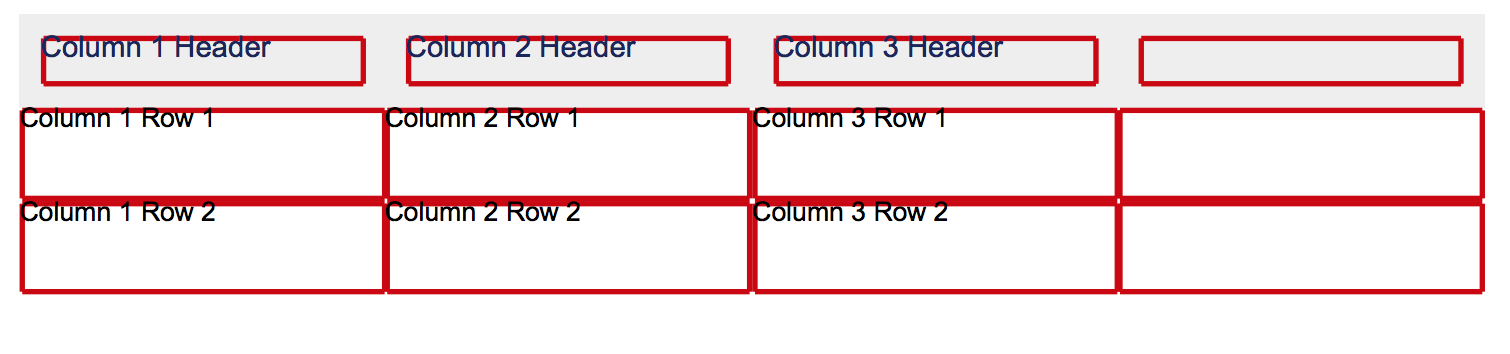
Case 3 (2 rows in table)
<Page style={styles.page} size="A4" wrap>
    <View style={styles.table}>
          <View style={[styles.row, styles.header]}>
              <Text style={[styles.headerText, styles.cell]}>Column 1 Header</Text>
              <Text style={[styles.headerText, styles.cell]}>Column 2 Header</Text>
              <Text style={[styles.headerText, styles.cell]}>Column 3 Header</Text>
              <Text style={[styles.headerText, styles.cell]}>Column 4 Header</Text>
          </View>
          <View style={[styles.row]}>
            <Text style={[styles.cell]}>Column 1 Row 1</Text>
            <Text style={[styles.cell]}>Column 2 Row 1</Text>
            <Text style={[styles.cell]}>Column 3 Row 1</Text>
            <Text style={[styles.cell]}>Column 4 Row 1</Text>
          </View>
          <View style={[styles.row]}>
            <Text style={[styles.cell]}>Column 1 Row 2</Text>
            <Text style={[styles.cell]}>Column 2 Row 2</Text>
            <Text style={[styles.cell]}>Column 3 Row 2</Text>
            <Text style={[styles.cell]}>Column 4 Row 2</Text>
          </View>
    </View>
</Page>
Result:
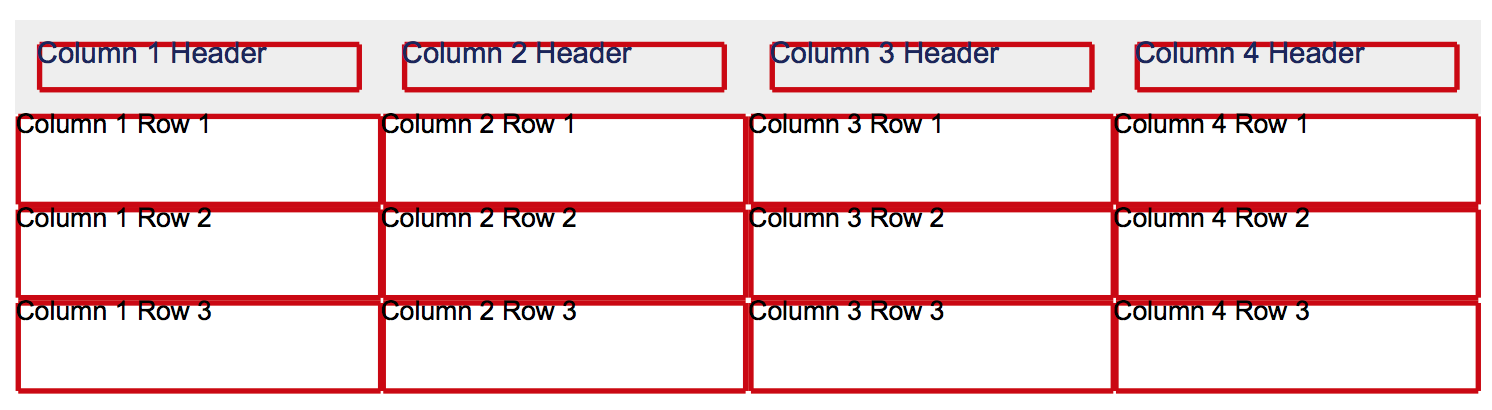
Case 4 (3+ rows in table)
<Page style={styles.page} size="A4" wrap>
    <View style={styles.table}>
          <View style={[styles.row, styles.header]}>
              <Text style={[styles.headerText, styles.cell]}>Column 1 Header</Text>
              <Text style={[styles.headerText, styles.cell]}>Column 2 Header</Text>
              <Text style={[styles.headerText, styles.cell]}>Column 3 Header</Text>
              <Text style={[styles.headerText, styles.cell]}>Column 4 Header</Text>
          </View>
          <View style={[styles.row]}>
            <Text style={[styles.cell]}>Column 1 Row 1</Text>
            <Text style={[styles.cell]}>Column 2 Row 1</Text>
            <Text style={[styles.cell]}>Column 3 Row 1</Text>
            <Text style={[styles.cell]}>Column 4 Row 1</Text>
          </View>
          <View style={[styles.row]}>
            <Text style={[styles.cell]}>Column 1 Row 2</Text>
            <Text style={[styles.cell]}>Column 2 Row 2</Text>
            <Text style={[styles.cell]}>Column 3 Row 2</Text>
            <Text style={[styles.cell]}>Column 4 Row 2</Text>
          </View>
          <View style={[styles.row]}>
            <Text style={[styles.cell]}>Column 1 Row 3</Text>
            <Text style={[styles.cell]}>Column 2 Row 3</Text>
            <Text style={[styles.cell]}>Column 3 Row 3</Text>
            <Text style={[styles.cell]}>Column 4 Row 3</Text>
          </View>
    </View>
</Page>
Result:
Other cases
You get the idea, the bug shows when there are less rows than columns...
TL;DR:
Basically for a table of n rows and m columns,
- when
n<m:
ncolumns are displayed correctly (text + border),n+1columns have a correct borderm-n-1columns are NOT displayed at all.n-1empty pages are appended after the current page
- when
n>=m:
- it's all good !
 crubier
on 12 Mar 2018
crubier
on 12 Mar 2018
Thanks for reporting it and for the extensive research @crubier !
I was looking at your snippets and you are right, this error seems to be with the wrap prop. You can see how it shows up when that prop is gone in here.
wrap is a really an unstable feature right now, and only works for just vertical layouts, such as the one in the page-wrap example. I'm in the middle of changing the text-layouting algorithm, which is a first step of having a more advanced wrapping. However, there is no precise solution I can provide right now other than not using the wrap feature
diegomura
on 12 Mar 2018
Yeah, I've been noticing that there are a bunch of pages being appended at the end and my layout has a bunch of columns with rows with columns and so forth.
 rclai
on 28 Mar 2018
rclai
on 28 Mar 2018
I've been working on improving the current wapping algorithm, which is quite poor and as you said here you were having problems with. Also this involves changes and improvements in the way flexbox work. Just wanted to give a heads up. I hope to be able to release this soon as a beta version, so you can try it. Spoiler on how its currently working (just with very ugly Views for the moment, but the concept is the same for other elements, such as Texts):
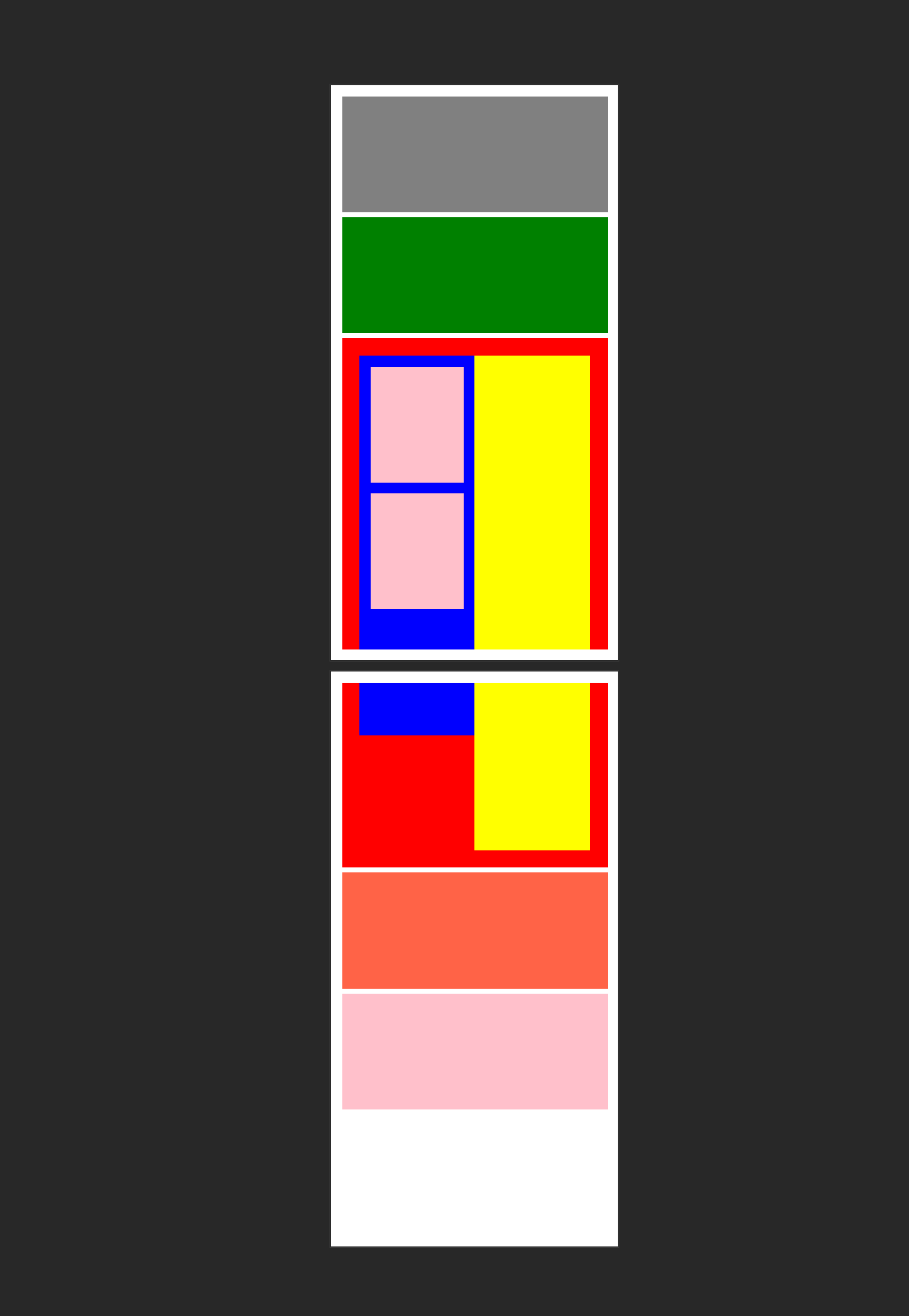
As you can see, now every element that does not fit the page, get's splited and resumed on the next page. Any inputs of feedback about what you see so far? It would be much appreciated!
@flaurida @crubier @rclai
diegomura
on 6 Apr 2018
Another cool feature about this: if a wrapped element suddenly gets alone in his container (imagine the blue box being a bit shorter and ending before the page break), with the correct flexbox properties, it can dynamically adjust, enabling very complex layouts:

The "two" yellow boxes aren't two Views. It's the same one that adjusts based on the page (or pages) that he is being rendered into
diegomura
on 6 Apr 2018
That is great progress.
Will you be supporting the CSS page-break-after/before/inside properties? I feel like being able to achieve those functionalities will get page wrapping in good standing.
rclai
on 6 Apr 2018
I didn’t though about that. That’s actually a very good idea. It would be great for a second iteration. And you are more than welcome to contribute!. I don’t want to be that ambitious on this one because it’s already a very complex issue to solve. Thanks!!
diegomura
on 6 Apr 2018
Looks impressive!
 pedroteixeira
on 6 Apr 2018
pedroteixeira
on 6 Apr 2018
Yes this looks very good @diegomura, I think this is what I would expect from the layout algorithm.
Only one thing worries me, it is that some views might get split. It is ok to split a list between elements. But as I understand it, the user will have to take care himself to not split list elements themselves, especially text lines.
So good congrats on these advances, and let us know about this potential problem.
crubier
on 6 Apr 2018
Thanks for your feedbacks!
@crubier I get what you say. To solve that I thought about being able to pass a prop to an element that disables wrapping for that element. If that element happens to be at the end of a page, it's going to be rendered completely on the next page. If not present, I think it would be ok to expect the text to break if it's at the end of a page. Otherwise you will have that text outside the page boundaries, which shouldn't be allowed. right?
diegomura
on 6 Apr 2018
@diegomura Amazing way the library has matured! kudos
I have been using it for the similar case with pages having dynamic breaks and columns in rows which makes things break.
I saw you actively working on the textkit branch, right?
just wanted to know if its stable to use?
 VrajSolanki
on 20 Apr 2018
VrajSolanki
on 20 Apr 2018
Hi @VrajSolanki . Thanks!
Yes. I've been working extensively there lately, and the results so far have been quite good for the use case I need to cover. But it's experimental yet. If you want, you can give this version a shot by installing 0.7.7-1 version of react-pdf packages. Just bare in mind that execution time is a bit slower now (much things going on: page wrapping, line-breaking, hyphenation, inline styling, among others). But I plan to do a performance test eventually and see where I can improve it.
If you do test it, I would really appreciate you sharing your experiences!
diegomura
on 20 Apr 2018
Hello @diegomura, sorry got caught up in something. To give you a heads up I am facing this error
{"level":"error","message":"Error occurred while rendering: "TypeError: Cannot read property 'slice' of undefined""}
at GlyphRun.slice (path_to/node_modules/@react-pdf/textkit/dist/models/GlyphRun.js:102:44)
    at GlyphString.get glyphRuns [as glyphRuns] (path_to/node_modules/@react-pdf/textkit/dist/models/GlyphString.js:83:24)
    at GlyphString.get height [as height] (path_to/node_modules/@react-pdf/textkit/dist/models/GlyphString.js:61:17)
    at LayoutEngine.layoutParagraph (path_to/node_modules/@react-pdf/textkit/dist/layout/LayoutEngine.js:109:139)
    at LayoutEngine.layoutColumn (path_to/node_modules/@react-pdf/textkit/dist/layout/LayoutEngine.js:82:26)
    at LayoutEngine.layout (path_to/node_modules/@react-pdf/textkit/dist/layout/LayoutEngine.js:68:22)
    at TextEngine.layout (path_to/node_modules/@react-pdf/core/lib/elements/TextEngine.js:117:25)
    at Text.measureText (path_to/node_modules/@react-pdf/core/lib/elements/Text.js:75:21)
    at path_to/node_modules/yoga-layout/dist/entry-common.js:221:40
    at Node.<anonymous> (path_to/node_modules/yoga-layout/dist/entry-common.js:234:21)
    at Node.prototype.(anonymous function) [as calculateLayout] (path_to/node_modules/yoga-layout/dist/entry-common.js:133:22)
    at SubPage.wrap (path_to/node_modules/@react-pdf/core/lib/elements/SubPage.js:89:19)
    at Page._callee$ (path_to/node_modules/@react-pdf/core/lib/elements/Page.js:133:56)
    at tryCatch (path_to/node_modules/babel-polyfill/node_modules/regenerator-runtime/runtime.js:65:40)
    at Generator.invoke [as _invoke] (path_to/node_modules/babel-polyfill/node_modules/regenerator-runtime/runtime.js:303:22)
    at Generator.prototype.(anonymous function) [as next] (path_to/node_modules/babel-polyfill/node_modules/regenerator-runtime/runtime.js:117:21)
    at step (path_to/node_modules/@react-pdf/core/lib/elements/Page.js:27:191)
    at path_to/node_modules/@react-pdf/core/lib/elements/Page.js:27:437
    at new Promise (<anonymous>)
    at Page.<anonymous> (path_to/node_modules/@react-pdf/core/lib/elements/Page.js:27:99)
    at Page.wrapPage (path_to/node_modules/@react-pdf/core/lib/elements/Page.js:150:21)
    at Document._callee4$ (path_to/node_modules/@react-pdf/core/lib/elements/Document.js:212:41)
maybe I am missing a settings here, I will dig deeper while you can have a look at it.
VrajSolanki
on 23 Apr 2018
Thanks for the report. Can you upload the snippet that is throwing that error?
diegomura
on 23 Apr 2018
@diegomura
so I believe the issue is with the the fonts. If I do not add any fonts I get the error
{"level":"error","message":"Error occurred while rendering: "TypeError: this.ctx._addGlyphs is not a function"","datetime":"2018-04-23T15:19:41.681Z"}
If I add my custom fonts by registering I get the error
{"level":"error","message":"Error occurred while rendering: "TypeError: Cannot read property 'slice' of undefined""}
and the code Snippet is:
let renderItems = [];

  _.map(itemsList,(item, index)=>{
    renderItems.push(
      <View style={{display: "flex", flexDirection: "row"}} break>
        <View><Text style={{fontFamily: 'Avenir Bold',fontSize: 11,color:'#5F5F69'}}>hello world</Text></View>
        <View><Text style={{fontFamily: 'Avenir Bold',fontSize: 11,color:'#5F5F69'}}>hello world</Text></View>
      </View>
    );
  });

   return <Page size="A4" wrap>{renderItems}</Page>;
I have registered the font Avenir Bold.
VrajSolanki
on 23 Apr 2018
The first error is because (for some reason I can figure out) you are not using the correct pdfkit version, which now should be https://github.com/react-pdf/pdfkit. Are you using yarn or npm? It may be related to that because currrently that react-pdf version relies on the resolutions feature here which I didn't try with npm. Also, try uploading to 0.7.7-2, but that's not where the issue is
diegomura
on 23 Apr 2018
I am using npm. yes there can be issue with this I can check that if with yarn.
Fair enough will upgrade to 7-2.
I do not have any dependencies for pdfkit in my package.json, I believe it was react-pdf dependency so should be taken care by the library, currently I have 0.8.1 version of pdfkit.
Shall I update that as well??
VrajSolanki
on 23 Apr 2018
Thanks! This is definitely an issue (hate when this happens). Please tell me if it works with yarn
diegomura
on 23 Apr 2018
Yup atleast got it built with yarn and currently on version 0.7.7-2
@diegomura lets do one thing add yarn in the build setup until the npm stuff with pdfkit is figured out, it would be helpful. I have seen some issues are already there regarding this.
Seems interesting to work on the layouts now!!
Also currently I am able to see the rows, columns in the flexbox will work drill more on the layout and page-break and keep you posted.
Thanks.
VrajSolanki
on 23 Apr 2018
It's great you could make it work. And glad to hear it's you find the new layout and page wrapping feature interesting. Probably it has things to improve yet, but test it and report anything you see.
The yarn thing is definitely something I should fix soon. I can't expect to all the users to use yarn. It's a shame npm does not support this
diegomura
on 23 Apr 2018
Hi, I'm also seeing a problem with columns inside a row cutting off some of the column content. I think it is a similar issue with nested flexboxes. Is this something that might get fixed soon or should I change my pdf design to be more flat perhaps? thanks!
 cml391
on 29 May 2018
cml391
on 29 May 2018
This is fixed on the 1.0.0 branch, which is the ongoing effort in releasing a more stable version, with tons of new features. However, I didn't have enough time to wrap it and deploy a release candidate yet. You can temporarily try that version, or as you said, flat the document design 😄
diegomura
on 29 May 2018
Some more flex weirdness, you can copy/paste the code below directly into the repl to see what I'm talking about.
The page layout works as expected with only _one_ <TwoColumnLayout />. With every _additional_ <TwoColumnLayout />, two blank pages get added to the document, plus the last word in each <Text /> gets chopped.


const TwoColumnLayout = () => (
  <View style={{ flexDirection: 'row', justifyContent: 'space-around' }} >
    <View style={{ flexDirection: 'column' }} >
      <Text>Left Column</Text>
    </View>

    <View style={{ flexDirection: 'column' }} >
      <Text>Right Column</Text>
    </View>
  </View>
);

const doc = (
  <Document>
    <Page style={{ padding: 30 }} wrap>
      <TwoColumnLayout />
      <TwoColumnLayout />
      <TwoColumnLayout />
      <TwoColumnLayout />
      <TwoColumnLayout />
    </Page>
  </Document>
);

ReactPDF.render(doc);
Edit: remove the wrap and everything goes back to normal
Edit 2: Just tried this same component on the 1.0.0 branch the issue appears to have been fixed!
although I get Emoji source not registered several times in the console
 tim-soft
on 6 Jun 2018
tim-soft
on 6 Jun 2018
New v1.0.0-alpha.7 implements the new wrapping algorithm. REPL is already running that version.
I'm closing this, and if anything else pops up, submit a new issue with proper example
diegomura
on 23 Jul 2018
Related issues
 cheald
·
3Comments
cheald
·
3Comments
 redcranesolutions
·
4Comments
redcranesolutions
·
4Comments
 theobat
·
3Comments
theobat
·
3Comments
 UsefulHunter
·
3Comments
UsefulHunter
·
3Comments
 yellowBanano
·
3Comments
yellowBanano
·
3Comments
Most helpful comment
Hi, thanks for the good work, however this bug (which you are talking about on top of this page) is totally blocking us !
We want to display some kind of tables using flexbox, but we are seeing wildly incorrect results, it's so bad it's even fun !
Example
The goal of the example is to display a table with 4 columns, and a varying number of rows... However:
We use these styles:
Case 1 (empty table)
Now here is an example of an empty table:
The result is the following:
Case 2 (1 row in table)
The result is the following:
Case 3 (2 rows in table)
Result:
Case 4 (3+ rows in table)
Result:
Other cases
You get the idea, the bug shows when there are less rows than columns...
TL;DR:
Basically for a table of
nrows andmcolumns,n<m:ncolumns are displayed correctly (text + border),n+1columns have a correct borderm-n-1columns are NOT displayed at all.n-1empty pages are appended after the current pagen>=m: