React-native: [Android] Since 0.63.1 images won't render on Android after subsequently applying & removing tintColor
Description
Since upgrading to react-native 0.63.1 (coming from v0.62.2) there is an issue on Android when subsequently applying & removing tintColor to an <Image>. When doing this on Android the rendered images disappears while on iOS it renders in the original color as expected. See gifs below.
React Native version:
System:
    OS: macOS 10.15.5
    CPU: (8) x64 Intel(R) Core(TM) i7-7820HQ CPU @ 2.90GHz
    Memory: 1.18 GB / 16.00 GB
    Shell: 5.7.1 - /bin/zsh
  Binaries:
    Node: 12.16.2 - /usr/local/bin/node
    Yarn: 1.22.0 - /usr/local/bin/yarn
    npm: 6.14.6 - /usr/local/bin/npm
    Watchman: 4.9.0 - /usr/local/bin/watchman
  Managers:
    CocoaPods: 1.9.3 - /Users/mattijs/.rbenv/shims/pod
  SDKs:
    iOS SDK:
      Platforms: iOS 13.5, DriverKit 19.0, macOS 10.15, tvOS 13.4, watchOS 6.2
    Android SDK:
      API Levels: 25, 26, 27, 28, 29
      Build Tools: 27.0.3, 28.0.3, 29.0.0, 29.0.0, 29.0.0, 29.0.2, 29.0.3
      System Images: android-21 | Intel x86 Atom_64, android-21 | Google APIs Intel x86 Atom_64, android-22 | Intel x86 Atom_64, android-24 | Intel x86 Atom, android-24 | Google Play Intel x86 Atom, android-25 | Google Play Intel x86 Atom, android-26 | Google Play Intel x86 Atom, android-28 | Intel x86 Atom_64, android-28 | Google APIs Intel x86 Atom, android-28 | Google Play Intel x86 Atom, android-29 | Intel x86 Atom_64, android-29 | Google APIs Intel x86 Atom, android-29 | Google APIs Intel x86 Atom_64
      Android NDK: Not Found
  IDEs:
    Android Studio: 4.0 AI-193.6911.18.40.6514223
    Xcode: 11.5/11E608c - /usr/bin/xcodebuild
  Languages:
    Java: 1.8.0_141 - /usr/bin/javac
    Python: 2.7.16 - /usr/bin/python
  npmPackages:
    @react-native-community/cli: Not Found
    react: 16.13.1 => 16.13.1
    react-native: 0.63.1 => 0.63.1
  npmGlobalPackages:
    *react-native*: Not Found
Steps To Reproduce
Provide a detailed list of steps that reproduce the issue.
- Load up an
<Image>component with some image - Apply
tintColorstyle e.gtintColor: "lightgrey" - Remove the
tintColor(e.g after some arbitrary delay)
Expected Results
After step 3 I expect the image to appear without any tintColor applied and being rendered with original colors. However on Android the image is no longer visible after step 3 while on iOS it renders correctly.
Code example
export default (): JSX.Element => {
  const [applyTint, setApplyTint] = useState(false)

  useEffect(() => {
    setTimeout(() => { setApplyTint(true) }, 2500)
    setTimeout(() => { setApplyTint(false) }, 5000)
  }, [])

  return (
    <View style={{ ...StyleSheet.absoluteFillObject, backgroundColor: "grey" }}>
      <Image
        source={{
          uri:
            "https://upload.wikimedia.org/wikipedia/commons/thumb/a/a7/React-icon.svg/440px-React-icon.svg.png",
        }}
        resizeMode="contain"
        style={[StyleSheet.absoluteFill, applyTint ? { tintColor: "lightgrey" } : {}]}
      />
    </View>
  )
}
Screenshot
Expected behavior: Launch > Original Logo (2.5s) > Tinted Grey Logo(2.5s) > Original Logo (2.5s)
_iOS_ (Good)
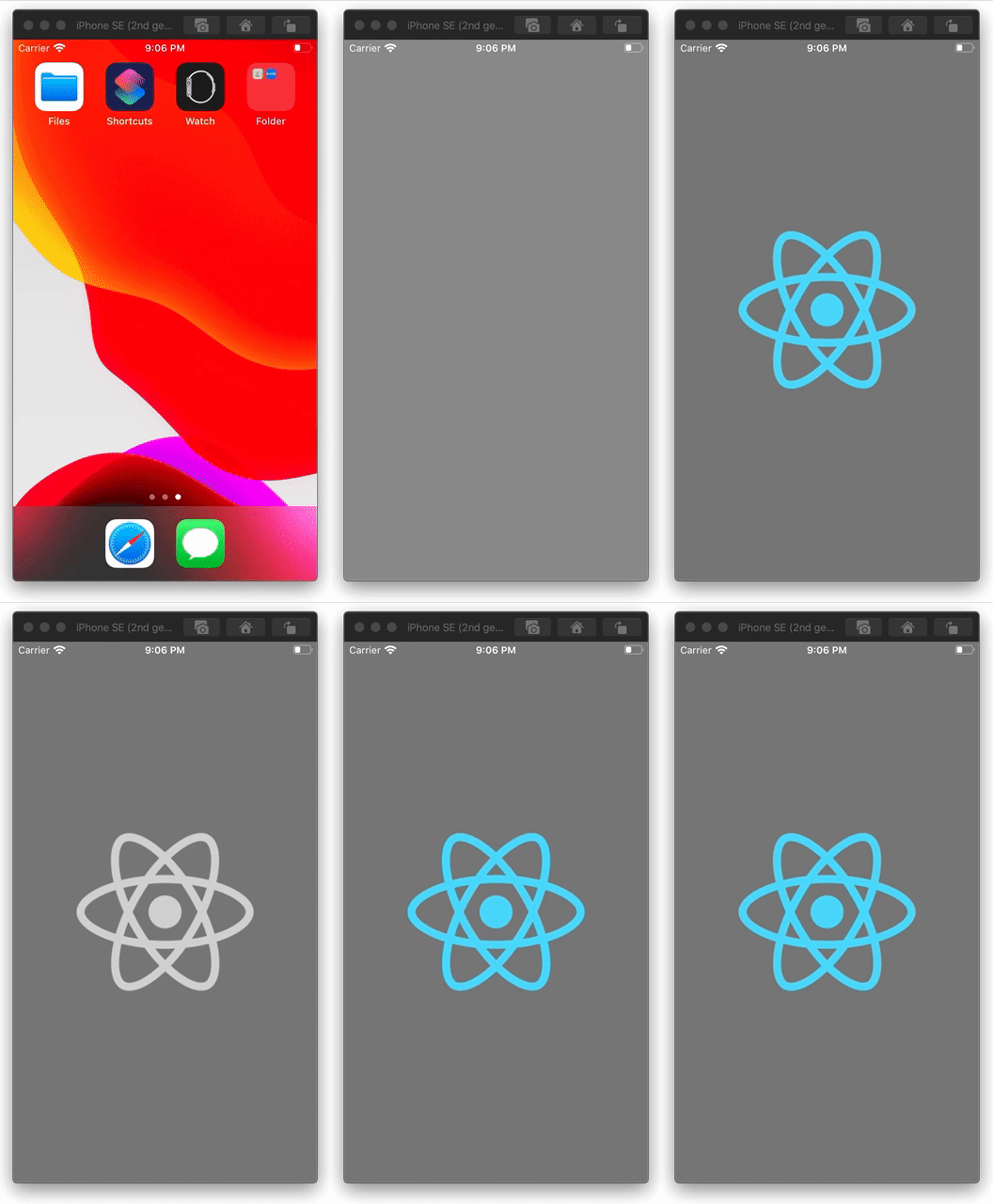
_Android_ (Broken)

 mattijsf
All 6 comments
The actual use case for this pattern is applying a tintColor for the loading / placeholder image via defaultSource after we track onLoadEnd and remove the tintColor so the source image is rendered without tinting. This worked in 0.62.2 but broke in 0.63.1 on Android.
mattijsf
on 17 Jul 2020
Same here ✋
 WadhahEssam
on 27 Jul 2020
WadhahEssam
on 27 Jul 2020
I've tried diffing 0.62 with 0.63 but couldn't find anything obvious that could be related to this. I hope someone within the team can have a look at this 🤞
mattijsf
on 28 Jul 2020
@mattijsf I think the issue relies in these changes:
https://github.com/facebook/react-native/commit/f4de45800f25930a1c70f757d12269d859066d3d#diff-470aef23c677dd2591172bcb4209a2d7
 efstathiosntonas
on 28 Jul 2020
efstathiosntonas
on 28 Jul 2020
I have a similar issue and the last version of RN as well. Some of my images start not showing up on android unless I give them an explicit tint-color. The png files I use do have colors and show up correctly on ios. The image takes up the space it's supposed to but it isn't visible without an explicit tint color.
 Mayaela
on 10 Sep 2020
Mayaela
on 10 Sep 2020
We've just encountered this issue, image renders fine on first paint, then dissapears.
We found applying a tintColor explicitly works as a short term fix.
But you can also add a key prop to the image component works, forcing a re-render of the image 👍
_Short term fix, but it works for what we need right now 😅_
 kepop1
on 21 Sep 2020
kepop1
on 21 Sep 2020
Related issues
 grabbou
·
3Comments
grabbou
·
3Comments
 janmonschke
·
3Comments
janmonschke
·
3Comments
 aniss
·
3Comments
aniss
·
3Comments
 ghost
·
3Comments
ghost
·
3Comments
 lazywei
·
3Comments
lazywei
·
3Comments
Most helpful comment
@mattijsf I think the issue relies in these changes:
https://github.com/facebook/react-native/commit/f4de45800f25930a1c70f757d12269d859066d3d#diff-470aef23c677dd2591172bcb4209a2d7