React-native-vector-icons: Not working with RN v0.62.0
This package in not working with RN v0.62.0. It's not getting linked in native dirs
 ajaybhatia
All 15 comments
I Just link it (react-native link) , after this I clean gradle : cd android; ./gradlew clean and this work
 EvertonCosmo
on 27 Mar 2020
EvertonCosmo
on 27 Mar 2020
I Just link it
(react-native link), after this I clean gradle :cd android; ./gradlew cleanand this work
Not working
ajaybhatia
on 28 Mar 2020
I found solution, make sure that the fonts are on the right path, by linking to 0.62, he created a src on the root of android, right path, android\app\src\main
 lucastryhorn
on 28 Mar 2020
lucastryhorn
on 28 Mar 2020
I found solution, make sure that the fonts are on the right path, by linking to 0.62, he created a src on the root of android, right path, android\app\src\main
I think the issue is with v0.62.0 itself and not with this package. I e opened an issue on react-native repo https://github.com/facebook/react-native/issues/28430. Everyone facing issue and comment there.
ajaybhatia
on 28 Mar 2020
it works for me by Manual linking
of course with skipping 'Edit your MainApplication.java... ' step
 abolfazlyounesi
on 30 Mar 2020
abolfazlyounesi
on 30 Mar 2020
Any solution? I tried react-native link and still doesn't work.
 stefanorueda
on 1 Apr 2020
stefanorueda
on 1 Apr 2020
If your found this error Red screen with "Unrecognized font family" error, try this.
put this
<key>UIAppFonts</key>
    <array>
            <string>AntDesign.ttf</string>
            <string>Entypo.ttf</string>
            <string>EvilIcons.ttf</string>
            <string>Feather.ttf</string>
            <string>FontAwesome.ttf</string>
            <string>FontAwesome5_Brands.ttf</string>
            <string>FontAwesome5_Regular.ttf</string>
            <string>FontAwesome5_Solid.ttf</string>
            <string>Foundation.ttf</string>
            <string>Ionicons.ttf</string>
            <string>MaterialIcons.ttf</string>
            <string>MaterialCommunityIcons.ttf</string>
            <string>SimpleLineIcons.ttf</string>
            <string>Octicons.ttf</string>
            <string>Zocial.ttf</string>
    </array>
at the end in Info.plist. It works for me react-native: 0.62.1
 siriwatknp
on 7 Apr 2020
siriwatknp
on 7 Apr 2020
If your found this error
Red screen with "Unrecognized font family" error, try this.put this
<key>UIAppFonts</key>
    <array>
            <string>AntDesign.ttf</string>
            <string>Entypo.ttf</string>
            <string>EvilIcons.ttf</string>
            <string>Feather.ttf</string>
            <string>FontAwesome.ttf</string>
            <string>FontAwesome5_Brands.ttf</string>
            <string>FontAwesome5_Regular.ttf</string>
            <string>FontAwesome5_Solid.ttf</string>
            <string>Foundation.ttf</string>
            <string>Ionicons.ttf</string>
            <string>MaterialIcons.ttf</string>
            <string>MaterialCommunityIcons.ttf</string>
            <string>SimpleLineIcons.ttf</string>
            <string>Octicons.ttf</string>
            <string>Zocial.ttf</string>
    </array>
at the end in
Info.plist. It works for mereact-native: 0.62.1
This solves my problem. Thanks!
stefanorueda
on 7 Apr 2020
Not working in RN 62.1 Tried everything.
 nbcnc
on 7 Apr 2020
nbcnc
on 7 Apr 2020
You also need to add the fonts as assets:
react-native.config.js:
module.exports = {
  assets: ['./assets/fonts/'],
};
Add the font(s) to said folder:
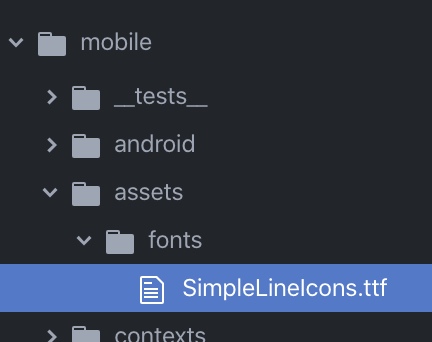
(Not sure if required but maybe do it anyway): cd ios && pod install
Example test case (I don't know where to find all the type names, some guessing required):
  <Input
     label="Phone number"
     placeholder="555 5555"
     leftIcon={
        <Icon name="phone" type="simple-line-icon" color="#517fa4" />
     }
     value={phoneNumber}
     errorStyle={{color: 'red'}}
     errorMessage="ENTER A VALID ERROR HERE"
  />
Clean the build folder and start up your project again:
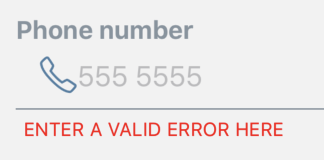
 allpwrfulroot
on 7 Apr 2020
allpwrfulroot
on 7 Apr 2020
suggestion from @allpwrfulroot worked.
So, here's the rundown on what finally got this working for me in RN v0.62.1. I am also using react-native-elements, which has a dependency on react-native-vector-icons, so this fix was extremely important.
yarn add react-native-vector-icons
Android:
- Follow the instructions on the react-native-vector-icons page under the heading "Option: With Gradle (recommended)"
- Add
react-native.config.jsto your project as described above - Copy the
.ttffiles into the newassets/fonts/directory in your project as described above - I ran
cd android && ./gradlew cleanbut that may not be necessary
iOS:
- Updated the
Info.plistfile with all of the fonts files I want as described above - I did not need to copy the font files into Xcode as described in the instructions.
- I ran
cd ios && pod install
Thank you!
nbcnc
on 7 Apr 2020
For anyone using npx react-native run-ios, you have to use it like:
import Icon from "react-native-vector-icons/Feather";

Icon.loadFont();
 sirakoff
on 14 Apr 2020
sirakoff
on 14 Apr 2020
I use manual linking as described in the readme
https://github.com/oblador/react-native-vector-icons#android
So, I do not need to specifying anything related to vector-icons in react-native.config.js.
This all works with RN 0.62.
The only blocking issue to migrate to 0.62, is https://github.com/oblador/react-native-vector-icons/pull/1153 (and it is because 6.6.1 release with ToolbarAndroid fix is not published to npm)
 vladp
on 25 Apr 2020
vladp
on 25 Apr 2020
@nbcnc detailed step-by-step, based on @allpwrfulroot answer worked for me. Guys, you saved my day! Thank you!!!
 phanghos
on 28 Apr 2020
phanghos
on 28 Apr 2020
Isn't @allpwrfulroot 's solution just manually copying the fonts to the local RN project and not linking it anyway to the node_modules?
 micnguyen
on 5 Jul 2020
micnguyen
on 5 Jul 2020
Related issues
 rmilejcz
·
3Comments
rmilejcz
·
3Comments
 jakewtaylor
·
4Comments
jakewtaylor
·
4Comments
 tharrington
·
4Comments
tharrington
·
4Comments
 peacechen
·
3Comments
peacechen
·
3Comments
 venux92
·
3Comments
venux92
·
3Comments
Most helpful comment
If your found this error
Red screen with "Unrecognized font family" error, try this.put this
at the end in
Info.plist. It works for mereact-native: 0.62.1