React-native-vector-icons: FontAwesome5 Pro - Unrecognized font family
I've followed the manual to instal Font Awesome pro and used my npm token
[SUCCESS] Set up npm config
[SUCCESS] Temporary directory [/var/folders/5w/hhvlq2ys0hg8975sgh_4ttmw0000gn/T/rnvi.XXXXXX.1iLxQFKB] was created
[SUCCESS] Font Awesome Pro was unpacked to [/var/folders/5w/hhvlq2ys0hg8975sgh_4ttmw0000gn/T/rnvi.XXXXXX.1iLxQFKB/package] directory
[SUCCESS] Copied Font Awesome Pro to [assets/fonts] directory
[SUCCESS] Modified package.json file
info iOS module "react-native-vector-icons" is already linked
info Android module "react-native-vector-icons" is already linked
info Linking assets to ios project
info Linking assets to android project
info Assets have been successfully linked to your project
[SUCCESS] Linked react-native-vector-icons to React Native
[SUCCESS] Font Awesome Pro was successfully upgraded
Note: [/var/folders/5w/hhvlq2ys0hg8975sgh_4ttmw0000gn/T/rnvi.XXXXXX.1iLxQFKB] was created. Delete it manually or it will be deleted automatically on next reboot
But then when I load my app
import Icon from 'react-native-vector-icons/FontAwesome5Pro'
I get this screen
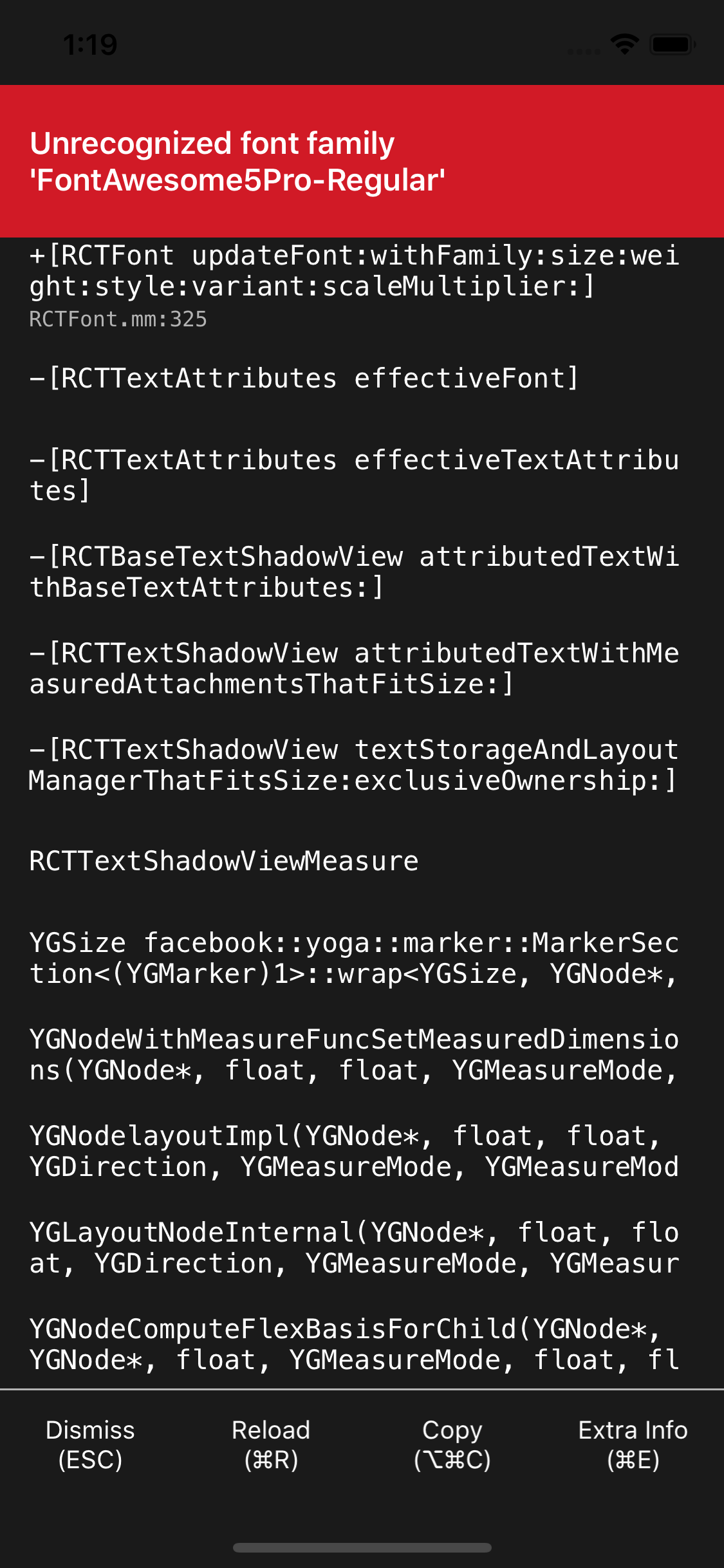
What should I do to fix this? I've tried to clean the build folder and re-start Xcode without success.
I can see the font in the assets/fonts folder and the link in my package.json as well
react-native-vector-icons: "^6.4.2",
 venux92
All 3 comments
Ok I fixed it.
I don't know why but when running
./node_modules/.bin/fa5-upgrade
The font were not correctly labeled
I added this script in my AppDelegate.m
for(NSString *fontfamilyname in [UIFont familyNames])
{
NSLog(@"family:'%@'",fontfamilyname);
for(NSString *fontName in [UIFont fontNamesForFamilyName:fontfamilyname])
{
NSLog(@"\tfont:'%@'",fontName);
}
NSLog(@"-------------");
}
And this returned me
2019-04-20 14:13:36.431079+1000 All2Gym[7986:1532752] family:'FontAwesome'
2019-04-20 14:13:36.431094+1000 All2Gym[7986:1532752] font:'FontAwesome'
2019-04-20 14:13:36.431581+1000 All2Gym[7986:1532752] family:'Font Awesome 5 Brands'
2019-04-20 14:13:36.431596+1000 All2Gym[7986:1532752] font:'FontAwesome5BrandsRegular'
2019-04-20 14:13:36.431602+1000 All2Gym[7986:1532752] font:'FontAwesome5Brands-Regular'
2019-04-20 14:13:36.432701+1000 All2Gym[7986:1532752] family:'Font Awesome 5 Free'
2019-04-20 14:13:36.432718+1000 All2Gym[7986:1532752] font:'FontAwesome5Free-Solid'
2019-04-20 14:13:36.432727+1000 All2Gym[7986:1532752] font:'FontAwesome5Free-Regular'
2019-04-20 14:13:36.434551+1000 All2Gym[7986:1532752] family:'Font Awesome 5 Pro'
2019-04-20 14:13:36.434567+1000 All2Gym[7986:1532752] font:'FontAwesome5ProSolid'
2019-04-20 14:13:36.434579+1000 All2Gym[7986:1532752] font:'FontAwesome5ProLight'
2019-04-20 14:13:36.434596+1000 All2Gym[7986:1532752] font:'FontAwesome5ProRegular'
There is no dash "-" in the pro font name.
First I deleted the font from Xcode fa-regular-400.ttf, fa-solid-900.ttf etc..
Then I went on fontAwesome and downloaded the pro font manually and added them into the /Fonts folder in react-native-vector-icons
I ran react-native link react-native-vector-icons
and now I got
2019-04-20 14:22:38.593736+1000 All2Gym[7994:1534649] family:'FontAwesome'
2019-04-20 14:22:38.593758+1000 All2Gym[7994:1534649] font:'FontAwesome'
2019-04-20 14:22:38.594343+1000 All2Gym[7994:1534649] family:'Font Awesome 5 Brands'
2019-04-20 14:22:38.594364+1000 All2Gym[7994:1534649] font:'FontAwesome5BrandsRegular'
2019-04-20 14:22:38.594371+1000 All2Gym[7994:1534649] font:'FontAwesome5Brands-Regular'
2019-04-20 14:22:38.595534+1000 All2Gym[7994:1534649] family:'Font Awesome 5 Free'
2019-04-20 14:22:38.595551+1000 All2Gym[7994:1534649] font:'FontAwesome5Free-Solid'
2019-04-20 14:22:38.595558+1000 All2Gym[7994:1534649] font:'FontAwesome5Free-Regular'
2019-04-20 14:22:38.597358+1000 All2Gym[7994:1534649] family:'Font Awesome 5 Pro'
2019-04-20 14:22:38.597378+1000 All2Gym[7994:1534649] font:'FontAwesome5Pro-Solid'
2019-04-20 14:22:38.597386+1000 All2Gym[7994:1534649] font:'FontAwesome5Pro-Light'
2019-04-20 14:22:38.597392+1000 All2Gym[7994:1534649] font:'FontAwesome5Pro-Regular'
And it worked!
venux92
on 20 Apr 2019
Don't do what is suggested above, it wont work when you reinstall your node_modules or share with your team.
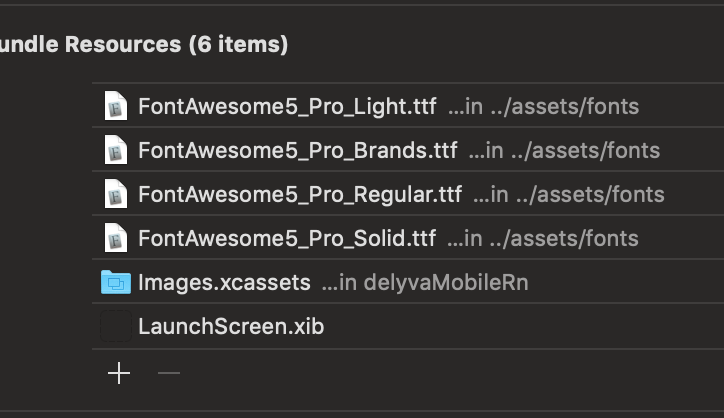
I got it working by linking/adding the fonts the script installs to
Targets/Build Phases/Copy Bundle Resources
and also adding the following to info.plist under UIAppFonts
<string>FontAwesome5_Pro_Brands.ttf</string>
        <string>FontAwesome5_Pro_Regular.ttf</string>
        <string>FontAwesome5_Pro_Solid.ttf</string>
Followed by cleaning my build folder and running react-native run-ios
Hope this helps someone else
 kev71187
on 13 May 2019
kev71187
on 13 May 2019
@kev71187 how do you got linking/adding the fonts the script installs to
Targets/Build Phases/Copy Bundle Resources? I think I just missed this steps
 muhaimincs
on 26 Aug 2019
muhaimincs
on 26 Aug 2019
Related issues
 afilp
·
4Comments
afilp
·
4Comments
 fevzican
·
3Comments
fevzican
·
3Comments
 peacechen
·
3Comments
peacechen
·
3Comments
 a82448186
·
4Comments
a82448186
·
4Comments
 facuescobar
·
3Comments
facuescobar
·
3Comments
Most helpful comment
Don't do what is suggested above, it wont work when you reinstall your node_modules or share with your team.
I got it working by linking/adding the fonts the script installs to
Targets/Build Phases/Copy Bundle Resources
and also adding the following to info.plist under UIAppFonts
<string>FontAwesome5_Pro_Brands.ttf</string>
        <string>FontAwesome5_Pro_Regular.ttf</string>
        <string>FontAwesome5_Pro_Solid.ttf</string>
Followed by cleaning my build folder and running
react-native run-iosHope this helps someone else