React-native-vector-icons: Ionicons with -outline suffix are not rendering with the 5.0.0 release.
Several icons I use with are Ionicons, I've been using the -outline suffix, so (example, ios-pricetag-outline). Which have rendering fine with the 4.x version. I upgrade to 5 and now getting question marks (instead of desired icon) for all of them when adding the -outine.
 osikes
All 13 comments
Why did new release version remove these icons?
 0es
on 17 Aug 2018
0es
on 17 Aug 2018
They have probably been removed from the font, check the website. I can only find solid pricetags for iOS.
 hampustagerud
on 17 Aug 2018
hampustagerud
on 17 Aug 2018
Super annoying! I tried installing older versions but I must've done something wrong because they still weren't rendering. Finally, I found an old release from January 2018 in in the @expo module, so I just replaced the react-native-vector-icons in node_modules with that one. And bingo -- it worked again. Remind me never to upgrade this library.
 Radilx
on 19 Aug 2018
Radilx
on 19 Aug 2018
Are you linking the library after upgrading? It is needed to replace the font files and has to be done every time you upgrade the library and the fonts has been updated 🙂
hampustagerud
on 19 Aug 2018
The fonts are generated thanks to the glyphmap (Ionicons.json) and Ionicons.tiff. If you want to keep the nice-looking, thin "outline" style icons, DO NOT UPGRADE THIS LIBRARY.
Below is a side-by-side comparison of the source code! In the latest update you can clearly see that the ios-home-outline was totally removed.
Original:
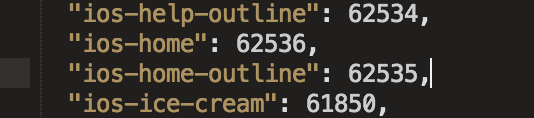
After Update:
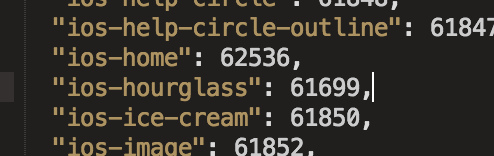
It's the same for many, many others. I have no clue why this happened but I'm very lucky I had saved some older versions. If you need the files let me know here and I can create a gist explaining how to revert this change.
There's probably a smarter way by installing an older version of the library if someone wants to share.
Radilx
on 20 Aug 2018
 m-vdb
on 20 Sep 2018
m-vdb
on 20 Sep 2018
@hampustagerud thank you for handling the issues with this attention and respect.

BTW, it's incredible how demanding people are with open-source - I imagine how much they are paying to use this library :trollface:
 daviscabral
on 21 Sep 2018
daviscabral
on 21 Sep 2018
@daviscabral Thank you, everyone should be respected until they did something to deserve otherwise 🙂 If I can help give back to the community that helped me learn a lot then I think I should but yes, people seem to equate open source with a proprietary company that can afford dedicating people to support. A lot of us are doing open-source on our spare-time and I would like more people to appreciate that but this was kinda the first time 🙃 Thank you for real 🙏
hampustagerud
on 26 Sep 2018
People are annoyed because the -outline icons used to be there, and were removed without notice. It was extra work to remove them. If a dependency removed them in an update, don't include the ^ in the package.json for that dependency.
 ghost
on 29 Nov 2018
ghost
on 29 Nov 2018
To people still coming here and liking the reply about not using ^, it does not impact the library for users since it is a devDependency! Fonts are checked into the repo along with the glyphmap meaning that the font file is linked to the version of this library instead of the actual dependency version. Whoever the ghost is was wrong, unnecessary hostile and does not understand how this library works. There was no "extra work" to remove any icons.
If you are worried about upgrading, check the release notes before doing so to make sure that you know what you are getting 🙂
I'm closing this now because it is not really an issue that can be fixed currently.
hampustagerud
on 24 May 2019
Here is how I fixed this problem when upgrading from Expo sdk 32 to 34.
I believe the same thing can be applied if you're out of expo, just working in /node_modules/react-native-vector-icons instead of @expo/vector-icons.
My example is for the Ionicons pack (import { Ionicons } from '@expo/vector-icons';) but you can apply it to any icon pack.
There are 3 problems to fix.
1. Import can't be done the same way
Fix it like this:
In your component, replace
import { Ionicons } from '@expo/vector-icons';
with
import Ionicons from 'react-native-vector-icons/Ionicons';
2. All '-outline' icons have been removed from the list of valid icon names
(this is why you get Warning: Failed prop type: Invalid prop 'name' of value 'ios-paper-outline' supplied to 'Icon')
Fix it like this:
In a temp folder, checkout your code from an earlier version, when outline icons worked for you, and grab this file:
/node_modules/@expo/vector-icons/build/vendor/react-native-vector-icons/glyphmaps/Ionicons.json
Then paste it into your project.
It contains the mapping between outline icons and the integer code.
Now your 'ios-xxx-outline' icon name is valid again, but it's still not present in the actual font file.
3. All '-outline' icons have been removed from the font file
Fix it like this:
From your temp folder with the old code version, grab this file:
/node_modules/@expo/vector-icons/build/vendor/react-native-vector-icons/Fonts/Ionicons.ttf
Then paste it into your project.
 vandrieu
on 19 Sep 2019
vandrieu
on 19 Sep 2019
^--- make sure to use patch-package after following the advice above
 jstacoder
on 12 Nov 2019
jstacoder
on 12 Nov 2019
You can just download the .SVG icon from https://ionicons.com/ so it could be any outline or filled or shape and after downloading (example : home-outline.SVG) move it to Your_Projectnode_modules\ionicons\dist\ionicons\svg directory... and then you are Ready To Use it ... i tried and it displays the icons !
 RohitPPednekar
on 2 Apr 2020
RohitPPednekar
on 2 Apr 2020
Related issues
 facuescobar
·
3Comments
facuescobar
·
3Comments
 toddmetheny
·
4Comments
toddmetheny
·
4Comments
 reactor123
·
3Comments
reactor123
·
3Comments
 arjs1000
·
3Comments
arjs1000
·
3Comments
 jszcl
·
3Comments
jszcl
·
3Comments
Most helpful comment
People are annoyed because the
-outlineicons used to be there, and were removed without notice. It was extra work to remove them. If a dependency removed them in an update, don't include the^in thepackage.jsonfor that dependency.