React-native-vector-icons: Icons not showing up on Android apk-release
I am using the following version:
"react": "^16.3.1",
"react-native": "^0.55.4",
"react-native-vector-icons": "^4.6.0",
- The icons show up on Android / iOS Simulators
- The icons show up on iPhone Devices
- The icons show up on Android Devices run through Android Studio and installed from apk-debug
As soon as I install from apk-release, the icons disappear completely without even the box with the cross.
I am installed using:
apply from: "../../node_modules/react-native-vector-icons/fonts.gradle" in build.gradle
Please help. Thanks!
 kelvinblade
All 16 comments
+1
 Lizhooh
on 21 Jun 2018
Lizhooh
on 21 Jun 2018
Did it used to work and broke with an upgrade of RN/RNVI or did it never work?
 oblador
on 21 Jun 2018
oblador
on 21 Jun 2018
I have the same issue
It used to work before the RN upgrade, I'm also using the apply from method just like @kelvinblade.
"react": "16.3.1",
"react-native": "0.55.4",
"react-native-vector-icons": "^4.6.0",
Any ideas?
Fix:
I copied the icons manually using the following and it works fine
Copy the contents in the Fonts folder to android/app/src/main/assets/fonts (note lowercase font folder).
 ant-fx
on 27 Jun 2018
ant-fx
on 27 Jun 2018
same
"react": "16.0.0",
"react-native": "0.51.0",
"react-native-vector-icons": "^4.5.0",
Icons not showing up on Android
 showtan001
on 28 Jun 2018
showtan001
on 28 Jun 2018
same issue,
I copied the icons manually on the corresponding folder and same issue.
After some time I realize I had a typo in my font name reference. It was with the first letter in uppercase.
- Make sure both the file name in assets/fonts and the code match the name :P
 carlosvega20
on 29 Jun 2018
carlosvega20
on 29 Jun 2018
@carlosvega20 was the problem that you had uppercase and you fixed it by lowercasing, or that it was lowercase and you fixed it by uppercasing, your message isn't clear.
 mrozbarry
on 13 Jul 2018
mrozbarry
on 13 Jul 2018
As an actionable item for @oblador , I think we have two options:
- Investigate why
apply from: "../../node_modules/react-native-vector-icons/fonts.gradle"isn't copying over fonts toandroid/app/src/main/assets/fonts/ - Remove the fonts.gradle setup as the suggested option.
For 1, I'm doing a production build with the following commands:
$(npm bin)/react-native bundle --platform android --dev false --entry-file index.js --bundle-output android/app/src/main/assets/index.android.bundle --assets-dest android/app/src/main/res
Then in Android Studio 3.1.2 (And Gradle 4.4), in my android/app/build.gradle:
// project.ext.vectoricons = [
//     iconFontNames: [ 'MaterialIcons.ttf', 'EvilIcons.ttf', 'FontAwesome.ttf', 'Ionicons.ttf', 'Entypo.ttf' ] // Name of the font files you want to copy
// ]
apply from: "../../node_modules/react-native-vector-icons/fonts.gradle"
I have that situated above my dependencies {} and task copyDownloadableDepsToLibs(type: Copy) blocks, if that makes any difference.
mrozbarry
on 13 Jul 2018
I also verify that the project.ext.vectoricons is not working with the latest Android Studio and gradle (4.4). The fonts selected there are not copied.
If this cannot be fixed, maybe remove it from documentation?
Thanks!
 afilp
on 11 Nov 2018
afilp
on 11 Nov 2018
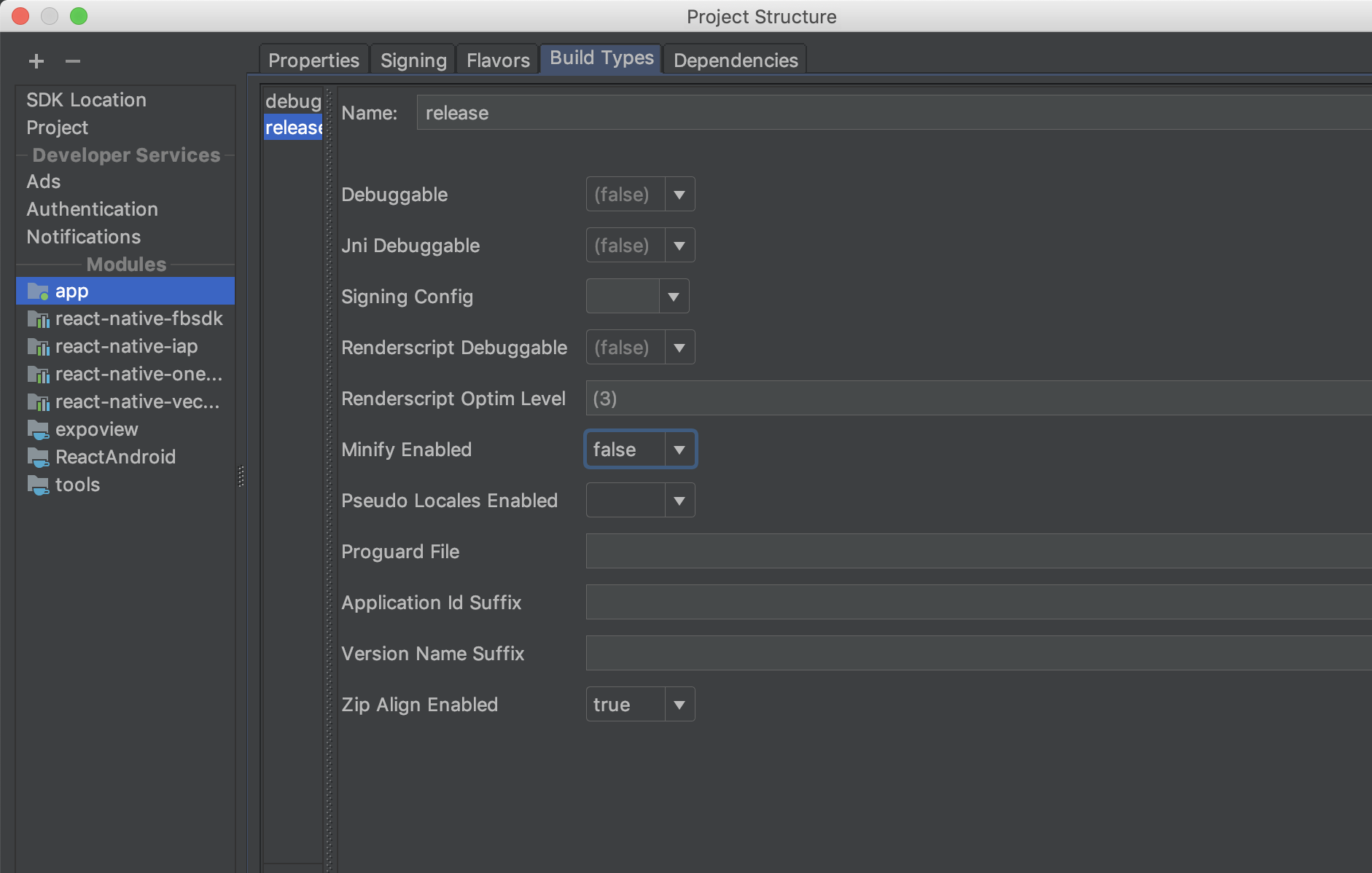
In my case what helped is setting Minify flag in Android for "false":
 Symyon
on 30 Nov 2018
Symyon
on 30 Nov 2018
+1 to @Symyon 's solution (even after https://github.com/oblador/react-native-vector-icons/pull/923). This was the only thing that worked for me.
 rares
on 4 Feb 2019
rares
on 4 Feb 2019
upgrading gradle helps me - https://github.com/expo/expo/issues/3226#issuecomment-520783975
 SnaiNeR
on 13 Aug 2019
SnaiNeR
on 13 Aug 2019
same problem here
 manjunathvustepalli
on 18 Dec 2019
manjunathvustepalli
on 18 Dec 2019
I've tried everything in this thread.
I've added the apply from line, I've copied fonts over, I've unlinked, re-linked, removed, re-downloaded, etc.
The icons show up for my in debug, but do not display for me at all in release.
 QuintonC
on 27 Dec 2019
QuintonC
on 27 Dec 2019
Same issue I am facing for last 2 weeks
All icons are showing when I load on expo
every thing work fine
but when I build apk and install it, all font are just showing like [x]
please Help!!!
 Rafay3198
on 27 Mar 2020
Rafay3198
on 27 Mar 2020
Am experiencing the exact same problem. This is nearly 2 years after the onset of this thread. There is a serious issue here which it would be great to know a workaround let alone a solution. I have tried everything on this and several other threads to no avail and have spent 2 16 hour days attempting to put this to bed.
I can see the fonts are present inside the apk in the assets/fonts folder. However on a release apk build they appear as Xs. Debug builds are working fine.
I am on react-native 0.61.5
 eddyoc
on 14 May 2020
eddyoc
on 14 May 2020
What helped me was to remove android/app/build folder and I ran ./gradlew clean before building APK.
 enterteg
on 2 Jul 2020
enterteg
on 2 Jul 2020
Related issues
 thanhcuong1990
·
21Comments
thanhcuong1990
·
21Comments
 amitanmol
·
21Comments
amitanmol
·
21Comments
 mrousavy
·
29Comments
mrousavy
·
29Comments
 jasan-s
·
23Comments
jasan-s
·
23Comments
 NaumanMoazzam
·
33Comments
NaumanMoazzam
·
33Comments
Most helpful comment
As an actionable item for @oblador , I think we have two options:
apply from: "../../node_modules/react-native-vector-icons/fonts.gradle"isn't copying over fonts toandroid/app/src/main/assets/fonts/For 1, I'm doing a production build with the following commands:
Then in Android Studio 3.1.2 (And Gradle 4.4), in my
android/app/build.gradle:I have that situated above my
dependencies {}andtask copyDownloadableDepsToLibs(type: Copy)blocks, if that makes any difference.