React-native-track-player: App crash on iOS, even on mode debug
Configuration
Run react-native info in your project and share the content.
What react-native-track-player version are you using?
"react-native-track-player": "^1.1.8",
Issue
The app crash on ios when I run from terminal by react-native run-ios so I cannot see the log, then I run it from xcode and I got the error message. It is
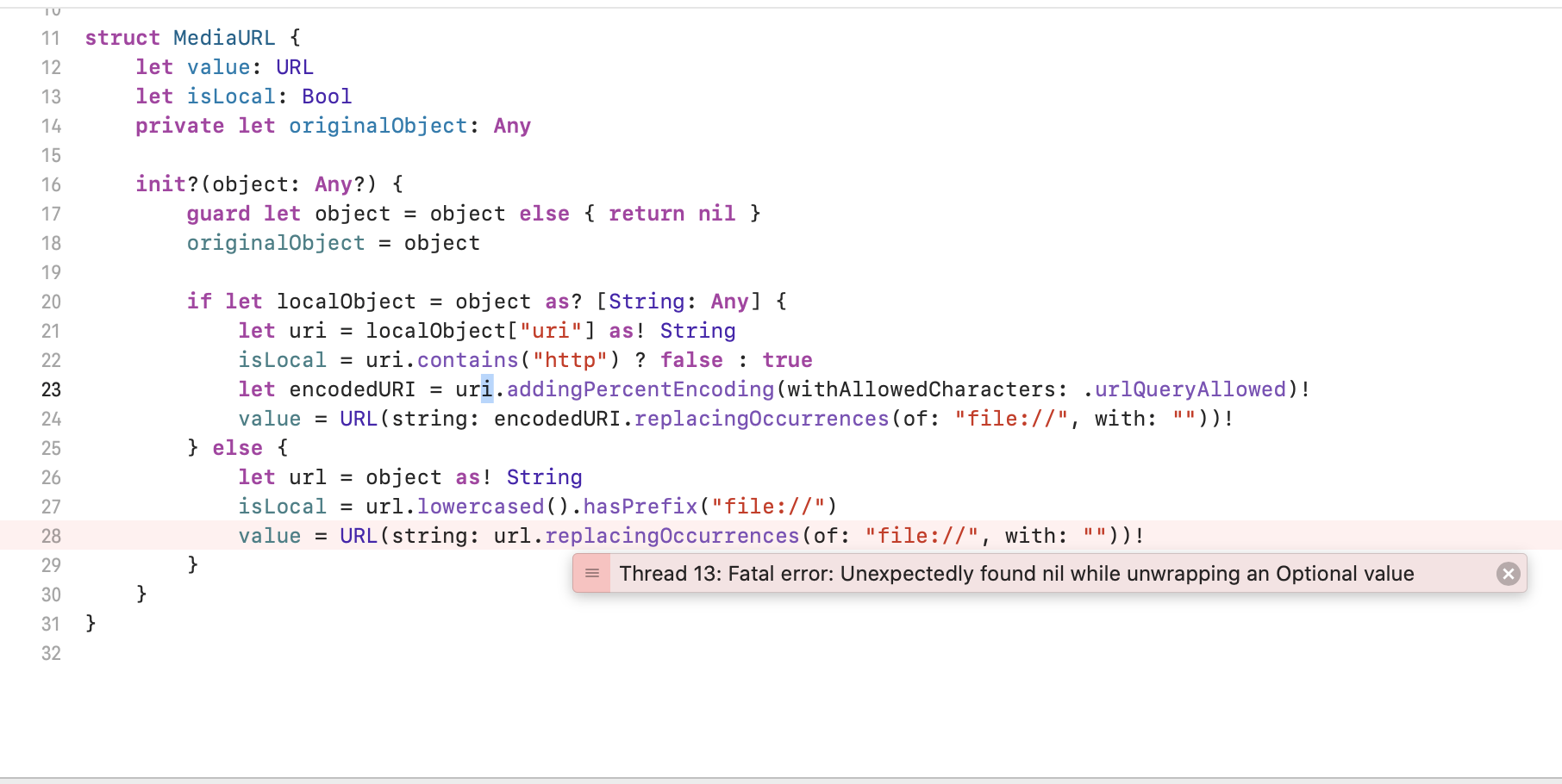
Fatal error: Unexpectedly found nil while unwrapping an Optional value: file /Users/boypanjaitan/Desktop/React/TeduhKu/node_modules/react-native-track-player/ios/RNTrackPlayer/Models/MediaURL.swift, line 28
Code
this is my code
`setUpPlayer = async (tmpTrack) => {
let state = await TrackPlayer.getState();
    if (state === TrackPlayer.STATE_NONE) {
        TrackPlayer.setupPlayer().then(() => {
            TrackPlayer.updateOptions({
                // One of RATING_HEART, RATING_THUMBS_UP_DOWN, RATING_3_STARS, RATING_4_STARS, RATING_5_STARS, RATING_PERCENTAGE
                ratingType: TrackPlayer.RATING_5_STARS,

                // Whether the player should stop running when the app is closed on Android
                stopWithApp: true,
                alwaysPauseOnInterruption: true,
                capabilities: [
                    TrackPlayer.CAPABILITY_PLAY,
                    TrackPlayer.CAPABILITY_PAUSE,
                    TrackPlayer.CAPABILITY_STOP,
                    TrackPlayer.CAPABILITY_SKIP_TO_NEXT,
                    TrackPlayer.CAPABILITY_SKIP_TO_PREVIOUS
                ],

                // An array of capabilities that will show up when the notification is in the compact form on Android
                compactCapabilities: [
                    TrackPlayer.CAPABILITY_PLAY,
                    TrackPlayer.CAPABILITY_PAUSE,
                    TrackPlayer.CAPABILITY_STOP,
                    TrackPlayer.CAPABILITY_SKIP_TO_NEXT,
                    TrackPlayer.CAPABILITY_SKIP_TO_PREVIOUS
                ],
                notificationCapabilities : [
                    TrackPlayer.CAPABILITY_PLAY,
                    TrackPlayer.CAPABILITY_PAUSE,
                    TrackPlayer.CAPABILITY_STOP,
                    TrackPlayer.CAPABILITY_SKIP_TO_NEXT,
                    TrackPlayer.CAPABILITY_SKIP_TO_PREVIOUS
                ],
                icon    : require('../img/icon.png')
            });
        });
    }

    TrackPlayer.add(tmpTrack)
        .then(() => {
            if(state !== TrackPlayer.STATE_PLAYING){
                TrackPlayer.stop();
            }
        })
        .catch(err => {
            Alert.alert('Player Error', err.toString());
        });

    console.log('NOW : '+state);

};`
 boypanjaitan16
All 20 comments
Which url you are trying to play?
 moonstruck
on 26 Nov 2019
moonstruck
on 26 Nov 2019
something like this https://teduhku.s3-ap-southeast-1.amazonaws.com/music/Andy%20Ambarita%20-%20Bejana%20Mu.mp3
boypanjaitan16
on 26 Nov 2019
May be because of Content-Type: application/octet-stream
Try any supported audio content like Content-Type: audio/mpeg
moonstruck
on 26 Nov 2019
But it working fine in Android, is it okay?
boypanjaitan16
on 26 Nov 2019
Hey anything else I can try ?
boypanjaitan16
on 29 Nov 2019
@boypanjaitan16
I have this issue too. I don't have control over the S3 bucket that also sends Content-Type: application/octet-stream.
I was able to get it working by saving the file locally first with rn-fetch-blob in an async function.
Here's an example code:
import RNFetchBlob from 'rn-fetch-blob';
const audioURL = 'https://teduhku.s3-ap-southeast-1.amazonaws.com/music/Andy%20Ambarita%20-%20Bejana%20Mu.mp3'
const response = await RNFetchBlob.config({
// add this option that makes response data to be stored as a file,
// this is much more performant.
fileCache: true,
appendExt: 'mp3' // need this to save as .mp3
}).fetch('GET', audioURL, {
// some headers ..
});
const { status } = response.info();
console.log('The file saved to ', response.path(), status); // status === 200 if success
const track = {
id: 'trackId',
url: { uri: response.path() }, // put path to local file here
title: 'title',
artist: 'artist',
description: `description`,
};
await TrackPlayer.add([track]);
await TrackPlayer.play();
However this saves the file to local but doesn't delete it. See the rn-fetch-blob documentation here on how to delete the file after you play it: Cache File Management
 zacharywenner
on 27 Dec 2019
zacharywenner
on 27 Dec 2019
Hi,
Disclaimer: I have touched Swift code from time to time, but I'm not an expert so please correct me if I did something wrong.
I received the exact same issue earlier today.
For me, the above solution by @zacharywenner looks like an extremely expensive workaround (basically building in a whole caching layer and extra latency + if the audio files you wanna play are over 1h in length you need to wait a long time).
Upon investigating the file in question that the issue references we find the following line throwing an exception:
value = URL(string: url.replacingOccurrences(of: "file://", with: ""))!
This is trying to parse an URL and for some reason many conventional URLs fail with this. Even ones with no formatting errors as I've seen on SO and other places while debugging the issue. You need to call a function that's in fact called a few lines above (I guess it was a different person writing the two pieces since they are very simlar solutions to the same problem).
Namely on line 23 you can find:
let encodedURI = uri.addingPercentEncoding(withAllowedCharacters: .urlQueryAllowed)!
This is pretty much a perfect solution that encodes any special character it finds in the given URL. I am not sure why it wasn't called before line 28 but adding it solves the issue.
if you add this line right before line 28:
let encodedURL = url.addingPercentEncoding(withAllowedCharacters: .urlQueryAllowed)!
and modify line 28 to use encodedURL instead of url the module works flawlessly.
With this the two lines would look like this:
let encodedURL = url.addingPercentEncoding(withAllowedCharacters: .urlQueryAllowed)!
value = URL(string: encodedURL.replacingOccurrences(of: "file://", with: ""))!
And just in case beginners stumble on this issue here's a collapsed version of the whole file as of Jan 11 2020:
Instructions
The file is in XCode -> Pods/Development Pods/react-native-track-player/Models/MediaURL.swift
//
//  MediaURL.swift
//  RNTrackPlayer
//
//  Created by David Chavez on 12.08.17.
//  Copyright © 2017 David Chavez. All rights reserved.
//

import Foundation

struct MediaURL {
    let value: URL
    let isLocal: Bool
    private let originalObject: Any

    init?(object: Any?) {
        guard let object = object else { return nil }
        originalObject = object

        if let localObject = object as? [String: Any] {
            let uri = localObject["uri"] as! String
            isLocal = uri.contains("http") ? false : true
            let encodedURI = uri.addingPercentEncoding(withAllowedCharacters: .urlQueryAllowed)!
            value = URL(string: encodedURI.replacingOccurrences(of: "file://", with: ""))!
        } else {
            let url = object as! String
            isLocal = url.lowercased().hasPrefix("file://")
            let encodedURL = url.addingPercentEncoding(withAllowedCharacters: .urlQueryAllowed)!
            value = URL(string: encodedURL.replacingOccurrences(of: "file://", with: ""))!
        }
    }
}
I hope this will help someone save the hours I've spent with this.
@Guichaguri if you think this should be a PR let me know.
 laszlolm
on 11 Jan 2020
laszlolm
on 11 Jan 2020
If I add artist key to the track it throws exception Thread 13: Fatal error: Unexpectedly found nil while unwrapping an Optional value. If no artist throws an error track is missing a key and working in the android perfectly but some flaws in Ios. please help someone how to set up and add the track the track player in Ios.
 basettykumar
on 10 Mar 2020
basettykumar
on 10 Mar 2020
@Guichaguri
When I percentage encode that way I resolve the crashed but cannot access the remote file at all, I believe due to this:
Important
You must not call this method on strings that are already percent-encoded. Calling this method on strings that are already percent-encoded will cause percent characters in a percent-encoded sequence to be percent-encoded twice.
https://developer.apple.com/documentation/foundation/nsstring/1411946-addingpercentencoding
Don't you get any such playback problems? Perhaps it is because my urls happens to be partly encoded?
 milesscherrer
on 18 Mar 2020
milesscherrer
on 18 Mar 2020
I had the same issue. The problem is for not encoded Urls.
@laszlolm's solution works for not encoded urls but does not work for uri encoded urls.
I get both encoded and not encoded urls from the api so I found this solution for my problem:
  if (decodeURI(url) === url) {
    url = encodeURI(url);
  }
This solution will not work for partly encoded urls.
 emech-en
on 24 Apr 2020
emech-en
on 24 Apr 2020
@Guichaguri , do you think this is something we should attempt to guard against within the module, or just require that supplied URLs are formatted properly?
 curiousdustin
on 24 Apr 2020
curiousdustin
on 24 Apr 2020
If I add artist key to the track it throws exception Thread 13: Fatal error: Unexpectedly found nil while unwrapping an Optional value. If no artist throws an error track is missing a key and working in the android perfectly but some flaws in Ios. please help someone how to set up and add the track the track player in Ios.
Battling with same issue
 breadface
on 26 Apr 2020
breadface
on 26 Apr 2020
Can you share an example of the track object you are trying to add, including artist?
curiousdustin
on 26 Apr 2020
Thanks @curiousdustin
Here's a sample track object
{
  "artist": "Rev'd Peter Alabi",
  "artwork": "https://rhemawordng.org/wp-content/uploads/2020/01/Taxis_Divine_Order_IV.jpg",
  "date": "Rev'd Peter Alabi | 23 June 2019",
  "id": "981ba18b-267b-4536-bbb2-6d707e26af46",
  "title": "Prevailing Prayers Series - Prevailing Prayers V",
  "url": "https://file-examples.com/wp-content/uploads/2017/11/file_example_MP3_1MG.mp3"
}
This track object works and plays for me, @breadface.
If you try this in the example app, does it crash?
curiousdustin
on 29 Apr 2020
@curiousdustin Are you solved this?
 fpgce
on 29 May 2020
fpgce
on 29 May 2020
You can try out #950 , it has not been merged yet, but does seem to resolve at least one case of crashes related to URL formatting. However, it was not targeted at solving this specific issue ticket.
curiousdustin
on 29 May 2020
@curiousdustin yes. I lost a few hours with this. The API return artwork name with ‘á’ string. Thanks for help.
fpgce
on 29 May 2020
Just to confirm. The changes in #950 resolved the issue with the special characters in your URL?
You say API... Were your URLs loading files from local storage, or from a server?
curiousdustin
on 29 May 2020
@curiousdustin Server. There was a special character in my url.
fpgce
on 29 May 2020
Related issues
 ManrickCapotolan
·
4Comments
ManrickCapotolan
·
4Comments
 krunalbad
·
3Comments
krunalbad
·
3Comments
 fabiocosta88
·
3Comments
fabiocosta88
·
3Comments
 EhteshamAnwar
·
3Comments
EhteshamAnwar
·
3Comments
 moduval
·
3Comments
moduval
·
3Comments
Most helpful comment
Hi,
Disclaimer: I have touched Swift code from time to time, but I'm not an expert so please correct me if I did something wrong.
I received the exact same issue earlier today.
For me, the above solution by @zacharywenner looks like an extremely expensive workaround (basically building in a whole caching layer and extra latency + if the audio files you wanna play are over 1h in length you need to wait a long time).
Upon investigating the file in question that the issue references we find the following line throwing an exception:
This is trying to parse an URL and for some reason many conventional URLs fail with this. Even ones with no formatting errors as I've seen on SO and other places while debugging the issue. You need to call a function that's in fact called a few lines above (I guess it was a different person writing the two pieces since they are very simlar solutions to the same problem).
Namely on line 23 you can find:
This is pretty much a perfect solution that encodes any special character it finds in the given URL. I am not sure why it wasn't called before line 28 but adding it solves the issue.
if you add this line right before line 28:
let encodedURL = url.addingPercentEncoding(withAllowedCharacters: .urlQueryAllowed)!and modify line 28 to use
encodedURLinstead ofurlthe module works flawlessly.With this the two lines would look like this:
And just in case beginners stumble on this issue here's a collapsed version of the whole file as of Jan 11 2020:
Instructions
The file is in XCode -> Pods/Development Pods/react-native-track-player/Models/MediaURL.swift
I hope this will help someone save the hours I've spent with this.
@Guichaguri if you think this should be a PR let me know.