React-native-track-player: Locked Screen buttons not working
Hi There,
I successfully enabled the background mode for IOS its working, and also I added some capabilities options. But when I try to use the locked screen buttons, they do not work. Can someone help me pls ?
React : v16.3.1
React-Native : SDK 30
"react-native-track-player": "0.2.5"
TrackPlayer.setupPlayer();
        TrackPlayer.updateOptions({
            stopWithApp: true,
            capabilities: [
                TrackPlayer.CAPABILITY_PLAY,
                TrackPlayer.CAPABILITY_PAUSE,
                TrackPlayer.CAPABILITY_SKIP_TO_NEXT,
                TrackPlayer.CAPABILITY_SKIP_TO_PREVIOUS,
            ]
 });
 vbspace
All 8 comments
Duplicate of #77
Just put up a PR fix here: #295
 CapitanRedBeard
on 8 Oct 2018
CapitanRedBeard
on 8 Oct 2018
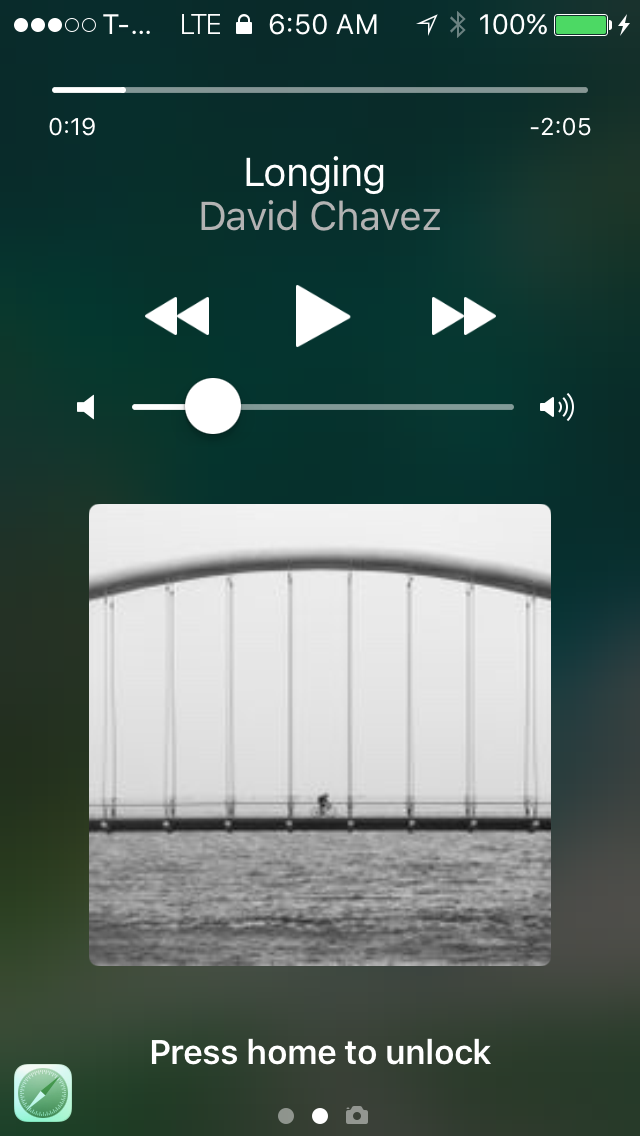
Thank you for replying. I don't think that's the fix for the problem I am having. The buttons appear but when I press, they don't do anything.
vbspace
on 9 Oct 2018
Oh interesting yeah I haven't seen that before.
Just to make sure you've registered the event handlers for play/pause/next/previous right? Events found here
Mine looks something like this and I set these before calling TrackPlayer. setupPlayer
TrackPlayer.registerEventHandler(async (data) =>
    switchcase({
      'remote-play': () => {
        TrackPlayer.play()
      },
      'remote-pause': () => {
        TrackPlayer.pause()
      },
      'remote-next': () => {
        TrackPlayer.skipToNext()
      },
      'remote-previous': () => {
        TrackPlayer.skipToPrevious()
      }
    })(null)(data.type)
)
await TrackPlayer.setupPlayer();
TrackPlayer.updateOptions({
    stopWithApp: true,
    capabilities: [
      TrackPlayer.CAPABILITY_PLAY,
      TrackPlayer.CAPABILITY_PAUSE,
      TrackPlayer.CAPABILITY_SKIP_TO_NEXT,
      TrackPlayer.CAPABILITY_SKIP_TO_PREVIOUS,
    ]
});
The only button working is the volume bar, the three other buttons are not working.
vbspace
on 9 Oct 2018
When the music changes, the play button goes from play to pause, and then from pause to play. But when I try to press it, it does not pause the music, the UI changes but the music doesn't stop, the same happens with next and back buttons, when I press then the music does not change
vbspace
on 9 Oct 2018
its now working
TrackPlayer.registerEventHandler(async (data) => {
         switch (data.type){
                case 'remote-play': {
                    TrackPlayer.pause()
                };
                case 'remote-pause': {
                    TrackPlayer.play()
                };
                case 'remote-next': {
                    TrackPlayer.skipToNext()
                };
                case 'remote-previous': {
                    TrackPlayer.skipToPrevious()
                };
            }
        })
        await TrackPlayer.setupPlayer();
        TrackPlayer.updateOptions({
            stopWithApp: true,
            capabilities: [
                TrackPlayer.CAPABILITY_PLAY,
                TrackPlayer.CAPABILITY_PAUSE,
                TrackPlayer.CAPABILITY_SKIP_TO_NEXT,
                TrackPlayer.CAPABILITY_SKIP_TO_PREVIOUS,
            ]
});
vbspace
on 9 Oct 2018
your switch case is wrong spelled. And also you have to test the field type. Thank you!
vbspace
on 9 Oct 2018
my bad I was copying bits and pieces. Glad it worked out
CapitanRedBeard
on 10 Oct 2018
Related issues
 simenJohnsen
·
3Comments
simenJohnsen
·
3Comments
 moduval
·
4Comments
moduval
·
4Comments
 KalebPortillo
·
4Comments
KalebPortillo
·
4Comments
 elioscordo
·
3Comments
elioscordo
·
3Comments
 b3rkaydem1r
·
3Comments
b3rkaydem1r
·
3Comments
Most helpful comment
my bad I was copying bits and pieces. Glad it worked out