React-native-tab-view: Spacing between tab bar items
Current behaviour
I am not able to specify spacing between tab bar items. Using margin right on tab style gives the desired spacing. But also increases the indicator width.
Expected behaviour
Able to specify spacing between tab bar items.
Code sample
renderTabBar = props => {
    return (
      <TabBar
        {...props}
        indicatorStyle={Styles.tabBarIndicatorStyle}
        style={Styles.tabBarStyle}
        tabStyle={Styles.tabBarTabStyle}
        labelStyle={Styles.tabBarLabelStyle}
      />
    )
  }
Styles are:
tabBarStyle: {
    backgroundColor: 'white',
    marginTop: moderateScale(20),
    marginLeft: moderateScale(16),
    shadowColor: 'black',
    shadowOpacity: 0,
    shadowRadius: 0,
    shadowOffset: {
      height: 0,
      width: 0,
    },
  },
  tabBarIndicatorStyle: {
    backgroundColor: '#FE7C85',
    height: 3,
    paddingRight: 32,
  },
  tabBarLabelStyle: {
    color: 'black',
    textTransform: 'capitalize',
    fontFamily: fonts.gilroyBold,
    fontSize: moderateScale(17),
  },
  tabBarTabStyle: {
    width: 'auto',
    padding: 0,
    marginRight: 32,
  },
Screenshots (if applicable)

What have you tried
Tried margin right on tabStyle to space items.
To remove indicator stretching, tried setting right: 32 on indicatorContainerStyle and paddingRight: 32 on indicator style
Your Environment
| software | version
| ---------------------------- | -------
| ios or android | ios latest
| react-native | 0.61
| react-native-tab-view | latest
| react-native-gesture-handler | 1.5.3
| react-native-reanimated | 1.4.0
| node | 10
| npm or yarn | 1.21
 vijayst
All 5 comments
I was able to resolve this issue with a custom indicator
        renderIndicator={indicatorProps => {
          const width = indicatorProps.getTabWidth(this.state.index) - 32
          return <TabBarIndicator {...indicatorProps} width={width} />
        }}
The solution of @vijayst works fine but the ripple effect on bar item is bigger than indicator, alternative is to customize renderTabItem method with a View that acts as separator
 renderTabBarItem: (props) => (
              <React.Fragment key={props.route.key}>
                <TabBarItem {...props} />
                <View style={{width: 29}} />
              </React.Fragment>
            ),
and then adjust left position of the indicator
  tabBar={(props) => (
            <MaterialTopTabBar {...props} indicatorStyle={[props.indicatorStyle, {left: props.state.index * 29}]} />
          )}
 mlecoq
on 18 Aug 2020
mlecoq
on 18 Aug 2020
I was not happy with the behavior of the indicator on swipe, so finally I had to modify translation :
  renderTabBarItem: (props) => (
              <React.Fragment key={props.route.key}>
                <TabBarItem {...props} />
                <Separator />
              </React.Fragment>
            ),
            renderIndicator: (props) => {
              const {
                navigationState: {routes},
                getTabWidth,
                position,
              } = props;
              const translateX =
                routes.length > 1 ? getTranslateX(isTablet ? 29 : 19, position, routes, getTabWidth) : 0;

              const indicatorStyle = {
                transform: [{translateX}] as any,
                height: 3,
                backgroundColor: theme.primary,
                borderRadius: 2,
                padding: 0,
              };

              return <TabBarIndicator {...props} style={indicatorStyle} />;
            },
and getTranslateX method
const getTranslateX = memoize(
  (separator: number, position: Animated.Node<number>, routes: Route[], getTabWidth: GetTabWidth) => {
    const inputRange = routes.map((_, i) => i);

    // every index contains widths at all previous indices
    const outputRange = routes.reduce<number[]>((acc, _, i) => {
      if (i === 0) {
        return [0];
      }
      return [...acc, acc[i - 1] + getTabWidth(i - 1) + separator];
    }, []);

    const translateX = interpolate(position, {
      inputRange,
      outputRange,
      extrapolate: Extrapolate.CLAMP,
    });

    return multiply(translateX, I18nManager.isRTL ? -1 : 1);
  },
);
Hi @mlecoq
Thanks for sharing your code. I have some troubles try to implementing that workaround and I was wondering if you could extend the solution, so I can see the full picture.

... All the red underlined are errors Cannot find ....
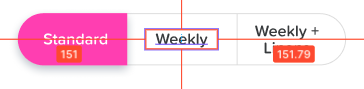
I wanna build tabs with this design requirement
 romelgomez
on 23 Dec 2020
romelgomez
on 23 Dec 2020
@romelgomez Here is the memoize function
function memoize<Result, Deps extends readonly any[]>(callback: (...deps: Deps) => Result) {
  let previous: Deps | undefined;
  let result: Result | undefined;

  return (...dependencies: Deps): Result => {
    let hasChanged = false;

    if (previous) {
      if (previous.length !== dependencies.length) {
        hasChanged = true;
      } else {
        for (let i = 0; i < previous.length; i++) {
          if (previous[i] !== dependencies[i]) {
            hasChanged = true;
            break;
          }
        }
      }
    } else {
      hasChanged = true;
    }

    previous = dependencies;

    if (hasChanged || result === undefined) {
      result = callback(...dependencies);
    }

    return result;
  };
}
Here is the imports from reanimated
import Animated, {interpolateNode} from 'react-native-reanimated';
And finally const {multiply, Extrapolate} = Animated;
mlecoq
on 28 Jan 2021
Related issues
 hyochan35
·
3Comments
hyochan35
·
3Comments
 AndriiUhryn
·
3Comments
AndriiUhryn
·
3Comments
 itzsaga
·
3Comments
itzsaga
·
3Comments
 nastarfan
·
3Comments
nastarfan
·
3Comments
 KingAmo
·
3Comments
KingAmo
·
3Comments