React-native-tab-view: Tab indicator in incorrect place
Current behaviour
Tab indicator is not lining up with non-index 0 tab items.
Expected behaviour
The tab indicator to be properly positioned.
Code sample
I tried but couldn't get the example working on Snack. Key piece of info is if the tab bar has to scroll horizontally to get to the initial index the indicator is in the incorrect place. It ends up where the tab item would be before scrolling to the center. This code produces the screenshot below on load.
state = {
    index: 2,
    routes: [
      { key: "stepOne", title: "Step One" },
      { key: "stepTwo", title: "Step Two" },
      { key: "stepThree", title: "Step Three" },
      { key: "stepFour", title: "Step Four" }
    ],
};
I'm using auto width as well.
Screenshots (if applicable)
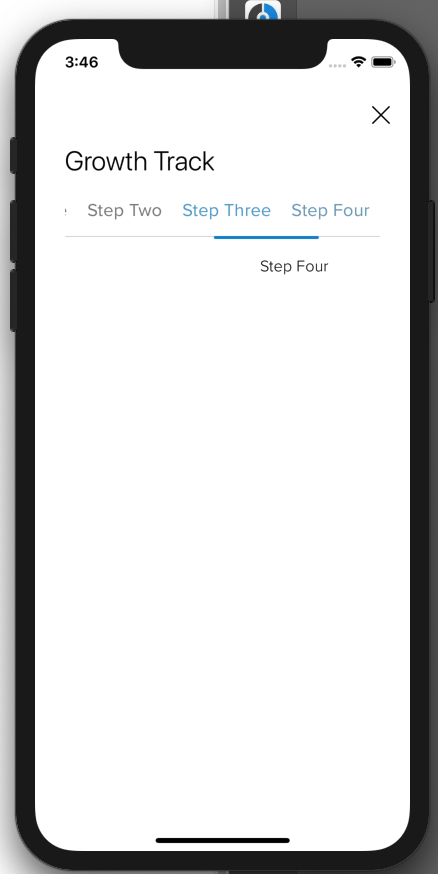
What have you tried
I've tried setting the index dynamically based on a prop, I've tried different Tab components chosen and rendered at runtime like the docs describe. I've tried just hardcoding it like I'm doing in this example.
Your Environment
| software | version
| ---------------------------- | -------
| ios or android |12.4
| react-native |0.59.9
| react-native-tab-view |2.10.0
| react-native-gesture-handler |1.1.0
| react-native-reanimated |1.0.1
| node |12.2.0
| npm or yarn |yarn
 itzsaga
All 3 comments
Hello 👋, this issue has been open for more than 2 months with no activity on it. If the issue is still present in the latest version, please leave a comment within 7 days to keep it open, otherwise it will be closed automatically. If you found a solution on workaround for the issue, please comment here for others to find. If this issue is critical for you, please consider sending a pull request to fix the issue.
![github-actions[bot] picture](https://avatars.githubusercontent.com/in/15368?v=4&s=40) github-actions[bot]
on 19 Nov 2019
github-actions[bot]
on 19 Nov 2019
I'm experiencing the same issue in version: 2.14.0.
I tried with the defaults TabBar and indicator, instead of using my customs, but the result is the same.
Looks like this issue should be open.
Is there anyone who can help with this?
Edited
The problem only happens when tapping the tabs. Swiping between them puts the indicator in the right position.

 matias91
on 28 Apr 2020
matias91
on 28 Apr 2020
Same problem here.
 PedroBern
on 20 Jul 2020
PedroBern
on 20 Jul 2020
Related issues
 KingAmo
·
3Comments
KingAmo
·
3Comments
 ashusdn
·
4Comments
ashusdn
·
4Comments
 karthikeyansundaram2
·
3Comments
karthikeyansundaram2
·
3Comments
 glennvgastel
·
3Comments
glennvgastel
·
3Comments
 Aravindhan12
·
4Comments
Aravindhan12
·
4Comments
Most helpful comment
I'm experiencing the same issue in version: 2.14.0.
I tried with the defaults TabBar and indicator, instead of using my customs, but the result is the same.
Looks like this issue should be open.
Is there anyone who can help with this?
Edited
The problem only happens when tapping the tabs. Swiping between them puts the indicator in the right position.