React-native-tab-view: "Invariant Vilation:[8, { "type":"value","value":<<NAN>>}] is not usables as a native method argument
Current behaviour
After seting up done , I'm geting error : "Invariant Vilation:[8, { "type":"value","value":<
Expected behaviour
it should be run correctly without error...
Code sample
@withTheme
export default class TabChannel extends BaseScreen {

    state = {
        routes: [
            { key: 'first', title: 'First' },
            { key: 'second', title: 'Second' },
        ],
    }


    render() {
        return (
            <View>
                <TabView
                    navigationState={this.state}
                    renderScene={SceneMap({
                        first: FirstRoute,
                        second: SecondRoute,
                    })}
                    onIndexChange={index => this.setState({ index })}
                    initialLayout={{ width: dimensions.width }}
                />
            </View>

        );
    }
}
Screenshots (if applicable)
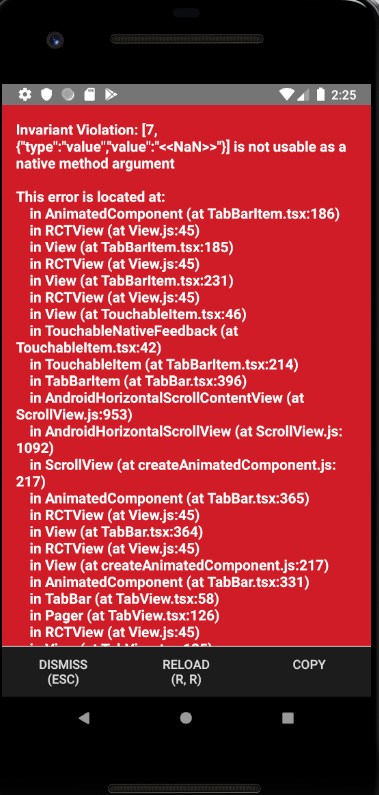
9-09-10 14-25-47.png…]()
Your Environment
| software | version
| ---------------------------- | -------
| android | 27
| react-native | 0.59.1
| react-native-tab-view | 2.10.0
| react-native-gesture-handler | ^1.4.1
| react-native-reanimated | ^1.2.0
| node | 8.10.0
| yarn | 1.17.3
| react-native-navigation |^3.1.2
 viet97
All 6 comments
state = {
        index: 0,
        routes: [
            { key: 'first', title: 'First' },
            { key: 'second', title: 'Second' },
        ],
    }
 jordangrant
on 16 Sep 2019
jordangrant
on 16 Sep 2019
Had the same error, for me it was because I set a percentage value as width in initialLayout props, when I stick to the initial example it works: initialLayout={{width: '100%'}} -> initialLayout={{width: Dimensions.get('window').width}}
 SimonPotier
on 29 Oct 2019
SimonPotier
on 29 Oct 2019
I am currently experiencing this error. Any solution as the one mentioned by @SimonPotier didn't work for me. I am actually using the example given.
 briantical
on 16 Dec 2019
briantical
on 16 Dec 2019
@briantical make sure that you initialize index state with 0.
 diegoprates
on 16 Dec 2019
diegoprates
on 16 Dec 2019
Hello 👋, this issue has been open for more than 2 months with no activity on it. If the issue is still present in the latest version, please leave a comment within 7 days to keep it open, otherwise it will be closed automatically. If you found a solution on workaround for the issue, please comment here for others to find. If this issue is critical for you, please consider sending a pull request to fix the issue.
![github-actions[bot] picture](https://avatars.githubusercontent.com/in/15368?v=4&s=40) github-actions[bot]
on 15 Feb 2020
github-actions[bot]
on 15 Feb 2020
I had the same problem and the following addition did the trick:
Define Index State
const [index, setIndex] = React.useState(0);
Example was:
navigationState={{ index, routes }}
Solution was:
navigationState={{ "index": index, routes }}
As @jordangrant correctly pointed out, there must be an index key in the navigation state. I don't know how the example is supposed to work?!
 bracketsberlin
on 16 Dec 2020
bracketsberlin
on 16 Dec 2020
Related issues
 hyochan35
·
3Comments
hyochan35
·
3Comments
 QuentinBrosse
·
4Comments
QuentinBrosse
·
4Comments
 glennvgastel
·
3Comments
glennvgastel
·
3Comments
 moerabaya
·
4Comments
moerabaya
·
4Comments
 ios-dev-newbie
·
3Comments
ios-dev-newbie
·
3Comments
Most helpful comment
@briantical make sure that you initialize index state with 0.