React-native-tab-view: Center the tabs of a TabBar
Hi,
I use your TabBar component with react-navigation and I am trying to center my tabs in the tab bar.
Expected behaviour

Actual behaviour

Code sample, screenshots
Here is my TabBar component call:
<TabBar
  {...props}
  onTabPress={this._handleOnPress}
  jumpToIndex={() => {}}
  renderIcon={this._renderIcon}
  renderIndicator={this._renderIndicator}
  style={styles.tabBar}
  tabStyle={styles.tabBarTab}
/>
with the corresponding styles:
tabBar: {
  backgroundColor: '#8FECC8',
  justifyContent: 'center',
},
tabBarTab: {
  borderRightWidth: 1,
  borderColor: 'white',
  width: 70,
},
What have you tried
As you can see above, I tried to add a justifyContent: 'center' to the style property of the TabBar but their is no effect.
Am I obliged to create a custom TabBar to do this kind of thing ? If it is the case, what is the best way to do it ?
Thanks a lot for your help ! :)
 QuentinBrosse
All 4 comments
Wrap the tab bar in a view and add justify center on the view.
 satya164
on 3 Nov 2017
satya164
on 3 Nov 2017
Tanks a lot @satya164.
For those who would be interested, here is my solution:
I get this result:
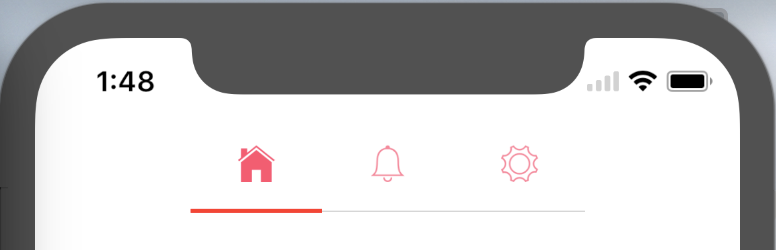
with this code:
const widthTabBar = TabBarTop.tabWidth * numberOfTabs;

return (
<View style={styles.tabBarContainer}>
  <TabBar
     [...]
     style={[styles.tabBar, {width: widthTabBar}]}
     tabStyle={styles.tabBarTab}
  />
</View>
);
and the corresponding style:
tabBar: {
  shadowColor: 'transparent',
  borderBottomWidth: StyleSheet.hairlineWidth,
  borderBottomColor: 'rgba(0,0,0,0.5)',
  backgroundColor: null,
},
tabBarTab: {
  borderWidth: 0,
  width: TabBarTop.tabWidth,
},
tabBarContainer: {
  flexDirection: 'row',
  justifyContent: 'center',
}
Hello,
I want to achieve the above mentioned functionality using dynamic tabs for these i tried the mentioned solution by @QuentinBrosse but i think TobTabBar component has been deprecated i am using "react-native-tab-view": "^2.14.2", please provide me the solution
 arun1705
on 29 May 2020
arun1705
on 29 May 2020
renderTabBar={props => (
indicatorStyle={{ backgroundColor: 'white' }}
tabStyle={{ width: 100}}
scrollEnabled={true}
style={{ backgroundColor: 'black'}}
labelStyle={{color: 'green', fontWeight: '500'}}
pressOpacity="0.7"
/>
)
/>
 khanhubgit
on 25 Aug 2020
khanhubgit
on 25 Aug 2020
Related issues
 moerabaya
·
4Comments
moerabaya
·
4Comments
 ahmedrowaihi
·
3Comments
ahmedrowaihi
·
3Comments
 jouderianjr
·
3Comments
jouderianjr
·
3Comments
 chen504554911
·
3Comments
chen504554911
·
3Comments
 f6m6
·
3Comments
f6m6
·
3Comments
Most helpful comment
Tanks a lot @satya164.
For those who would be interested, here is my solution:
I get this result:

with this code:
and the corresponding style: