React-native-swipe-list-view: SwipeRow height


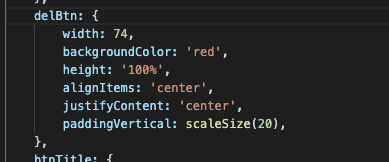
When I updated the 2 component because the height was dynamic, after I refreshed the view, the 1 component was not at the same height as it was the first time
Environment (please complete the following information):
- OS: [e.g. iOS or Android] :ios
- RNSLV Version: [e.g. v2.0.2]:2.0.6
- RN Version: [e.g. v60.0.5]:0.61.2


 baicuhaha
All 6 comments
I have the same issue. Have you found the solution?
 jonnynfb
on 1 Dec 2019
jonnynfb
on 1 Dec 2019
👍1
Hey @baicuhaha @jonnynfb try adding recalculateHiddenLayout={true} as a prop to your SwipeRow. Let me know if that works, thanks!
 jemise111
on 1 Dec 2019
jemise111
on 1 Dec 2019
👍3
🚀1
❤1
🎉1
😄1
@jemise111 I've solved my problem. Thank you
baicuhaha
on 2 Dec 2019
👍1
@jonnynfb Using this recalculateHiddenLayout can be solved
baicuhaha
on 2 Dec 2019
@jemise111 @baicuhaha Thank guys! That fixed it for me.
jonnynfb
on 2 Dec 2019
👍1
I have tried to set rowFront.height to 90 after settings recalculateHiddenLayout on SwipeListView, this is my code:
        renderItem={data => (
          <Animated.View
            style={{
              height: this.rowTranslateAnimatedValues[data.item.key].interpolate({
                inputRange: [0, 1],
                outputRange: [0, 50],
              }),
            }}
          >
            <TouchableRipple
              onPress={() => console.log('You touched me')}
              style={styles.rowFront}
              underlayColor={'#AAA'}
            >
              <View>
                <Text>
                  {data.item.description}
                </Text>
              </View>
            </TouchableRipple>
          </Animated.View>
        )}
and my view looks like this:

How do you set the height to be dynamic?
 kopax
on 10 Feb 2020
kopax
on 10 Feb 2020
Was this page helpful?
0 / 5 - 0 ratings
Related issues
 kyangy
·
3Comments
kyangy
·
3Comments
 VitaliiK91
·
3Comments
VitaliiK91
·
3Comments
 nzrin
·
5Comments
nzrin
·
5Comments
 m-ruhl
·
6Comments
m-ruhl
·
6Comments
 ramisalem
·
5Comments
ramisalem
·
5Comments
Most helpful comment
Hey @baicuhaha @jonnynfb try adding
recalculateHiddenLayout={true}as a prop to yourSwipeRow. Let me know if that works, thanks!