React-native-swipe-list-view: Close opened row is there any other ways when delete one row in listview?
@jemise111
when I open one row ,there is a delete-button .And I touch button to delete this row,its not closed when row in not end of listview .
Now ,how to close row which be opened voluntarily,not press to close and slide to close.Thanks
 sharingjingang050241
All 9 comments
1

2

3

sharingjingang050241
on 31 Oct 2016
Hey @sharingjingang050241 hm I'm not sure what's going. If you follow the SwipeListExample/example.js file it's working just fine with deleting rows and closing the deleted ones. Here's a GIF to show what the behavior is in the example:

If you still can't get it to work please reopen this issue and paste some code you're using to do the deleting, and I'll be happy to take a closer look, thanks!
 jemise111
on 5 Nov 2016
jemise111
on 5 Nov 2016
I have same issue.I used SwipeRow in my project.Another solution that i found is to use SwipeListView.But sometime it creates problem in rendering rows.Sometimes some of rows getting rendered and other portion of the screen remains blank.When I just scroll,all rows getting rendered.So I avoid to use that solution and remains on SwipeRow to render my list.
Please any one can help?
 bhoomika911
on 20 Jun 2017
bhoomika911
on 20 Jun 2017
@sharingjingang050241 just set ref={'swipeListView'} in SwipeListView, and call this.refs.swipeListView.safeCloseOpenRow(); when you Press on Delete Button
 chudaotrucnhan
on 28 Nov 2017
chudaotrucnhan
on 28 Nov 2017
I know this is somewhat late but if anyone is still experiencing this issue, it's because the key that is used to identify the row is not correctly defined. Make sure if you are using the keyExtractor that it is not returning an undefined value or something
 IamStephan
on 17 Oct 2018
IamStephan
on 17 Oct 2018
hey @lamStephan, I still face this problem. keyExtractor I got from index so can not be undefined or something but still not working! Please help!
 thanhluantl2304
on 6 Feb 2020
thanhluantl2304
on 6 Feb 2020
Hey @thanhluantl2304, haven't worked with this library in some time. Mainly because it tends to be hard for users to identify this feature unless it is specifically shown to them.
This is purely based on memory and if you can provide a code snippet that will be helpful. I think what's happening is that when the user opens a list item the framework uses the key to know what item is open after a state update. The problem with this and using the index as a key is that when the item is removed the index values change for all the items below that deleted row. So when the state updates the lower row gets the old index of the deleted item. Meaning the framework still believes that the delete row exists and it should be kept open.
Short answer: Use the keyExtractor but use unique values and not the index of the item. Maybe a id. If I remember correctly, my list did not have unique ids so what i did was use the Math.random + the index. Try to avoid this since you'll lose references to the rows and can really do anything to them with your code (I think).
IamStephan
on 7 Feb 2020
Ok, i got this. You saved my life! Thank you very much!^^
thanhluantl2304
on 12 Feb 2020
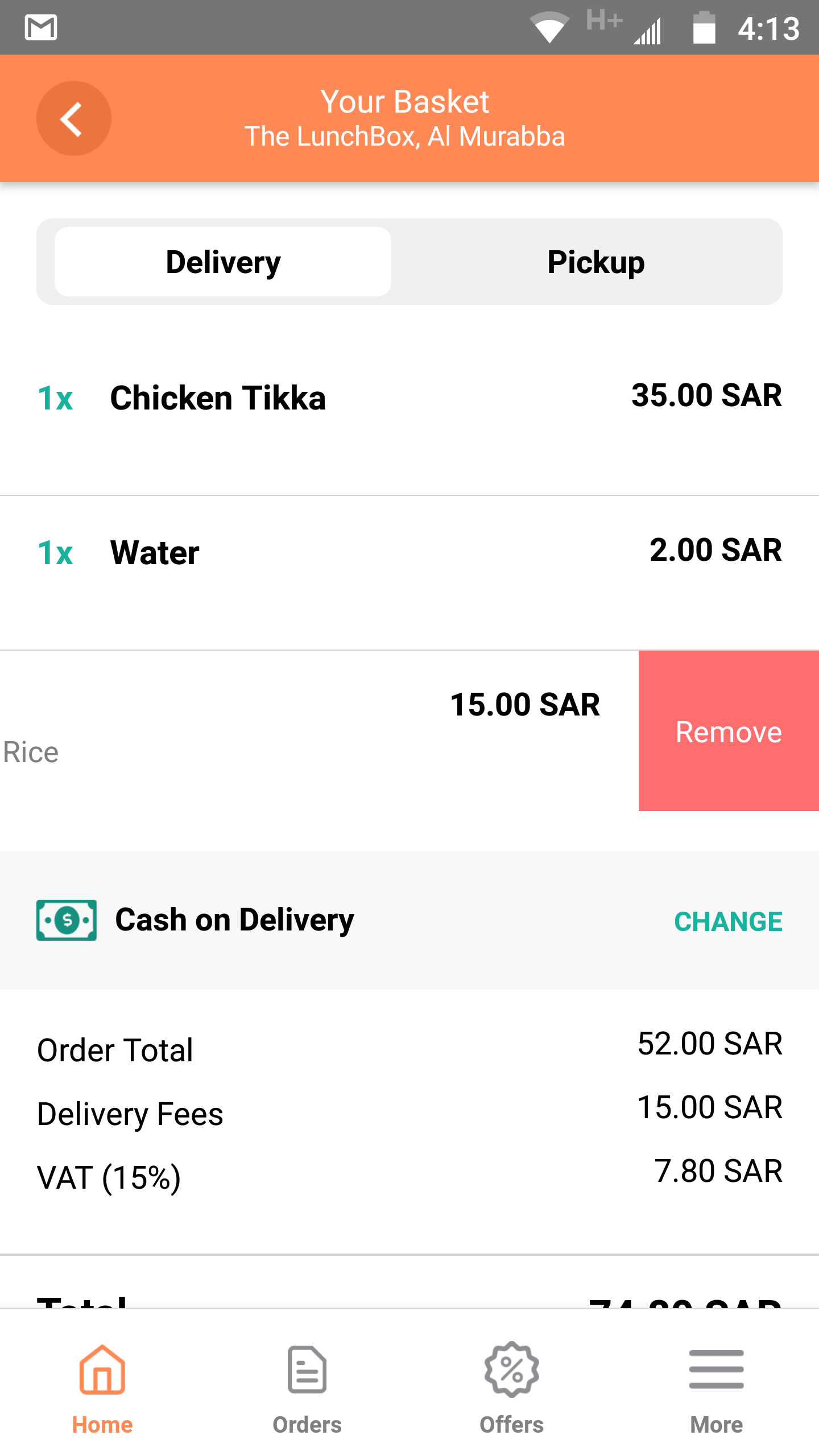
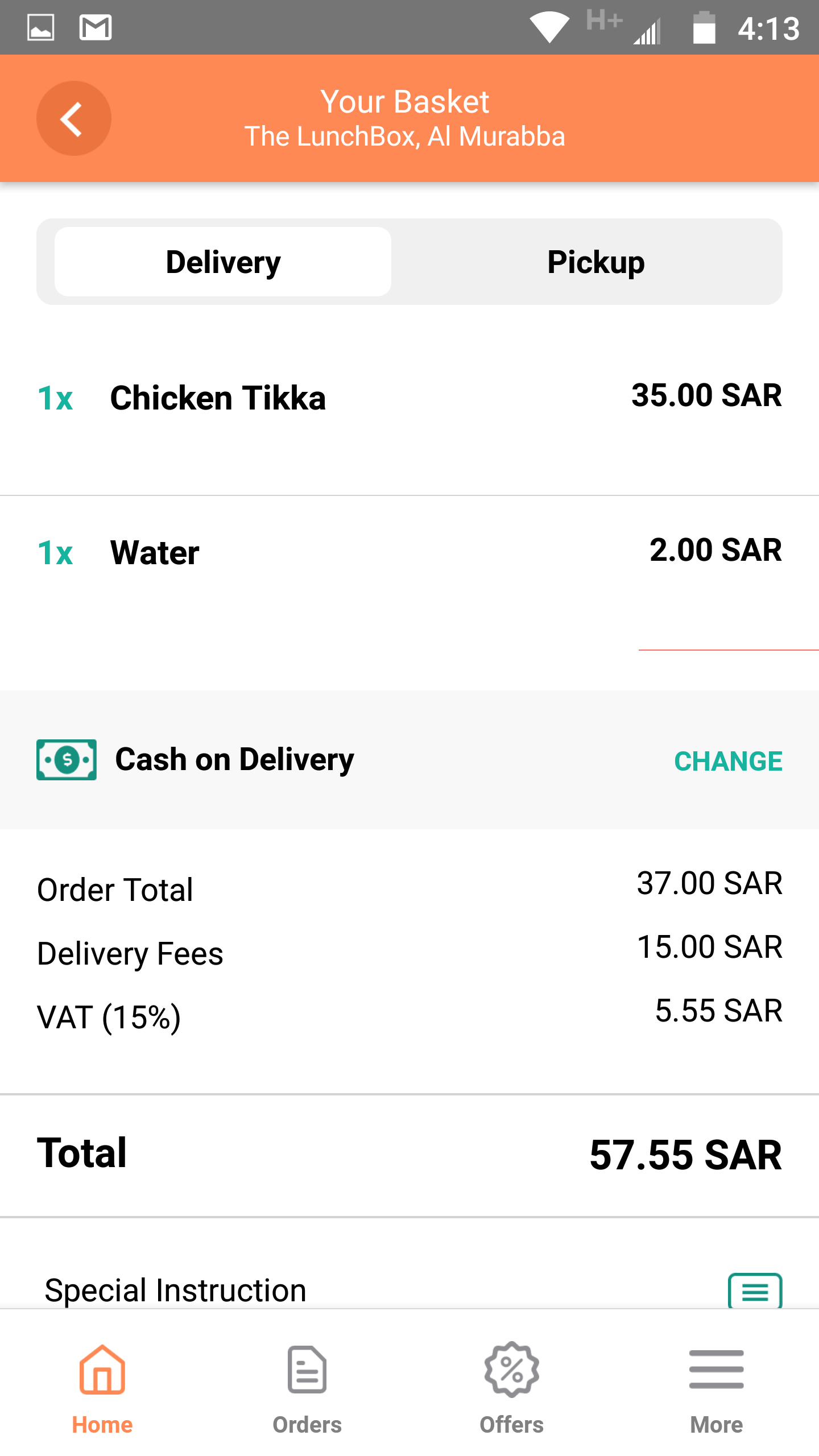
@IamStephan fixed the row closing issue thanks to you. There is also another problem I am facing. Deleting the last row leaves a little of the deleted row hidden delete button. It show like a little line. I have attached the image. Please give them a look. Look at the the little red line that stays after the item is deleted.
 muhammadtaha1998
on 10 Sep 2020
muhammadtaha1998
on 10 Sep 2020
Related issues
 kopax
·
4Comments
kopax
·
4Comments
 terencestone
·
5Comments
terencestone
·
5Comments
 Slapbox
·
6Comments
Slapbox
·
6Comments
 Elijen
·
5Comments
Elijen
·
5Comments
 jjhesk
·
3Comments
jjhesk
·
3Comments
Most helpful comment
I know this is somewhat late but if anyone is still experiencing this issue, it's because the key that is used to identify the row is not correctly defined. Make sure if you are using the keyExtractor that it is not returning an undefined value or something