React-native-swipe-list-view: Can't set dynamic height with swipe to delete because of interpolate using fixed row value
Description
I am working on a react-native project using expo SDK36.
I want to do a swipe left/right list view. I use react-native-swipe-list-view to achieve it.
So far everything worked perfectly, the default example uses a fixed height: 50 per row, while I want to set the height of each row dynamically.
Every attempt where a failure, note that I already use <SwipeListView recalculateHiddenLayout={true} />
This is bad for the UX, since the default line is having a small height: 50, it is nearly impossible to drag the line on iOS and android properly.
Reproduction
- Snack: https://snack.expo.io/@kopax/react-native-swipe-list-view-408
import React from 'react';
import { Dimensions, Text, View, StyleSheet } from 'react-native';
import Constants from 'expo-constants';

// You can import from local files
import SwipeListView from './components/SwipeListView';

// or any pure javascript modules available in npm
import { Card } from 'react-native-paper';

export default class App extends React.Component {
  render() {
    return (
      <View style={styles.container}>
        <Text style={styles.paragraph}>
          Change code in the editor and watch it change on your phone! Save to get a shareable url.
        </Text>
        <Card>
          <SwipeListView
            dimensions={Dimensions.get('window')}
            listViewData={Array(20).fill('').map((d, i) => ({
              ...d,
              title: `Item ${i}`,
              description: `This is a very long description for item number #${i},
                it should be so long that you cannot see all the content,
                the issue is about fixing the dynamic height for each row`
              }))
            }
            minHeight={200}
          />
        </Card>
      </View>
    );
  }
}

const styles = StyleSheet.create({
  container: {
    flex: 1,
    justifyContent: 'center',
    paddingTop: Constants.statusBarHeight,
    backgroundColor: '#ecf0f1',
    padding: 8,
  },
  paragraph: {
    margin: 24,
    fontSize: 18,
    fontWeight: 'bold',
    textAlign: 'center',
  },
});
This is my components/SwipeListView.js
import React, { Component } from 'react';
import {
  Animated,
  Image,
  StyleSheet,
  TouchableOpacity,
  TouchableHighlight,
  View,
} from 'react-native';
import {
  Avatar,
  Button,
  Text,
  Title,
  Subheading,
  TouchableRipple,
  withTheme,
} from 'react-native-paper';
import { SwipeListView as SwipeListViewDefault } from 'react-native-swipe-list-view';

/* eslint-disable react/prop-types, react/destructuring-assignment, react/no-access-state-in-setstate  */
class SwipeListView extends Component {

  leftBtnRatio = 0.25;
  rightBtnRatio = 0.75;

  constructor(props) {
    super(props);
    this.state = {
      listType: 'FlatList',
      listViewData: props.listViewData
        .map((data, i) => ({ key: `${i}`, ...data })),
    };

    this.rowTranslateAnimatedValues = {};
    props.listViewData
      .forEach((data, i) => {
        this.rowTranslateAnimatedValues[`${i}`] = new Animated.Value(1);
      });
  }

  getStyles() {
    const { minHeight, theme } = this.props;
    const { colors } = theme;

    return StyleSheet.create({
      rowFrontContainer: {
        overflow: 'hidden',
      },
      rowFront: {
        alignItems: 'center',
        backgroundColor: colors.surface,
        borderBottomColor: colors.accent,
        borderBottomWidth: 1,
        justifyContent: 'center',
        minHeight: '100%',
        flex: 1,
      },
      rowBack: {
        alignItems: 'center',
        backgroundColor: colors.surface,
        flexDirection: 'row',
        justifyContent: 'space-between',
        paddingLeft: 15,
        minHeight: '100%',
      },
      backBtn: {
        alignItems: 'center',
        bottom: 0,
        justifyContent: 'center',
        position: 'absolute',
        top: 0,
      },
      backLeftBtn: {
        backgroundColor: colors.primary,
        left: 0,
        width: `${this.leftBtnRatio * 100}%`,
      },
      backRightBtn: {
        backgroundColor: colors.accent,
        right: 0,
        width: `${this.rightBtnRatio * 100}%`,
      },
    });
  }

  onRowDidOpen = (rowKey) => {
    console.log('This row opened', rowKey);
  };

  onSwipeValueChange = swipeData => {
    const { dimensions } = this.props;
    const { key, value } = swipeData;
    if (value < -dimensions.width * this.rightBtnRatio && !this.animationIsRunning) {
      this.animationIsRunning = true;
      Animated.timing(this.rowTranslateAnimatedValues[key], {
        toValue: 0,
        duration: 200,
      }).start(() => {
        const newData = [...this.state.listViewData];
        const prevIndex = this.state.listViewData.findIndex(item => item.key === key);
        newData.splice(prevIndex, 1);
        this.setState({listViewData: newData});
        this.animationIsRunning = false;
      });
    }
  };

  closeRow(rowMap, rowKey) {
    if (rowMap[rowKey]) {
      rowMap[rowKey].closeRow();
    }
  }

  deleteRow(rowMap, rowKey) {
    this.closeRow(rowMap, rowKey);
    const newData = [...this.state.listViewData];
    const prevIndex = this.state.listViewData.findIndex(
      (item) => item.key === rowKey,
    );
    newData.splice(prevIndex, 1);
    this.setState({ listViewData: newData });
  }

  render() {
    const { minHeight, dimensions, theme } = this.props;
    const { colors } = theme;
    const styles = this.getStyles();
    return (
      <SwipeListViewDefault
        data={this.state.listViewData}
        renderItem={data => (
          <Animated.View
            style={[styles.rowFrontContainer, {
              height: this.rowTranslateAnimatedValues[data.item.key].interpolate({
                inputRange: [0, 1],
                outputRange: [0, minHeight],
              })}]}
          >
            <TouchableRipple
              onPress={() => console.log('You touched me')}
              style={styles.rowFront}
              underlayColor={colors.background}
            >
              <View>
                <Title>{data.item.title}</Title>
                <Text>
                  {data.item.description}
                </Text>
              </View>
            </TouchableRipple>
          </Animated.View>
        )}
        renderHiddenItem={(data, rowMap) => (
          <View style={styles.rowBack}>

            <TouchableOpacity
              style={[
                styles.backLeftBtn,
                styles.backBtn,
              ]}
              onPress={() => this.closeRow(rowMap, data.item.key)}
            >
              <Text>Tap pour annuler</Text>
            </TouchableOpacity>
            <TouchableOpacity
              style={[
                styles.backRightBtn,
                styles.backBtn,
              ]}
              onPress={() => this.deleteRow(rowMap, data.item.key)}
            >
              <Animated.View
                style={[
                  styles.trash,
                  {
                    transform: [
                      {
                        scale: this.rowTranslateAnimatedValues[
                          data.item.key
                          ].interpolate({
                          inputRange: [
                            45,
                            90,
                          ],
                          outputRange: [0, 1],
                          extrapolate:
                            'clamp',
                        }),
                      },
                    ],
                  },
                ]}
              >
                <Text>Swipe left to delete</Text>
              </Animated.View>
            </TouchableOpacity>
          </View>
        )}
        leftOpenValue={dimensions.width * this.leftBtnRatio}
        rightOpenValue={-dimensions.width * this.rightBtnRatio}
        previewRowKey={'0'}
        previewOpenValue={-40}
        previewOpenDelay={3000}
        onRowDidOpen={this.onRowDidOpen}
        onSwipeValueChange={this.onSwipeValueChange}
        recalculateHiddenLayout={true}
      />
    );
  }
}

export default withTheme(SwipeListView);
Expect
I expect when using recalculateHiddenLayout={true}, to get the hidden row height calculated dynamically
Result Screenshots
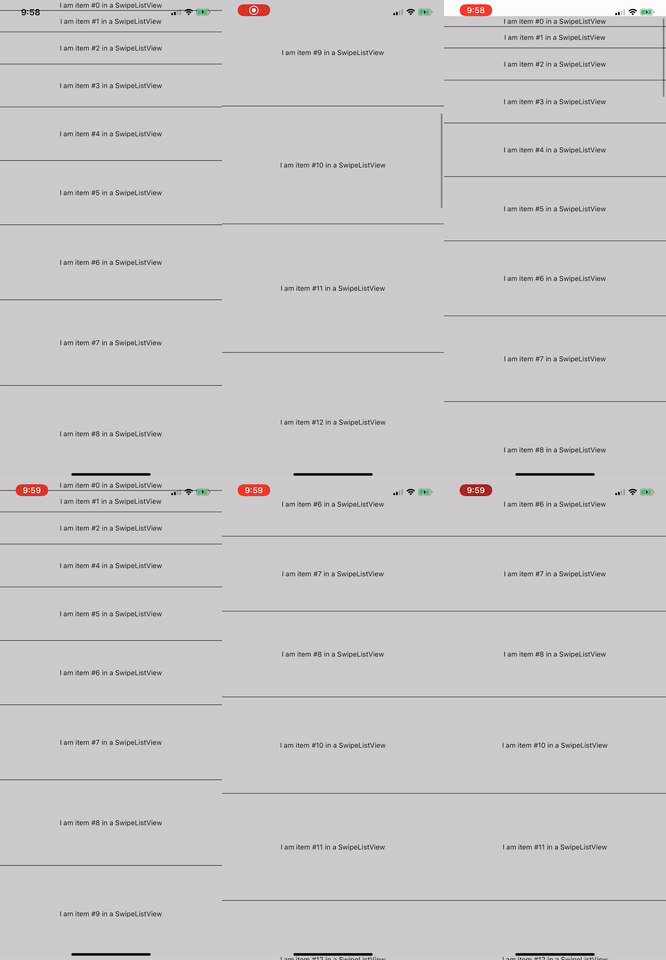
On the web, I am able to set the height:

but I when using iOS and Android, the height is forced.

Environment
- OS: ios/android/web
- RN Version: expo SDK36
How can I set the height of each row dynamically?
Important edit
The problem is the fixed value here in the animation:
              height: this.rowTranslateAnimatedValues[data.item.key].interpolate({
                inputRange: [0, 1],
                outputRange: [0, minHeight],
              })}]}
I have updated the example, if that fix the height issue, it doesn't permit dynamic height.
 kopax
kopax
All 4 comments
@kopax I don't understand your issue. There are no problems with swipe to delete and using dynamic heights. Just change the outputRange height to be dynamic. I just tried it using this:
{
height: this.rowTranslateAnimatedValues[
data.item.key
].interpolate({
inputRange: [0, 1],
outputRange: [0, 20 + data.index * 20],
}),
},
And have no problems at all
 jemise111
on 21 Feb 2020
jemise111
on 21 Feb 2020
By dynamic height, imagine a collapsable list, how do you know the height the content will take in advance for each item?
I was describing the fact that the content will set the height. (not the index)
Using minHeight, I am able to animate, but not to height: 0%since it's just minHeight.
I have tried to play with onLayout, try to display and hide the content quickly, I am still looking on a way to do that.
kopax
on 21 Feb 2020
@kopax
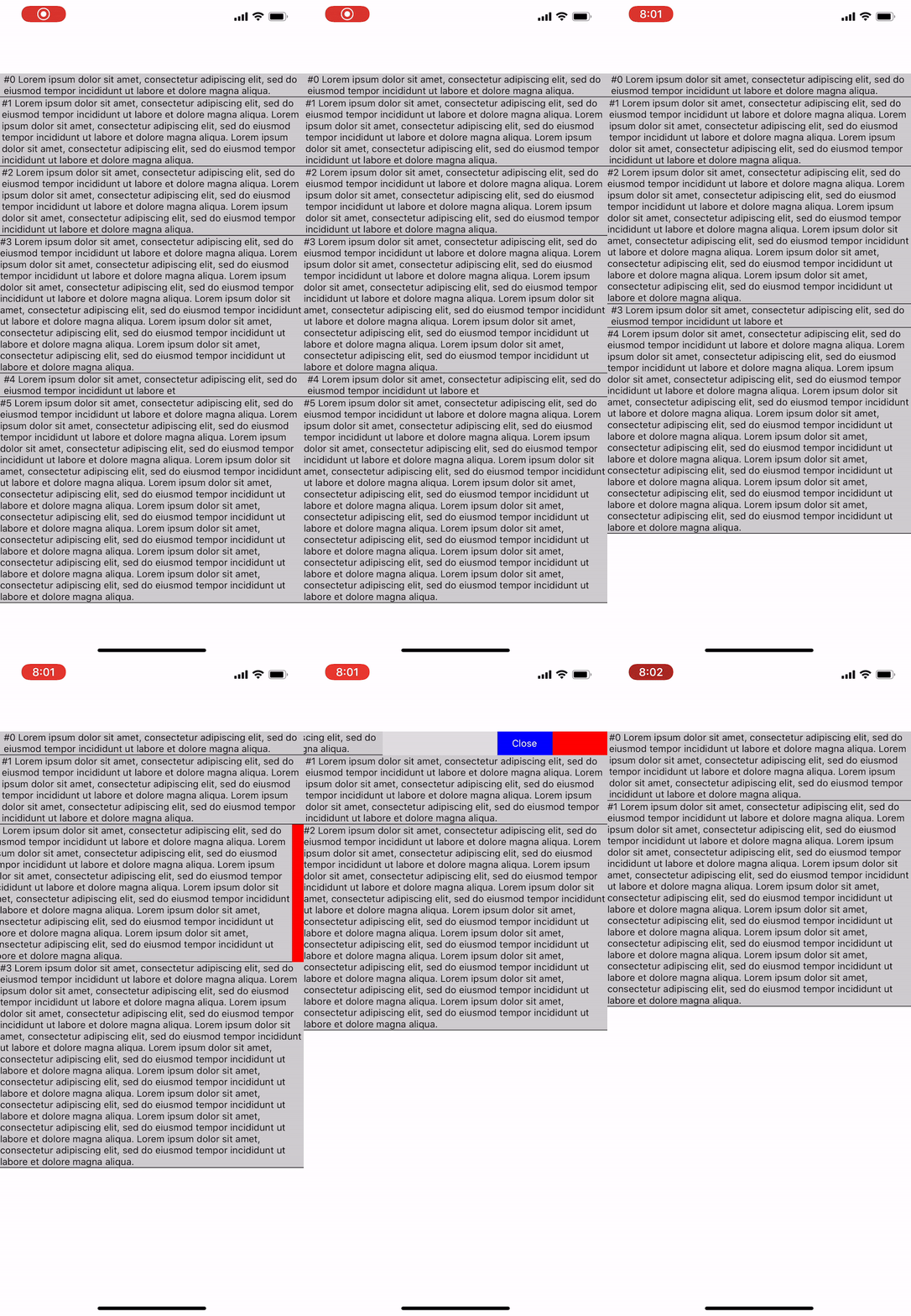
Here's a way to do it with onLayout. This is modified from the swipe to delete example. This is almost certainly not an issue with this library.
import React, { Component } from 'react';
import {
    Animated,
    Dimensions,
    Image,
    StyleSheet,
    Text,
    TouchableOpacity,
    TouchableHighlight,
    View,
} from 'react-native';

import SwipeListView from './SwipeListView';
import SwipeRow from './SwipeRow';
class DeleteSwipeListView extends Component {
    constructor(props) {
        super(props);
        this.state = {
            heights: [],
            listType: 'FlatList',
            listViewData: [
                {
                    key: '1',
                    text:
                        'Lorem ipsum dolor sit amet, consectetur adipiscing elit, sed do eiusmod tempor incididunt ut labore et dolore magna aliqua.',
                },
                {
                    key: '2',
                    text:
                        'Lorem ipsum dolor sit amet, consectetur adipiscing elit, sed do eiusmod tempor incididunt ut labore et dolore magna aliqua. Lorem ipsum dolor sit amet, consectetur adipiscing elit, sed do eiusmod tempor incididunt ut labore et dolore magna aliqua. Lorem ipsum dolor sit amet, consectetur adipiscing elit, sed do eiusmod tempor incididunt ut labore et dolore magna aliqua.',
                },
                {
                    key: '3',
                    text:
                        'Lorem ipsum dolor sit amet, consectetur adipiscing elit, sed do eiusmod tempor incididunt ut labore et dolore magna aliqua. Lorem ipsum dolor sit amet, consectetur adipiscing elit, sed do eiusmod tempor incididunt ut labore et dolore magna aliqua. Lorem ipsum dolor sit amet, consectetur adipiscing elit, sed do eiusmod tempor incididunt ut labore et dolore magna aliqua.',
                },
                {
                    key: '4',
                    text:
                        'Lorem ipsum dolor sit amet, consectetur adipiscing elit, sed do eiusmod tempor incididunt ut labore et dolore magna aliqua. Lorem ipsum dolor sit amet, consectetur adipiscing elit, sed do eiusmod tempor incididunt ut labore et dolore magna aliqua. Lorem ipsum dolor sit amet, consectetur adipiscing elit, sed do eiusmod tempor incididunt ut labore et dolore magna aliqua. Lorem ipsum dolor sit amet, consectetur adipiscing elit, sed do eiusmod tempor incididunt ut labore et dolore magna aliqua. Lorem ipsum dolor sit amet, consectetur adipiscing elit, sed do eiusmod tempor incididunt ut labore et dolore magna aliqua. Lorem ipsum dolor sit amet, consectetur adipiscing elit, sed do eiusmod tempor incididunt ut labore et dolore magna aliqua.',
                },
                {
                    key: '5',
                    text:
                        'Lorem ipsum dolor sit amet, consectetur adipiscing elit, sed do eiusmod tempor incididunt ut labore et',
                },
                {
                    key: '6',
                    text:
                        'Lorem ipsum dolor sit amet, consectetur adipiscing elit, sed do eiusmod tempor incididunt ut labore et dolore magna aliqua. Lorem ipsum dolor sit amet, consectetur adipiscing elit, sed do eiusmod tempor incididunt ut labore et dolore magna aliqua. Lorem ipsum dolor sit amet, consectetur adipiscing elit, sed do eiusmod tempor incididunt ut labore et dolore magna aliqua. Lorem ipsum dolor sit amet, consectetur adipiscing elit, sed do eiusmod tempor incididunt ut labore et dolore magna aliqua. Lorem ipsum dolor sit amet, consectetur adipiscing elit, sed do eiusmod tempor incididunt ut labore et dolore magna aliqua. Lorem ipsum dolor sit amet, consectetur adipiscing elit, sed do eiusmod tempor incididunt ut labore et dolore magna aliqua. Lorem ipsum dolor sit amet, consectetur adipiscing elit, sed do eiusmod tempor incididunt ut labore et dolore magna aliqua. Lorem ipsum dolor sit amet, consectetur adipiscing elit, sed do eiusmod tempor incididunt ut labore et dolore magna aliqua. Lorem ipsum dolor sit amet, consectetur adipiscing elit, sed do eiusmod tempor incididunt ut labore et dolore magna aliqua.',
                },
            ],
        };
        this.rowTranslateAnimatedValues = {};
        Array(20)
            .fill('')
            .forEach((_, i) => {
                this.rowTranslateAnimatedValues[`${i}`] = new Animated.Value(1);
            });
    }

    closeRow(rowMap, rowKey) {
        if (rowMap[rowKey]) {
            rowMap[rowKey].closeRow();
        }
    }

    deleteRow(rowMap, rowKey) {
        this.closeRow(rowMap, rowKey);
        const newData = [...this.state.listViewData];
        const prevIndex = this.state.listViewData.findIndex(
            item => item.key === rowKey
        );
        newData.splice(prevIndex, 1);
        this.setState({ listViewData: newData });
    }

    onRowDidOpen = rowKey => {
        console.log('This row opened', rowKey);
    };

    onSwipeValueChange = swipeData => {
        const { dimensions } = this.props;
        const { key, value } = swipeData;
        if (
            value < -Dimensions.get('window').width &&
            !this.animationIsRunning
        ) {
            this.animationIsRunning = true;
            Animated.timing(this.rowTranslateAnimatedValues[key], {
                toValue: 0,
                duration: 200,
            }).start(() => {
                const newData = [...this.state.listViewData];
                const newHeights = [...this.state.heights];
                const prevIndex = this.state.listViewData.findIndex(
                    item => item.key === key
                );
                newData.splice(prevIndex, 1);
                newHeights.splice(prevIndex, 1);
                this.setState({
                    listViewData: newData,
                    heights: newHeights,
                });
                this.animationIsRunning = false;
            });
        }
    };

    onLayout = index => ({ nativeEvent }) => {
        if (!this.state.heights[index]) {
            const {
                layout: { height },
            } = nativeEvent;
            const heights = [...this.state.heights];
            heights[index] = height;
            this.setState({ heights });
        }
    };

    getStyles() {
        const { dimensions } = this.props;
        return StyleSheet.create({
            backTextWhite: {
                color: '#FFF',
            },
            rowFront: {
                alignItems: 'center',
                backgroundColor: '#CCC',
                borderBottomColor: 'black',
                borderBottomWidth: 1,
                justifyContent: 'center',
                // height: '100%',
            },
            rowBack: {
                alignItems: 'center',
                backgroundColor: '#DDD',
                flex: 1,
                flexDirection: 'row',
                justifyContent: 'space-between',
                paddingLeft: 15,
            },
            backRightBtn: {
                alignItems: 'center',
                bottom: 0,
                justifyContent: 'center',
                position: 'absolute',
                top: 0,
                width: 75,
            },
            backRightBtnLeft: {
                backgroundColor: 'blue',
                right: 75,
            },
            backRightBtnRight: {
                backgroundColor: 'red',
                right: 0,
            },
            trash: {
                height: 25,
                width: 25,
            },
        });
    }
    render() {
        const { dimensions } = this.props;
        const styles = this.getStyles();
        return (
            <SwipeListView
                recalculateHiddenLayout={true}
                data={this.state.listViewData}
                renderItem={data => (
                    <Animated.View
                        onLayout={this.onLayout(data.index)}
                        style={[
                            styles.rowFrontContainer,
                            this.state.heights[data.index] && {
                                height: this.rowTranslateAnimatedValues[
                                    data.item.key
                                ].interpolate({
                                    inputRange: [0, 1],
                                    outputRange: [
                                        0,
                                        this.state.heights[data.index],
                                    ],
                                }),
                            },
                        ]}
                    >
                        <TouchableHighlight
                            onPress={() => console.log('You touched me')}
                            style={styles.rowFront}
                            underlayColor={'#AAA'}
                        >
                            <View>
                                <Text>
                                    #{data.index} {data.item.text}
                                </Text>
                            </View>
                        </TouchableHighlight>
                    </Animated.View>
                )}
                renderHiddenItem={(data, rowMap) => (
                    <View style={styles.rowBack}>
                        <Text>Left</Text>
                        <TouchableOpacity
                            style={[
                                styles.backRightBtn,
                                styles.backRightBtnLeft,
                            ]}
                            onPress={() => this.closeRow(rowMap, data.item.key)}
                        >
                            <Text style={styles.backTextWhite}>Close</Text>
                        </TouchableOpacity>
                        <TouchableOpacity
                            style={[
                                styles.backRightBtn,
                                styles.backRightBtnRight,
                            ]}
                            onPress={() =>
                                this.deleteRow(rowMap, data.item.key)
                            }
                        >
                            <Animated.View
                                style={[
                                    styles.trash,
                                    {
                                        transform: [
                                            {
                                                scale: this.rowTranslateAnimatedValues[
                                                    data.item.key
                                                ].interpolate({
                                                    inputRange: [45, 90],
                                                    outputRange: [0, 1],
                                                    extrapolate: 'clamp',
                                                }),
                                            },
                                        ],
                                    },
                                ]}
                            >
                                <Image
                                    source={require('./images/trash.png')}
                                    style={styles.trash}
                                />
                            </Animated.View>
                        </TouchableOpacity>
                    </View>
                )}
                leftOpenValue={Dimensions.get('window').width}
                rightOpenValue={-Dimensions.get('window').width}
                previewRowKey={'0'}
                previewOpenValue={-40}
                previewOpenDelay={3000}
                onRowDidOpen={this.onRowDidOpen}
                onSwipeValueChange={this.onSwipeValueChange}
                style={{ paddingTop: 100 }}
            />
        );
    }
}

export default DeleteSwipeListView;
This was answered, please re-open if more work was needed here, thanks!
jemise111
on 4 Jul 2020
Related issues
 Slapbox
·
6Comments
Slapbox
·
6Comments
 lsbiosite
·
6Comments
lsbiosite
·
6Comments
 kyangy
·
3Comments
kyangy
·
3Comments
 jwilliamson-qb
·
3Comments
jwilliamson-qb
·
3Comments
 terencestone
·
5Comments
terencestone
·
5Comments
Most helpful comment
@kopax
Here's a way to do it with
onLayout. This is modified from the swipe to delete example. This is almost certainly not an issue with this library.