React-native-screens: headerStyle and headerLargeStyle backgroundColor are not applied after theme switching
Description
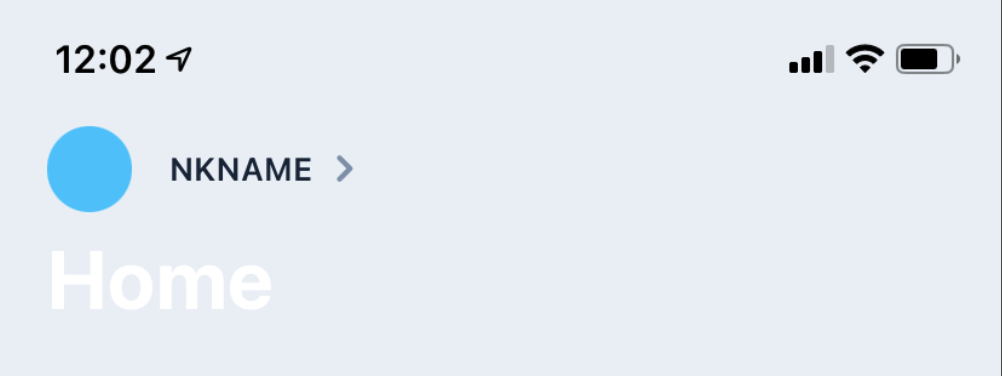
Header styles are not applied after switching the theme within the application
Screenshots

Steps To Reproduce
- Add custom styles with two themes for react-native-screens header
- Toggle theme
    headerLargeTitleStyle: {
      color: EStyleSheet.value('$label01'),
    },
    headerLargeStyle: {
      backgroundColor: EStyleSheet.value('$ui02'),
    },
    headerTitleStyle: Platform.select({
      ios: {
        color: EStyleSheet.value('$label01'),
      },
      android: {
        fontWeight: '700',
        color: EStyleSheet.value('$label01'),
      },
    }),
    headerStyle: {
      backgroundColor: EStyleSheet.value('$ui02'),
    },
Expected behavior
headerStyle: { backgroundColor } and headerLargeStyle: { backgroundColor } equals `EStyleSheet.value('$ui02') after theme switching
Actual behavior
headerStyle and headerLargeStyle backgroundColor have system colors (not defined in Stack)
Stack
<Stack.Screen
        options={{
          headerLargeTitle: true,
          headerLargeTitleStyle: {
            color: EStyleSheet.value('$label01'),
          },
          headerLargeStyle: {
            backgroundColor: EStyleSheet.value('$ui02'),
          },
          headerTitleStyle: Platform.select({
            ios: {
              color: EStyleSheet.value('$label01'),
            },
            android: {
              fontWeight: '700',
              color: EStyleSheet.value('$label01'),
            },
          }),
          headerStyle: {
            backgroundColor: EStyleSheet.value('$ui02'),
          },
        }}
        component={HomeScreen}
      />
Package versions
- React: 16.13.1
- React Native: 0.63.4
- React Native Screens: 2.18.1
 tronin
All 23 comments
If you restart the app, everything works fine
tronin
on 22 Mar 2021
tronin
on 22 Mar 2021
Hello, I have the same problem.
 aurelienmartin
on 22 Mar 2021
aurelienmartin
on 22 Mar 2021
Hey @tronin and @aurelienmartin,
Do you mind submitting a minimal, reproducible example that we could copy, run and test? I mean minimal but with all necessary imports and files.
See this guide: https://stackoverflow.com/help/minimal-reproducible-example
 kacperkapusciak
on 23 Mar 2021
kacperkapusciak
on 23 Mar 2021
Here's a possibly related screen example that reproduces headerStyle not being applied, used with react-navigation on iPad iOS 14.4.
the header color gets set correctly if there's less child components,
but incorrectly if there's lots of child components / a longer render time
import React, { useEffect } from 'react';
import { View, Text, Pressable } from 'react-native';

function TestComponent({}) {
  return (
    <View style={{ flex: 1, opacity: 0.9 }}>
      <Text style={{ color: 'blue' }}>text </Text>
    </View>
  );
}

export default function TestScreen({ navigation }) {
  useEffect(() => {
    navigation.setOptions({
      title: 'Test Title', // always works
      headerStyle: { // works with less child elements
        backgroundColor: true ? '#00753E' : '#448C6A',
      },
      headerRight: () => ( // always works
        <Pressable onPress={() => navigation.goBack()}>
          <Text>Back</Text>
        </Pressable>
      ),
      headerLeft: () => ( // always works
        <Pressable onPress={() => navigation.goBack()}>
          <Text>Back</Text>
        </Pressable>
      ),
    });
  }, [navigation]);

  let childAmount = 50;
  // uncomment below to fix issue (render time is faster)
  // childAmount = 5

  const mappableArray = Array(childAmount).fill(0);

  return (
    <View style={{ flex: 1 }}>
      {mappableArray.map((item, index) => (
        <TestComponent key={index} />
      ))}
    </View>
  );
}
the screen also had a default headerStyle background color set
 hugo-chq
on 24 Mar 2021
hugo-chq
on 24 Mar 2021
Having the same issue but it's not actually related to theme switching. Once I set headerRight the issue starts to appear. Maybe it's related to the time it takes because of this as @hugo-chq suggests. It's not happening all the time though. Maybe 1/5th of the time the background color gets lost.
 MSchmidt
on 31 Mar 2021
MSchmidt
on 31 Mar 2021
We have the same problem since we update:
Package: From -> to
"@react-navigation/bottom-tabs": 5.11.7 -> "^5.11.8",
"@react-navigation/compat": 5.3.13 -> "^5.3.14",
"@react-navigation/native": 5.9.2 -> "^5.9.3",
"@react-navigation/stack": 5.14.2 -> "^5.14.3"
"react-native-screens": 2.17.1 -> "^2.18.1",
And remove headerRight didn't solved anything.
The issue occurre sometimes only on iOS; but on first load only or after building, or after fast refresh, but never after a normal usage.
 Pierre-CLIND
on 2 Apr 2021
Pierre-CLIND
on 2 Apr 2021
I'm actually seeing this on iOS release builds as well. Not all the time, but regularly enough that it's an issue. It's actually not just losing the background color but the entire nav bar background. Do you see the same?
MSchmidt
on 3 Apr 2021
I'm seeing this behaviour as well and it's not related to theme switching for me. The issue happens inconsistently whenever setting custom screen options. Either via screenOptions prop on the navigator, or options on the screen, or via a call to setOptions inside of the components.
I tried to downgrade as per @Pierre-CLIND's comment but that didn't work.
Did someone find a way to mitigate the issue ?
 evarouss
on 6 Apr 2021
evarouss
on 6 Apr 2021
It's related to RN0.64 on your cases?
Maybe it's related with the theme (dark/light)?
Pierre-CLIND
on 6 Apr 2021
I'm on RN0.63.4 still. So I'd say it's not related to 0.64.
MSchmidt
on 6 Apr 2021
I'm testing this PR right now:
https://github.com/software-mansion/react-native-screens/pull/847
Maybe it's solved our issue...
Pierre-CLIND
on 6 Apr 2021
Here's a scenario to reproduce the issue:
In a nutshell, it's a scenario where you have a native stack navigator inside of a tab navigator and custom screen options.
The issue happens intermittently.
import React from "react";
import { View, Text } from "react-native";

import { createNativeStackNavigator } from "react-native-screens/native-stack";
import { createBottomTabNavigator } from "@react-navigation/bottom-tabs";
import { DefaultTheme, NavigationContainer } from "@react-navigation/native";

const FeedScreen = () => (
  <View style={{ flex: 1, justifyContent: "center", alignItems: "center" }}>
    <Text>Feed screen</Text>
  </View>
);

const ProfileScreen = () => (
  <View style={{ flex: 1, justifyContent: "center", alignItems: "center" }}>
    <Text>Profile screen</Text>
  </View>
);

const SettingsScreen = () => (
  <View style={{ flex: 1, justifyContent: "center", alignItems: "center" }}>
    <Text>Settings screen</Text>
  </View>
);

const FeedStack = createNativeStackNavigator();

function FeedStackScreen() {
  return (
    <FeedStack.Navigator>
      <FeedStack.Screen
        name="Feed"
        component={FeedScreen}
        options={{
          title: "Feed",
          headerLeft: () => (
            <View>
              <Text>Action Button</Text>
            </View>
          ),
        }}
      />
      {/* other screens */}
    </FeedStack.Navigator>
  );
}

const ProfileStack = createNativeStackNavigator();

function ProfileStackScreen() {
  return (
    <ProfileStack.Navigator>
      <ProfileStack.Screen name="Profile" component={ProfileScreen} />
    </ProfileStack.Navigator>
  );
}

const Tab = createBottomTabNavigator();

function HomeTabs() {
  return (
    <Tab.Navigator>
      <Tab.Screen name="Feed" component={FeedStackScreen} />
      <Tab.Screen name="Profile" component={ProfileStackScreen} />
    </Tab.Navigator>
  );
}

const RootStack = createNativeStackNavigator();

export default function App() {
  return (
    <NavigationContainer theme={DefaultTheme}>
      <RootStack.Navigator screenOptions={{ headerShown: false }}>
        <RootStack.Screen name="Home" component={HomeTabs} />
        <RootStack.Screen name="Settings" component={SettingsScreen} />
      </RootStack.Navigator>
    </NavigationContainer>
  );
}
Issue:
Notice how the header is getting a dark background / losing the Theme Styles

Versions:
{
    "@react-navigation/bottom-tabs": "^5.11.8",
    "@react-navigation/native": "^5.9.3",
    "@react-navigation/stack": "^5.14.3",
    "react-native": "0.63.4",
    "react-native-screens": "^3.0.0",
}
I'm not experiencing this anymore with the latest release 3.1.1. Not sure at which point this got (possibly) resolved though.
MSchmidt
on 19 Apr 2021
I'm experiencing a similar problem but I'm using Expo SDK41, which has v3.0.0 already installed. Can I successfully upgrade to v3.1.1?
Thanks!
 Razorholt
on 20 Apr 2021
Razorholt
on 20 Apr 2021
@Razorholt try at least 3.1.0
I think, it's:
Don't update header without navctr (#847) by @WoLewicki and @hehex9
Pierre-CLIND
on 20 Apr 2021
If it was resolved by #847, I'll close it. Remember that you cannot upgrade the native code when using Expo managed workflow, so bumping the version from the one used in the current SDK (3.0.0 for SDK 41), will probably resolve in unwanted behavior only and will not fix native code's issues.
 WoLewicki
on 20 Apr 2021
WoLewicki
on 20 Apr 2021
I'm still experiencing the header color issue, but this issue might be more related https://github.com/software-mansion/react-native-screens/issues/888 (since it's not only when theme switching)
edit:
my mistake, added a new screen without the correct default header background, it's all working thanks
hugo-chq
on 21 Apr 2021
I double confirm that the issue was fixed in v3.1.0 by #847.
Reproduction by evarouss:
react-native-screens 3.0.0
react-native-screens 3.1.1
Reproduction by hugo-chq:
react-native-screens 3.0.0
react-native-screens 3.1.1
kacperkapusciak
on 21 Apr 2021
Thanks for the hard work !
evarouss
on 21 Apr 2021
not sure why but this issue still happening but less frequently after updating to 3.1.1,
it seems to occasionally happen if headerStyle:backgroundColor is set in the screens default options, and set again differently in navigation.setOptions
hugo-chq
on 27 Apr 2021
@hugo-chq I've tried reproducing what you've described and I think I see where a developer could potentially make a mistake:
Code
import React, {useEffect, useState} from 'react';
import {View, Button} from 'react-native';
import {NavigationContainer, ParamListBase} from '@react-navigation/native';
import {
  createNativeStackNavigator,
  NativeStackNavigationProp,
} from 'react-native-screens/native-stack';

function TestScreen({
  navigation,
}: {
  navigation: NativeStackNavigationProp<ParamListBase>;
}) {
  const [color, setColor] = useState('crimson'); // <- default color

  useEffect(() => {
    navigation.setOptions({
      headerStyle: {
        backgroundColor: color,
      },
    });
  }, [navigation, color]);

  return (
    <View>
      <Button title="Dodgerblue" onPress={() => setColor('dodgerblue')} />
      <Button title="Tomato" onPress={() => setColor('tomato')} />
    </View>
  );
}

const Stack = createNativeStackNavigator();

export default function App(): JSX.Element {
  return (
    <NavigationContainer>
      <Stack.Navigator>
        {/* backgroundColor set up in options is overwritten here by useEffect */}
        <Stack.Screen
          name="TestScreen"
          component={TestScreen}
          options={{
            headerStyle: {
              backgroundColor: 'black',
            },
          }}
        />
      </Stack.Navigator>
    </NavigationContainer>
  );
}
When you set up backgroundColor in screen options but leave a default state value in useState (eg. set to null or empty string) it's either way overwritten after first render by useEffect by the default value. The problem is easily solved by providing a default color value in useState. If it's not the case for you please add repro and I'll reopen this issue.
Cheers
kacperkapusciak
on 27 Apr 2021
thanks for that example
apologies the issue described may've been my leftover 1s timeout workaround to re-apply the header color ,
but that's good to know about aswell cheers
hugo-chq
on 29 Apr 2021
Related issues
 chai86
·
3Comments
chai86
·
3Comments
 kantorm
·
5Comments
kantorm
·
5Comments
 ukasiu
·
4Comments
ukasiu
·
4Comments
 jeveloper
·
5Comments
jeveloper
·
5Comments
 pvinis
·
5Comments
pvinis
·
5Comments
Most helpful comment
I double confirm that the issue was fixed in v3.1.0 by #847.
Reproduction by evarouss:
react-native-screens 3.0.0
https://user-images.githubusercontent.com/39658211/115518901-fa171200-a288-11eb-9949-b5936f9c3895.mov
react-native-screens 3.1.1
https://user-images.githubusercontent.com/39658211/115518945-069b6a80-a289-11eb-9a5e-39f0ec9862b0.mov
Reproduction by hugo-chq:
react-native-screens 3.0.0
https://user-images.githubusercontent.com/39658211/115516220-309f5d80-a286-11eb-8940-90115ce22386.mov
react-native-screens 3.1.1
https://user-images.githubusercontent.com/39658211/115516279-3dbc4c80-a286-11eb-974b-059e42b46c08.mov