React-native-screens: Android: when closing the screen. it first hide the images inside the screen then pop the screen.
Description
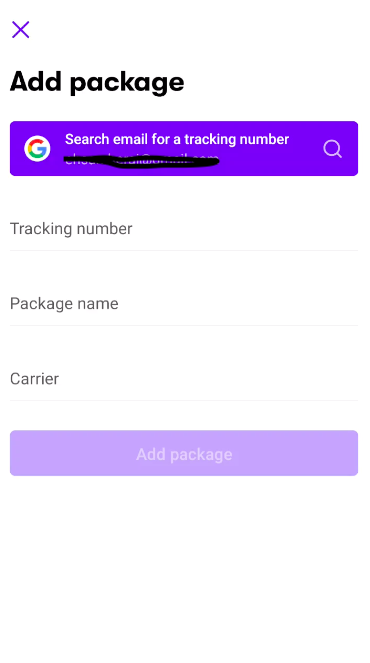
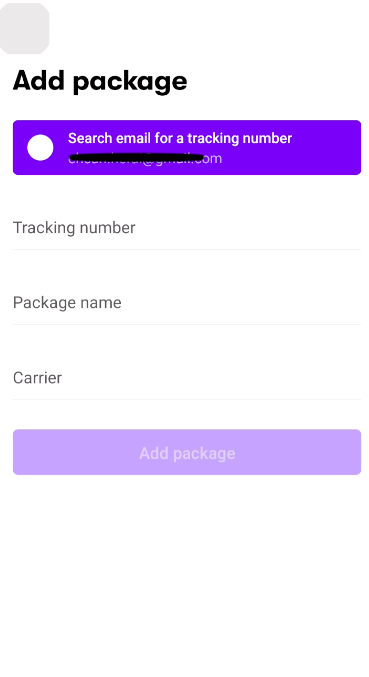
in Android when I want to close a screen. it first hide the images inside the screen and then pop the screen.
I see the same behaviour in shopify shop app.
As you can seen in the screen shots. the back button and gmail images are hidden when poping the screen
Screen shots of the behavior
these screen shots are from shopify shop app 😨 . and I also have the same issue
- React: 16.13.1
- React Native: 0.63.3
- React Native Screens: 2.17.1
 TheEhsanSarshar
All 18 comments
Can you check if it is not a duplicate of #773? And if so, does https://github.com/software-mansion/react-native-screens/issues/773#issuecomment-770043776 fix the issue?
 WoLewicki
on 1 Feb 2021
WoLewicki
on 1 Feb 2021
@WoLewicki Thanks for immediate response.
The issue is with images specially. I am not sure if svg have also the same issue
TheEhsanSarshar
on 1 Feb 2021
@WoLewicki Thanks for immediate response.
The issue is with images specially. I am not sure if svg have also the same issue
@WoLewicki need this patch to fix this:
https://github.com/software-mansion/react-native-screens/issues/773#issuecomment-764686684
 msvargas
on 1 Feb 2021
msvargas
on 1 Feb 2021
@msvargas thank for the patch.
but issue still exists.
maybe this patch only bother images inside header.
TheEhsanSarshar
on 3 Feb 2021
@EhsanSarshar Show your code please
msvargas
on 3 Feb 2021
@msvargas I just patched the provided patch.
here is the patched file.
ScreenStackHeaderConfig.java
Show code
package com.swmansion.rnscreens;

import android.content.Context;
import android.content.pm.ActivityInfo;
import android.graphics.PorterDuff;
import android.graphics.drawable.Drawable;
import android.os.Build;
import android.text.TextUtils;
import android.util.TypedValue;
import android.view.Gravity;
import android.view.View;
import android.view.ViewGroup;
import android.view.ViewParent;
import android.widget.ImageView;
import android.widget.TextView;

import androidx.annotation.Nullable;
import androidx.appcompat.app.ActionBar;
import androidx.appcompat.app.AppCompatActivity;
import androidx.appcompat.widget.Toolbar;
import androidx.fragment.app.Fragment;

import com.facebook.react.ReactApplication;
import com.facebook.react.bridge.JSApplicationIllegalArgumentException;
import com.facebook.react.views.text.ReactFontManager;

import java.util.ArrayList;

public class ScreenStackHeaderConfig extends ViewGroup {

  private final ArrayList<ScreenStackHeaderSubview> mConfigSubviews = new ArrayList<>(3);
  private String mTitle;
  private int mTitleColor;
  private String mTitleFontFamily;
  private String mDirection;
  private float mTitleFontSize;
  private Integer mBackgroundColor;
  private boolean mIsHidden;
  private boolean mIsBackButtonHidden;
  private boolean mIsShadowHidden;
  private boolean mDestroyed;
  private boolean mBackButtonInCustomView;
  private boolean mIsTopInsetEnabled = true;
  private boolean mIsTranslucent;
  private int mTintColor;
  private final Toolbar mToolbar;
  private int mScreenOrientation = ActivityInfo.SCREEN_ORIENTATION_UNSPECIFIED;

  private boolean mIsAttachedToWindow = false;

  private int mDefaultStartInset;
  private int mDefaultStartInsetWithNavigation;

  private static class DebugMenuToolbar extends Toolbar {

    public DebugMenuToolbar(Context context) {
      super(context);
    }

    @Override
    public boolean showOverflowMenu() {
      ((ReactApplication) getContext().getApplicationContext()).getReactNativeHost().getReactInstanceManager().showDevOptionsDialog();
      return true;
    }
  }

  private OnClickListener mBackClickListener = new OnClickListener() {
    @Override
    public void onClick(View view) {
      ScreenStackFragment fragment = getScreenFragment();
      if (fragment != null) {
        ScreenStack stack = getScreenStack();
        if (stack != null && stack.getRootScreen() == fragment.getScreen()) {
          Fragment parentFragment = fragment.getParentFragment();
          if (parentFragment instanceof ScreenStackFragment) {
            ((ScreenStackFragment) parentFragment).dismiss();
          }
        } else {
          fragment.dismiss();
        }
      }
    }
  };

  public ScreenStackHeaderConfig(Context context) {
    super(context);
    setVisibility(View.GONE);

    mToolbar = BuildConfig.DEBUG ? new DebugMenuToolbar(context) : new Toolbar(context);
    mDefaultStartInset = mToolbar.getContentInsetStart();
    mDefaultStartInsetWithNavigation = mToolbar.getContentInsetStartWithNavigation();

    // set primary color as background by default
    TypedValue tv = new TypedValue();
    if (context.getTheme().resolveAttribute(android.R.attr.colorPrimary, tv, true)) {
      mToolbar.setBackgroundColor(tv.data);
    }
    mToolbar.setClipChildren(false);
  }

  @Override
  protected void onLayout(boolean changed, int l, int t, int r, int b) {
    // no-op
  }

  public void destroy() {
    mDestroyed = true;
  }

  @Override
  protected void onAttachedToWindow() {
    super.onAttachedToWindow();
    mIsAttachedToWindow = true;
    onUpdate();
  }

  @Override
  protected void onDetachedFromWindow() {
    super.onDetachedFromWindow();
    mIsAttachedToWindow = false;
  }

  private Screen getScreen() {
    ViewParent screen = getParent();
    if (screen instanceof Screen) {
      return (Screen) screen;
    }
    return null;
  }

  private ScreenStack getScreenStack() {
    Screen screen = getScreen();
    if (screen  != null) {
      ScreenContainer container = screen.getContainer();
      if (container instanceof ScreenStack) {
        return (ScreenStack) container;
      }
    }
    return null;
  }

  protected @Nullable ScreenStackFragment getScreenFragment() {
    ViewParent screen = getParent();
    if (screen instanceof Screen) {
      Fragment fragment = ((Screen) screen).getFragment();
      if (fragment instanceof ScreenStackFragment) {
        return (ScreenStackFragment) fragment;
      }
    }
    return null;
  }

  public void onUpdate() {
    Screen parent = (Screen) getParent();
    final ScreenStack stack = getScreenStack();
    boolean isTop = stack == null ? true : stack.getTopScreen() == parent;

    if (!mIsAttachedToWindow || !isTop || mDestroyed) {
      return;
    }

    AppCompatActivity activity = (AppCompatActivity) getScreenFragment().getActivity();
    if (activity == null) {
      return;
    }

    if (Build.VERSION.SDK_INT >= Build.VERSION_CODES.JELLY_BEAN_MR1 && mDirection != null) {
      if (mDirection.equals("rtl")) {
        mToolbar.setLayoutDirection(View.LAYOUT_DIRECTION_RTL);
      } else if (mDirection.equals("ltr")) {
        mToolbar.setLayoutDirection(View.LAYOUT_DIRECTION_LTR);
      }
    }

    // orientation
    if (getScreenFragment() == null || !getScreenFragment().hasChildScreenWithConfig(getScreen())) {
      // we check if there is no child that provides config, since then we shouldn't change orientation here
      activity.setRequestedOrientation(mScreenOrientation);
    }

    if (mIsHidden) {
      if (mToolbar.getParent() != null) {
        getScreenFragment().removeToolbar();
      }
      return;
    }

    if (mToolbar.getParent() == null) {
      getScreenFragment().setToolbar(mToolbar);
    }

    if (mIsTopInsetEnabled) {
      if (Build.VERSION.SDK_INT >= Build.VERSION_CODES.M) {
        mToolbar.setPadding(0, getRootWindowInsets().getSystemWindowInsetTop(), 0, 0);
      } else {
        // Hacky fallback for old android. Before Marshmallow, the status bar height was always 25
        mToolbar.setPadding(0, (int) (25 * getResources().getDisplayMetrics().density), 0, 0);
      }
    } else {
      if (mToolbar.getPaddingTop() > 0) {
        mToolbar.setPadding(0, 0, 0, 0);
      }
    }

    activity.setSupportActionBar(mToolbar);
    ActionBar actionBar = activity.getSupportActionBar();

    // Reset toolbar insets. By default we set symmetric inset for start and end to match iOS
    // implementation where both right and left icons are offset from the edge by default. We also
    // reset startWithNavigation inset which corresponds to the distance between navigation icon and
    // title. If title isn't set we clear that value few lines below to give more space to custom
    // center-mounted views.
    mToolbar.setContentInsetStartWithNavigation(mDefaultStartInsetWithNavigation);
    mToolbar.setContentInsetsRelative(mDefaultStartInset, mDefaultStartInset);

    // hide back button
    actionBar.setDisplayHomeAsUpEnabled(getScreenFragment().canNavigateBack() ? !mIsBackButtonHidden : false);

    // when setSupportActionBar is called a toolbar wrapper gets initialized that overwrites
    // navigation click listener. The default behavior set in the wrapper is to call into
    // menu options handlers, but we prefer the back handling logic to stay here instead.
    mToolbar.setNavigationOnClickListener(mBackClickListener);


    // shadow
    getScreenFragment().setToolbarShadowHidden(mIsShadowHidden);

    // translucent
    getScreenFragment().setToolbarTranslucent(mIsTranslucent);

    // title
    actionBar.setTitle(mTitle);
    if (TextUtils.isEmpty(mTitle)) {
      // if title is empty we set start  navigation inset to 0 to give more space to custom rendered
      // views. When it is set to default it'd take up additional distance from the back button which
      // would impact the position of custom header views rendered at the center.
      mToolbar.setContentInsetStartWithNavigation(0);
    }
    TextView titleTextView = getTitleTextView();
    if (mTitleColor != 0) {
      mToolbar.setTitleTextColor(mTitleColor);
    }
    if (titleTextView != null) {
      if (mTitleFontFamily != null) {
        titleTextView.setTypeface(ReactFontManager.getInstance().getTypeface(
                mTitleFontFamily, 0, getContext().getAssets()));
      }
      if (mTitleFontSize > 0) {
        titleTextView.setTextSize(mTitleFontSize);
      }
    }

    // background
    if (mBackgroundColor != null) {
      mToolbar.setBackgroundColor(mBackgroundColor);
    }

    // color
    if (mTintColor != 0) {
      Drawable navigationIcon = mToolbar.getNavigationIcon();
      if (navigationIcon != null) {
        navigationIcon.setColorFilter(mTintColor, PorterDuff.Mode.SRC_ATOP);
      }
    }

    // subviews
    for (int i = mToolbar.getChildCount() - 1; i >= 0; i--) {
      if (mToolbar.getChildAt(i) instanceof ScreenStackHeaderSubview) {
        mToolbar.removeViewAt(i);
      }
    }
    for (int i = 0, size = mConfigSubviews.size(); i < size; i++) {
      ScreenStackHeaderSubview view = mConfigSubviews.get(i);
      ScreenStackHeaderSubview.Type type = view.getType();

      if (type == ScreenStackHeaderSubview.Type.BACK) {
        // we special case BACK button header config type as we don't add it as a view into toolbar
        // but instead just copy the drawable from imageview that's added as a first child to it.
        View firstChild = view.getChildAt(0);
        if (!(firstChild instanceof ImageView)) {
          throw new JSApplicationIllegalArgumentException("Back button header config view should have Image as first child");
        }
        actionBar.setHomeAsUpIndicator(((ImageView) firstChild).getDrawable());
        continue;
      }

      Toolbar.LayoutParams params =
              new Toolbar.LayoutParams(LayoutParams.WRAP_CONTENT, LayoutParams.MATCH_PARENT);

      switch (type) {
        case LEFT:
          // when there is a left item we need to disable navigation icon by default
          // we also hide title as there is no other way to display left side items
          if (!mBackButtonInCustomView) {
            mToolbar.setNavigationIcon(null);
          }
          mToolbar.setTitle(null);
          params.gravity = Gravity.START;
          break;
        case RIGHT:
          params.gravity = Gravity.END;
          break;
        case CENTER:
          params.width = LayoutParams.MATCH_PARENT;
          params.gravity = Gravity.CENTER_HORIZONTAL;
          mToolbar.setTitle(null);
          break;
      }

      view.setLayoutParams(params);
      mToolbar.addView(view);

    }
  }

  @Override
  public View getChildAt(int index) {
    return getConfigSubview(index);
  }

  @Override
  public int getChildCount() {
    return getConfigSubviewsCount();
  }

  private void maybeUpdate() {
    if (getParent() != null && !mDestroyed) {
      onUpdate();
    }
  }

  public ScreenStackHeaderSubview getConfigSubview(int index) {
    return mConfigSubviews.get(index);
  }

  public int getConfigSubviewsCount() {
    return mConfigSubviews.size();
  }

  public void removeConfigSubview(int index) {
    mConfigSubviews.remove(index);
    maybeUpdate();
  }

  public void removeAllConfigSubviews() {
    mConfigSubviews.clear();
    maybeUpdate();
  }

  public void addConfigSubview(ScreenStackHeaderSubview child, int index) {
    mConfigSubviews.add(index, child);
    maybeUpdate();
  }

  private TextView getTitleTextView() {
    for (int i = 0, size = mToolbar.getChildCount(); i < size; i++) {
      View view = mToolbar.getChildAt(i);
      if (view instanceof TextView) {
        TextView tv = (TextView) view;
        if (tv.getText().equals(mToolbar.getTitle())) {
          return tv;
        }
      }
    }
    return null;
  }

  public int getScreenOrientation() {
    return mScreenOrientation;
  }

  public void setTitle(String title) {
    mTitle = title;
  }

  public void setTitleFontFamily(String titleFontFamily) {
    mTitleFontFamily = titleFontFamily;
  }

  public void setTitleFontSize(float titleFontSize) {
    mTitleFontSize = titleFontSize;
  }

  public void setTitleColor(int color) {
    mTitleColor = color;
  }

  public void setTintColor(int color) {
    mTintColor = color;
  }

  public void setTopInsetEnabled(boolean topInsetEnabled) { mIsTopInsetEnabled = topInsetEnabled; }

  public void setBackgroundColor(Integer color) {
    mBackgroundColor = color;
  }

  public void setHideShadow(boolean hideShadow) {
    mIsShadowHidden = hideShadow;
  }

  public void setHideBackButton(boolean hideBackButton) {
    mIsBackButtonHidden = hideBackButton;
  }

  public void setHidden(boolean hidden) {
    mIsHidden = hidden;
  }

  public void setTranslucent(boolean translucent) {
    mIsTranslucent = translucent;
  }

  public void setBackButtonInCustomView(boolean backButtonInCustomView) { mBackButtonInCustomView = backButtonInCustomView; }

  public void setDirection(String direction) {
    mDirection = direction;
  }

  public void setScreenOrientation(String screenOrientation) {
    if (screenOrientation == null) {
      mScreenOrientation = ActivityInfo.SCREEN_ORIENTATION_UNSPECIFIED;
      return;
    }

    switch (screenOrientation) {
      case "all":
        mScreenOrientation = ActivityInfo.SCREEN_ORIENTATION_FULL_SENSOR;
        break;
      case "portrait":
        mScreenOrientation = ActivityInfo.SCREEN_ORIENTATION_SENSOR_PORTRAIT;
        break;
      case "portrait_up":
        mScreenOrientation = ActivityInfo.SCREEN_ORIENTATION_PORTRAIT;
        break;
      case "portrait_down":
        mScreenOrientation = ActivityInfo.SCREEN_ORIENTATION_REVERSE_PORTRAIT;
        break;
      case "landscape":
        mScreenOrientation = ActivityInfo.SCREEN_ORIENTATION_SENSOR_LANDSCAPE;
        break;
      case "landscape_left":
        mScreenOrientation = ActivityInfo.SCREEN_ORIENTATION_REVERSE_LANDSCAPE;
        break;
      case "landscape_right":
        mScreenOrientation = ActivityInfo.SCREEN_ORIENTATION_LANDSCAPE;
        break;
      default:
        mScreenOrientation = ActivityInfo.SCREEN_ORIENTATION_UNSPECIFIED;
        break;
    }
  }
}
@EhsanSarshar can you provide a test example in TestsExample project (https://github.com/software-mansion/react-native-screens/tree/master/TestsExample) with minimal configuration needed to reproduce the issue? It would be then easier to debug and find a solution.
WoLewicki
on 4 Feb 2021
Seem likes the issue is somewhere between react-native-fast-image and react-native-screens. Based on @EhsanSarshar reproduction example you can see that using createStackNavigator instead of createNativeStackNavigator fixes the issue as well as using Image(from react-native) instead of one from react-native-fast-image.
I also noticed that commenting out requestManager.clear(view) in onDropViewInstance in node_modules/react-native-fast-image/android/src/main/java/com/dylanvann/fastimage/FastImageViewManager.java also fixes the issue.
However I don't have enough knowledge about any of this projects to investigate in further.
 MiloszFilimowski
on 8 Feb 2021
MiloszFilimowski
on 8 Feb 2021
@MiloszFilimowski and one thing more, if I navigate back using native back arrow icon on the header, everything is fine. but If I manually navigate it back the issue arises.
TheEhsanSarshar
on 8 Feb 2021
@EhsanSarshar The same problem. For me it's custom Title Component. If I use back arrow, everything works fine, but if I use Android Hardware Back Button, Title Component disappears before transition animation finishes.

 stachu2k
on 16 Feb 2021
stachu2k
on 16 Feb 2021
The flow of navigation is different when clicking native header back button. It is fired on the native side, so the screens are not removed till after the transition.
WoLewicki
on 18 Feb 2021
@WoLewicki would you mind to guide a little bit. I am to make a PR to fix this
TheEhsanSarshar
on 22 Feb 2021
@EhsanSarshar what PR do you mean? If it is for the disappearing header components, it should be resolved with #820 (@stachu2k could you check if applying #820 fixes your problem?). If it is for the images on the screen, it is discussed in #773 and needs fixes in the libraries of the image components, not in react-native-screens.
WoLewicki
on 22 Feb 2021
@EhsanSarshar I made a PR in react-native-fast-image for the issue with disappearing views based on your reproduction. Can you check if it fixes the issues?
WoLewicki
on 22 Feb 2021
Ok @WoLewicki I will check that. Thanks alot
TheEhsanSarshar
on 22 Feb 2021
@stachu2k could you check if applying #820 fixes your problem?
@WoLewicki Yes it fixes my problem. Now it works like a charm. Thank you :)
stachu2k
on 23 Feb 2021
I will close this issue to keep the discussion about wrongly recycled images of react-native-fast-image and react-native-svg in one place (#773). Those issues should be fixed by PRs mentioned here: https://github.com/software-mansion/react-native-screens/issues/773#issuecomment-783469792. Feel free to comment if something is wrong to reopen it.
WoLewicki
on 25 Feb 2021
FastImageViewManager.java
class FastImageViewManager extends SimpleViewManager<FastImageViewWithUrl> implements FastImageProgressListener {
    ...
    @Override
    public void onDropViewInstance(final FastImageViewWithUrl view) {
        // This will cancel existing requests.
        view.setOnDetachedFromWindowListener(new FastImageViewWithUrl.OnDetachedFromWindowListener() {
            @Override
            public void onDetached() {
                if (requestManager != null) {
                    requestManager.clear(view);
                }

                if (view.glideUrl != null) {
                    final String key = view.glideUrl.toString();
                    FastImageOkHttpProgressGlideModule.forget(key);
                    List<FastImageViewWithUrl> viewsForKey = VIEWS_FOR_URLS.get(key);
                    if (viewsForKey != null) {
                        viewsForKey.remove(view);
                        if (viewsForKey.size() == 0) VIEWS_FOR_URLS.remove(key);
                    }
                }
            }
        });
        super.onDropViewInstance(view);
    }
    ...
}
FastImageViewWithUrl.java
class FastImageViewWithUrl extends ImageView {
    public GlideUrl glideUrl;
    private OnDetachedFromWindowListener mOnDetachedFromWindowListener;

    public FastImageViewWithUrl(Context context) {
        super(context);
    }

    @Override
    protected void onDetachedFromWindow() {
        super.onDetachedFromWindow();
        if (mOnDetachedFromWindowListener != null) {
            mOnDetachedFromWindowListener.onDetached();
        }
    }

    public void setOnDetachedFromWindowListener(OnDetachedFromWindowListener onDetachedFromWindowListener) {
        mOnDetachedFromWindowListener = onDetachedFromWindowListener;
    }

    public interface OnDetachedFromWindowListener {
        void onDetached();
    }
}
 qindachang
on 21 May 2021
qindachang
on 21 May 2021
Related issues
 Kinark
·
4Comments
Kinark
·
4Comments
 thorbenandresen
·
4Comments
thorbenandresen
·
4Comments
 iDuuck
·
5Comments
iDuuck
·
5Comments
 dotconnor
·
5Comments
dotconnor
·
5Comments
 kantorm
·
5Comments
kantorm
·
5Comments
Most helpful comment
@WoLewicki Yes it fixes my problem. Now it works like a charm. Thank you :)