React-native-screens: Change backgroundColor of the card behind a modal
When a modal pops up, the behind content dims (gets darker/less opacity), however, if we are working on a dark themed app (with a black bg), the background should turn to gray when a modal pops up (notice the grayish card in the back).

when working with a black background and the modal pops up, the result is something like this:
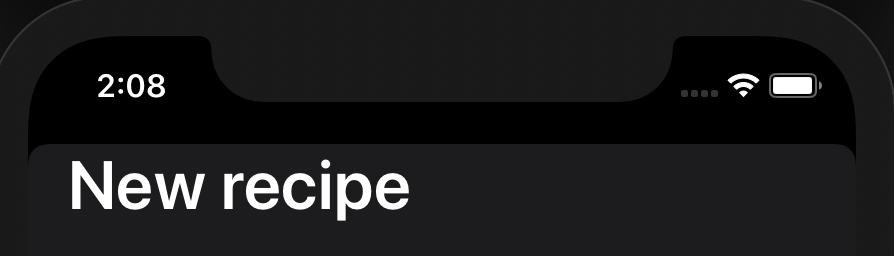
As you can see, the card in the back is completely gone.
Is it possible to do such thing with createNativeStackNavigator?
 Kinark
All 4 comments
Can you provide a repo/snack with minimal configuration needed to reproduce the issue so I can work on it?
 WoLewicki
on 13 Aug 2020
WoLewicki
on 13 Aug 2020
Also, I am afraid that this grayish color comes from the usage of the system colors introduced in iOS 13. It is probably dynamic .systemBackground color for an elevated layer. (check 10:00 here https://developer.apple.com/videos/play/wwdc2019/808). In react-native you can use this color with PlatformColor. Applying https://github.com/facebook/react-native/blob/master/RNTester/js/examples/PlatformColor/PlatformColorExample.js#L60 to your headerStyle's backgroundColor will result in this effect in dark mode. Can I help you any more with this issue?
WoLewicki
on 19 Aug 2020
Also, I am afraid that this grayish color comes from the usage of the system colors introduced in iOS 13. It is probably dynamic .systemBackground color for an elevated layer. (check 10:00 here https://developer.apple.com/videos/play/wwdc2019/808). In
react-nativeyou can use this color withPlatformColor. Applying https://github.com/facebook/react-native/blob/master/RNTester/js/examples/PlatformColor/PlatformColorExample.js#L60 to your headerStyle'sbackgroundColorwill result in this effect in dark mode. Can I help you any more with this issue?
But if I apply a fixed backgroundColor to my headerStyle, I'll get a static gray header even when it's in first plan. What I want to achieve is a 100% black background that turns gray when in second plan.
Take a look at this native app:
NativeApp.zip
Kinark
on 19 Aug 2020
Oh, nevermind. It worked just perfect :D
Thanks, @WoLewicki!!!
Kinark
on 19 Aug 2020
Related issues
 joshua-augustinus
·
4Comments
joshua-augustinus
·
4Comments
 hadnet
·
4Comments
hadnet
·
4Comments
 chengsokdara
·
3Comments
chengsokdara
·
3Comments
 jeveloper
·
5Comments
jeveloper
·
5Comments
 sibelius
·
3Comments
sibelius
·
3Comments
Most helpful comment
Also, I am afraid that this grayish color comes from the usage of the system colors introduced in iOS 13. It is probably dynamic .systemBackground color for an elevated layer. (check 10:00 here https://developer.apple.com/videos/play/wwdc2019/808). In
react-nativeyou can use this color withPlatformColor. Applying https://github.com/facebook/react-native/blob/master/RNTester/js/examples/PlatformColor/PlatformColorExample.js#L60 to your headerStyle'sbackgroundColorwill result in this effect in dark mode. Can I help you any more with this issue?