React-native-screens: Color flash between large and small title screen
"react-native-screens": "^2.7.0",
"react-native": "0.62.2",

I can't seem to transition between a large and small title screen without colours flashing.
Screen A
 largeTitleBackgroundColor="red"
backgroundColor="red"
largeTitleHideShadow
title="Status"
Screen B
largeTitleBackgroundColor="red"
backgroundColor="red"
backTitle="Back"
title="Privacy"
Edit: It seems like I have to force translucent={false} on both screens for this issue to go away.
 kyle-ssg
All 11 comments
Can you provide a repo with minimal configuration needed to reproduce the issue?
 WoLewicki
on 25 May 2020
WoLewicki
on 25 May 2020
@WoLewicki https://snack.expo.io/@kyle-ssg/color-flash-between-large-and-small-title-screen
Similarly to the issue with expo not showing translucent screens properly (mentioned here https://github.com/software-mansion/react-native-screens/issues/524) I think the code will need to be ran on a vanilla react-native app in the simulator / on a phone to replicate as expo seems to do weird things with the headers.
To replicate with current code, click the back button in the header or drag back.
kyle-ssg
on 17 Jun 2020
It's more visible on black background

 sercanov
on 23 Jun 2020
sercanov
on 23 Jun 2020
@sercanov where is the flashing color in your gif?
WoLewicki
on 24 Jun 2020
I believe this is a slightly different issue which I've also seen, I'd imagine he's talking about the glitchy looking background colour here. I'm fairly sure replication is slightly different to this issue.

kyle-ssg
on 24 Jun 2020
yes, @kyle-ssg is right. I thought it's the same issue, if not I can open a new one
sercanov
on 24 Jun 2020
I think the combination of properties is very slightly different, but apologies if not 👍
kyle-ssg
on 24 Jun 2020
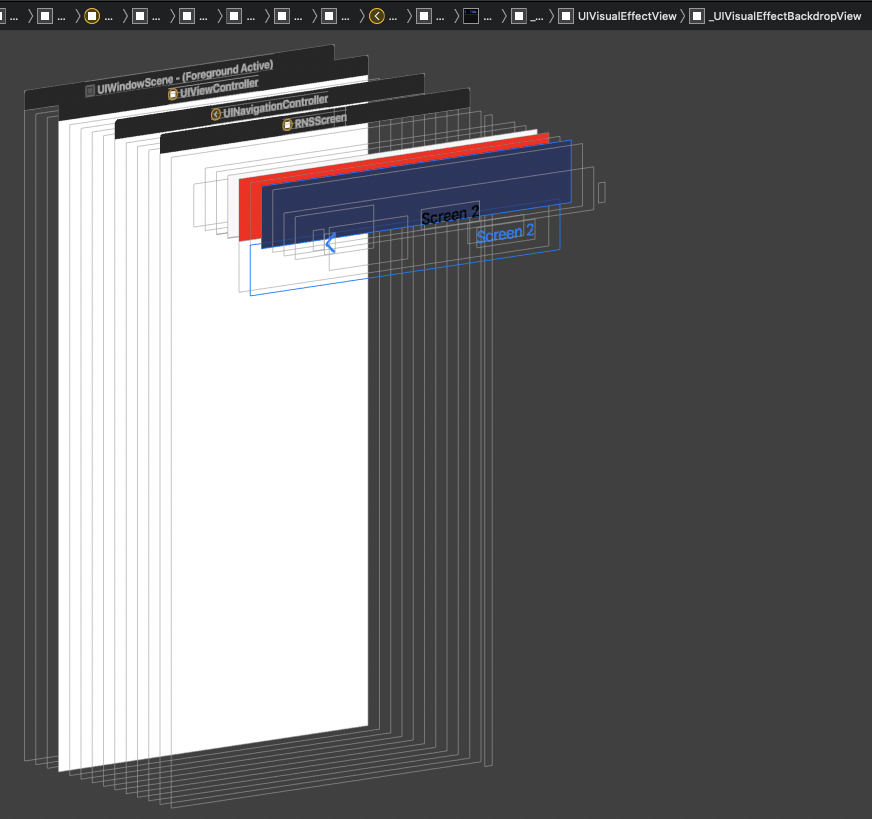
@sercanov would be nice if you could open another issue with this and attach a repro. @kyle-ssg I debugged it and there appears to be quite the same issue as https://stackoverflow.com/questions/39571613/tabbar-navigation-bar-became-dark-after-updating-to-xcode-8. There is UIVisualEffectBackdropView applied during the transition and I am not sure why it is there. Can you repro this behavior in native-stack? I will try to look more at it tomorrow.
WoLewicki
on 24 Jun 2020
I think I know why this happened. If not setting the translucent={false} explicitly, the UIVisualEffectBackdropView becomes opaque and with dark color, as it is written in the SO thread I linked. It happens due to configureWithDefaultBackground prop set on appearance here: https://github.com/software-mansion/react-native-screens/blob/master/ios/RNSScreenStackHeaderConfig.m#L271 which applies systemChromeMaterial blur effect. I updated my PR #512 to remove that configureWithDefaultBackground with the translucent header. If you want a quick workaround, you can apply appearance.backgroundEffect = [UIBlurEffect effectWithStyle:UIBlurEffectStyleRegular]; in native code under the line I mentioned.
WoLewicki
on 25 Jun 2020
@WoLewicki tried out the PR, can confirm it solves this issue, brilliant!
kyle-ssg
on 26 Jun 2020
Closing since #512 was merged. Feel free to comment if something is wrong.
WoLewicki
on 29 Jul 2020
Related issues
 jeveloper
·
5Comments
jeveloper
·
5Comments
 sibelius
·
3Comments
sibelius
·
3Comments
 Kinark
·
4Comments
Kinark
·
4Comments
 bitttttten
·
3Comments
bitttttten
·
3Comments
 chai86
·
3Comments
chai86
·
3Comments
Most helpful comment
I believe this is a slightly different issue which I've also seen, I'd imagine he's talking about the glitchy looking background colour here. I'm fairly sure replication is slightly different to this issue.