React-native-screens: autoFocus inputs with native stack causes double navigation glitch
This is a cross post issue from react navigation ex, as I believe it is caused by react native screens.
Current Behavior
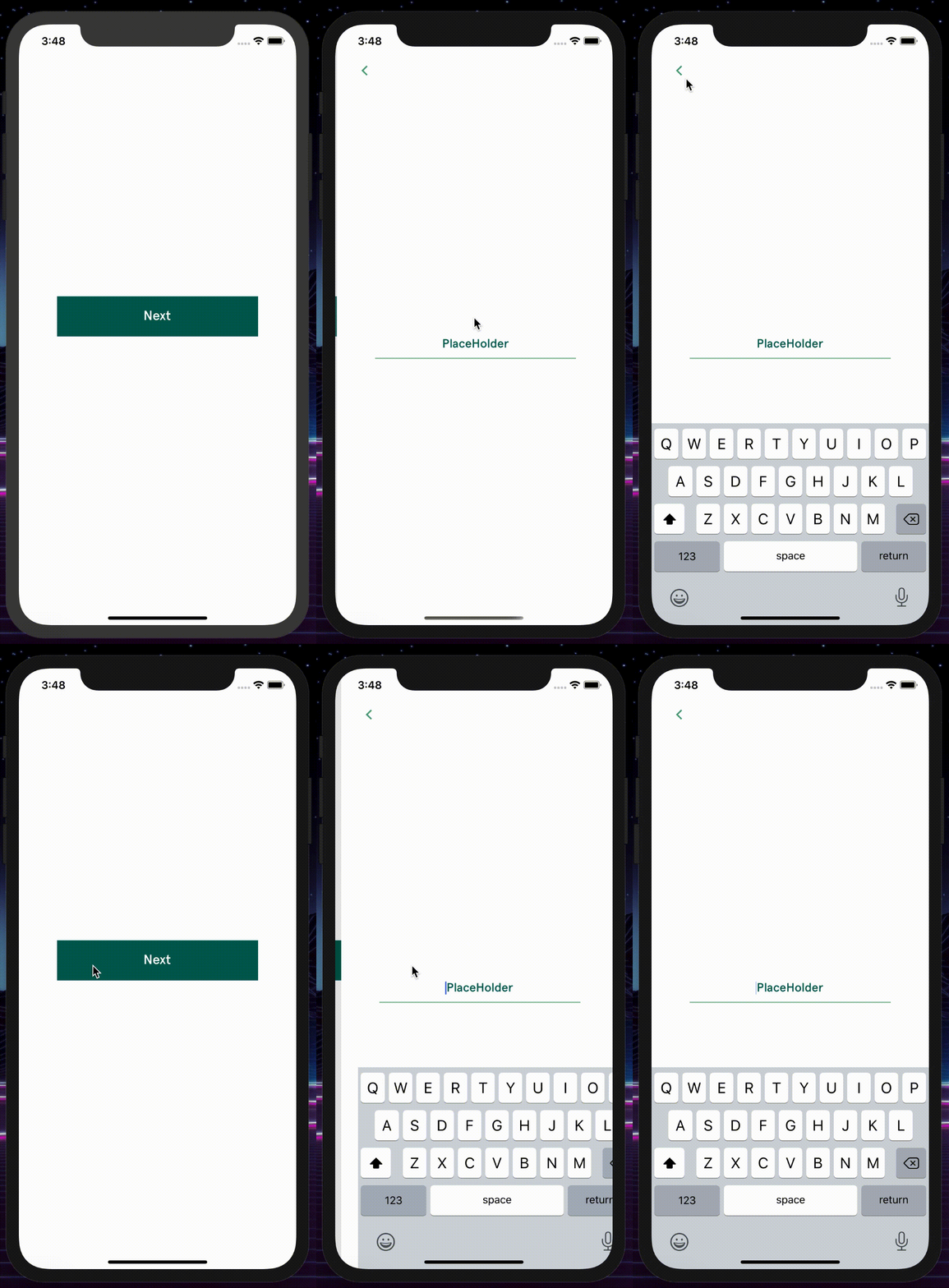
- Navigating to a screen using createNativeStackNavigator will cause screen to have a double navigation glitch, the animation will reset when the keyboard is activated.
- I can confirm this does not happen with the JS stack navigator.
Expected Behavior
- autofocus inputs should not re-trigger the navigation animation, when showing the keyboard.
How to reproduce
- Navigate to a route with autoFocus TextInput in a native stack navigator.
Your Environment
"@react-navigation/core": "^5.0.0-alpha.20",
"@react-navigation/native": "^5.0.0-alpha.14",
"@react-navigation/native-stack": "^5.0.0-alpha.9",
"react-native": "^0.61.5"
"react-native-screens": "^2.0.0-alpha.12",
https://github.com/react-navigation/navigation-ex/issues/168
 owinter86
All 13 comments
I have noticed this as well. My workaround was not to use the autoFocus prop but instead, to call .focus() on the TextInput component on componentDidMount.
 Jarred-Sumner
on 28 Nov 2019
Jarred-Sumner
on 28 Nov 2019
Yep that’s what I am currently doing, intercept the autofocus prop for iOS and call the focus method on the ref, but need at least a 400ms delay on mount to avoid any weird effect.
owinter86
on 28 Nov 2019
This required a fix in react-native https://github.com/facebook/react-native/pull/27217/commits/217780671048f412afda33abc1b9ce38783a555a
This should make it in the next release (0.62)
 janicduplessis
on 17 Dec 2019
janicduplessis
on 17 Dec 2019
Hey @janicduplessis I have just build the 62 RC which includes this commit and can still replicate this issue.
owinter86
on 19 Dec 2019
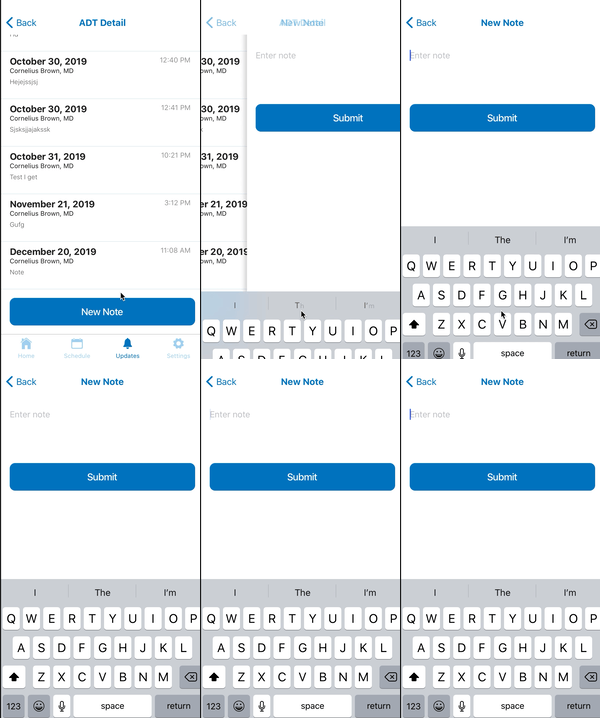
Not sure if related but mine is doing this with two times keyboard open
Just to preclude a troubleshooting step I have only one render happening here confirmed by logging out the renders
 shamilovtim
on 29 Dec 2019
shamilovtim
on 29 Dec 2019
@owinter86 have you tried the latest 0.62.0-rc.2?
 wong2
on 22 Feb 2020
wong2
on 22 Feb 2020
Original fix didn't fix the issue completely. A better fix has been merged in master but not yet released https://github.com/facebook/react-native/commit/6adba409e6256fd2dcc27a4272edcedae89927af
janicduplessis
on 22 Feb 2020
@janicduplessis thanks, will it be included in 0.62 release?
wong2
on 23 Feb 2020
@janicduplessis I have added this commit to the RC candidate locally and resolves this issue.
owinter86
on 23 Feb 2020
@wong2 I have requested this gets cherrypicked for the next 62 release candidate, should be a simple pick as I could do it locally quite easily.
owinter86
on 23 Feb 2020
Going to close this issue as the proper fix is outside of the scope of this library.
In order for auto focus to work as in native iOS app, it is necessary for the field to be marked as focused right when it installs. This needed to be change in RN core as autoFocus used to be a prop that'd just call to focus with some delay. With @janicduplessis's change to RN when you push a screen with autoFocus on iOS the keyboard will navigate from the side along with the screen.
The temporary workaround I've been using in a couple diff projects was to not rely on autoFocus but call focus on ref from screen appear callback. This does not result in that neat effect when field is focused already during animation but at least you don't get the push animation glitch.
 kmagiera
on 27 Feb 2020
kmagiera
on 27 Feb 2020
@kmagiera this is also fixed in the new React native release candidate so can be closed anyway.
owinter86
on 27 Feb 2020
I'm still having this issue using [email protected] and [email protected]
 amorino
on 22 Dec 2020
amorino
on 22 Dec 2020
Related issues
 chai86
·
3Comments
chai86
·
3Comments
 pvinis
·
5Comments
pvinis
·
5Comments
 bartzy
·
3Comments
bartzy
·
3Comments
 thorbenandresen
·
4Comments
thorbenandresen
·
4Comments
 beetlebum
·
5Comments
beetlebum
·
5Comments
Most helpful comment
I'm still having this issue using
[email protected]and[email protected]