React-native-permissions: Does this plug-in require cocoapods?
Hi there,
I'm used to linking packages by simply running the RN CLI command 'react-native link', and what I'm trying to figure out for this package is if you need to use cocoa pods to get it to work? (I'm pretty sure the answer is yes...)
(I would upgrade to RN 0.60.0 to solve some of the problems I'm having, but that's a nightmare in of itself.)
Long story short, iOS 13 is causing me some real headaches when it comes to location permissions, and I don't know if it's a bug with my app, iOS 13, or RN core. (If anyone else is having issues lmk, I'd love to discuss.)
As a result, I need this package to figure out what might be causing the issue.... Unfortunately I've spent about 13 hours trying to install this package and stepped through the pods setup instructions, but unfortunately have been unable to get it to work... I think part of my problem is that I am already linking a large number of other dependencies into my project, which makes things more complicated.
I'm determined I'm doing something wrong with the installation, so if I need to actually use cocoa pods with all of the packages I was previously linking with RN CLI, then please let me know! I have a suspicion this is the case.
One final thing, is it possible to just use cocoa pods for this one package, and then hook all of my other packages up with the RN CLI? If not, then that's my problem!
Anyway, thank you for your time all!
 inf3rnus
All 14 comments
What version of RN are you using? In RN60 you shouldn't need to link anything, but you will need to use Cocoapods for everything.
This is not a link that is right on target for you, but you can see the differences between an RN59 and an RN60 setup for the same module - similar to this one - here: https://github.com/react-native-community/react-native-device-info/blob/master/refresh-example-rn59.sh versus https://github.com/react-native-community/react-native-device-info/blob/master/refresh-example.sh
For this module, in it's iOS13 compatible versions (that is: 2.x) you need to use Cocoapods. It is possible to use Cocoapods just for one module and nothing else but I will caution it is not easy. Here is an example Podfile doing that for react-native-firebase linking in some Pods but otherwise expecting manual linking under react-native 0.59: https://github.com/mikehardy/rnfbdemo/blob/master/make-demo-rn59.sh which uses: https://github.com/mikehardy/rnfbdemo/blob/master/PodfileRN59
 mikehardy
on 12 Oct 2019
mikehardy
on 12 Oct 2019
Mike,
You're a huge help, and your repos are invaluable. After a nice weekend grind I've got my code running in time for a big deployment thanks to your information. :)
If you have a Patreon or something along those lines, I'd love to send you a donation.
Best,
Aaron
inf3rnus
on 13 Oct 2019
It might seem random, but send it to react-native-firebase - they are my most used repo and I don't have any way to accept funds myself but those guys do pay me for support work, so it works out. Glad you got everything working, I bet that feels good. https://opencollective.com/react-native-firebase
mikehardy
on 13 Oct 2019
@inf3rnus A workaround if you don't want to rely on Cocoapods is to add the files references directly in your xcodeproj project.
- Link the
RNPermissions.xcodeprojproject, old school style (withreact-native linkon RN <= 0.59, or manually) - Create a new
Group without folder, name itPermissions - Go to
node_modules/react-native-permissions/ios - Drag and drop the handlers you want, create folder references
- Profit

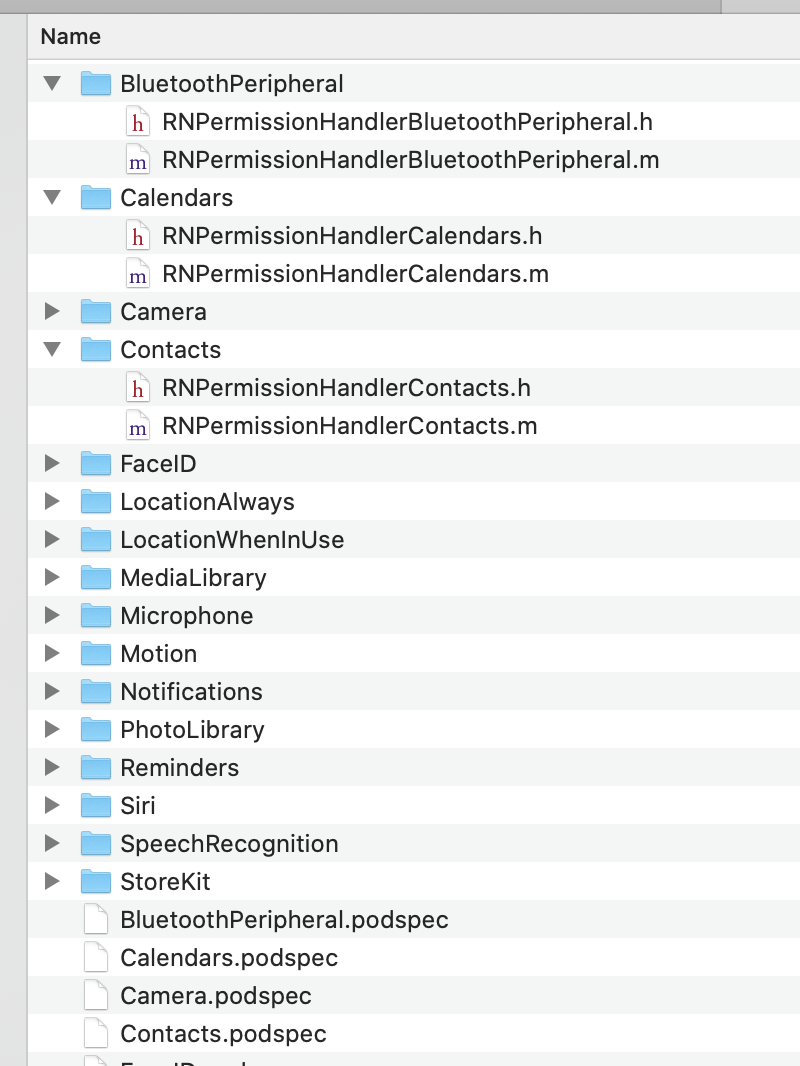
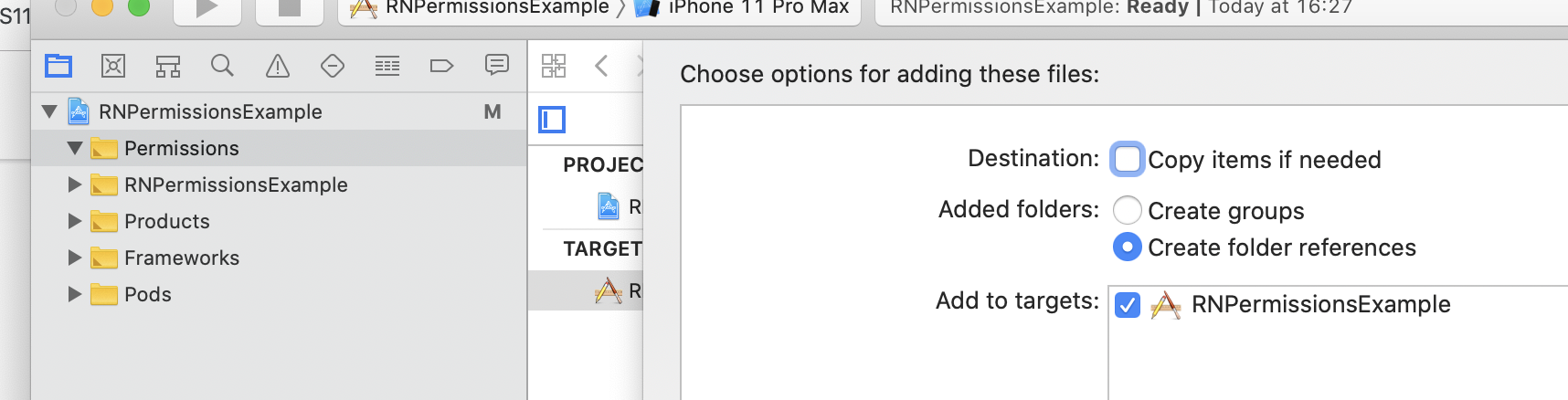
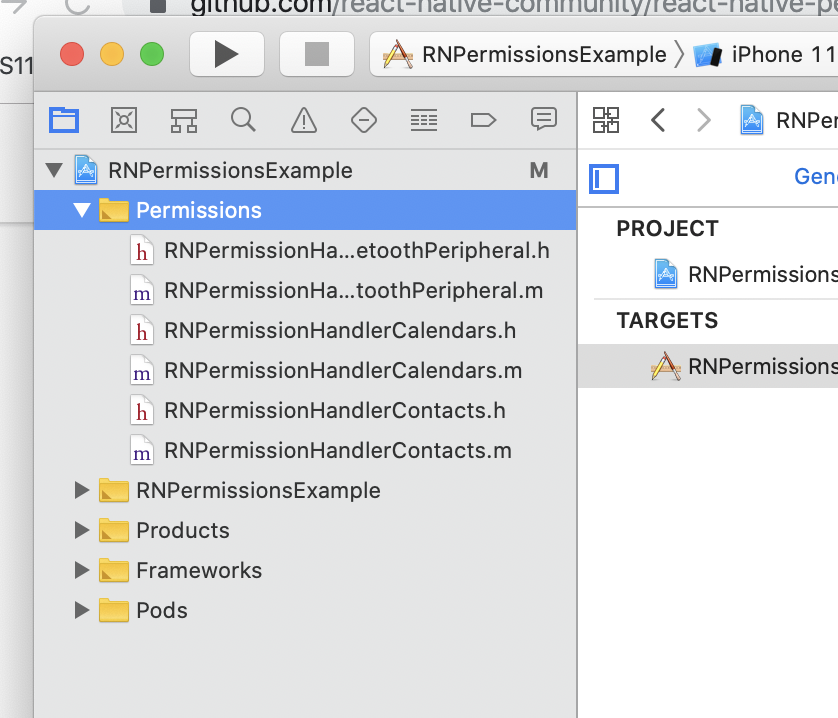
 zoontek
on 13 Oct 2019
zoontek
on 13 Oct 2019
@zoontek Excellent information, I wasn't aware of that as a possibility for linking projects. This will definitely come in handy for projects that don't use pods.
inf3rnus
on 14 Oct 2019
@inf3rnus Can I close this?
zoontek
on 16 Oct 2019
@zoontek Yes, all set here, thank you!
inf3rnus
on 16 Oct 2019
@zoontek I am new to RN and building on RN 0.61.4. Could you please explain what 'old school' linking style is? Or provide some keywords that I could google...
 lonnylot
on 25 Nov 2019
lonnylot
on 25 Nov 2019
@lonnylot "old school" linking style is either manual linking or explicitly calling 'react-native link cd ios && pod install
mikehardy
on 25 Nov 2019
@zoontek I config the project followed your steps, add the Permissions folder, but when I invoke check(PERMISSIONS.IOS.CAMERA), it still has the error: Invalid RNPermission 'ios.permission.CAMERA'. should be one of: ( )
 duzliang
on 3 Dec 2019
duzliang
on 3 Dec 2019
@duzliang Did you tests every points in https://github.com/react-native-community/react-native-permissions/blob/master/README.md#%EF%B8%8F-if-you-encounter-the-error-invalid-rnpermission-x-should-be-one-of- ?
zoontek
on 3 Dec 2019
@inf3rnus A workaround if you don't want to rely on Cocoapods is to add the files references directly in your
xcodeprojproject.
- Link the
RNPermissions.xcodeprojproject, old school style (withreact-native linkon RN <= 0.59, or manually)- Create a new
Group without folder, name itPermissions- Go to
node_modules/react-native-permissions/ios- Drag and drop the handlers you want, create folder references
- Profit
I tried with that for old project, doesn't work. I tried to put line to file #include "RNYourPermission.h" that says that unknown file.
I think Search Paths of project RNPermissions.xcodeproj are modified and began as wrong.
 mpochron
on 10 Feb 2020
mpochron
on 10 Feb 2020
@mpochron Hey guys! I am using react-native 0.59.10 and I don't use Cocoapods.
@zoontek 's workaround didn't work for me, this is what did work:
- I linked the library with
react-native link react-native-permissions - Instead of adding these handler files (.h and .m) to my project, I add them to Libraries > RNPermissions.xcodeproj and then I add them to the Build Phases of RNPermissions: the .m handler files in Compile sources and the .h files in the Headers section.
(If you don't have the Headers section, add it by clicking the + button on the top left corner > New headers phase)
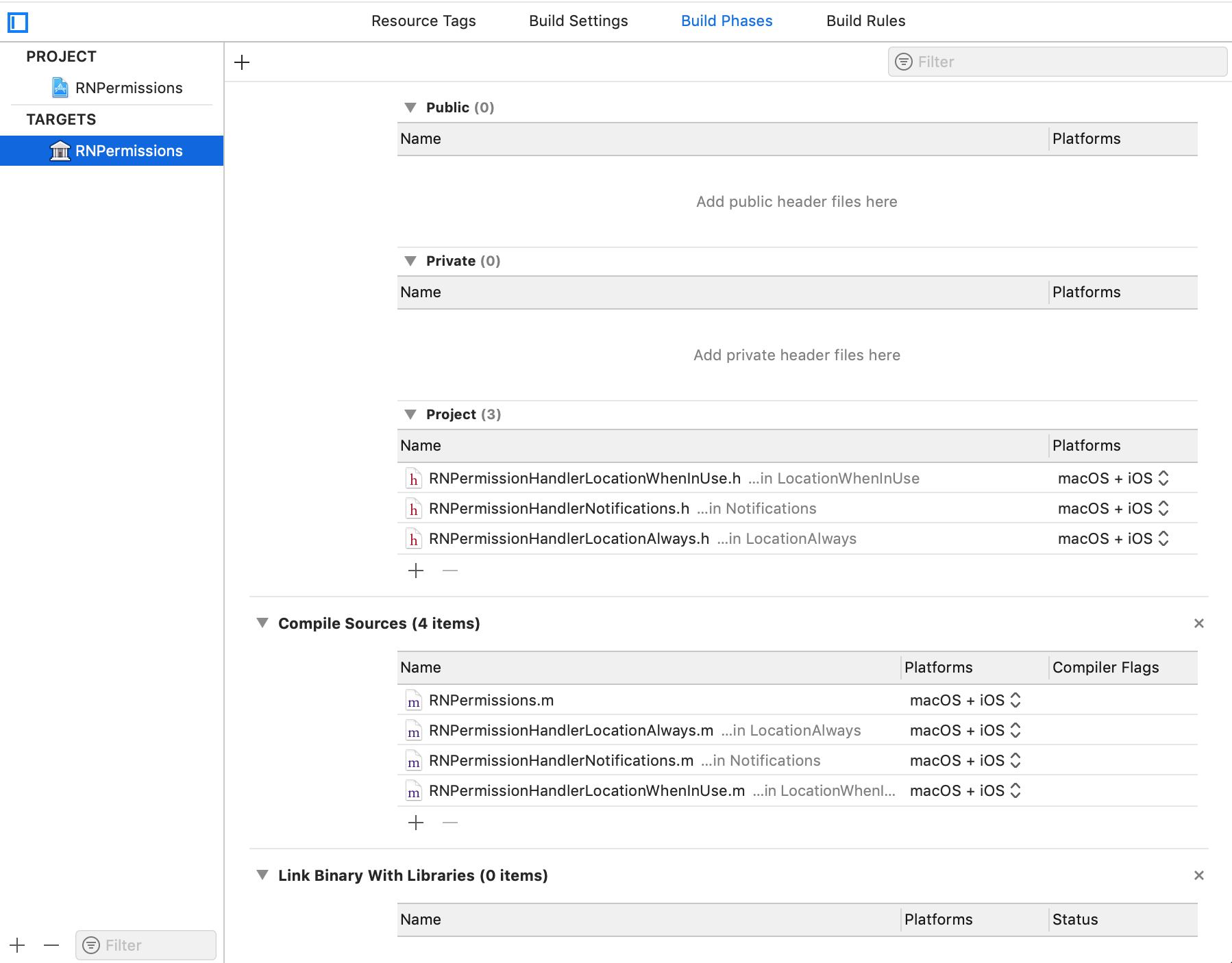
Hope it helps!
 axlalvaro
on 8 May 2020
axlalvaro
on 8 May 2020
@axlalvaro 's solution worked for me and I'm using react-native 0.59.10 as well.
The only thing that may worth to mention is I still need to add "libRNPermissions.a" into "Link Binary With Libraries" under "Build Phases" of my App's target, besides the steps listed by @axlalvaro
Also please note that these manual steps will cause changes in node_modules/react-native-permissions/ios/RNPermissions.xcodeproj/project.pbxproj, and it will probably be ignored by your .gitignore file. To work around that issue you will need to persist your changes using tools like patch-package.
 walterwing
on 8 Jul 2020
walterwing
on 8 Jul 2020
Related issues
 Daavidaviid
·
18Comments
Daavidaviid
·
18Comments
 ozturkilgim
·
31Comments
ozturkilgim
·
31Comments
 note89
·
35Comments
note89
·
35Comments
 algera
·
44Comments
algera
·
44Comments
 haveamission
·
19Comments
haveamission
·
19Comments
Most helpful comment
@inf3rnus A workaround if you don't want to rely on Cocoapods is to add the files references directly in your
xcodeprojproject.RNPermissions.xcodeprojproject, old school style (withreact-native linkon RN <= 0.59, or manually)Group without folder, name itPermissionsnode_modules/react-native-permissions/ios