React-native-permissions: No Permission Handler Detected (IOS)
Bug
After I have tried to install react-native-permissions package, I have faced with this error on IOS Simulator. I ignored it but it also prevented to test app on testflight.
Error
⚠ No permission handler detected.
• Check that you link at least one permission handler in your Podfile.
• Uninstall this app, delete your Xcode DerivedData folder and rebuild it.
• If you use use_frameworks!, follow the workaround guide in the project README.
-[RNPermissions constantsToExport]
RNPermissions.m:186
__32-[RCTModuleData gatherConstants]_block_invoke
RCTUnsafeExecuteOnMainQueueSync
-[RCTModuleData gatherConstants]
__49-[RCTCxxBridge _prepareModulesWithDispatchGroup:]_block_invoke
_dispatch_call_block_and_release
_dispatch_client_callout
_dispatch_main_queue_callback_4CF
__CFRUNLOOP_IS_SERVICING_THE_MAIN_DISPATCH_QUEUE__
__CFRunLoopRun
CFRunLoopRunSpecific
GSEventRunModal
UIApplicationMain
main
start
0x0
Environment info
System:
OS: macOS 10.15.2
CPU: (8) x64 Intel(R) Core(TM) i5-8279U CPU @ 2.40GHz
Memory: 58.15 MB / 8.00 GB
Shell: 5.7.1 - /bin/zsh
Binaries:
Node: 10.16.3 - /usr/local/bin/node
Yarn: Not Found
npm: 6.13.7 - /usr/local/bin/npm
Watchman: 4.9.0 - /usr/local/bin/watchman
Managers:
CocoaPods: 1.8.4 - /usr/local/bin/pod
SDKs:
iOS SDK:
Platforms: iOS 13.2, DriverKit 19.0, macOS 10.15, tvOS 13.2, watchOS 6.1
Android SDK: Not Found
IDEs:
Android Studio: 3.6 AI-192.7142.36.36.6392135
Xcode: 11.3.1/11C504 - /usr/bin/xcodebuild
Languages:
Python: 2.7.16 - /usr/bin/python
npmPackages:
@react-native-community/cli: Not Found
react: 16.11.0 => 16.11.0
react-native: 0.62.0 => 0.62.0
npmGlobalPackages:
react-native: Not Found
My Pods:
```bash
platform :ios, '9.0'
require_relative '../node_modules/@react-native-community/cli-platform-ios/native_modules'
def add_flipper_pods!
version = '~> 0.33.1'
pod 'FlipperKit', version, :configuration => 'Debug'
pod 'FlipperKit/FlipperKitLayoutPlugin', version, :configuration => 'Debug'
pod 'FlipperKit/SKIOSNetworkPlugin', version, :configuration => 'Debug'
pod 'FlipperKit/FlipperKitUserDefaultsPlugin', version, :configuration => 'Debug'
pod 'FlipperKit/FlipperKitReactPlugin', version, :configuration => 'Debug'
end
Post Install processing for Flipper
def flipper_post_install(installer)
installer.pods_project.targets.each do |target|
if target.name == 'YogaKit'
target.build_configurations.each do |config|
config.build_settings['SWIFT_VERSION'] = '4.1'
end
end
end
end
target 'ast' do
# Pods for ast
permissions_path = '../node_modules/react-native-permissions/ios'
pod 'Permission-LocationAlways', :path => "#{permissions_path}/LocationAlways.podspec"
pod 'Permission-LocationWhenInUse', :path => "#{permissions_path}/LocationWhenInUse.podspec"
pod 'Permission-MediaLibrary', :path => "#{permissions_path}/MediaLibrary.podspec"
pod 'Permission-Notifications', :path => "#{permissions_path}/Notifications.podspec"
pod 'Permission-PhotoLibrary', :path => "#{permissions_path}/PhotoLibrary.podspec"
pod 'Firebase/Messaging'
pod 'react-native-google-places', :path => '../node_modules/react-native-google-places'
pod 'FBLazyVector', :path => "../node_modules/react-native/Libraries/FBLazyVector"
pod 'FBReactNativeSpec', :path => "../node_modules/react-native/Libraries/FBReactNativeSpec"
pod 'RCTRequired', :path => "../node_modules/react-native/Libraries/RCTRequired"
pod 'RCTTypeSafety', :path => "../node_modules/react-native/Libraries/TypeSafety"
pod 'React', :path => '../node_modules/react-native/'
pod 'React-Core', :path => '../node_modules/react-native/'
pod 'React-CoreModules', :path => '../node_modules/react-native/React/CoreModules'
pod 'React-Core/DevSupport', :path => '../node_modules/react-native/'
pod 'React-RCTActionSheet', :path => '../node_modules/react-native/Libraries/ActionSheetIOS'
pod 'React-RCTAnimation', :path => '../node_modules/react-native/Libraries/NativeAnimation'
pod 'React-RCTBlob', :path => '../node_modules/react-native/Libraries/Blob'
pod 'React-RCTImage', :path => '../node_modules/react-native/Libraries/Image'
pod 'React-RCTLinking', :path => '../node_modules/react-native/Libraries/LinkingIOS'
pod 'React-RCTNetwork', :path => '../node_modules/react-native/Libraries/Network'
pod 'React-RCTSettings', :path => '../node_modules/react-native/Libraries/Settings'
pod 'React-RCTText', :path => '../node_modules/react-native/Libraries/Text'
pod 'React-RCTVibration', :path => '../node_modules/react-native/Libraries/Vibration'
pod 'React-Core/RCTWebSocket', :path => '../node_modules/react-native/'
pod 'React-cxxreact', :path => '../node_modules/react-native/ReactCommon/cxxreact'
pod 'React-jsi', :path => '../node_modules/react-native/ReactCommon/jsi'
pod 'React-jsiexecutor', :path => '../node_modules/react-native/ReactCommon/jsiexecutor'
pod 'React-jsinspector', :path => '../node_modules/react-native/ReactCommon/jsinspector'
pod 'ReactCommon/callinvoker', :path => "../node_modules/react-native/ReactCommon"
pod 'ReactCommon/turbomodule/core', :path => "../node_modules/react-native/ReactCommon"
pod 'Yoga', :path => '../node_modules/react-native/ReactCommon/yoga', :modular_headers => true
pod 'DoubleConversion', :podspec => '../node_modules/react-native/third-party-podspecs/DoubleConversion.podspec'
pod 'glog', :podspec => '../node_modules/react-native/third-party-podspecs/glog.podspec'
pod 'Folly', :podspec => '../node_modules/react-native/third-party-podspecs/Folly.podspec'
pod 'BVLinearGradient', :path => '../node_modules/react-native-linear-gradient'
pod 'RNVectorIcons', :path => '../node_modules/react-native-vector-icons'
pod 'lottie-react-native', :path => '../node_modules/lottie-react-native'
pod 'lottie-ios', :path => '../node_modules/lottie-ios'
pod 'react-native-google-places', :path => '../node_modules/react-native-google-places'
pod 'RNI18n', :path => '../node_modules/react-native-i18n'
pod 'RNIap', :path => '../node_modules/react-native-iap'
pod 'react-native-fcm', :path => '../node_modules/react-native-fcm'
target 'astTests' do
inherit! :complete
# Pods for testing
end
use_native_modules!
# Enables Flipper.
#
# Note that if you have use_frameworks! enabled, Flipper will not work and
# you should disable these next few lines.
add_flipper_pods!
post_install do |installer|
flipper_post_install(installer)
end
end
target 'ast-tvOS' do
# Pods for ast-tvOS
target 'ast-tvOSTests' do
inherit! :search_paths
# Pods for testing
end
end
``` #
[ ]
Info.plist:
```bash
```
 ozturkilgim
All 31 comments
@ozturkilgim Could you, at least, request permissions in development? Try wiping your project caches with https://github.com/pmadruga/react-native-clean-project
 zoontek
on 19 Apr 2020
zoontek
on 19 Apr 2020
I just faced the same issue. Unfortunately wiping the project caches didn't resolve the issue.
 SamuelNitsche
on 19 Apr 2020
SamuelNitsche
on 19 Apr 2020
The same case
 dubinam
on 19 Apr 2020
dubinam
on 19 Apr 2020
Can someone create a repository with a minimal amount of code to reproduce the issue?
zoontek
on 19 Apr 2020
I tried it on a fresh project with a similar setup (RN version + react-native-permissions version) without any issue. It's probably related to some additional config.
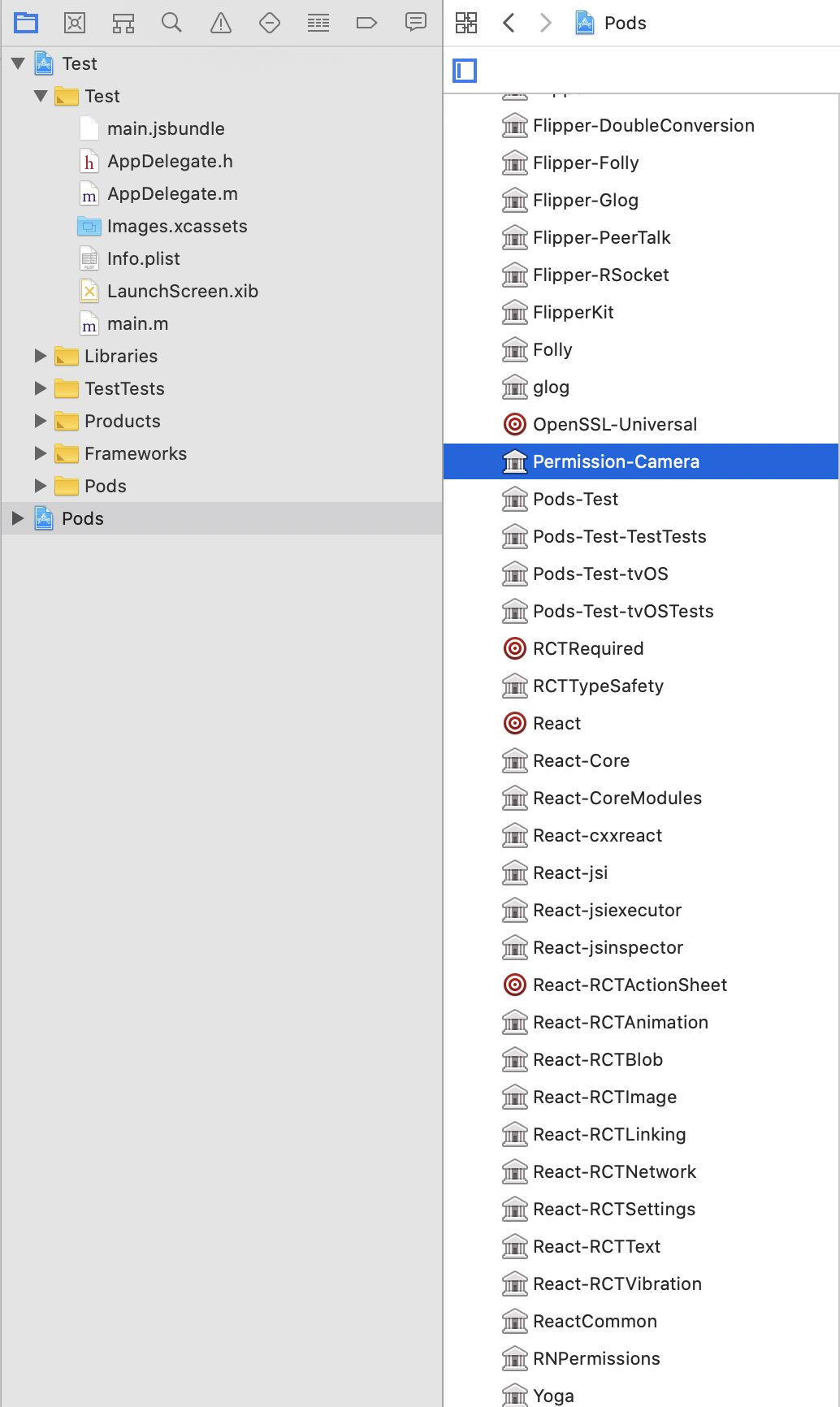
Could you please provide a screenshot of your installed Pods (precise if you use use_frameworks or not)? Like this one:
zoontek
on 19 Apr 2020
I have created a new project and havent install react-native-permissions. I couldn't solve it :/
ozturkilgim
on 20 Apr 2020
@ozturkilgim Could you at least awnser to my questions?
zoontek
on 20 Apr 2020
@zoontek
Hi Zoontek.
It's seems we got the cached issue.
After I tried debug inside node_modules folder where it check variable

After that it's working fine again.
 Quynh-Nguyen
on 20 Apr 2020
Quynh-Nguyen
on 20 Apr 2020
@Quynh-Nguyen What did you do to solve it? (you only say after that)
zoontek
on 20 Apr 2020
@Quynh-Nguyen What did you do to solve it? (you only say
after that)
I throw RCTLogError for each step and after that I removed it.
Everything working well again.
Quynh-Nguyen
on 20 Apr 2020
@Quynh-Nguyen So, definitively a Xcode caching issue. Glad you solved it!
zoontek
on 20 Apr 2020
i had same issue , after that i change version to 2.0.9 and it works.
 kimivn
on 22 Apr 2020
kimivn
on 22 Apr 2020
go to
node_modules --> react-native-permission --> RNPermissions.m
in this file Search for "No permission handler detected"
and comment this line "RCTLogError(@"%@", message)"
Enjoying 😉
 gouravbhati
on 24 Apr 2020
gouravbhati
on 24 Apr 2020
@gouravbhati
go to
node_modules --> react-native-permission --> RNPermissions.m
in this file Search for "No permission handler detected"
and comment this line "RCTLogError(@"%@", message)"
Enjoying 😉
So, your advice is to let people proceed with "using" this module, even though no actual permission handlers are installed, so they can't possibly use the module?
That check is vital. It lets people know they don't have it integrated correctly. If I understand correctly nothing will work if that check is triggered and developers need to know.
 mikehardy
on 24 Apr 2020
mikehardy
on 24 Apr 2020
In my particular case it was because I didn't added the right permissions in the podspec file.
After that, did pod install, then opened xcode, clean build folder and then build & run. Hope it helps someone :)
 organom
on 25 Apr 2020
organom
on 25 Apr 2020
At least one permission needs to be configured on iOS
 MR03web
on 26 Apr 2020
MR03web
on 26 Apr 2020
Hey there!
I have solved this problem
First thing you have to paste this code in podfile:
permissions_path = '../node_modules/react-native-permissions/ios'
pod 'Permission-Camera', :path => "../node_modules/react-native-permissions/ios/Camera.podspec"
and then install react-native-permissions
$ npm install --save react-native-permissions
--- or ---
$ yarn add react-native-permissions
after that, you have to paste this code in ios/appname/info.plist
and then go inside IOS folder
cd Ios
run command: pod install
after that, you have to reinstall the app and re-run the react-native server
react-native run-ios
Thanks :)
 Developerusman
on 26 Apr 2020
Developerusman
on 26 Apr 2020
UsmanRana77's solution works, and more detail is here: https://medium.com/@rossbulat/react-native-managing-app-permissions-for-ios-4204e2286598
If we check out the official documentation under the iOS section, each permission handler is documented individually for us to copy and paste into our own Podfile. Copy each permission you require into your Podfile, located at ios/Podfile. Here is an example of doing so:
target 'my-app' do

  permissions_path = '../node_modules/react-native-permissions/ios'
  pod 'Permission-Contacts', :path => "#{permissions_path}/Contacts.podspec"
  pod 'Permission-Microphone', :path => "#{permissions_path}/Microphone.podspec"
  pod 'Permission-Notifications', :path => "#{permissions_path}/Notifications.podspec"
  ...
end
With the required permissions copied, now run pod install:
cd ios && pod install
 seanbhart
on 27 Apr 2020
seanbhart
on 27 Apr 2020
I'm closing this since the "solutions" offered here are just the first lines of the documentation.
zoontek
on 28 Apr 2020
Every time it's the same library reporting an error, it's too difficult
 whereiscode
on 15 May 2020
whereiscode
on 15 May 2020
@ozturkilgim Have a try , Clean up the project and build again
whereiscode
on 15 May 2020
re start node server and reinstall app solve problem
 heyman333
on 27 May 2020
heyman333
on 27 May 2020
RCTLogError(@"%@", message)
It least it helps me to get rid of the error pop ! and saved a lot of times
 khuznain
on 2 Jun 2020
khuznain
on 2 Jun 2020
I performed everything mentioned above but am still getting same error :(
 jamesdmurphy51
on 16 Aug 2020
jamesdmurphy51
on 16 Aug 2020
I'm using:
- react-native: 0.59.10 without
use_frameworks! - react-native-permissions: 2.1.5
I tried all the steps above, but I'm still facing this issue. Commenting out RCTLogError(@"%@", message) is working for me, but that's definitely not a proper solution.
 taingmeng
on 21 Sep 2020
taingmeng
on 21 Sep 2020
It seems that Xcode handles permissions on its own. Just simply add permissions in info.plist file in project/ios/project. Remove permissions from Podfile . It worked for me
Thank you
 Shoukat488
on 22 Sep 2020
Shoukat488
on 22 Sep 2020
After removing permission from pod run pod install
Shoukat488
on 22 Sep 2020
As @zoontek mentioned, this is xcode cache proplem .Make sure you run "pod install" after adding permission to podfile. After that, just open your ios project from xcode and press command shift K.
yarn start --reset-cache
npx react-native run-ios
 hungvu193
on 5 Oct 2020
hungvu193
on 5 Oct 2020
At least one permission needs to be configured on iOS
How do configure it
 yashukla47
on 30 Dec 2020
yashukla47
on 30 Dec 2020
At least one permission needs to be configured on iOS
How do configure it
You can configure a permission by setting it in ios folder's info.plist and including its path in podfile after including ios permissions path. pod install after adding permission. I was able to fix no permission handler detected by doing this (with correct pod path), cleaning xcode project, deleting app from phone, and re-installing.
 tycali17
on 22 Jan 2021
tycali17
on 22 Jan 2021
Hey there!
I have solved this problem
First thing you have to paste this code in podfile:
permissions_path = '../node_modules/react-native-permissions/ios'
pod 'Permission-Camera', :path => "../node_modules/react-native-permissions/ios/Camera.podspec"and then install react-native-permissions
$ npm install --save react-native-permissions
--- or ---
$ yarn add react-native-permissions
after that, you have to paste this code in ios/appname/info.plist
NSCameraUsageDescription
Your message to user when the camera is accessed for the first time
NSMicrophoneUsageDescription
Your message to user when the microphone is accessed for the first timeand then go inside IOS folder
cd Ios
run command: pod install
after that, you have to reinstall the app and re-run the react-native server
react-native run-ios
Thanks :)
In my case:
pod 'Permission-Camera', :path => "#{permissions_path}/Camera/Permission-Camera.podspec"
You can check in ../node_modules/react-native-permissions/ios and then change link
 daonamutc1
on 23 Feb 2021
daonamutc1
on 23 Feb 2021
Related issues
 booker-dragon
·
3Comments
booker-dragon
·
3Comments
 b-asaf
·
3Comments
b-asaf
·
3Comments
 hamoudaarfaoui
·
5Comments
hamoudaarfaoui
·
5Comments
 vishalTechnoFreek
·
4Comments
vishalTechnoFreek
·
4Comments
 willks
·
4Comments
willks
·
4Comments
Most helpful comment
Hey there!
I have solved this problem
First thing you have to paste this code in podfile:
permissions_path = '../node_modules/react-native-permissions/ios'
pod 'Permission-Camera', :path => "../node_modules/react-native-permissions/ios/Camera.podspec"
and then install react-native-permissions
$ npm install --save react-native-permissions
--- or ---
$ yarn add react-native-permissions
after that, you have to paste this code in ios/appname/info.plist
and then go inside IOS folder
cd Ios
run command: pod install
after that, you have to reinstall the app and re-run the react-native server
react-native run-ios
Thanks :)