React-native-paper: Chrome adding blue border around TextInput
Environment
"react-native-paper": "^3.9.0",
"react-native-web": "~0.11.7",
Expo
Description
I am using InputText as
<TextInput
                    style={{outlineColor: 'rgba(0,0,0,0)', outlineOffset: 0, outlineStyle: 'none',
                            outlineWidth: 0, backgroundColor: 'white'}}
                    theme={this.textValidationTheme(styles)}
                    mode="flat"
                    ref={o => (this.txtInput = o)}
                    label={this.props.label}
                    //placeholder={this.state.isFocused ? "" : this.props.label}
                    value={this.state.text}
                    onFocus={this.onFocus}
                    onChangeText={this.onChangeText}
                    onBlur={this.onBlur}
                    onSubmitEditing={this.onSubmit}
                    underlineColor={color.lightGray}
                    {...this.props.textInputProps}
                />
It seems that chrome is adding a default blue outline and no modification in outline settings seem to be working..

 zelin
zelin
All 12 comments
here is the walkaround for this. Not sure if we can pass some prop to disable this shadowBox when focused
also here is some old issue about it
 jbinda
on 21 May 2020
jbinda
on 21 May 2020
with react native web you can do:
<TextInput
   style={{outline: "none"}}
/>
 timsonater
on 27 May 2020
timsonater
on 27 May 2020
@zelin can you confirm if above solution works for you ?
jbinda
on 27 May 2020
with react native web you can do:
<TextInput
   style={{outline: "none"}}
/>
it doesn't work
 thorxtecnologia
on 29 May 2020
thorxtecnologia
on 29 May 2020
outlineWidth: 0, worked for me
 jcarraway
on 12 Jun 2020
jcarraway
on 12 Jun 2020
The focus ring is important for accessibility. If you are removing it, you need to make sure that you're not removing it for keyboard users.
You can use this polyfill to achieve this https://github.com/WICG/focus-visible
 satya164
on 12 Jun 2020
satya164
on 12 Jun 2020
This is still not working for me
 Jonatthu
on 18 Jun 2020
Jonatthu
on 18 Jun 2020
I'm stuck with this issue as well. Any known workarounds?
 brandonpearcy
on 17 Jul 2020
brandonpearcy
on 17 Jul 2020
I was able to disable the default blue highlight on react-native-paper TextInputs when using react-native-web like so:
App.css
.disable-outline input {
    outline-width: 0;
}
CustomTextInput.tsx
return (
      <div className={'disable-outline'}>
        <TextInput .../>
     </div>
);
@brandonpearcy I'm having problems with your solution. Do I need a babel plugin or something related to transpile the App.css file? Even on the web it throw an error when i write import './App.css'; .
I have replicated your solution but using instead a package called emotion that allows me to embed global css styles in web format without babel plugins. This is just another workaround.
Here it's a live example on expo snack link
 Menganitou
on 6 Aug 2020
Menganitou
on 6 Aug 2020
My solution works in a modern create-react-app environment. If I understand correctly, under the hood, CRA is using CSS Modules. More info here: https://create-react-app.dev/docs/adding-a-css-modules-stylesheet/
If you're using a different CSS framework, you'll almost certainly have to adjust the solution. Thanks for sharing a solution using Emotion!
brandonpearcy
on 11 Aug 2020
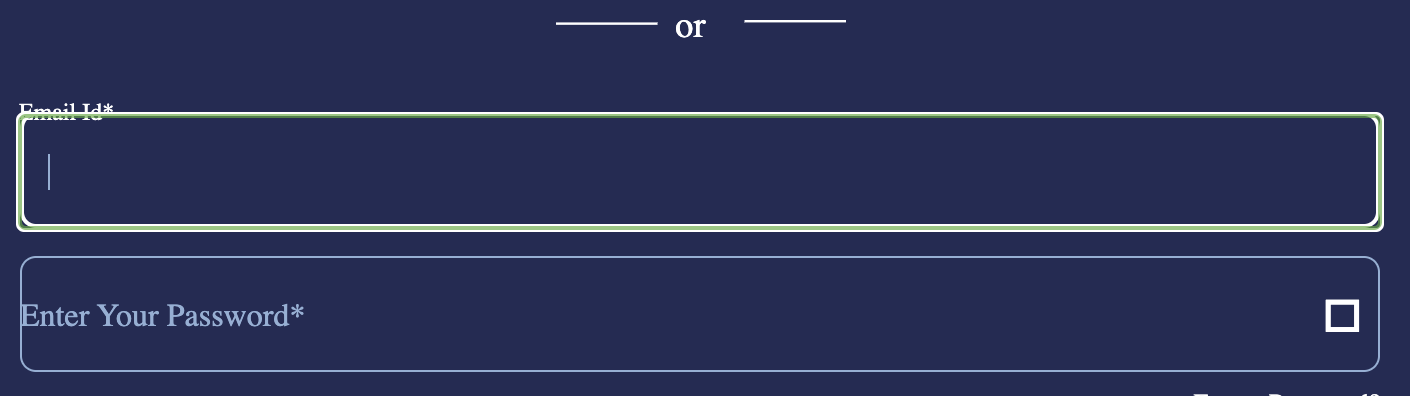
This is not working, please help.
<TextInput
          ref={ref1}
          mode={'outlined'}
          returnKeyType={'next'}
          style={{
            width: '100%',
            ...Platform.select({
              web: {
                outlineWidth: 0
              }
            })
          }}
          {...props}
        />
 kamalthebidigital
on 9 Sep 2020
kamalthebidigital
on 9 Sep 2020
Related issues
 sritharanpalani
·
4Comments
sritharanpalani
·
4Comments
 kpervin
·
3Comments
kpervin
·
3Comments
 alikazemkhanloo
·
4Comments
alikazemkhanloo
·
4Comments
 sm2017
·
4Comments
sm2017
·
4Comments
 knobandre
·
4Comments
knobandre
·
4Comments
Most helpful comment
outlineWidth: 0,worked for me