React-native-paper: Snackbar Opacity
Ask your Question
I am using dark theme and for some reason my snackbars have an opacity less than one (making the content below visible). Is there a way to make the snackbar a solid color (opacity = 1)?
 lnickdnguyen
All 4 comments
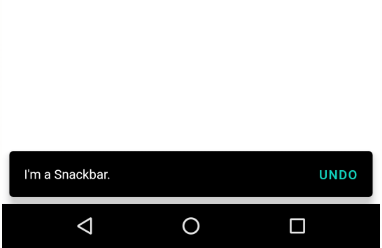
Use the onSurface color property in theme to edit the color of the Snackbar
Here I am reducing the opacity of the Snackbar
theme={{
    colors: {
        onSurface: "rgba(0, 0, 0, 0.4)",
    },
}}
Output

In your case, you can set the opacity to 1 in the onSurface property to make it a solid color
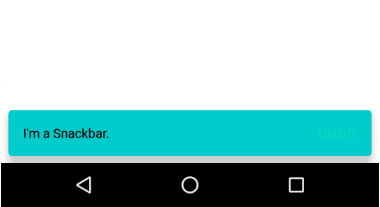
In the example below I have changed the color of the Snackbar and the Text
theme={{
    colors: {
      onSurface: "rgba(0, 204, 204, 1)",
      surface: "black",
    },
}}
Output
Snackbar Code for Reference
<Snackbar
    visible={visible}
    onDismiss={this._onDismissSnackBar}
    action={{
        label: "Undo",
        onPress: () => {
            // Do something
            console.log("Hello");
        },
    }}

    theme={{
        colors: {
            onSurface: "rgba(0, 0, 0, 1)",
        },
    }}
>
    I'm a Snackbar.
</Snackbar>
Output
 mohanyadav
on 14 May 2020
mohanyadav
on 14 May 2020
@mohanyadav Hey thanks for the tip! Unfortunately, I still am seeing items beneath the snackbar, even after setting the opacity to 1 as you mentioned. Any other ideas?
lnickdnguyen
on 16 May 2020
Thanks @mohanyadav! I could not figure out how to change the text color of my message...why would that call it surface...Thanks for the post!
 TheHuns
on 9 Nov 2020
TheHuns
on 9 Nov 2020
Thank you very much! it has solved my problem :)
 ShivamGoyal26
on 14 Jan 2021
ShivamGoyal26
on 14 Jan 2021
Related issues
 trialsNow
·
25Comments
trialsNow
·
25Comments
 devsrv
·
25Comments
devsrv
·
25Comments
 binyamin
·
44Comments
binyamin
·
44Comments
 rolandjitsu
·
14Comments
rolandjitsu
·
14Comments
 smkhalsa
·
14Comments
smkhalsa
·
14Comments