React-native-paper: Feature Request: Use Appbar.Header with react-navigation
It would be great if we could use Appbar.Header as a drop-in replacement for the standard Header component within a react-navigation StackNavigator.
Maybe we could use a customer StackNavigator, similar to:
https://github.com/react-navigation/react-navigation-material-bottom-tabs
 smkhalsa
All 14 comments
This would be so great
 hugopretorius914
on 12 Apr 2019
hugopretorius914
on 12 Apr 2019
I need this feature too. 😄
 giautm
on 21 Apr 2019
giautm
on 21 Apr 2019
You can replace the default one by returning the Appbar.Header when you call createStackNavigator. reference: https://reactnavigation.org/docs/en/stack-navigator.html#stacknavigatorconfig
const myAwesomeStackNavigator = createStackNavigator(
  {
    HomeScreen: {
      screen: HomeScreen
    }
  },
  {
    defaultNavigationOptions: ({ navigation }) => {
      return ({
        header: (
          <Appbar.Header>
            <Appbar.BackAction onPress={() => navigation.goBack()} />
          </Appbar.Header>
        ),
      })
    }
  }
);
The example app in this repo also does something similar, see here
As a drop-in replacement, it's good enough enough for my use cases.
 cltsang
on 17 May 2019
cltsang
on 17 May 2019
You can replace the default one by returning the Appbar.Header when you call createStackNavigator. reference: https://reactnavigation.org/docs/en/stack-navigator.html#stacknavigatorconfig
const myAwesomeStackNavigator = createStackNavigator(
  {
    HomeScreen: {
      screen: HomeScreen
    }
  },
  {
    defaultNavigationOptions: ({ navigation }) => {
      return ({
        header: (
          <Appbar.Header>
            <Appbar.BackAction onPress={() => navigation.goBack()} />
          </Appbar.Header>
        ),
      })
    }
  }
);
The example app in this repo also does something similar, see here
As a drop-in replacement, it's good enough enough for my use cases.
Very helpful. Thank you!
 wobsoriano
on 17 Jul 2019
wobsoriano
on 17 Jul 2019
Basically it works, but not quite good for me.. When I switch tabs the screen content jumps most of the time, but if I set statusBarHeight it seems that it works correctly. I guess some calculations are made in SafeAreaView?
react-native-paper: 3.0.0-alpha3
react-native: 0.59.9
react-navigation: 3.11.1
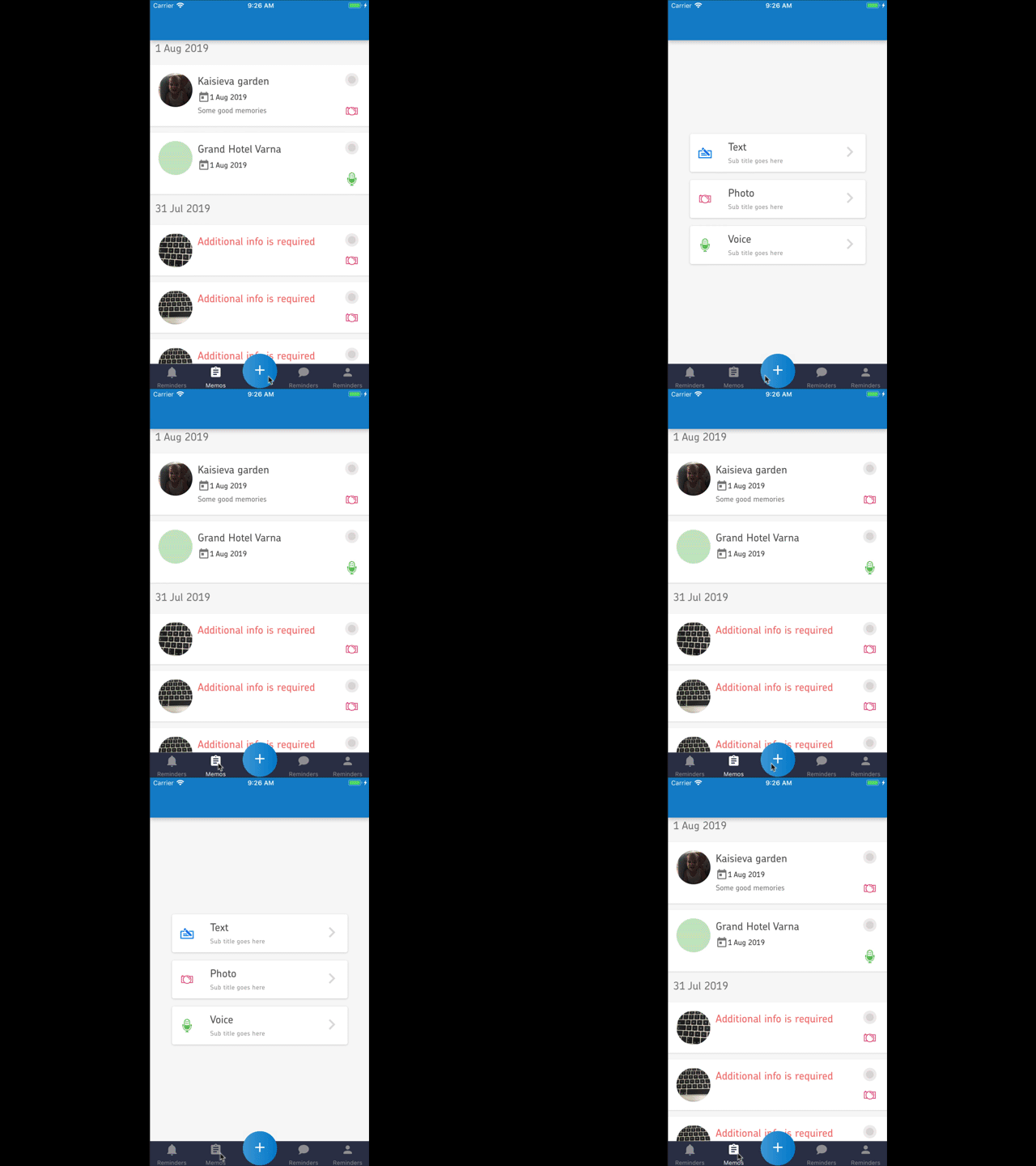
 netbull
on 2 Aug 2019
netbull
on 2 Aug 2019
I experience that too.
May be related to #1035 ?
cltsang
on 3 Aug 2019
Hello 👋, this issue has been open for more than 2 months with no activity on it. If the issue is still present in the latest version, please leave a comment within 7 days to keep it open, otherwise it will be closed automatically. If you found a solution on workaround for the issue, please comment here for others to find. If this issue is critical for you, please consider sending a pull request to fix the issue.
![github-actions[bot] picture](https://avatars.githubusercontent.com/in/15368?v=4&s=40) github-actions[bot]
on 15 Dec 2019
github-actions[bot]
on 15 Dec 2019
keep-it-open
giautm
on 16 Dec 2019
Please, reopen this issue
 Polombo98
on 26 Dec 2019
Polombo98
on 26 Dec 2019
Seconded (or thirded) please reopen!
 tevonsb
on 27 Dec 2019
tevonsb
on 27 Dec 2019
I worked around this by just disabling the header in react-navigation using headerMode: 'none' and then setting up Appbar in my screens.
const AppNavigator = createStackNavigator(
  {
    Home: HomeScreen
  },
  {
    initialRouteName: 'Home',
    headerMode: 'none'
  }
)
Then in a screen:
         <Appbar.Header>
          <Appbar.BackAction
            onPress={() => { this.props.navigation.goBack() }}
          />
          <Appbar.Content
            title='My screen'
            subtitle='my subtitle'
          />
        </Appbar.Header>
 kriscarle
on 4 Jan 2020
kriscarle
on 4 Jan 2020
I'm experiencing this issue too. Using react navigation 5 and defining:
 <Stack.Navigator
  initialRouteName="Home"
  mode="modal"
  screenOptions={{
    headerShown: false,
    contentStyle: {
      backgroundColor: Colors.blanco,
    },
  }}
>
Te content is white in the transition from one screen to another. However, as appbar is in the content (not replacing the original header) I get a terrible animation because of that. I attach a video

Is there any workaround?
Thanks
 faustinogagneten
on 23 Apr 2020
faustinogagneten
on 23 Apr 2020
If this helps anyone, I have this setup that works without problems:
AppbarHeader.js
import * as React from 'react'
import { Appbar } from 'react-native-paper'
import { DrawerActions } from '@react-navigation/native'
import PropTypes from 'prop-types'

const AppbarHeader = ({ scene, navigation }) => {
  const { options } = scene.descriptor
  return (
    <Appbar.Header>
       <Appbar.Action icon='menu' onPress={() => (navigation.dispatch(DrawerActions.toggleDrawer()))} />
      <Appbar.Content title={options.headerTitle} />
    </Appbar.Header>
  )
}

AppbarHeader.propTypes = {
  navigation: PropTypes.object,
  scene: PropTypes.object
}

export default AppbarHeader
then in App.js:
<Stack.Navigator headerMode={'screen'} screenOptions={{ header: AppbarHeader }}>
  <Stack.Screen name='Main' component={MainContainer} />
Inside the main component I have a drawer navigator, thus the appbar menu button toggles the drawer.
I have no flickering issues, maybe those who have should do as suggested in the docs here:
https://reactnavigation.org/docs/stack-navigator#specify-a-height-in-headerstyle
 jaime-ez
on 3 Jul 2020
jaime-ez
on 3 Jul 2020
I worked around this by just disabling the header in
react-navigationusingheaderMode: 'none'and then setting upAppbarin my screens.const AppNavigator = createStackNavigator( { Home: HomeScreen }, { initialRouteName: 'Home', headerMode: 'none' } )Then in a screen:
         <Appbar.Header>
          <Appbar.BackAction
            onPress={() => { this.props.navigation.goBack() }}
          />
          <Appbar.Content
            title='My screen'
            subtitle='my subtitle'
          />
        </Appbar.Header>
Thanks, this is exactly I was looking for.
 ThedathUMCG
on 24 Sep 2020
ThedathUMCG
on 24 Sep 2020
Related issues
 sm2017
·
4Comments
sm2017
·
4Comments
 zachariahtimothy
·
3Comments
zachariahtimothy
·
3Comments
 ButuzGOL
·
4Comments
ButuzGOL
·
4Comments
 knobandre
·
4Comments
knobandre
·
4Comments
 ZhengYuTay
·
3Comments
ZhengYuTay
·
3Comments
Most helpful comment
You can replace the default one by returning the Appbar.Header when you call createStackNavigator. reference: https://reactnavigation.org/docs/en/stack-navigator.html#stacknavigatorconfig
The example app in this repo also does something similar, see here
As a drop-in replacement, it's good enough enough for my use cases.