React-native-paper: How to change the color of action in Snackbar?
How to change the color of action in Snackbar?
Hi guys ! Help to understand how to change the color of the action in Snackbar ?
         <Snackbar
           visible={this.state.visible}
          onDismiss={() => this.setState({ visible: false })}
          action={{

            label: "Undo",
            onPress: () => this.setState({ isHidden: true })}}>
          You are registered on {namefilm}
        </Snackbar>
question
 ilyaux
All 5 comments
You can change it via theme prop:
theme={{ colors: { accent: 'red' }}}
 Trancever
on 14 Mar 2019
Trancever
on 14 Mar 2019
👍16
🎉2
❤1
👎1
Hmm, this doesn't feel quite right. Why doesn't the Context-provided theme apply to this specific component?
 robertherber
on 21 Aug 2019
robertherber
on 21 Aug 2019
👍9
and, how to change the label color?
 potier97
on 9 Jun 2020
potier97
on 9 Jun 2020
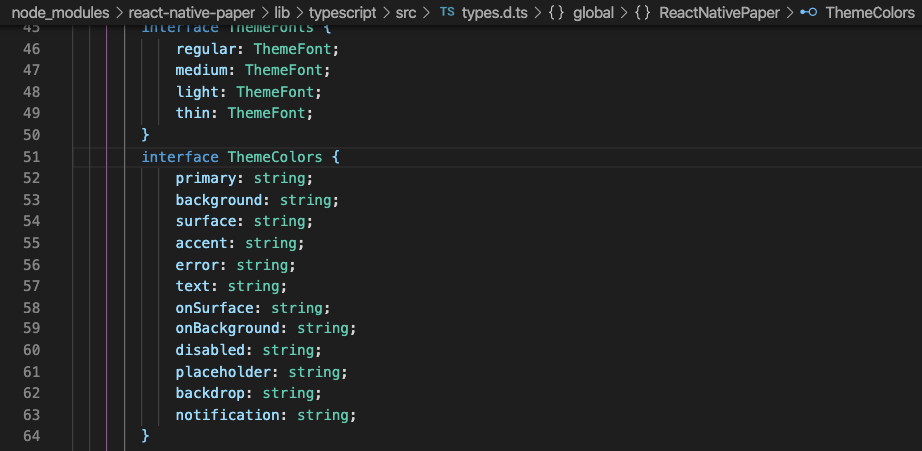
@potier97 in case you didn't find an answer - it's better to check TS definitions of Theme. I tried a few to find that I needed to change:
 vsheyanov
on 3 Aug 2020
vsheyanov
on 3 Aug 2020
❤1
theme={{ colors: {surface: 'blue', accent: 'red'},}}
The example above describes the snackbar text color (and label color) as blue and the action color as red.
 oberdan-dev
on 31 Dec 2020
oberdan-dev
on 31 Dec 2020
👍1
Was this page helpful?
0 / 5 - 0 ratings
Related issues
 ButuzGOL
·
4Comments
ButuzGOL
·
4Comments
 zachariahtimothy
·
3Comments
zachariahtimothy
·
3Comments
 cassioseffrin
·
3Comments
ButuzGOL
·
3Comments
cassioseffrin
·
3Comments
ButuzGOL
·
3Comments
 knobandre
·
4Comments
knobandre
·
4Comments
Most helpful comment
You can change it via theme prop: