React-native-navigation: [V4] Event listener/callback missing on close sideMenu when clicking on center component
Issue Description
When using a sideMenu layout, the left/right part of the screen will automatically close when the user clicks on the center part of the screen. There is no event listener or callback that can be triggered when the left/right part closes.
In our setup, we use leftButtons & rightButtons in the TopBar of the left part of the sideMenu.

It's possible to attach click listeners to those top bar buttons, so we know when one of those buttons is clicked and the left screen is closed. This is done using the following listener. To prevent keeping listeners active when the left screen has already been closed, we remove the listener in handleDismissSideMenu.
unsubPressedListener = Navigation.events().registerNavigationButtonPressedListener(
      ({ buttonId }) => {
        if (buttonId === 'leftButtonCallback') {
          console.log('Do something when left button is clicked');
          handleDismissSideMenu();
        }
      },
    );
Because there is no listener when the left screen is closed by clicking on the center screen, the button listener will not be destroyed, yet the left screen is closed and the reference to it is removed. This creates ghost listeners that are not removable anymore.
Steps to Reproduce
Below is a video that demonstrates this issue using the playground app. The first 4 times, the left screen is being closed by clicking on the center screen. The left side screen is opened 4 times, so 4 event listeners are created. Only when the top bar action button is clicked, those event listeners will all be triggered.
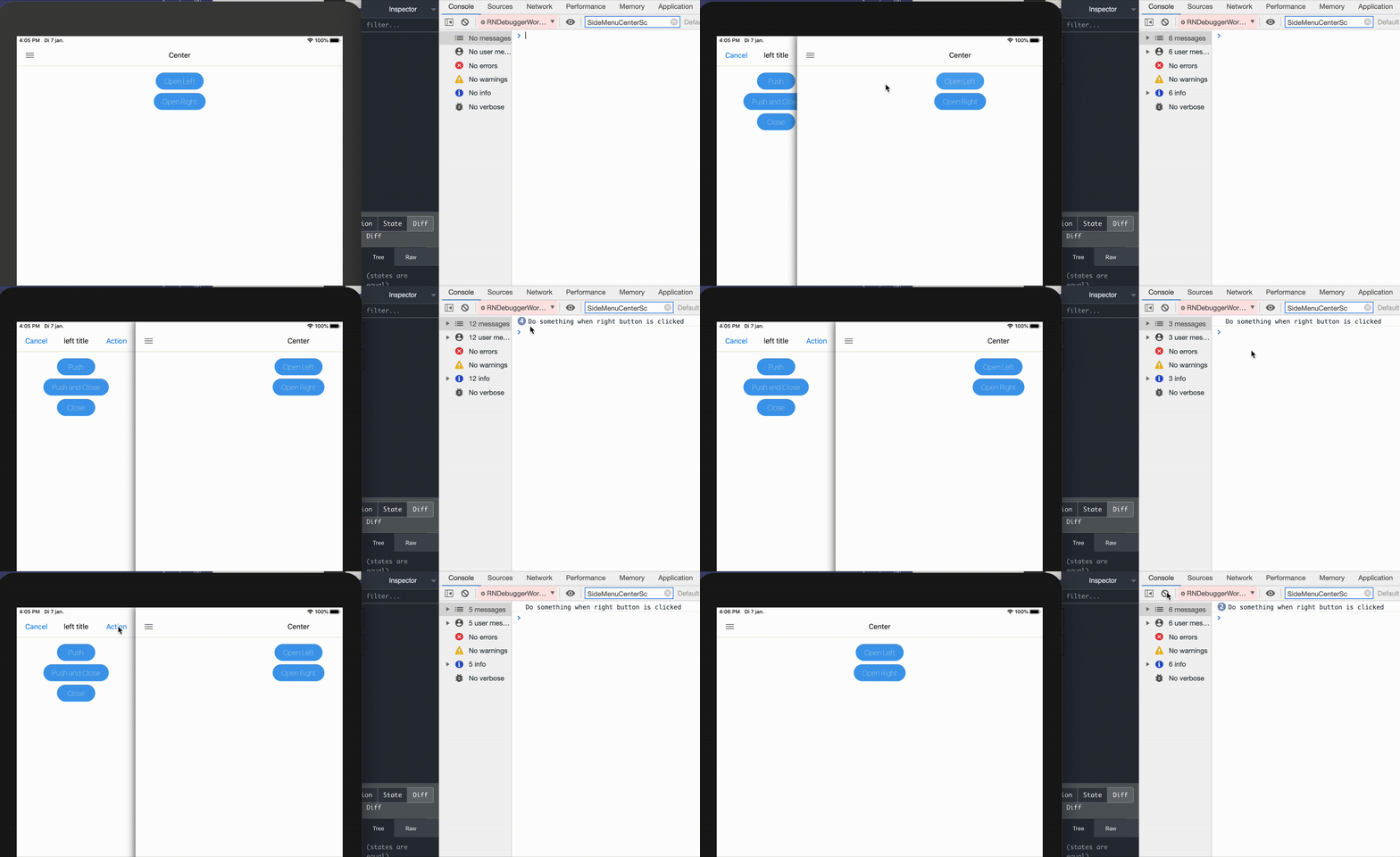
This issue is reproduced in my fork of the playground app
Environment
- React Native Navigation version: 4.2.0
- React Native version: 0.61.4
- Platform(s) (iOS, Android, or both?): iOS
- Device info (Simulator/Device? OS version? Debug/Release?): Any iOS 13.1 simulator or device on both Debug and Release
 DonovanDeSmedt
All 7 comments
Hey @DonovanDeSmedt, visibility events are emitted when the SideMenu opens and closes. When the SideMenu is closed due to tapping on the center screen - componentDidDisappearevent is emitted - I think this addresses your use case.
 guyca
on 8 Jan 2020
guyca
on 8 Jan 2020
Hey @guyca, I've tried that solution as well. It seems to work at first but after opening & closing the side screen a couple times in normal behavior, a warning is being shown. When continuing the same operations after the warning is displayed, it will eventually throw an error.
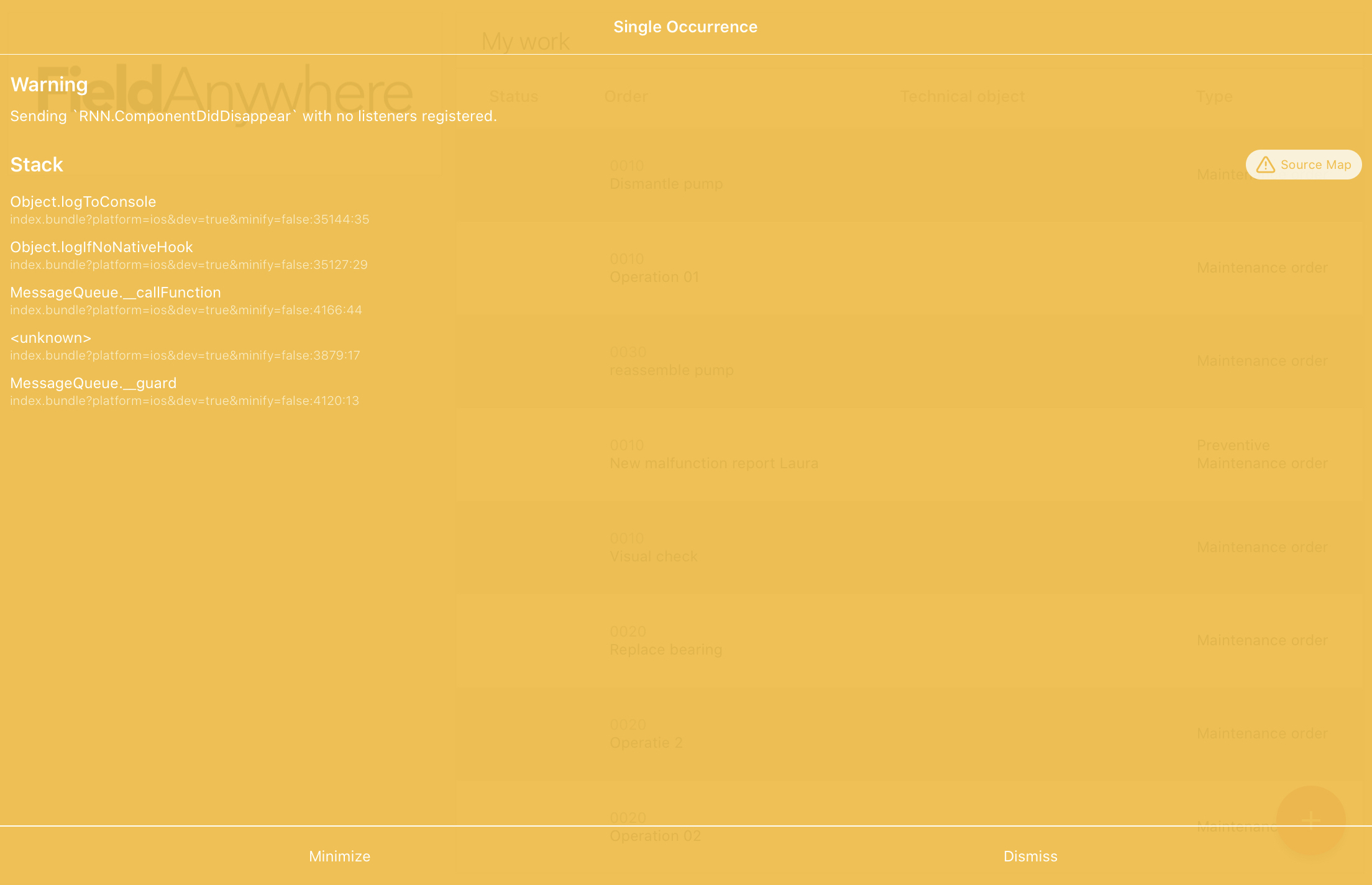
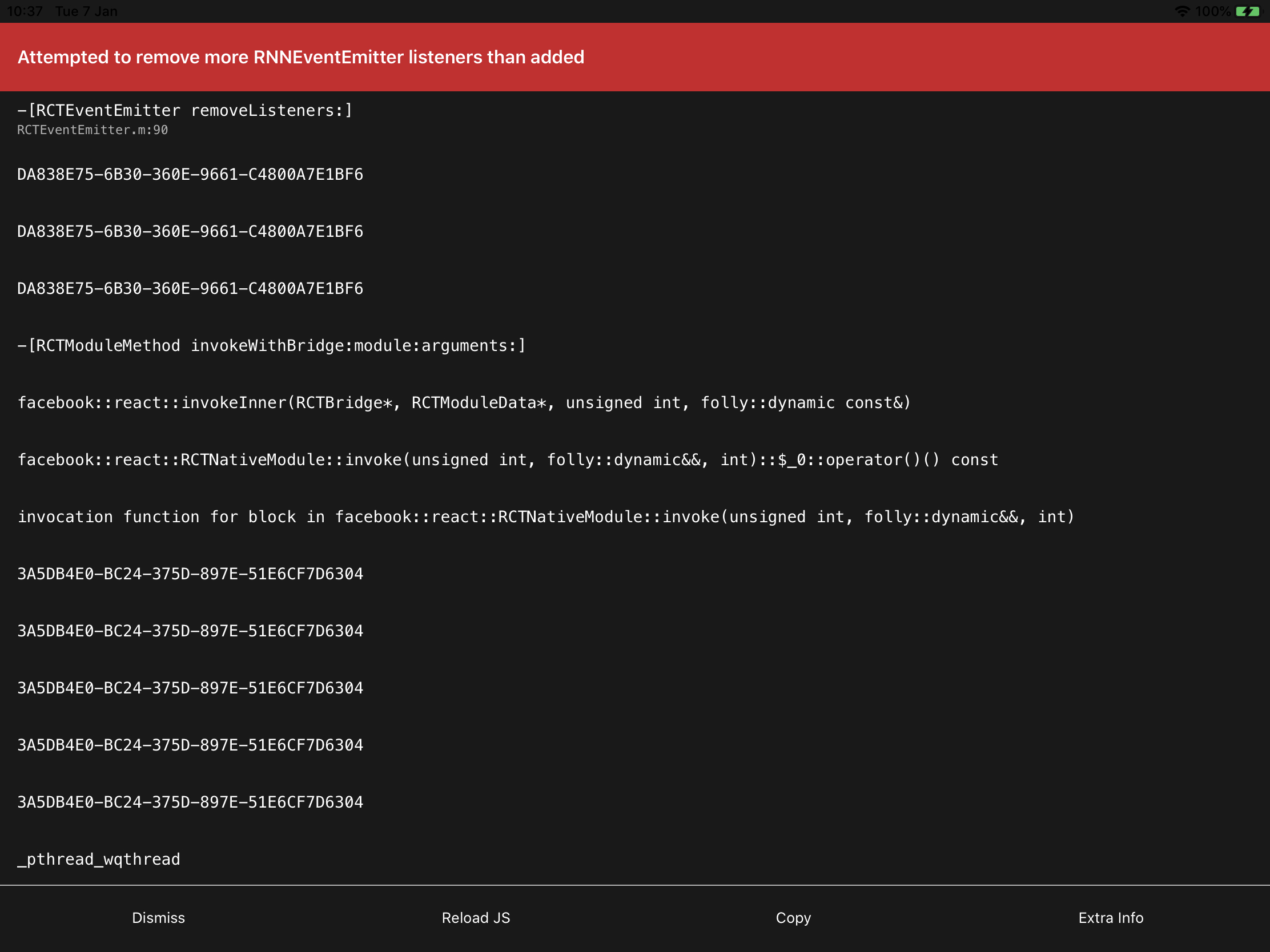
This useEffect is implemented in the sideScreen component (DRAWER in our case). When the drawer closes, it will trigger this event listener and remove itself.
Am I missing something or doing something wrong here?
  useEffect(() => {
    const componentAppearListener = Navigation.events().registerComponentDidDisappearListener(
      ({ componentId: compId }) => {
        if (compId === DRAWER) {
          // do something when the SideMenu closes
        }
      },
    );
    return () => {
      componentAppearListener.remove();
    };
  }, []);
@DonovanDeSmedt @MakhouT the left drawer in the SideMenu screen in the playground app is now a functional component. Can you please reproduce the bug in the playground? I wasn't able to reproduce the issue.
guyca
on 9 Jan 2020
Thanks for the quick update @guyca !
I'll try it this weekend and keep you posted next week.
DonovanDeSmedt
on 10 Jan 2020
Hi @guyca Sorry for the delay, we had issues while reproducing this.
But we've finally managed to find time to create a reproduction in the playground app.
https://github.com/MakhouT/react-native-navigation/commit/f7ef83f76e1d0736b0f9db17da2878905c88a5ef
The issue
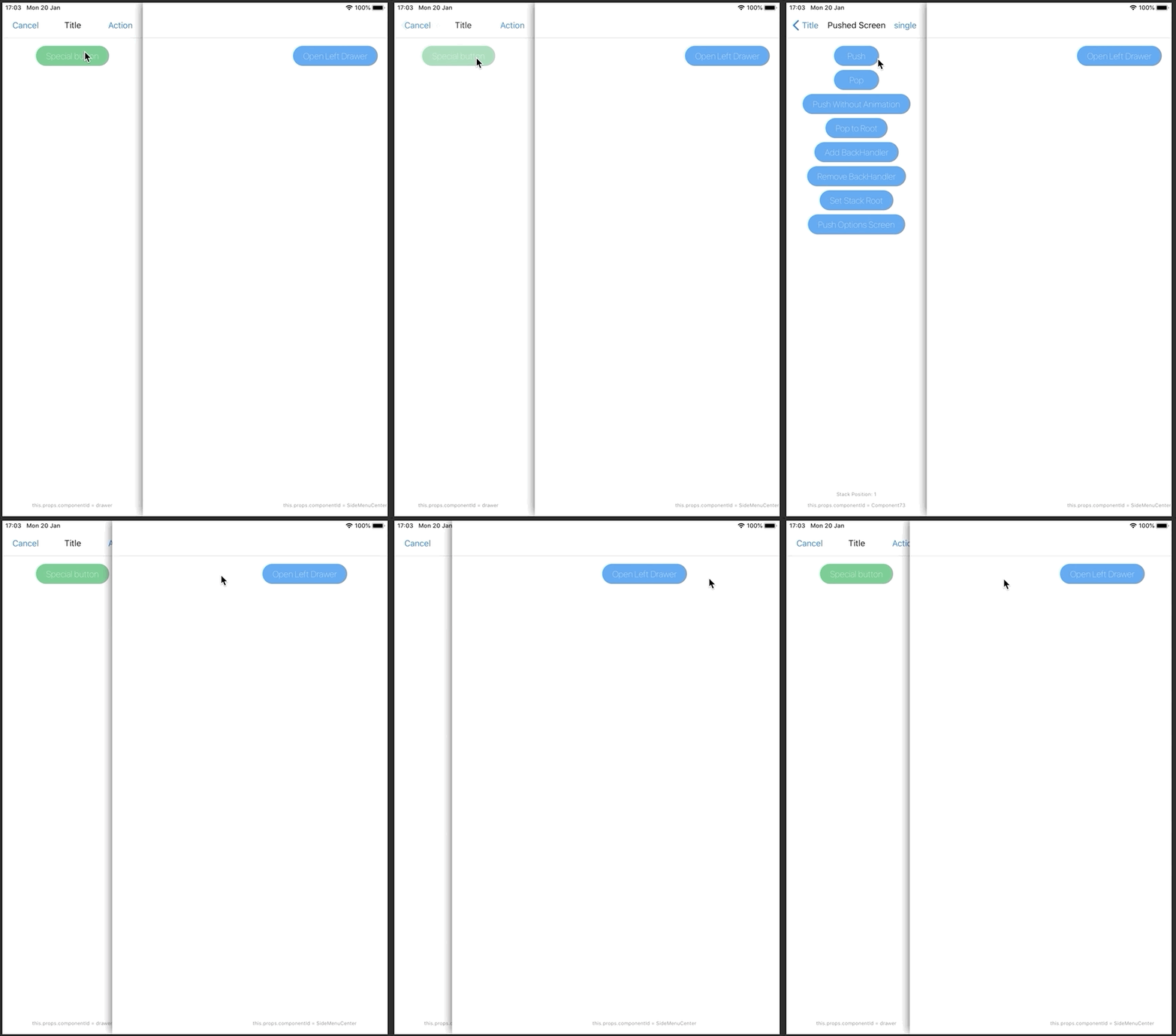
We have a sideMenu, where we are setting a setStackRoot on it.
In the sideMenu, we inject component that are passed by props to it. In my reproduction I am injecting a button into it, with the label 'Special button'.
When pressing that button, a push is being done on the stack of the sideMenu.
Then we have 2 ways we can go from here:
Pop by pressing the back button and close the sidemenu. Then open up the sideMenu again, this works perfectly and correctly as expected.
Don't pop, and stay on the second screen of the stack and close the sideMenu. Then open up the sideMenu again, and here is the problem now - the sidemenu is empty. Close the sidemenu again and open it up again and it's working again as expected (unless you are pushing on the stack of the sidemenu again)
 MakhouT
on 20 Jan 2020
MakhouT
on 20 Jan 2020
Removing id: 'drawer' from the component displayed in the SideMenu will fix this.
When you call setStackRoot, the previous root is unmounted. When a component is unmounted, we clear its props from our internal store. Since both new and old component had the same id, the new component never got the props.
guyca
on 30 Jan 2020
@DonovanDeSmedt your codes works for me just alittle tweek...
this is what i implemented in mine
`
const [menuBtn, setMenuBtn] = useState(true);
useEffect(() => {
const screenEventListener = Navigation.events().registerComponentDidDisappearListener(({ componentId, componentName }) => {
if (componentName === 'awesome-places.MenuScreen') {
setMenuBtn(true);
}
});
    const sidebarSharePlaceListener = Navigation.events().registerNavigationButtonPressedListener(({ buttonId }) => {
        if (buttonId === 'sideDrawer_sharePlace') {
            if (Platform.OS === 'android') {
                Navigation.mergeOptions(startMainTabs.root.sideMenu.id, {
                    sideMenu: {
                        left: {
                            visible: true,
                            enabled: true,
                        },
                    },
                });
                return;
            }
            Navigation.mergeOptions(startMainTabs.root.sideMenu.id, {
                sideMenu: {
                    left: {
                        visible: menuBtn === true ? true : false,
                        enabled: true,
                    },
                },
            });

            function toggleMenuBtn() {
                setMenuBtn(menuBtn === false ? true : false);
            }
            toggleMenuBtn();
        }
    });

    // unsubscribe sidebarSharePlaceListener
    return () => {
        sidebarSharePlaceListener.remove();
        screenEventListener.remove();
    };
}, [menuBtn]);`
 tbanj
on 14 Sep 2020
tbanj
on 14 Sep 2020
Related issues
 ghost
·
3Comments
ghost
·
3Comments
 zhanguangao
·
3Comments
zhanguangao
·
3Comments
 birkir
·
3Comments
birkir
·
3Comments
 Chipped1
·
3Comments
Chipped1
·
3Comments
 switchtrue
·
3Comments
switchtrue
·
3Comments
Most helpful comment
Hey @guyca, I've tried that solution as well. It seems to work at first but after opening & closing the side screen a couple times in normal behavior, a warning is being shown. When continuing the same operations after the warning is displayed, it will eventually throw an error.
This
useEffectis implemented in the sideScreen component (DRAWER in our case). When the drawer closes, it will trigger this event listener and remove itself.Am I missing something or doing something wrong here?