React-native-navigation: Small button area in navbar on ios
Issue Description
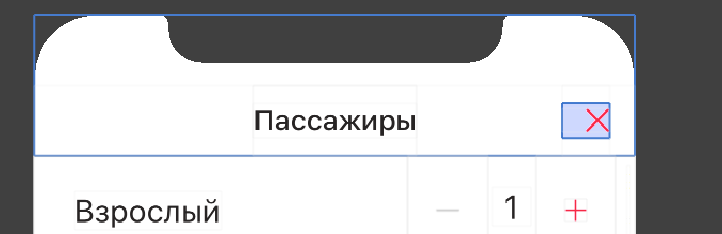
Small button area in navbar on ios. With real use cases, it’s very difficult to hit the button.
Steps to Reproduce / Code Snippets / Screenshots
Environment
- React Native Navigation version: 4.0.3
- React Native version: 0.61.5
- Platform(s) (iOS, Android, or both?): iOS
- Device info (Simulator/Device? OS version? Debug/Release?): All ios devices Debug, Release
 sorokin0andrey
All 16 comments
This issue has been automatically marked as stale because it has not had recent activity. It will be closed if no further activity occurs.
If you believe the issue is still relevant, please test on the latest Detox and report back. Thank you for your contributions.
![stale[bot] picture](https://avatars.githubusercontent.com/in/1724?v=4&s=40) stale[bot]
on 2 Jan 2020
stale[bot]
on 2 Jan 2020
not stale
sorokin0andrey
on 3 Jan 2020
This issue has been automatically marked as stale because it has not had recent activity. It will be closed if no further activity occurs.
If you believe the issue is still relevant, please test on the latest Detox and report back. Thank you for your contributions.
stale[bot]
on 2 Feb 2020
Not stale
sorokin0andrey
on 2 Feb 2020
not stale. have issues with left button / back button as well
 bneigher
on 7 Feb 2020
bneigher
on 7 Feb 2020
This issue has been automatically marked as stale because it has not had recent activity. It will be closed if no further activity occurs.
If you believe the issue is still relevant, please test on the latest version and report back. Thank you for your contributions.
stale[bot]
on 8 Mar 2020
not stale
sorokin0andrey
on 8 Mar 2020
This issue has been automatically marked as stale because it has not had recent activity. It will be closed if no further activity occurs.
If you believe the issue is still relevant, please test on the latest version and report back. Thank you for your contributions.
stale[bot]
on 7 Apr 2020
not stale lol
sorokin0andrey
on 7 Apr 2020
not stale.
FWIW - I have a post install patch that fixes the issue for me, its just annoying to have to make my own edits to this: ./node_modules/react-native-navigation/lib/ios/RNNUIBarButtonItem.m
-(instancetype)init:(NSString*)buttonId withIcon:(UIImage*)iconImage {
  // UIButton* button = [[UIButton alloc] init];
  // [button addTarget:self action:@selector(onButtonPressed) forControlEvents:UIControlEventTouchUpInside];
  // [button setImage:iconImage forState:UIControlStateNormal];
  // [button setFrame:CGRectMake(0, 0, iconImage.size.width + 40, iconImage.size.height + 20)];
  // self = [super initWithCustomView:button];
  // self.buttonId = buttonId;
  // button.contentHorizontalAlignment = UIControlContentHorizontalAlignmentLeft;
  self = [super initWithImage:iconImage style:UIBarButtonItemStylePlain target:self action:@selector(onButtonPressed)];
  self.buttonId = buttonId;
  return self;
}
@sorokin0andrey lmk if this works for you and hopefully if its legit the wix team can get this changed in the source
bneigher
on 7 Apr 2020
This issue has been automatically marked as stale because it has not had recent activity. It will be closed if no further activity occurs.
If you believe the issue is still relevant, please test on the latest version and report back. Thank you for your contributions.
stale[bot]
on 7 May 2020
Not stale
sorokin0andrey
on 8 May 2020
This issue has been automatically marked as stale because it has not had recent activity. It will be closed if no further activity occurs.
If you believe the issue is still relevant, please test on the latest version and report back. Thank you for your contributions.
stale[bot]
on 7 Jun 2020
Not stale
sorokin0andrey
on 8 Jun 2020
This issue has been automatically marked as stale because it has not had recent activity. It will be closed if no further activity occurs.
If you believe the issue is still relevant, please test on the latest version and report back. Thank you for your contributions.
stale[bot]
on 11 Jul 2020
Duplicate of #5000 , PR at #6482
 danilobuerger
on 16 Sep 2020
danilobuerger
on 16 Sep 2020
Related issues
 zagoa
·
3Comments
zagoa
·
3Comments
 viper4595
·
3Comments
viper4595
·
3Comments
 charlesluo2014
·
3Comments
charlesluo2014
·
3Comments
 birkir
·
3Comments
birkir
·
3Comments
 swingywc
·
3Comments
swingywc
·
3Comments