React-native-navigation: Top bar left button is too big
Issue Description
In the release apk of the application, the top bar left icon is always bigger that it should whereas the right icon as in the correct size. This bug is only on release.apk, not in debug.apk
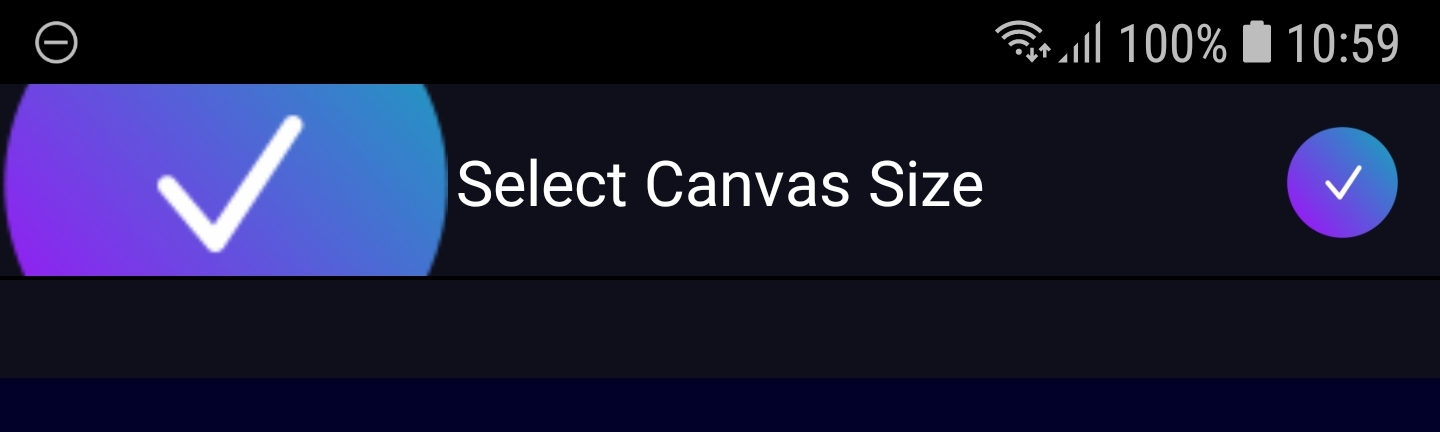
Both buttons have the exact same icon as source.
Steps to Reproduce / Code Snippets / Screenshots
Navigation.push(this.props.componentId, {
            component: {
                name: constants.CANVAS_SIZE_SCREEN.id,
                passProps: {
                },
                options: {
                    topBar: {
                        height: Dimensions.get('window').height * palette.MAIN_TOP_BAR_HEIGHT,
                        visible: true,
                        title: {
                            text: constants.CANVAS_SIZE_SCREEN.name,
                            alignment: 'center',
                            color: 'white',
                            waitForRender: true,
                        },
                        borderHeight: 1.3,
                        elevation: 1.5, // TopBar elevation in dp,
                        background: {
                            color: palette.SECONDARY_DARK
                        },
                        leftButtons: [
                            {
                                id: 'BackButton',
                                icon: require('../assets/btn_succeed.png')
                            }
                        ],
                        rightButtons: [
                            {
                                id: 'ProceedButton',
                                icon: require('../assets/btn_succeed.png')
                            }
                        ]
                    },
                    sideMenu: {
                        left: {
                            visible: false,
                            enabled: false
                        }
                    }
                }
            }
        });
Environment
- React Native Navigation version: 3.2.0
- React Native version: 0.59.10
- Platform(s) (iOS, Android, or both?): Android (haven't tested iOS)
- Device info (Simulator/Device? OS version? Debug/Release?):S7 Edge, Android 8, Release only
 meraklis56
All 8 comments
I do have the same issue like @meraklis56. Icon is good when debug but get too big on release build.
 vietnt-uet
on 26 Nov 2019
vietnt-uet
on 26 Nov 2019
I have a similar issue but with right button. In my case the height is good but width is stretched almost double. In RNN v2 it works good but in v3 and v4 not. I've tested it on ios 13 on simulator and on real iPhone Xs. React-native 0.61.5.
 mucha-git
on 3 Dec 2019
mucha-git
on 3 Dec 2019
This issue has been automatically marked as stale because it has not had recent activity. It will be closed if no further activity occurs.
If you believe the issue is still relevant, please test on the latest Detox and report back. Thank you for your contributions.
![stale[bot] picture](https://avatars.githubusercontent.com/in/1724?v=4&s=40) stale[bot]
on 2 Jan 2020
stale[bot]
on 2 Jan 2020
The issue has been closed for inactivity.
stale[bot]
on 9 Jan 2020
@stalebot this is still an issue
 kurnal
on 21 Aug 2020
kurnal
on 21 Aug 2020
@stalebot still an issue
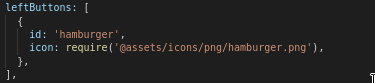
I'm facing this issue as well, for release build.
React native version: 0.63.2
RNN version: 7.0.0
 koiralakiran1
on 30 Sep 2020
koiralakiran1
on 30 Sep 2020
@koiralakiran1 Make sure you icon contains all required resolutions (@2, @3 etc)
 guyca
on 30 Sep 2020
guyca
on 30 Sep 2020
Just saw seconds ago that this works fine on the release build of playgroud app.
@koiralakiran1 Make sure you icon contains all required resolutions (@2, @3 etc)
This fixed the issue for me. Thanks @guyca
koiralakiran1
on 30 Sep 2020
Related issues
 swingywc
·
3Comments
swingywc
·
3Comments
 switchtrue
·
3Comments
switchtrue
·
3Comments
 ghost
·
3Comments
ghost
·
3Comments
 nbolender
·
3Comments
nbolender
·
3Comments
 birkir
·
3Comments
birkir
·
3Comments
Most helpful comment
Just saw seconds ago that this works fine on the release build of playgroud app.
This fixed the issue for me. Thanks @guyca