React-native-navigation: Android fails to build after upgrading to RN v59.10
Issue Description
I'm working on an existing RN (v55.4) project that is using RNN. We upgraded to RNN v2.22.3 last week and then upgraded our RN version to v59.10. I have been banging my head against a wall trying to resolve the Android build errors for 3 days.
Any help is much appreciated. I have looked up some of these issues, but they seem to be related to assembling a release. This is just for building.
Steps to Reproduce / Code Snippets / Screenshots
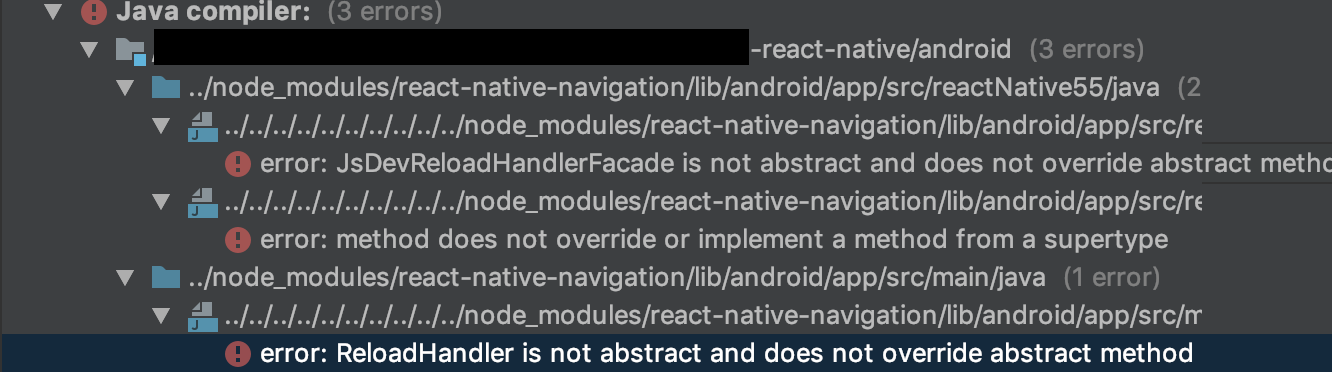
Lmk if you need to see any other files. I'm at a loss of what to do next.
Environment
- React Native Navigation version: 2.22.3
- React Native version: 59.10
- Platform(s) (iOS, Android, or both?): Android
- Device info (Simulator/Device? OS version? Debug/Release?): Android Studio, Android devices, Development
 Xesme
Xesme
All 10 comments
I have the same problem.
Environment
- React Native Navigation version: 2.22.3
- React Native version: 60.0
- Platform(s) (iOS, Android, or both?): Android
- Device info (Simulator/Device? OS version? Debug/Release?): Android Studio, Android devices, Development
 amdrade
on 8 Jul 2019
amdrade
on 8 Jul 2019
I fixed these errors by updating the RN missingDimensionStrategy from 55 to 57_5
app/build.gradle
missingDimensionStrategy "RNN.reactNativeVersion", "reactNative57_5"
Xesme
on 8 Jul 2019
I fixed these errors by updating the RN missingDimensionStrategy from 55 to 57_5
app/build.gradle
missingDimensionStrategy "RNN.reactNativeVersion", "reactNative57_5"
Not work for me :(
FAILURE: Build failed with an exception.
 What went wrong:
Could not determine the dependencies of task ':app:compileDebugJavaWithJavac'.
 Could not resolve all task dependencies for configuration ':app:debugCompileClasspath'.
    Could not resolve project :react-native-navigation.
     Required by:
         project :app
       Unable to find a matching variant of project :react-native-navigation:
          - Variant 'reactNative56DebugApiElements':
              - Required RNN.reactNativeVersion 'reactNative57_5' and found incompatible value 'reactNative56'.
              - Required com.android.build.api.attributes.BuildTypeAttr 'debug' and found compatible value 'debug'
amdrade
on 8 Jul 2019
What does your java compiler look like?
Xesme
on 8 Jul 2019
java version "1.8.0_211"
Java(TM) SE Runtime Environment (build 1.8.0_211-b12)
Java HotSpot(TM) 64-Bit Server VM (build 25.211-b12, mixed mode)
amdrade
on 9 Jul 2019
Sorry, I mean within the Android Studio window. You should be able to open the compiler to see the issues associated with each library. Like my screenshot in the original issue.
You may need to downgrade to RN v59.10 btw v60 may not be supported yet.
Xesme
on 9 Jul 2019
I downgrade to RN v59.9 but not work
Task :app:processDebugResources FAILED
FAILURE: Build failed with an exception.
- What went wrong:
Execution failed for task ':app:processDebugResources'.
> Android resource linking failed
error Command failed: gradlew.bat app:installDebug
debug Error: Command failed: gradlew.bat app:installDebug
Run Android Studio:
Android resource linking failed
C:\Users--\android\app\build\intermediates\incremental\mergeDebugResources\merged.dir\values-v28\values-v28.xml:7: error: resource android:attr/dialogCornerRadius not found.
C:\Users--\android\app\build\intermediates\incremental\mergeDebugResources\merged.dir\values-v28\values-v28.xml:11: error: resource android:attr/dialogCornerRadius not found.
C:\Users--\android\app\build\intermediates\incremental\mergeDebugResources\merged.dir\values\values.xml:3062: error: resource android:attr/fontVariationSettings not found.
C:\Users--\android\app\build\intermediates\incremental\mergeDebugResources\merged.dir\values\values.xml:3063: error: resource android:attr/ttcIndex not found.
error: failed linking references.
amdrade
on 9 Jul 2019
Same issue here .. :/
 losheredos
on 2 Aug 2019
losheredos
on 2 Aug 2019
This issue has been automatically marked as stale because it has not had recent activity. It will be closed if no further activity occurs.
If you believe the issue is still relevant, please test on the latest Detox and report back. Thank you for your contributions.
![stale[bot] picture](https://avatars.githubusercontent.com/in/1724?v=4&s=40) stale[bot]
on 1 Sep 2019
stale[bot]
on 1 Sep 2019
The issue has been closed for inactivity.
stale[bot]
on 8 Sep 2019
Related issues
 switchtrue
·
3Comments
switchtrue
·
3Comments
 zhanguangao
·
3Comments
zhanguangao
·
3Comments
 ghost
·
3Comments
ghost
·
3Comments
 no23reason
·
3Comments
no23reason
·
3Comments
 viper4595
·
3Comments
viper4595
·
3Comments
Most helpful comment
Not work for me :(
FAILURE: Build failed with an exception.
 What went wrong:
Could not determine the dependencies of task ':app:compileDebugJavaWithJavac'.
 Could not resolve all task dependencies for configuration ':app:debugCompileClasspath'.
    Could not resolve project :react-native-navigation.
     Required by:
         project :app
       Unable to find a matching variant of project :react-native-navigation:
          - Variant 'reactNative56DebugApiElements':
              - Required RNN.reactNativeVersion 'reactNative57_5' and found incompatible value 'reactNative56'.
              - Required com.android.build.api.attributes.BuildTypeAttr 'debug' and found compatible value 'debug'