React-native-navigation: [V2][iOS] topBar is not displaying Title Text
Issue Description
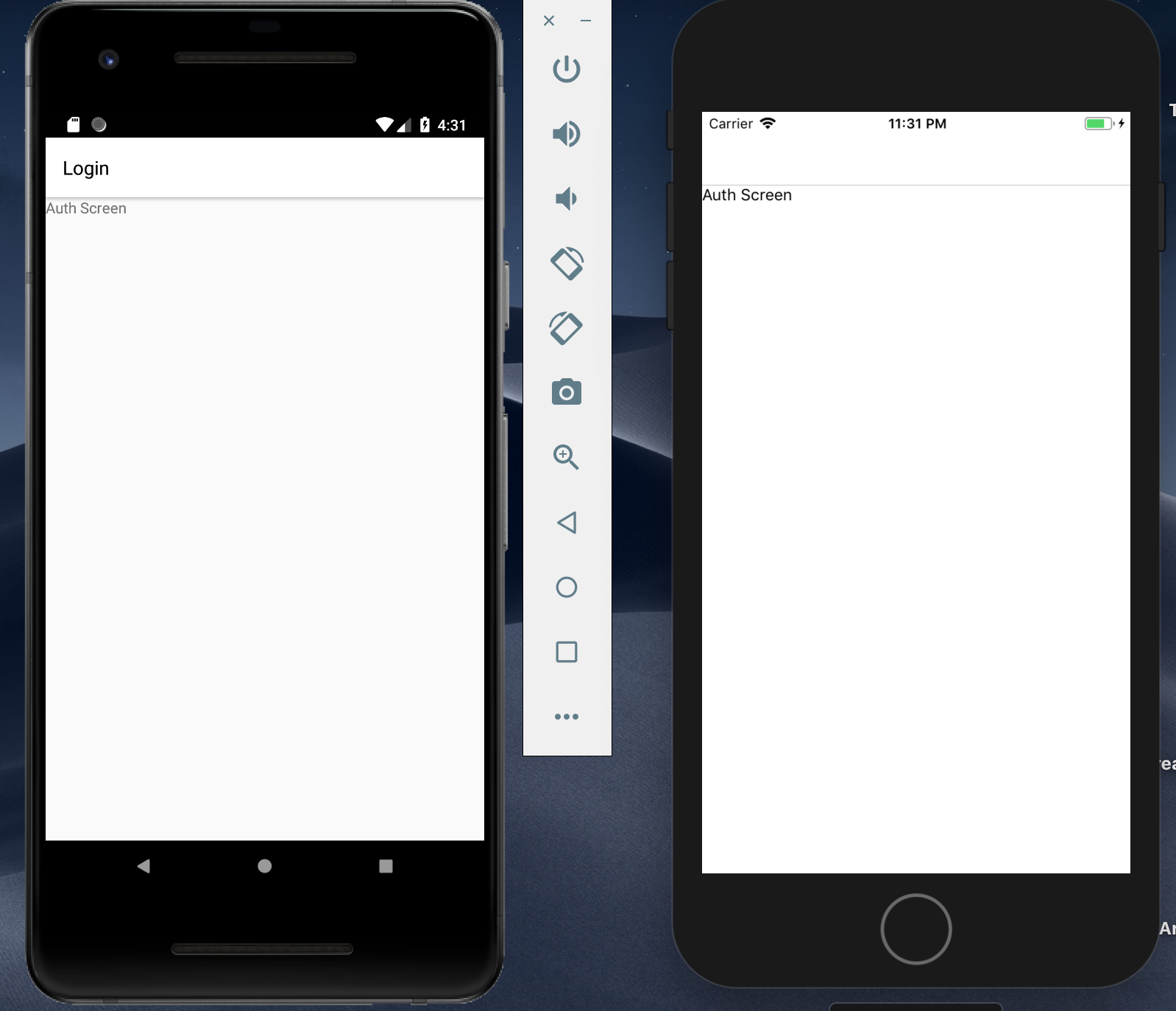
IOS topbar is not rendering text at all while Android's topbar title is. The phone on the right is the Iphone 8 SImulator while the phone on the left is the Google Pixel 2.
Steps to Reproduce / Code Snippets / Screenshots
import { Navigation } from "react-native-navigation";
import AuthScreen from './src/screens/Auth';
Navigation.registerComponent('AuthScreen', () => AuthScreen);

Navigation.events().registerAppLaunchedListener(() => {
  Navigation.setRoot({
    root: {
      stack: {
        children: [{
          component: {
            name: 'AuthScreen',
          }
        }],
        options: {
          topBar: {
            title: {
              text: 'Login'
            }
          }
        }
      }
    }
  });
});
Environment
"react-native": "0.58.5",
- React Native Navigation version: ^2.12.0
- React Native version: 0.58.5
- Platform(s) (iOS, Android, or both?): IOS
- Device info (Simulator/Device? OS version? Debug/Release?): Iphone 8 Simulator
 frederickalcantara
All 2 comments
Hello. Please try to replace topBar options from stack to component. I thinks it should be something like this:
Navigation.events().registerAppLaunchedListener(() => {
  Navigation.setRoot({
    root: {
      stack: {
        children: [{
          component: {
            name: 'AuthScreen',
            options: {
              topBar: {
                title: {
                  text: 'Login'
                }
              }
            }
          }
        }]
      }
    }
  });
});
 RoTTex
on 22 Feb 2019
RoTTex
on 22 Feb 2019
👍3
This solved my problem, this should be noted in the docs if it hasn't already.
frederickalcantara
on 24 Feb 2019
Was this page helpful?
0 / 5 - 0 ratings
Related issues
 switchtrue
·
3Comments
switchtrue
·
3Comments
 swingywc
·
3Comments
swingywc
·
3Comments
 zhanguangao
·
3Comments
zhanguangao
·
3Comments
 edcs
·
3Comments
edcs
·
3Comments
 viper4595
·
3Comments
viper4595
·
3Comments
Most helpful comment
Hello. Please try to replace topBar options from
stacktocomponent. I thinks it should be something like this: