React-native-navigation: [v2] Centering of TopBar text doesn't update until tabs are switched
Issue Description
I'm trying to center the top bar text of one (out of three) of my tabs. I can do this with the following:
Navigation.mergeOptions(this.props.componentId, {
  topBar: {
    title: {
      alignment: 'center',
      text: <varies in length per render>,
    },
    subtitle: {
      alignment: 'center',
      text: 'Subtitle',
    },
  },
});
But, there are two problems with this:
Firstly, on the initial boot, the text is still left-aligned.
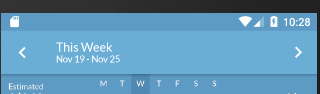
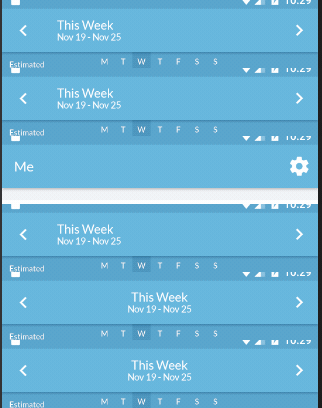
Changing tabs, then coming back, recenters the text:
Secondly, when the title changes, it sometimes becomes offset from the actual center, and only fixes when tabs are changed:
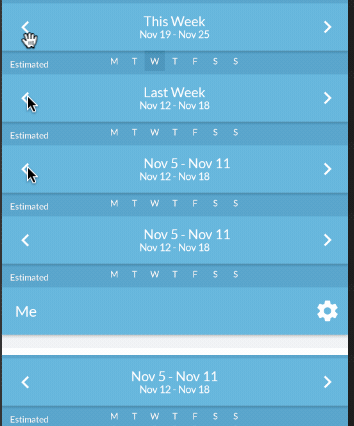
Before switching tabs:
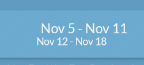
After:
Is there any way to have the text centered from the start (I am calling Navigation.mergeOptions in componentDidMount), and also have it recenter itself if the length changes?
This worked in v1, so I'm surprised it's so difficult in v2.
Steps to Reproduce / Code Snippets / Screenshots
See above
Environment
- React Native Navigation version: 2.1.3
- React Native version: 0.57.3
- Platform(s) (iOS, Android, or both?): Android
- Device info (Simulator/Device? OS version? Debug/Release?): Emulator Android 7
 deecewan
All 7 comments
Have you tried to put the code in static options() instead of Navigation.mergeOptions()?
 minhloi
on 21 Nov 2018
minhloi
on 21 Nov 2018
I have tried there, too. Exact same problem.
Let me confirm that that is the case, tho.
Edit: Yup, same behavior.
deecewan
on 21 Nov 2018
I'm using setDefaultOptions and it works fine. Every screen has a title in the center.
Navigation.setDefaultOptions({
    topBar: {
      title: {
        alignment: "center"
      }
    }
})
This issue has been automatically marked as stale because it has not had recent activity. It will be closed if no further activity occurs.
If you believe the issue is still relevant, please test on the latest Detox and report back. Thank you for your contributions.
![stale[bot] picture](https://avatars.githubusercontent.com/in/1724?v=4&s=40) stale[bot]
on 26 Dec 2018
stale[bot]
on 26 Dec 2018
The issue has been closed for inactivity.
stale[bot]
on 4 Jan 2019
This is still an issue!
 samiede
on 21 May 2019
samiede
on 21 May 2019
@samiede Which version of RNN are you observing this on?
 guyca
on 21 May 2019
guyca
on 21 May 2019
Related issues
 yayanartha
·
3Comments
yayanartha
·
3Comments
 swingywc
·
3Comments
swingywc
·
3Comments
 ghost
·
3Comments
ghost
·
3Comments
 tmaly1980
·
3Comments
tmaly1980
·
3Comments
 nbolender
·
3Comments
nbolender
·
3Comments
Most helpful comment
I'm using setDefaultOptions and it works fine. Every screen has a title in the center.