React-native-navigation: Task :react-native-navigation:compileReactNative56DebugJavaWithJavac FAILED. Problems with Android Emulator. Wix RNN React Native Navigation
I am trying to set up a new project from scratch.
    "react-native": "^0.57.3",
    "react-native-navigation": "^2.0.2608"
Tried/Integrated the following:-
missingDimensionStrategy "RNN.reactNativeVersion", "reactNative56"-
2.
subprojects { subproject ->
  afterEvaluate {
     if ((subproject.plugins.hasPlugin('android') || subproject.plugins.hasPlugin('android-library'))) {
        android {
          variantFilter { variant ->
             def names = variant.flavors*.name
                if (names.contains("reactNative51") || names.contains("reactNative55")) {
                  setIgnore(true)
                  }}}}}}
-
3.
configurations.all {
  resolutionStrategy {
    eachDependency { DependencyResolveDetails details ->
       if (details.requested.group == 'com.facebook.react' && details.requested.name == 'react-native') {
         details.useVersion "0.57.3" // Your real React Native version here
       }}}}
chmod 755 android/gradlewreact-native run-android --variant debug
Everything boils down to these 2 errors on Android:-
npm run android- Task :react-native-navigation:compileReactNative56DebugJavaWithJavac FAILEDreact-native run-android- Could not install the app on the device, read the error above for details.
Make sure you have an Android emulator running or a device connected and have
set up your Android development environment
If I directly run the emulator from Android studio, everything works well.
Downgrading to react-native 0.56.0 throws this error
On iOS:-
Failed to load bundle(http://localhost:8081/index.bundle?platform=ios&dev=true&minify=false) with error:(/Users/"system-name"/"project-name"/index.js: .overrides is not allowed in preset options (null))
On Android:-
Task :app:transformDexArchiveWithExternalLibsDexMergerForDebug FAILED
D8: Program type already present: android.support.design.widget.CoordinatorLayout$Behavior
I would prefer a solution that won't require downgrading from react-native 0.57.3.
Any ideas?
_Originally posted by @PurnimaNaik in https://github.com/wix/react-native-navigation/issue_comments#issuecomment-432299031_
 PurnimaNaik
All 15 comments
+1 I went through these exact same steps and am seeing the same issues.
 varunrau
on 24 Oct 2018
varunrau
on 24 Oct 2018
I can make react-native run android works with specify reactNative57 on step 1.
But failed to run ./gradlew assembleRelease
 jp928
on 24 Oct 2018
jp928
on 24 Oct 2018
We use the issue tracker exclusively for bug reports and feature requests. This issue appears to be a general usage or support question. Instead, please ask a question on Stack Overflow with the react-native-navigation tag.
![support[bot] picture](https://avatars.githubusercontent.com/in/6408?v=4&s=40) support[bot]
on 24 Oct 2018
support[bot]
on 24 Oct 2018
Hey,
you've already specified the flavor in app/build.gradle - you can compile using ./gradlew app:assembleDebug
 guyca
on 24 Oct 2018
guyca
on 24 Oct 2018
Had to move to React Native 0.56.0
I ran the following in the project directory:-
brew install gradle
gradle wrapper
./gradlew build
Added implementation'com.android.support:design:27.1.0 to app level build.gradle
If you don't, you will get this error-
> Task :app:transformDexArchiveWithExternalLibsDexMergerForDebug FAILED
D8: Program type already present: android.support.design.widget.CoordinatorLayout$Behavior
Then, ran the following in the android directory inside my project:- ./gradlew app:assembleDebug
If you don't run the command in the app directory, you will get this error:-
Project 'app' not found in root project 'Project-name'.
It builds successfully.
Then I ran npm run android and react-native run-android on separate occasions to test both commands. The build is successful using both commands.
react-native run-android pulls up the app on emulator which is nice since npm run android doesn't do that.
Now, I have a new problem- The development server returned response error code: 500
Apparently this is a problem with RN v 0.56 so to solve the error, you need to downgrade to 55.4 or 55.3. But if I do that, then I am back to square one with this error-
Execution failed for task ':react-native-navigation:compileReactNative56DebugJavaWithJavac'.
Even if I follow all the steps listed above that helped me get rid of the issue with 0.56, it does not help with 0.55^. Not sure if it has anything to do with RNN. From what I can tell it has to do with the metro-react-native-babel-preset.
😫No end in sight. If anyone has any leads please let me know!
PurnimaNaik
on 24 Oct 2018
@PurnimaNaik is the The development server returned response error code: 500 related to babel?
I see this error: .overrides is not allowed in preset options (on both ios and android)
varunrau
on 25 Oct 2018
@PurnimaNaik
It is painful to keep update RNN with latest RN.
However, I had successfully upgrade since 0.54. The approches are varied from differnet versions.
Please specify a RN version you’d like to go with. So we can help. Otherwise, try pure javascript solution like react-navigation which would be more convenient if you wish to switch between RN versions.
jp928
on 25 Oct 2018
@varunrau Yes, I faced both those error messages, you have to download the right versions of babel...I tried so many that I lost track of their names..but this is what my babel.rc file looks like at this moment. You will also have to tweak the RN versions to be compatible with babel too.
{
    "presets": [
        "@babel/preset-env",
        "@babel/preset-react"
    ]
}
But getting over this bump did'nt mean a smooth ride after, as I mentioned in my last comment, I got stuck again. So it isn't building as it should.
PurnimaNaik
on 25 Oct 2018
@jp928 Thank you for showing interest! RN 0.56 would be great. I am looking into react-navigation. Will try it out and see how smooth it is in terms of integration, implementation and visuals too.
PurnimaNaik
on 25 Oct 2018
@jp928 Right now this is where I am stuck-
My App.js looks like this:-
/**
 * Sample React Native App
 * https://github.com/facebook/react-native
 *
 * @format
 * @flow
 */

import React, {Component} from 'react';
import {Platform, StyleSheet, Text, View} from 'react-native';

const instructions = Platform.select({
  ios: 'Press Cmd+R to reload,\n' + 'Cmd+D or shake for dev menu',
  android:
    'Double tap R on your keyboard to reload,\n' +
    'Shake or press menu button for dev menu',
});

type Props = {};
export default class App extends Component<Props> {
  render() {
    return (
      <View style={styles.container}>
        <Text style={styles.welcome}>Hello Race!</Text>
      </View>
    );
  }
}

const styles = StyleSheet.create({
  container: {
    flex: 1,
    justifyContent: 'center',
    alignItems: 'center',
    backgroundColor: '#F5FCFF',
  },
  welcome: {
    fontSize: 20,
    textAlign: 'center',
    margin: 10,
  },
  instructions: {
    textAlign: 'center',
    color: '#333333',
    marginBottom: 5,
  },
});
This is the error I am getting:-
The development server returned response error code: 500
URL: http://10.0.2.2:8081/index.delta?platform=android&dev=true&minify=false
Body:
{"type":"TransformError","lineNumber":19,"column":5,"filename":"/Users/"System-name"/"Project-name"/App.js","errors":[{"description":"SyntaxError: /Users/"System-name"/"Project-name"/App.js: Unexpected token, expected \";\" (19:5)\n\n\u001b[0m \u001b[90m 17 | \u001b[39m})\u001b[33m;\u001b[39m\u001b[0m\n\u001b[0m \u001b[90m 18 | \u001b[39m\u001b[0m\n\u001b[0m\u001b[31m\u001b[1m>\u001b[22m\u001b[39m\u001b[90m 19 | \u001b[39mtype \u001b[33mProps\u001b[39m \u001b[33m=\u001b[39m {}\u001b[33m;\u001b[39m\u001b[0m\n\u001b[0m \u001b[90m | \u001b[39m \u001b[31m\u001b[1m^\u001b[22m\u001b[39m\u001b[0m\n\u001b[0m \u001b[90m 20 | \u001b[39m\u001b[36mexport\u001b[39m \u001b[36mdefault\u001b[39m \u001b[36mclass\u001b[39m. . . .
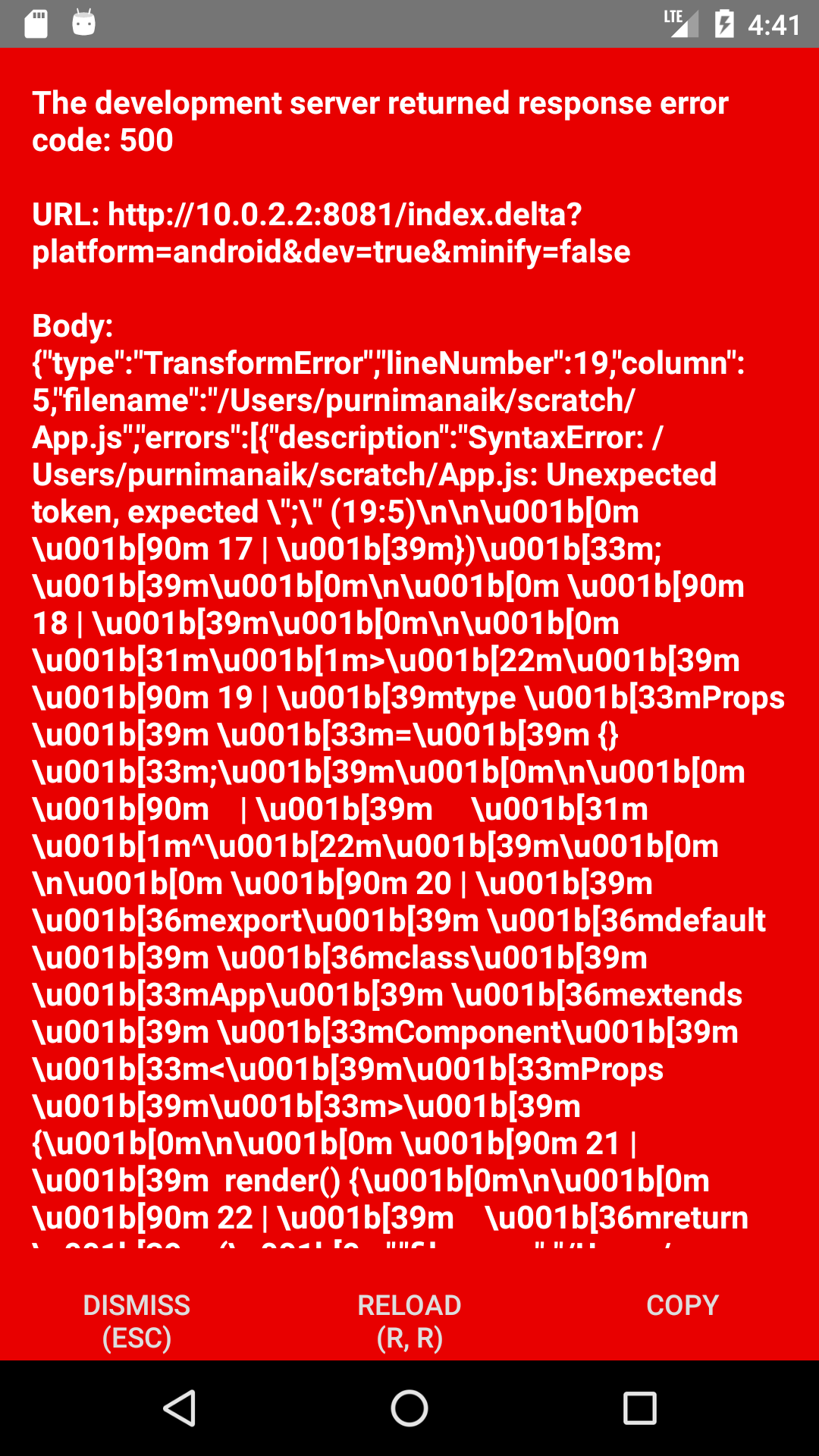
I didn't edit the App.js other than that one line -
What syntax error is it pointing to? I don't think there is any syntax error in App.js.

PurnimaNaik
on 25 Oct 2018
@PurnimaNaik
if you want to use RN0.56 then please check
- in package.json in devDependency you have: "babel-preset-react-native": "^5"
- in babel.rc preset: 'babel-preset-react-native'
- do rm -rf node_modules and yarn or npm install
jp928
on 26 Oct 2018
RN 0.57 is bit annoying for me, it breaks all my jest tests so I migrated to .bablerc.js
and I have
let presets = ["module:metro-react-native-babel-preset"];
const plugins = ["jest-hoist"];

if (process.env['ENV'] === 'test') {
  presets = ["@babel/preset-flow", "@babel/react", "react-native"];
}

module.exports = { presets, plugins };
Also, you can use react-native init [project-name] --version '0.5x' to compare the .bablerc and package.json.
jp928
on 26 Oct 2018
@jp928 Thank you Jing. I will try it out soon. For now I am running with react-navigation as I am short on time.
PurnimaNaik
on 26 Oct 2018
This thread solves the problem of building RNN v2 in RN 0.57 projects:
https://github.com/wix/react-native-navigation/issues/3419#issue-334820245
 alexsmartens
on 2 Nov 2018
alexsmartens
on 2 Nov 2018
Related issues
 yayanartha
·
3Comments
yayanartha
·
3Comments
 tmaly1980
·
3Comments
tmaly1980
·
3Comments
 no23reason
·
3Comments
no23reason
·
3Comments
 viper4595
·
3Comments
viper4595
·
3Comments
 bjacog
·
3Comments
bjacog
·
3Comments
Most helpful comment
+1 I went through these exact same steps and am seeing the same issues.