React-native-navigation: Icons not show on Android apk release
Icons not show on Android apk release
I'm trying to compile an apk to upload to Google Store but when I compile an apk to upload it doesn't show the icons in BottomTabs.
Steps to Reproduce
This is the init TabBar:
import { Provider } from 'react-redux';
import { Navigation } from 'react-native-navigation';
import { registerScreens } from './screens';
import configureStore from './store/configureStore';

const store = configureStore();

registerScreens(store, Provider);

// In android change tabStyle to appStyle
const appStyle = {
    navBarBackgroundColor: '#FFFFFF',
    navBarTextColor: '#333333',
    navBarButtonColor: '#333333',
    tabBarBackgroundColor: '#FFFFFF',
    tabBarButtonColor: '#333333',
    tabBarSelectedButtonColor: '#3498DB',
    statusBarColor: '#808080',
    tabFontFamily: 'BioRhyme-Bold',
    forceTitlesDisplay: true,
};

Navigation.startTabBasedApp({
    tabs: [
        {
            label: 'Home',
            screen: 'smile-pet.Home',
            icon: require('./images/icons/home.png'),
            title: 'Smily Pet'
        },
        {
            label: 'Cart',
            screen: 'smile-pet.CartList',
            icon: require('./images/icons/cart.png'),
            title: 'My cart'
        },
        {
            label: 'Bookings',
            screen: 'smile-pet.MyBookings',
            icon: require('./images/icons/bookmark.png'),
            title: 'My bookings'
        },
        {
            label: 'Payments',
            screen: 'smile-pet.MyPayments',
            icon: require('./images/icons/credit-card.png'),
            title: 'My payments'
        },
        {
            label: 'Account',
            screen: 'smile-pet.Account',
            icon: require('./images/icons/account.png'),
            title: 'My profile'
        }
    ],
    appStyle
});
I have the images :
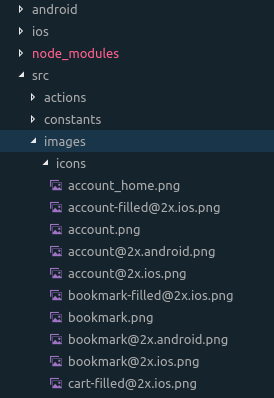
But when I installed the apk that are into android/app/build/outputs/apk/debug/app-debug.apk this not shows the icons.

Environment
- React Native Navigation version: 1.1.365
- React Native version: 0.50.3
- Platform(s) (iOS, Android, or both?): Android
- Device info (Simulator/Device? OS version? Debug/Release?): Debug/Release apk
 jgtorrejon
All 4 comments
I got the same issue with RN 0.55.4 and React Native Navigation 1.1.471.
On iOS everything is working find, on Android just on Emulator - Release Builds on Devices doesn't have TabBar Icons or custom TopBar Icons.
 nerdchandise
on 16 Jun 2018
nerdchandise
on 16 Jun 2018
@nerdchandise
same versions, TabBar Icons not show on my android device. I found android-buildTypes-debuggable setting may have bad effect, when debuggable=true( you may set it, or just the gradle/ide's default value for the target buildType ), the icons gone.
 wengz
on 19 Jun 2018
wengz
on 19 Jun 2018
@wengz
I ended up with settings up a whole new project, installing all dependencies new and coping my JS files. It do not see any differences in my settings or gradle files, but the icons are showing up now.
It was a little unsatisfactory, but after a sleepless night, I gave up finding a solution.
nerdchandise
on 19 Jun 2018
I fixed it using react-native-vector-icons, here you have an example.
app example with vector icons
jgtorrejon
on 29 Jun 2018
Related issues
 tmaly1980
·
3Comments
tmaly1980
·
3Comments
 switchtrue
·
3Comments
switchtrue
·
3Comments
 Chipped1
·
3Comments
Chipped1
·
3Comments
 nbolender
·
3Comments
nbolender
·
3Comments
 viper4595
·
3Comments
viper4595
·
3Comments
Most helpful comment
@nerdchandise
same versions, TabBar Icons not show on my android device. I found android-buildTypes-debuggable setting may have bad effect, when debuggable=true( you may set it, or just the gradle/ide's default value for the target buildType ), the icons gone.