React-native-navigation: [V2] Overlay displaying over modal
Issue Description
When dispatching a show modal action, the overlay would block the modal. Not sure if this is by design or not, I think the modal should be on top of everything include the overlay.
[ENTER DESCRIPTION HERE - Please make sure to use the current [naming conventions]
Overlay persist over modal.
Steps to Reproduce / Code Snippets / Screenshots
Call Navigation.showOverlay({ component: { id: 'componentId1', name: 'overlayComponent', options: { overlay: { interceptTouchOutside: false } } } }) to init the overlay, then call Navigation.showModal({
stack: {
children: [{
component: {
name: 'example.ModalScreen',
passProps: {
text: 'stack with one child'
},
}
}]
}
});
the overlay is still on top of the modal.
Environment
- React Native Navigation version: 2.0.2241
- React Native version: 0.51.0
- Platform(s) (iOS, Android, or both?): iOS and Android
- Device info (Simulator/Device? OS version? Debug/Release?): emulator
 DevArenaCN
All 6 comments
Hey, Overlay is displayed over modals by design.
Overlay can be used to show persistent UI elements, Alerts etc and there for has to be on top of other elements.
If you wish to hide an Overlay when modals are displayed, you can listen to modal displayed events and hide the overlay accordingly:
Navigation.events().onNavigationCommand((name, params) => {
  if (name === 'showModal') {
    // hide overlay
  }
});
 guyca
on 24 Apr 2018
guyca
on 24 Apr 2018
Overlay also displays over system dialogs like alerts:
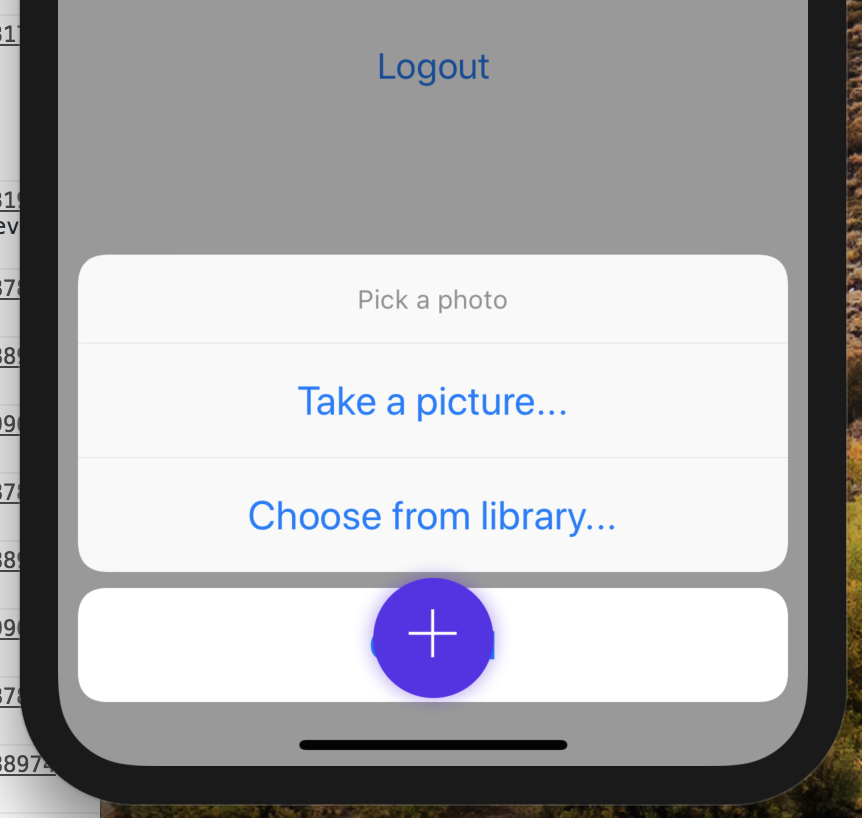
Is it possible to change it somehow?
 pie6k
on 23 Jul 2018
pie6k
on 23 Jul 2018
Overlay still displays over system ui like actionsheet
pie6k
on 28 Oct 2018
I think https://github.com/wix/react-native-navigation/pull/4241 will address this.
@yogevbd lets prioritise this issue
guyca
on 28 Oct 2018
Can't wait for the fix to be merged :) +1
 VicFrolov
on 31 Oct 2018
VicFrolov
on 31 Oct 2018
FYI: The suggestion above by @guyca is no longer valid in RNN v2. The correct way is :
const commandListener = Navigation.events().registerCommandListener((name, params) => {
...
});
as documented : https://wix.github.io/react-native-navigation/#/docs/events?id=registercommandlistener
 calendee
on 15 May 2019
calendee
on 15 May 2019
Related issues
 yedidyak
·
3Comments
yedidyak
·
3Comments
 ghost
·
3Comments
ghost
·
3Comments
 henrikra
·
3Comments
henrikra
·
3Comments
 bdrobinson
·
3Comments
bdrobinson
·
3Comments
 bjacog
·
3Comments
bjacog
·
3Comments