React-native-modal-datetime-picker: TypeError: _reactNative.NativeModules.RNDatePickerAndroid.dismiss is not a function
Environment
System:
    OS: Linux 5.8 Manjaro Linux
    CPU: (8) x64 Intel(R) Core(TM) i7-6700 CPU @ 3.40GHz
    Memory: 1.30 GB / 15.56 GB
    Shell: 5.8 - /bin/zsh
  Binaries:
    Node: 15.0.1 - /usr/bin/node
    Yarn: Not Found
    npm: 6.14.9 - /usr/bin/npm
    Watchman: Not Found
  SDKs:
    Android SDK: Not Found
  IDEs:
    Android Studio: Not Found
  Languages:
    Java: 14.0.2 - /usr/bin/javac
    Python: 3.8.6 - /usr/bin/python
  npmPackages:
    @react-native-community/cli: Not Found
    react: 16.13.1 => 16.13.1
    react-native: https://github.com/expo/react-native/archive/sdk-39.0.3.tar.gz => 0.63.2
  npmGlobalPackages:
    *react-native*: Not Found
Platforms
Android using Expo.
Versions
- Android: Expo SDK 39 support
- iOS: Expo SDK 39 support
- react-native-modal-datetime-picker: 9.1.0
- react-native-community/datetimepicker: 3.0.0 (locked by Expo)
- react-native: Expo sdk 39.0.3
- react: 16.13.1
Description
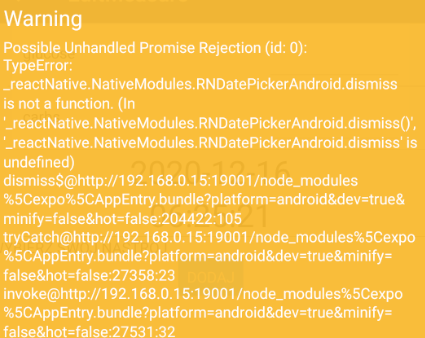
The following warning is thrown each time I select the date then the time:
[Unhandled promise rejection: TypeError: _reactNative.NativeModules.RNDatePickerAndroid.dismiss is not a function. (In '_reactNative.NativeModules.RNDatePickerAndroid.dismiss()', '_reactNative.NativeModules.RNDatePickerAndroid.dismiss' is undefined)]
Reproducible Demo
I use your component inside a re-usable input component:
import React, { ReactElement, useState } from 'react';
import DateTimePickerModal, { ReactNativeModalDateTimePickerProps } from 'react-native-modal-datetime-picker';
import { formatter } from '@kidways/typescript';
import InputWrapper, { InputWrapperProps } from './InputWrapper';
import InputValue from './InputValue';

interface Props extends Pick<ReactNativeModalDateTimePickerProps, 'mode'>, InputWrapperProps {
  value?: Date;
  defaultValue?: Date;
  label: string;
  theme?: 'primary' | 'secondary';
  onChange: (date: Date) => void;
  // TODO: Proper extends of @react-native-community/datetimepicker
  minimumDate?: Date;
  maximumDate?: Date;
}

const InputDateTime = ({
  theme, label, onChange, value, defaultValue, mode, help, error, ...props
}: Props): ReactElement => {
  const [show, setShow] = useState(false);

  const handleConfirm = (selectedDate: Date): void => {
    setShow(false);
    onChange(selectedDate);
  };

  const handleCancel = (): void => {
    setShow(false);
  };

  const formatDate = (date: Date): string => {
    switch (mode) {
      case 'date':
        return formatter.datetime.date(date);
      case 'time':
        return formatter.datetime.time(date);
      case 'datetime':
        return formatter.datetime.calendar(date, true);
      default:
        return 'Invalid date format.';
    }
  };

  return (
    <InputWrapper
      label={label}
      value={value}
      focus={show}
      onPress={() => setShow(true)}
      help={help}
      error={error}
    >
      {value && <InputValue value={formatDate(value)} />}
      <DateTimePickerModal
        isVisible={show}
        is24Hour
        display="default"
        isDarkModeEnabled={false}
        onConfirm={handleConfirm}
        onCancel={handleCancel}
        date={value ?? defaultValue ?? new Date()}
        mode={mode}
        locale="fr-FR"
        headerTextIOS="Choisissez une date"
        confirmTextIOS="Confirmer"
        cancelTextIOS="Annuler"
        {...props}
      />
    </InputWrapper>
  );
};

export default InputDateTime;
I'm sure I did not have this error before, so I suspect it happens after an update. Keep investigating.
We may suspect an issue with the react-native-community/datetimepicker, however I am not using it directly. Maybe the required dependency versions has to be updated?
 soullivaneuh
All 28 comments
Hm, does the example work for you?
This does seem more of a native datetimepicker issue though because we're not invoking dismiss anywhere here :/
 mmazzarolo
on 13 Dec 2020
mmazzarolo
on 13 Dec 2020
I have the same issue when cancel or ok are pressed.
 paulsizer
on 15 Dec 2020
paulsizer
on 15 Dec 2020
Hm, does the example work for you?
This does seem more of a native datetimepicker issue though because we're not invoking dismiss anywhere here :/
mmazzarolo
on 15 Dec 2020
i have the same issue
 godoffuture
on 16 Dec 2020
godoffuture
on 16 Dec 2020
Yeah, I have the same issue too and it has nothing to do with this library but with the library that this library is dependent on:
https://github.com/react-native-datetimepicker/datetimepicker
I attempted to use the library from the link provided and got that very same error.
 SiriuslySirius
on 16 Dec 2020
SiriuslySirius
on 16 Dec 2020
I used to have the same issue when using the following library versions:
expo: 40.0.0
react-native-community/datetimepicker: 3.0.8
react-native-modal-datetime-picker: 9.1.0
However, after I downgraded the react-native-community/datetimepicker verrsion to 3.0.4, the error messages disappeared.
 hans-permana
on 16 Dec 2020
hans-permana
on 16 Dec 2020
However, after I downgraded the react-native-community/datetimepicker verrsion to 3.0.4, the error messages disappeared.
I tried that and still get that warning. :(
SiriuslySirius
on 16 Dec 2020
mine too is not working, i have tried to use version 2.4.0, 2.6.5, 3.0.4 and 3.0.8 none of them worked for me,
the only difference is in version 2.4.0 my app does not restart and it throws
godoffuture
on 16 Dec 2020
which RN version are you guys using? @SiriuslySirius @godoffuture
hans-permana
on 16 Dec 2020
i am using 0.63.4
godoffuture
on 16 Dec 2020
yeah same mine is also 0.63.4 as part of expo 40.0.0. Is it possible that you may still be using v3.0.8 due to this information still being stored in the yarn.lock or package-lock.json?
hans-permana
on 16 Dec 2020
I'm currently using version 0.63.2 of RN and Expo 39.0.5. @hans-permana
SiriuslySirius
on 16 Dec 2020
@SiriuslySirius @hans-permana So i have updated my expo version from 38.0.0 to 40.0.0 and it worked, thanks guys :)
godoffuture
on 16 Dec 2020
@hans-permana @godoffuture Can confirm updating Expo to 40.0.0 resolved the problem.
@soullivaneuh Hope it works for you too.
SiriuslySirius
on 17 Dec 2020
Thanks @SiriuslySirius .
mmazzarolo
on 18 Dec 2020
It didn't working even I updated the expo version from 38 to 40
 Rooban19
on 6 Jan 2021
Rooban19
on 6 Jan 2021
I has the 4.0.17 version of my expo and keep sending the warning. Anyone find the solution?
 PepeValenzuela98
on 16 Jan 2021
PepeValenzuela98
on 16 Jan 2021
Use expo install and the warning no longer appears
PepeValenzuela98
on 16 Jan 2021
I rebuilt the entire app from scratch, installing everything using expo install (not npm or yarn). I am using expo ~40.0.0 and @react-native-community/datetimepicker 3.0.4. I am still getting this message on for dismiss and onChange when I use DateTimePicker. @PepeValenzula98, can you expand on what you did? What did you have to install with "expo install" before the warning disappeared?
 gjeff
on 18 Jan 2021
gjeff
on 18 Jan 2021
For what it's worth, all I needed to do to resolve the issue was uninstall the package using yarn remove, reinstall it using expo install, and clearing the cache before restarting the expo server using expo start -c.
I'm using Expo v40. No longer receiving the warnings.
 dave-vazquez
on 21 Jan 2021
dave-vazquez
on 21 Jan 2021
That did eventually work. Thank you all.
For others reading this, also make sure that you don't try passing anything into your onChange event. Here is the chunk of my code as an example:
My DatePicker control:
            <DatePicker
            defaultDate={new Date()}
            minimumDate={new Date(2018, 1, 1)}
            maximumDate={new Date(2099, 12, 31)}
            chosenDate={this.state.chosenDate}
            locale={"en"}
            modalTransparent={true}
            animationType={"fade"}
            androidMode={"default"}
            placeHolderText={(new Date()).toLocaleDateString()}
            textStyle={{ color: "grey" }}
            placeHolderTextStyle={{ color: "#d3d3d3" }}
            onChange={this.onChangeMINE}
            disabled={false}
            value={this.state.chosenDate}
            />
My onChange method:
      onChangeMINE (event, selectedDate) {
          console.log("Inside onChangeMINE.  selectedDate=" + selectedDate);
        }
It will fail with the unhandled promise if you say (for example): onChange={this.onChangeMINE()}
gjeff
on 22 Jan 2021
@dave-vazquez @gjeff can you share what package versions you're using of: @react-native-community/datetimepicker and react-native-modal-datetime-picker that are working? Thanks
 iamnader
on 29 Jan 2021
iamnader
on 29 Jan 2021
Hi,
I am not directly using react-native-modal-datetime-picker. I am using the
following versions:
"@react-native-community/datetimepicker": "3.0.4",
"native-base": "^2.15.2",
On Fri, Jan 29, 2021 at 9:40 AM Nader Akhnoukh notifications@github.com
wrote:
@dave-vazquez https://github.com/dave-vazquez @gjeff
https://github.com/gjeff can you share what package versions you're
using of: @react-native-community/datetimepicker and
react-native-modal-datetime-picker that are working? Thanks—
You are receiving this because you were mentioned.
Reply to this email directly, view it on GitHub
https://github.com/mmazzarolo/react-native-modal-datetime-picker/issues/502#issuecomment-769914376,
or unsubscribe
https://github.com/notifications/unsubscribe-auth/ABNGR34SMGZXGWDOSMKH3H3S4LQGTANCNFSM4UYQWSEA
.
gjeff
on 29 Jan 2021
@iamnader
"@react-native-community/datetimepicker": "3.0.4"
not using react-native-modal-datetime-picker
dave-vazquez
on 29 Jan 2021
That did eventually work. Thank you all.
For others reading this, also make sure that you don't try passing anything into your onChange event. Here is the chunk of my code as an example:
My DatePicker control:
            <DatePicker
            defaultDate={new Date()}
            minimumDate={new Date(2018, 1, 1)}
            maximumDate={new Date(2099, 12, 31)}
            chosenDate={this.state.chosenDate}
            locale={"en"}
            modalTransparent={true}
            animationType={"fade"}
            androidMode={"default"}
            placeHolderText={(new Date()).toLocaleDateString()}
            textStyle={{ color: "grey" }}
            placeHolderTextStyle={{ color: "#d3d3d3" }}
            onChange={this.onChangeMINE}
            disabled={false}
            value={this.state.chosenDate}
            />
My onChange method:
      onChangeMINE (event, selectedDate) {
          console.log("Inside onChangeMINE.  selectedDate=" + selectedDate);
        }
It will fail with the unhandled promise if you say (for example):
onChange={this.onChangeMINE()}
Thanks @gjeff . You'r my hero. After days looking to solve (and try using other library for date picker) this is the issue.
 plateena
on 20 Feb 2021
plateena
on 20 Feb 2021
Hm, why were you using onChange? 🤔
Maybe we can show a warning when it's being used (or avoid passing it down at all) &/or update the docs?
mmazzarolo
on 20 Feb 2021
For what it's worth, all I needed to do to resolve the issue was uninstall the package using
yarn remove, reinstall it usingexpo install, and clearing the cache before restarting the expo server usingexpo start -c.I'm using Expo v40. No longer receiving the warnings.
This worked, thanks!
 Reinaldooo
on 3 Mar 2021
Reinaldooo
on 3 Mar 2021
For what it's worth, all I needed to do to resolve the issue was uninstall the package using
yarn remove, reinstall it usingexpo install, and clearing the cache before restarting the expo server usingexpo start -c.I'm using Expo v40. No longer receiving the warnings.
Also works for me!
 GustavoEklund
on 15 Mar 2021
GustavoEklund
on 15 Mar 2021
Related issues
 LutherBaker
·
7Comments
LutherBaker
·
7Comments
 domsterthebot
·
3Comments
domsterthebot
·
3Comments
 mustafaskyer
·
3Comments
mustafaskyer
·
3Comments
 DominicHan
·
4Comments
DominicHan
·
4Comments
 pankajguptablueivory
·
3Comments
pankajguptablueivory
·
3Comments
Most helpful comment
It didn't working even I updated the expo version from 38 to 40