React-native-modal-datetime-picker: v8.0.0 release (@react-native-community pickers support)
👋As you may already know, the react-native date and time pickers have recently been moved to a new @react-native-community repository.
The original react-native date and time pickers (used by react-native-modal-datetime-picker < 8.0.0) are now deprecated.
The v8 of react-native-modal-datetime-picker takes care of this by starting to use the new pickers.
You can install it by following the instructions on this branch README.
Please notice that there are breaking changes and deprecations, and that we did our best to report them trough yellow warning.
We also took a chance to remove react-native-modal in favour of a lighter solution (that provides the same functionality).
Deprecated props:
A few prop names are going to be changed (the old name will still work for some time though).
- titleIOS → headerTextIOS
- customTitleContainerIOS → customHeaderIOS
- onHideAfterConfirm → onHide
- customDatePickerIOS → customPickerIOS
Breaking changes:
The following props are not supported anymore:
cancelTextStyle→ Please usecustomCancelButtonIOSto override the component insteadconfirmTextStyle→ Please usecustomConfirmButtonIOSto override the component insteaddatePickerModeAndroid→ Please use thedisplayprop of@react-native-community/react-native-datetimepickerinsteaddismissOnBackdropPressIOS→ This is now the default behaviour on iOShideTitleContainerIOS→ Please setcustomHeaderIOStonullinsteadneverDisableConfirmIOS→ This behaviour was causing a few issues with the new pickerpickerRefCb→ Not supported by the new pickerreactNativeModalPropsIOS→react-native-modalis not being used anymore
If you tested v8 and it worked well for you please add a 👍 to this post.
Otherwise, if you've noticed an issue, please report it in a comment below.
Thank you! ❤️
 mmazzarolo
All 74 comments
https://registry.npmjs.org/@react-native-community%2freact-native-datetimepicker
{"error":"Not found"}
 Barney4242
on 17 Oct 2019
Barney4242
on 17 Oct 2019
@Barney4242 thank you for reporting, I updated the README: it's @react-native-community/datetimepicker
mmazzarolo
on 17 Oct 2019
Hi, I am having an issue on iOS, the dates do not show up on the picker, the rest of the shape is fine. I thought I may be missing a new style object or something.
Bellow is the component:

<DateTimePickerModal
        isVisible={this.state.hidePicker}
        onConfirm={this.handleDatePicked}
        onCancel={this.hideDatePicker}
        headerTextIOS='EXPIRE DATE'
        date={selectedDateUpper}
        cancelTextStyle={style.cancelTextStyle}
        confirmTextStyle={style.confirmTextStyle}
        titleStyle={style.titleStyle}
        minimumDate={minimumDateUpper}
        maximumDate={maxDateUpper} />
 OshaFoster
on 17 Oct 2019
OshaFoster
on 17 Oct 2019
Hey @OshaFoster !
That issue is caused by the iOS dark mode.
See the README for a fix/workaround and the other related issues:
- #293
- #283
- #294
- #296
mmazzarolo
on 17 Oct 2019
Thanks mmazzarolo, I look through the issues posted. The rest of my app does not support dark mode, I would like to use the picker in light mode only, is there a solution for this, can you point me to it? From what I read it seems like you have to switch it to dark mode to be visible, did I miss something?
Thanks, I am using expo so I don't have access to that appDelegate file, adding "UIUserInterfaceStyle": "Light" to the app.json worked, I just had to do a build. Thanks!
OshaFoster
on 18 Oct 2019
@OshaFoster You can use this solution
mmazzarolo
on 18 Oct 2019
I have issue with android mode={'datetime'} after update to version 8.0.0. It opens time picker twice, so first it shows date picker, after confirm it displays time picker and after confirm it diplays time picker again.
 pani7
on 23 Oct 2019
pani7
on 23 Oct 2019
@pani7 thanks for reporting, mind showing the code for the picker? The issue sounds similar to another one that was reported last month that I wasn't able to reproduce.
mmazzarolo
on 23 Oct 2019
Nothing special, just:
<DateTimePicker
            isVisible={isDatePickerVisible}
            onConfirm={this.handleDatePicked}
            onCancel={this.toggleDatePicker}
            date={moment().toDate()}
            mode={'datetime'}
          />
pani7
on 23 Oct 2019
Also, i suppose on RN 0.62.1 i do not need to link manually, just npm install both packages and then pod install without updating manually podfile and that is it?
Thanks for fast response
pani7
on 23 Oct 2019
Also, i suppose on RN 0.62.1 i do not need to link manually, just npm install both packages and then pod install without updating manually podfile and that is it?
That's correct.
Thanks for reporting the issue, I'll try to investigate a bit more (could you try the example in your own app using datetime to see if it works? it does for me)
mmazzarolo
on 23 Oct 2019
Resolved the issue, for some reason when i was calling 2 asynchronous functions one after other - 1. api call, 2. setState({isDatePickerVisible: false}) -> on click date picker ok, it would dismiss and show again, but when i put api call, as callback to set state it works ok. Strange. On version 7.6.0 version it was working ok. Maybe it is community date picker issue. Anyway thanks for your help
pani7
on 23 Oct 2019
No worries, thanks for reporting back what was causing the issue!
mmazzarolo
on 23 Oct 2019
I just integrated this with my work project via the @next-major tag - all seems fine
Might be nice to have a quick migration guide from v7->v8 (I think it's just the yarn dependencies that change? an add for the new one, and a remove for the modal?)
Nice work!
 mikehardy
on 27 Oct 2019
mikehardy
on 27 Oct 2019
Might be nice to have a quick migration guide from v7->v8 (I think it's just the yarn dependencies that change? an add for the new one, and a remove for the modal?)
Regarding the dependencies, installing the updated version + the new community pickers is enough (the modal was a built-in dependency, so you don't have to explicitly remove it). This means that the update install is the same as a brand-new installation.
There are some deprecations and breaking changes that I included at the top of the post, do you think I should highlight them more? (The top post is already linked in the README.md).
Thanks for the feedback!
mmazzarolo
on 27 Oct 2019
This means that the update install is the same as a brand-new installation.
That explains why I couldn't find any part to remove :-), excellent I'm all set then and the docs seem fine as well then
There are some deprecations and breaking changes that I included at the top of the post, do you think I should highlight them more? (The top post is already linked in the README.md).
No - I thought the call-out for breaking changes was in a good spot and seemed fine to me
Cheers
mikehardy
on 27 Oct 2019
Hey,
Can't figure out this error:
Unhandled promise rejection: TypeError: null is not an object (evaluating '_reactNative.NativeModules.RNDatePickerAndroid.open'
refrence to @react-native-community\datetimepicker liabrary.
installed and linked react-native-modal-datetime-picker and @react-native-community/datetimepicker
what am i doing wrong?
 itaygolbary
on 29 Oct 2019
itaygolbary
on 29 Oct 2019
@itaygolbary does using the datetimepicker alone work?
Also, did you reset your metro server and reinstalled the app after installing the datetimepicker?
mmazzarolo
on 29 Oct 2019
@itaygolbary does using the datetimepicker alone work?
Also, did you reset your metro server and reinstalled the app after installing the datetimepicker?
Tried react-native-modal-datetime-picker alone, although the version was 8.0.1. Do you think I should try v7?
Forgot to mentioned I'm using expo and my android device.
itaygolbary
on 29 Oct 2019
Forgot to mentioned I'm using expo and my android device.
🤔 hm... I guess that's probably what is causing the issue.
I took a quick look at the Expo planning and it looks like the community datetimepicker will be added on SDK36.
The current one seems to be SDK35, so I guess you'll need to use react-native-modal-datetime-picker V7 for now.
Once SDK36 is available, I guess you can move to V8 and skip the community datetimepicker setup since it will be included in Expo (I'll update the docs accordingly). Thanks for reporting!
mmazzarolo
on 29 Oct 2019
Thought it was referring to a different library. Thanks.
itaygolbary
on 29 Oct 2019
Please take a look at line 49 in file DateTimePickerModal.android.js. You should use getDate() instead of getDay(). It returns wrong date when I use datetime mode in android. getDay func to get day of week, no get day of month. @mmazzarolo
 kaisv7n
on 8 Nov 2019
kaisv7n
on 8 Nov 2019
Nice catch @kaisv7n , thanks!
The fix is now available on v8.0.2.
mmazzarolo
on 8 Nov 2019
What should be the correct usage of customCancelButtonIOS and customConfirmButtonIOS? In v7 and the Typescript and PropType definitions it states it should contain a node / JSX.Element, though the code and the documentation state that it should contain a Component.
Though I expect this to be a typing issue, I'd like to verify this before filing a PR.
 thabemmz
on 11 Nov 2019
thabemmz
on 11 Nov 2019
@thabemmz yeah, I think we're just using the wrong terminology somewhere.
You can see from here that they should be React components (classes/functions). They should not be instances of components.
A PR would be great. Thank you!
mmazzarolo
on 11 Nov 2019
@mmazzarolo PR can be found with the link above.
thabemmz
on 11 Nov 2019
merged! thank you.
Published in v8.0.3
mmazzarolo
on 11 Nov 2019
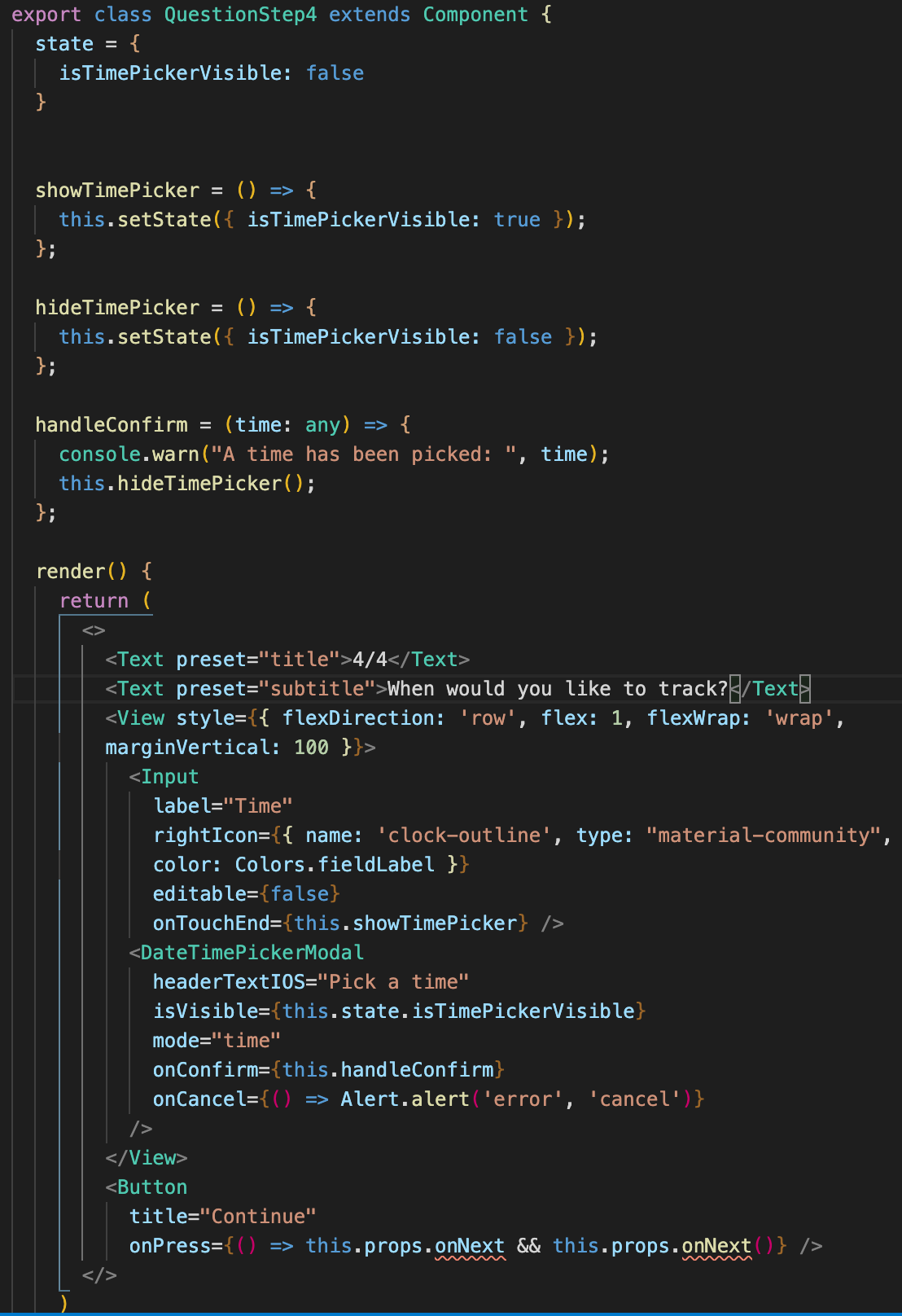
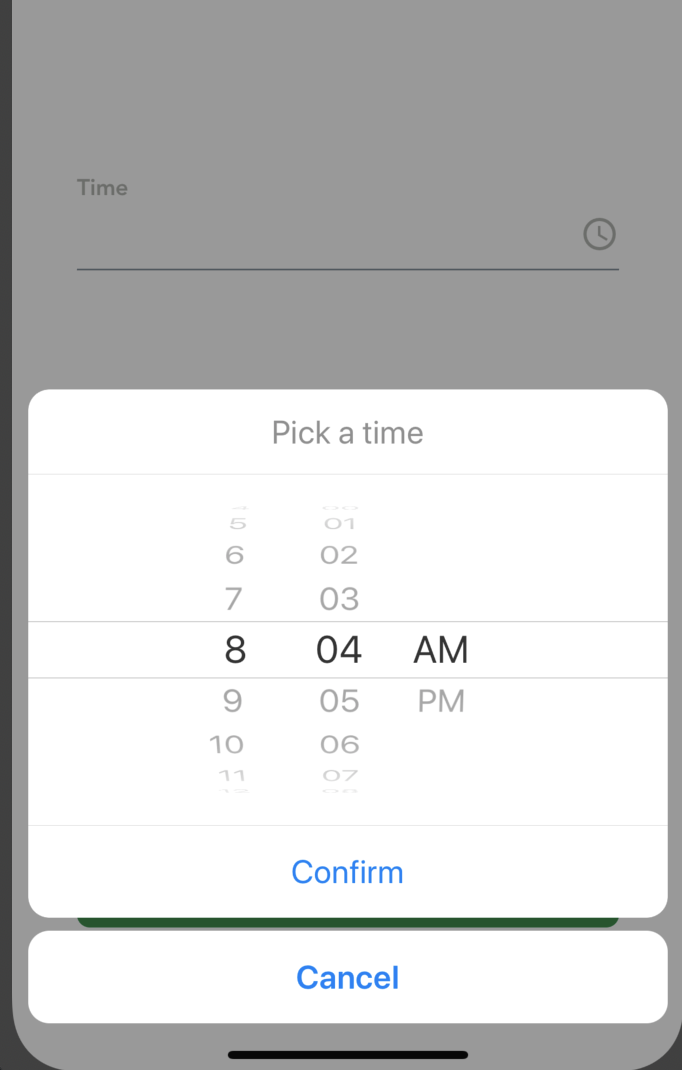
@mmazzarolo The cancel or confirm button cannot be clicked on v.8.0.3
 addingama
on 20 Nov 2019
addingama
on 20 Nov 2019
@addingama strangely it's working for me though when I integrated it I did notice an oddity I couldn't pin down https://github.com/mmazzarolo/react-native-modal-datetime-picker/pull/262#issuecomment-536017873 - I'm definitely using 8.0.3 with success on android+ios dark mode or not
mikehardy
on 20 Nov 2019
👋 @addingma what do you mean by "cannot be pressed"? Is it not showing the Alert?
Does the README example work for you?
Also, could you try refactoring your cancel onCancel by moving the callback in a class method and see if it fixes your issue?
e.g.:
handleCancel = () => {
  Alert.alert('error', 'cancel');
};
I'm not saying this is a valid solution, I'm just trying to understand what is causing the issue, because I can't reproduce it.
mmazzarolo
on 20 Nov 2019
@addingama can you try without Debug JS Remotely, I had the same issue
 chakrihacker
on 20 Nov 2019
chakrihacker
on 20 Nov 2019
@mikehardy FYI I think the issues you had in #262 might be related to https://github.com/react-native-community/react-native-datetimepicker/issues/54
mmazzarolo
on 20 Nov 2019
@mmazzarolo can we add to README stating to hide picker first and do rest of the stuff🤔🤔🤔
chakrihacker
on 20 Nov 2019
@chakrihacker 🤔 you mean as a workaround for the datetimepicker issue that I posted? Can you confirm that the issue is there?
(I just pinged the author of that lib)
mmazzarolo
on 20 Nov 2019
Yes, issue 54 where picker appears twice and it's happening when the mode is time or date also. I tried to reproduce in the fresh app but not able to do it. In my case I am calling prop which triggers render with state visible true and then second render with state visible false
handleConfirm = (date) => {
    if(someBool) {
        this.props.someRandomeProp(date)
    }
    if(anotherBool) {
        this.props.anotherProp(date)
    }
    this.setState({visible: false})

}
My function is something like this with few conditionals
and if I do setState first and then call props the issue will not occur
chakrihacker
on 21 Nov 2019
When i change date and click cancel and then reopen the picker the default value is the last changed one, is there an option to make the picker shows every time the initial value i gave to it?
 ali-hellani
on 22 Nov 2019
ali-hellani
on 22 Nov 2019
When i change date and click cancel and then reopen the picker the default value is the last changed one, is there an option to make the picker shows every time the initial value i gave to it?
iOS/Android? does it also happen if you directly use the community picker? https://github.com/react-native-community/react-native-datetimepicker
mmazzarolo
on 22 Nov 2019
Hi mmazzarolo, thank you for your work.
Just to let you know, i had an issue with the v8, with multiple datepicker.
I have a startTime and endTime, and when the startTime is modified, i have to keep the interval between those dates, and update on the fly the endTime.
My issue was that the endTime was modified in my store, but the component kept the old value when the datepicker modal was opened. I tried many things, and finally i had to revert to the current stable version
 arnaultBreuil
on 5 Dec 2019
arnaultBreuil
on 5 Dec 2019
hey @arnaultBreuil : Android/iOS? Are you able to share a reproducible repo?
mmazzarolo
on 5 Dec 2019
Here are the 2 files concerned. I do not know if it is of any use.
Same issue on both android/ios
arnaultBreuil
on 5 Dec 2019
Hey mmazzarolo, thanks for your amazing work!
After this update I am with an issue on Android where I cant get the confirm and cancel buttons:
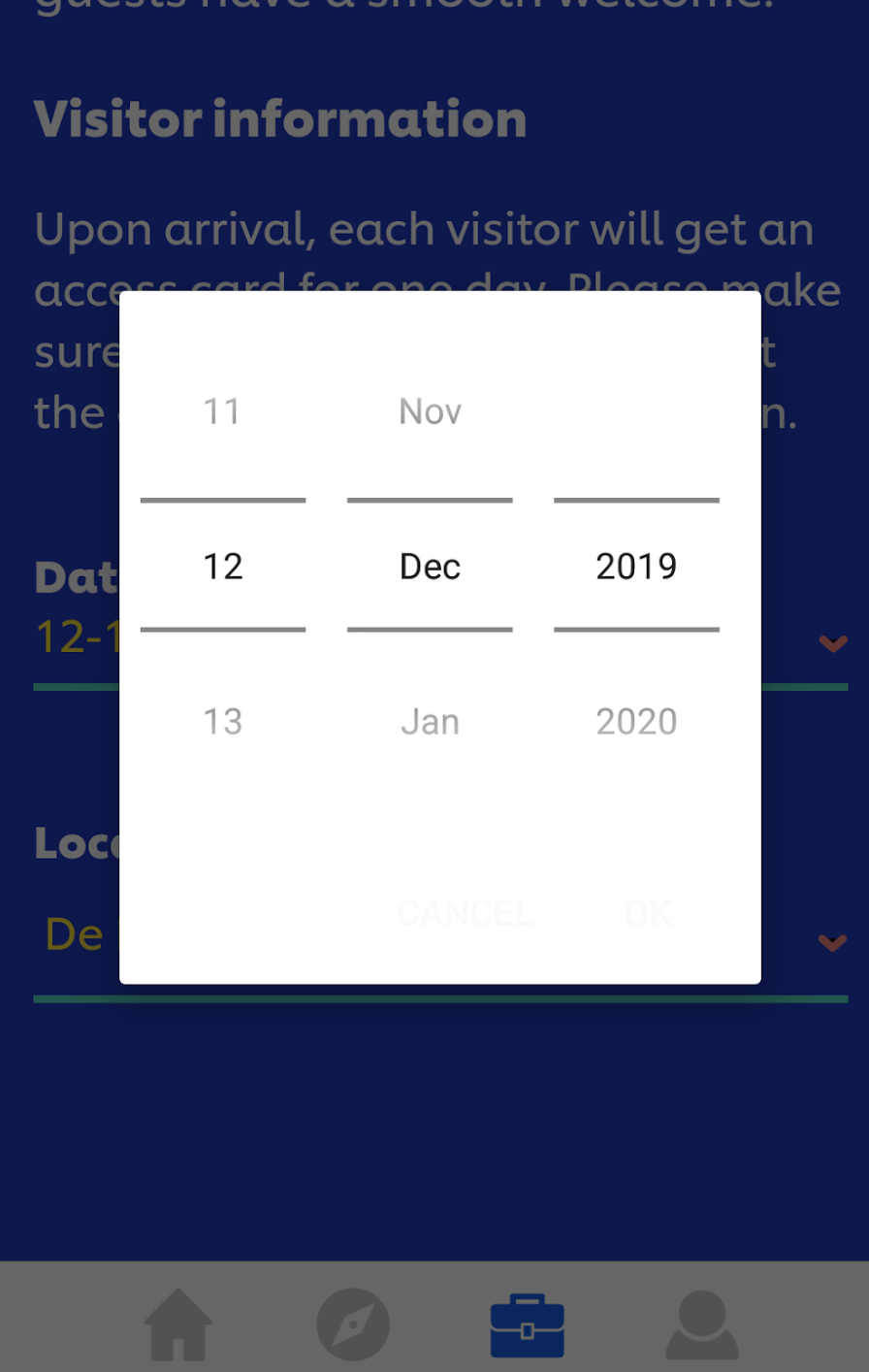
Code:
<InputContainer
            datepicker
            isVisible={isDatePickerVisible}
            mode="date"
            label="Date"
            minimumDate={today}
            onPress={() => this.handleDateTimePicker('date')}
            onConfirm={(newDate) => this.handleDatePicked(newDate, 'date')}
            onCancel={() => this.hideDateTimePicker('date')}
            dateTimeSelect={date}
            style={{ marginRight: 40 }}
          />
(InputContainer tag here results in DateTimePicker tag)
Can you tell me what am I doing wrong?
Thank you,
Mário
 MarioSilvaPrada
on 12 Dec 2019
MarioSilvaPrada
on 12 Dec 2019
@MarioSilvaPrada does it also happen if you directly use the community picker? https://github.com/react-native-community/react-native-datetimepicker
react-native-modal-datetime-picker is not changing the picker behaviour on Android, so it could be a problem of the library used underneath :/
mmazzarolo
on 12 Dec 2019
@mmazzarolo apparently the buttons are there if you look closely. The color of the font is almost the same as the background. Do we have any way to change this color?
MarioSilvaPrada
on 13 Dec 2019
@MarioSilvaPrada react-native-modal-datetime-picker is not changing the style of the picker on Android. Please try using directly the community pickers (https://github.com/react-native-community/react-native-datetimepicker) to see if the issue is persists.
mmazzarolo
on 13 Dec 2019
@mmazzarolo hi! Can you please merge my last PR (export props) into 8.. branch as well?
 Alex-Bond
on 14 Dec 2019
Alex-Bond
on 14 Dec 2019
@Alex-Bond done! Available in v8.0.4
mmazzarolo
on 14 Dec 2019
Expo SDK 36 is not available. Can anyone test it?
mmazzarolo
on 23 Dec 2019
Just a quick update.
I'm on vacation, but @brentvatne and @satya164 had a chance to give v8 on Expo SDK36 (the version which includes the community pickers) a try and it seems to be working fine (thanks 🙏!)
Once I'm back from vacation I'll test and prepare the release:
https://twitter.com/notbrent/status/1210748246148046848
Again, thanks to everyone who contributed, helped and tested it so far 🙌
mmazzarolo
on 28 Dec 2019
@mmazzarolo - might be worth updating the readme to suggest expo install react-native-modal-datetime-picker @react-native-community/datetimepicker when using expo-cli because this will pick the compatible version of datetimepicker :)
 brentvatne
on 30 Dec 2019
brentvatne
on 30 Dec 2019
customConfirmButtonIOS, customCancelButtonIOS, customHeaderIOS and customPickerIOS props are typed incorrectly. React.ComponentType accepts type parameter for Props, which should be specified because it is clearly defined what kind of props are being passed to these components: https://github.com/mmazzarolo/react-native-modal-datetime-picker/blob/next-major/src/DateTimePickerModal.ios.js#L195, https://github.com/mmazzarolo/react-native-modal-datetime-picker/blob/next-major/src/DateTimePickerModal.ios.js#L201, https://github.com/mmazzarolo/react-native-modal-datetime-picker/blob/next-major/src/DateTimePickerModal.ios.js#L187, https://github.com/mmazzarolo/react-native-modal-datetime-picker/blob/next-major/src/DateTimePickerModal.ios.js#L189.
So for example customConfirmButtonIOS should be typed something like React.ComponentType<{ isDisabled: boolean, onPress: (event: GestureResponderEvent) => void, label: string }>. Ideally it could be a separate interface which would be used by our custom components
 simonasdev
on 31 Dec 2019
simonasdev
on 31 Dec 2019
As of now I'm getting Type '({ isDisabled, label, ...props }: ButtonProps) => JSX.Element' is not assignable to type 'FunctionComponent<{}>'. or Type 'FC<ButtonProps>' is not assignable to type 'FunctionComponent<{}>
simonasdev
on 31 Dec 2019
@mmazzarolo - might be worth updating the readme to suggest
expo install react-native-modal-datetime-picker @react-native-community/datetimepickerwhen usingexpo-clibecause this will pick the compatible version of datetimepicker :)
Done, thanks!
@simonasdev thanks for reporting... wanna tackle it with a PR? that would be great!
mmazzarolo
on 1 Jan 2020
sure, the PR should target next-major branch, right?
simonasdev
on 2 Jan 2020
@simonasdev yes! Thank you!
mmazzarolo
on 2 Jan 2020
Just a heads up. @react-native-community/datetimepicker does not seem to support non-AndroidX projects (react-native < 0.60):
https://github.com/react-native-community/react-native-datetimepicker/issues/11
EDIT
@mikehardy starting from 1.0.0 source code RNDatePickerDialogFragment.java imports from androidx java package:
import androidx.fragment.app.DialogFragment;
 eightyfive
on 6 Jan 2020
eightyfive
on 6 Jan 2020
@eightyfive I'd be surprised if that was actually the case, though if you want to stay on support libraries at this point you've got to get savvy with jetifier in reverse mode
https://github.com/mikehardy/jetifier#to-reverse-jetify--convert-node_modules-dependencies-to-support-libraries
mikehardy
on 6 Jan 2020
Awesome work! Works great for me.
Only issue I found is this work around for hiding the title container on IOS:
hideTitleContainerIOS→ Please setcustomHeaderIOStonullinstead
The header is determined with the following lines (165-166 in DateTimePickerModal.ios.js):
const HeaderComponent =
    customTitleContainerIOS || customHeaderIOS || Header;
So setting customHeaderIOS to null does not remove the header as null is a falsy value and the HeaderComponent will resolve to the default Header anyway
 Phillip-Cognativ
on 9 Jan 2020
Phillip-Cognativ
on 9 Jan 2020
the component is no longer working ios, any new updates?
 AnasAlamin
on 15 Jan 2020
AnasAlamin
on 15 Jan 2020
@AnasAlamin what do you mean? Mind adding some more details?
mmazzarolo
on 15 Jan 2020
v8 is not out of beta :) Thanks to anyone who contributed to it!
mmazzarolo
on 16 Jan 2020
@mmazzarolo Sir, I have thoroughly readout all of Issues Created then SomeOne In above have same issue that I'm faCing right now.
I have CorreCtly installed this library in my expo project using
expo install react-native-modal-datetime-picker @react-native-community/datetimepicker v8.1
And i'm using SDK35 right now with
Can't figure out this error:
Unhandled promise rejection: TypeError: null is not an object (evaluating '_reactNative.NativeModules.RNDatePickerAndroid.open'
 zain148
on 23 Jan 2020
zain148
on 23 Jan 2020
@zain148 , react-native-modal-datetime-picker v8 works only on Expo SDK36.
If you can't upgrade you can still use v7 though.
mmazzarolo
on 23 Jan 2020
@mmazzarolo In above bugs someOne asked you to fixed an error in v7 probably it was getDay in DateTimePickerAndroid.js
Is't resolved for v7 for now?
zain148
on 23 Jan 2020
@zain148 please check the release page to see the current state of the release.
Please notice that from now on only > v8 will be actively supported/maintained.
mmazzarolo
on 23 Jan 2020
_In info.plist file add this lines_
<key>UIUserInterfaceStyle</key>
<string>Light</string>
 AKKIDETROJA
on 27 Jan 2020
AKKIDETROJA
on 27 Jan 2020
I have started getting this error now -
1- not using expo, using android sdk emulator
2- "@react-native-community/datetimepicker": "^2.4.0",
"react-native-modal-datetime-picker": "^8.6.0"
3- and the datepicker (mode="date") doesn't show up on button click
Possible Unhandled Promise Rejection (id: 1):
TypeError: null is not an object (evaluating '_reactNative.NativeModules.RNDatePickerAndroid.open')
open$@http://10.0.2.2:8081/index.bundle?platform=android&dev=true&minify=false:153696:96
tryCatch@http://10.0.2.2:8081/index.bundle?platform=android&dev=true&minify=false:26952:23
invoke@http://10.0.2.2:8081/index.bundle?platform=android&dev=true&minify=false:27128:32
tryCatch@http://10.0.2.2:8081/index.bundle?platform=android&dev=true&minify=false:26952:23
invoke@http://10.0.2.2:8081/index.bundle?platform=android&dev=true&minify=false:27028:30
http://10.0.2.2:8081/index.bundle?platform=android&dev=true&minify=false:27058:19
tryCallTwo@http://10.0.2.2:8081/index.bundle?platform=android&dev=true&minify=false:28899:9
doResolve@http://10.0.2.2:8081/index.bundle?platform=android&dev=true&minify=false:29063:25
Promise@http://10.0.2.2:8081/index.bundle?platform=android&dev=true&minify=false:28922:14
callInvokeWithMethodAndArg@http://10.0.2.2:8081/index.bundle?platform=android&dev=true&minify=false:27057:33
enqueue@http://10.0.2.2:8081/index.bundle?platform=android&dev=true&minify=false:27062:157
async@http://10.0.2.2:8081/index.bundle?platform=android&dev=true&minify=false:27079:69
open@http://10.0.2.2:8081/index.bundle?platform=android&dev=true&minify=false:153690:42
RNDateTimePicker@http://10.0.2.2:8081/index.bundle?platform=android&dev=true&minify=false:153532:60
renderWithHooks@http://10.0.2.2:8081/index.bundle?platform=android&dev=true&minify=false:16140:33
mountIndeterminateComponent@http://10.0.2.2:8081/index.bundle?platform=android&dev=true&minify=false:18335:34
beginWork$$1@http://10.0.2.2:8081/index.bundle?platform=android&dev=true&minify=false:23958:31
performUnitOfWork@http://10.0.2.2:8081/index.bundle?platform=android&dev=true&minify=false:23107:30
workLoopSync@http://10.0.2.2:8081/index.bundle?platform=android&dev=true&minify=false:23089:45
performSyncWorkOnRoot@http://10.0.2.2:8081/index.bundle?platform=android&dev=true&minify=false:22784:29
performSyncWorkOnRoot@[native code]
 smriti-spotnana
on 15 May 2020
smriti-spotnana
on 15 May 2020
I have started getting this error now -
1- not using expo, using android sdk emulator
2-"@react-native-community/datetimepicker": "^2.4.0", "react-native-modal-datetime-picker": "^8.6.0"
3- and the datepicker (mode="date") doesn't show up on button clickPossible Unhandled Promise Rejection (id: 1): TypeError: null is not an object (evaluating '_reactNative.NativeModules.RNDatePickerAndroid.open') open$@http://10.0.2.2:8081/index.bundle?platform=android&dev=true&minify=false:153696:96 tryCatch@http://10.0.2.2:8081/index.bundle?platform=android&dev=true&minify=false:26952:23 invoke@http://10.0.2.2:8081/index.bundle?platform=android&dev=true&minify=false:27128:32 tryCatch@http://10.0.2.2:8081/index.bundle?platform=android&dev=true&minify=false:26952:23 invoke@http://10.0.2.2:8081/index.bundle?platform=android&dev=true&minify=false:27028:30 http://10.0.2.2:8081/index.bundle?platform=android&dev=true&minify=false:27058:19 tryCallTwo@http://10.0.2.2:8081/index.bundle?platform=android&dev=true&minify=false:28899:9 doResolve@http://10.0.2.2:8081/index.bundle?platform=android&dev=true&minify=false:29063:25 Promise@http://10.0.2.2:8081/index.bundle?platform=android&dev=true&minify=false:28922:14 callInvokeWithMethodAndArg@http://10.0.2.2:8081/index.bundle?platform=android&dev=true&minify=false:27057:33 enqueue@http://10.0.2.2:8081/index.bundle?platform=android&dev=true&minify=false:27062:157 async@http://10.0.2.2:8081/index.bundle?platform=android&dev=true&minify=false:27079:69 open@http://10.0.2.2:8081/index.bundle?platform=android&dev=true&minify=false:153690:42 RNDateTimePicker@http://10.0.2.2:8081/index.bundle?platform=android&dev=true&minify=false:153532:60 renderWithHooks@http://10.0.2.2:8081/index.bundle?platform=android&dev=true&minify=false:16140:33 mountIndeterminateComponent@http://10.0.2.2:8081/index.bundle?platform=android&dev=true&minify=false:18335:34 beginWork$$1@http://10.0.2.2:8081/index.bundle?platform=android&dev=true&minify=false:23958:31 performUnitOfWork@http://10.0.2.2:8081/index.bundle?platform=android&dev=true&minify=false:23107:30 workLoopSync@http://10.0.2.2:8081/index.bundle?platform=android&dev=true&minify=false:23089:45 performSyncWorkOnRoot@http://10.0.2.2:8081/index.bundle?platform=android&dev=true&minify=false:22784:29 performSyncWorkOnRoot@[native code]
same issue here!
 abdulghanitech
on 5 Aug 2020
abdulghanitech
on 5 Aug 2020
@abdulghanitech Classic failure to correctly link in the native module, could be for a variety of reasons, but is project-specific
mikehardy
on 5 Aug 2020
@abdulghanitech Classic failure to correctly link in the native module, could be for a variety of reasons, but is project-specific
I had to edit the datepicker.android.js file. It was having RNDatePicker.open had to change it to DatePicker.open (similiar method)
I don't remember the exact line numbers but this what I had to do to get it running!
abdulghanitech
on 5 Aug 2020
@abdulghanitech that sounds like a much much more serious issue, if the underlying object names changed - could you open a new issue? Also, you may want to use https://github.com/ds300/patch-package to persist your change locally if you've never seen patch-package before
mikehardy
on 5 Aug 2020
@abdulghanitech that sounds like a much much more serious issue, if the underlying object names changed - could you open a new issue? Also, you may want to use https://github.com/ds300/patch-package to persist your change locally if you've never seen patch-package before
Yes! I've used patch-package for persisting my local changes 🙌🏻.
Sure, I'll open a new issue.
abdulghanitech
on 5 Aug 2020
I had to edit the datepicker.android.js file. It was having RNDatePicker.open had to change it to DatePicker.open (similiar method)
There's no trace of RNDatePicker.open in DateTimePickerModal.android.js 🤔 ... also, datepicker.android.js is the name the file had before v8... so I guess it's something that didn't work correctly during the npm/yarn update of the component, unless you mean the community one
mmazzarolo
on 6 Aug 2020
npx react-native-clean-project and try again is my goto there
mikehardy
on 6 Aug 2020
👋As you may already know, the react-native date and time pickers have recently been moved to a new
@react-native-communityrepository.The original react-native date and time pickers (used by
react-native-modal-datetime-picker < 8.0.0) are now deprecated.
Thev8ofreact-native-modal-datetime-pickertakes care of this by starting to use the new pickers.
You can install it by following the instructions on this branch README.Please notice that there are breaking changes and deprecations, and that we did our best to report them trough yellow warning.
We also took a chance to removereact-native-modalin favour of a lighter solution (that provides the same functionality).Deprecated props:
A few prop names are going to be changed (the old name will still work for some time though).
-titleIOS→headerTextIOS
-customTitleContainerIOS→customHeaderIOS
-onHideAfterConfirm→onHide
-customDatePickerIOS→customPickerIOSBreaking changes:
The following props are not supported anymore:
cancelTextStyle→ Please usecustomCancelButtonIOSto override the component insteadconfirmTextStyle→ Please usecustomConfirmButtonIOSto override the component insteaddatePickerModeAndroid→ Please use thedisplayprop of@react-native-community/react-native-datetimepickerinsteaddismissOnBackdropPressIOS→ This is now the default behaviour on iOShideTitleContainerIOS→ Please setcustomHeaderIOStonullinsteadneverDisableConfirmIOS→ This behaviour was causing a few issues with the new pickerpickerRefCb→ Not supported by the new pickerreactNativeModalPropsIOS→react-native-modalis not being used anymoreIf you tested v8 and it worked well for you please add a 👍 to this post.
Otherwise, if you've noticed an issue, please report it in a comment below.
Thank you! ❤️
Link to the Readme file is broken, can you please update with working one?
 avenyproduction
on 21 Nov 2020
avenyproduction
on 21 Nov 2020
Related issues
 domsterthebot
·
3Comments
domsterthebot
·
3Comments
 gopikasireddy202
·
3Comments
gopikasireddy202
·
3Comments
 DominicHan
·
4Comments
DominicHan
·
4Comments
 pankajguptablueivory
·
3Comments
pankajguptablueivory
·
3Comments
 pixsolution
·
4Comments
pixsolution
·
4Comments
Most helpful comment
Resolved the issue, for some reason when i was calling 2 asynchronous functions one after other - 1. api call, 2. setState({isDatePickerVisible: false}) -> on click date picker ok, it would dismiss and show again, but when i put api call, as callback to set state it works ok. Strange. On version 7.6.0 version it was working ok. Maybe it is community date picker issue. Anyway thanks for your help