React-native-modal-datetime-picker: Add a point (.) to AM and PM and library translation
Hi, I am using this package and it works fine for me, attached captures:
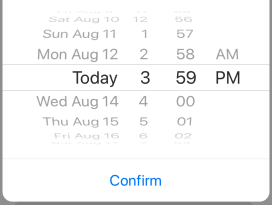

But I need 2 things:
How do I add a point (.) to AM and PM format? I need to display A.M and P.M because the api that I am using in this project is like this and does not accept it without a point.
How to translate the library into Spanish? to display date in spanish
Thanks in advance
regards
 pixsolution
All 4 comments
@pixsolution
- is seams that you're sending the time to the API in a format that it doesn't accept it. You need to format the string you're sending to the API.
- use prop locale="es_ES"
 hetmann
on 14 Aug 2019
hetmann
on 14 Aug 2019
Yup, I agree with @hetmann (thanks for posting).
Regarding the first question, react-native-modal-datetime-picker uses the standard JS date format, so you should be able to format it manually.
 mmazzarolo
on 14 Aug 2019
mmazzarolo
on 14 Aug 2019
Thank you for your answers @hetmann @mmazzarolo but:
- OK
- The language did not work, I attached the 2 options I tried. I don't know if you see something that is not right?
`//option 1
NSLocale * locale = [[NSLocale alloc] initWithLocaleIdentifier:@"es_ES"];
datePicker.locale = locale;
datePicker.calender = [locale objectForKey:NSLocaleCalender];
//option 2
NSString *currentLanguage = [[NSLocale preferredLanguages] firstObject];
[[UIDatePicker appearance] setLocale:[[NSLocale alloc]initWithLocaleIdentifier:@"es_ES"]];`
attached also capture of the device so that you see that it is configured in Spanish, and nothing it keeps showing everything of the package in English
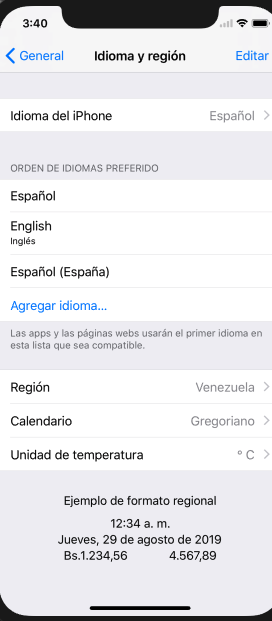
pixsolution
on 14 Aug 2019
@pixsolution the locale prop is used to render the date/time based on regions, basically it will translate it to Spanish: Monday -> Lunes
The idea is that the DateTimePicker will give you a value and you can format that value based on your needs.
Formatting is done using libraries like this:
- dayjs: https://github.com/iamkun/dayjs
- momentjs: https://github.com/moment/moment/
hetmann
on 15 Aug 2019
Related issues
 cgathergood
·
5Comments
cgathergood
·
5Comments
 taylorkline
·
4Comments
taylorkline
·
4Comments
 gopikasireddy202
·
3Comments
gopikasireddy202
·
3Comments
 mustafaskyer
·
3Comments
mustafaskyer
·
3Comments
 onusgit
·
7Comments
onusgit
·
7Comments
Most helpful comment
@pixsolution the locale prop is used to render the date/time based on regions, basically it will translate it to Spanish: Monday -> Lunes
The idea is that the DateTimePicker will give you a value and you can format that value based on your needs.
Formatting is done using libraries like this: