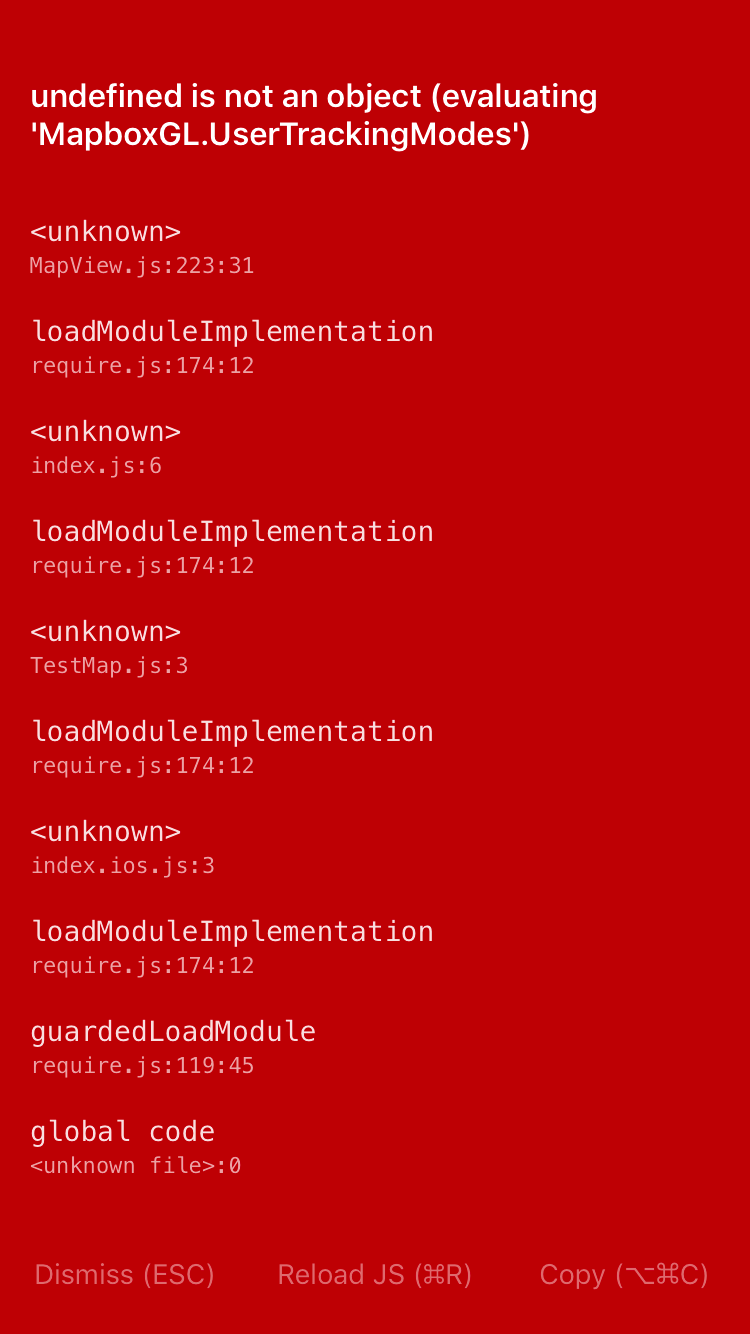
React-native-mapbox-gl: undefined is not an object (evaluating 'MapboxGL.UserTrackingModes')
Getting the error on iOS by following the sample from the official website.
Environment
React Native 0.47.2
@mapbox/react-native-mapbox-gl 6.0.1
Sample Code
import React, { Component } from 'react';
import { StyleSheet, View } from 'react-native';
import Mapbox from '@mapbox/react-native-mapbox-gl';

Mapbox.setAccessToken('<access-token>');

export default class App extends Component<{}> {
  render() {
    return (
      <View style={styles.container}>
        <Mapbox.MapView
            styleURL={Mapbox.StyleURL.Street}
            zoomLevel={15}
            centerCoordinate={[11.256, 43.770]}
            style={styles.container}>
        </Mapbox.MapView>
      </View>
    );
  }
}

const styles = StyleSheet.create({
  container: {
    flex: 1,
  },
});
Thanks
 KevinHu2014
All 18 comments
You need to link the native code to your projects follow these guides https://github.com/mapbox/react-native-mapbox-gl/blob/master/README.md#installation-guides
 nitaliano
on 6 Dec 2017
nitaliano
on 6 Dec 2017
@nitaliano I have been using V5 in my project.
Does upgrading to V6 requires relinking the native code?
KevinHu2014
on 6 Dec 2017
Yes, v6 is a complete rewrite
nitaliano
on 6 Dec 2017
@nitaliano
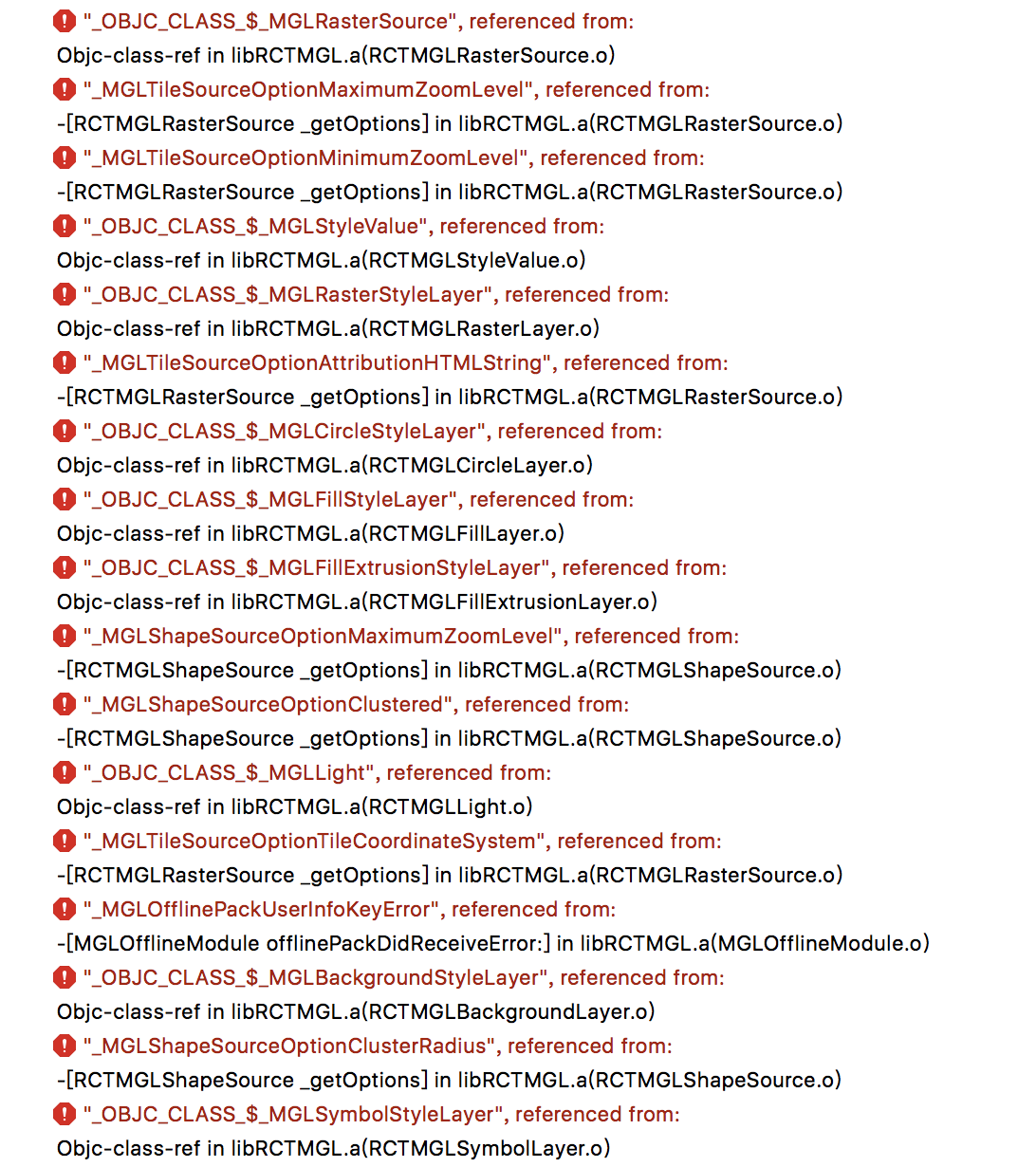
While relinking the Library , I ran into another error.
Any Ideas on this one?
Thanks!
KevinHu2014
on 6 Dec 2017
Did you also re embed Mapbox.framework?
nitaliano
on 6 Dec 2017
Yes
KevinHu2014
on 6 Dec 2017
Update your header search paths to point to Mapbox.framework https://github.com/mapbox/react-native-mapbox-gl/blob/master/ios/install.md#add-framework-header-search-paths.
I just ran through the steps on a clean project and got it up and running so it must be something between the old and new config
nitaliano
on 6 Dec 2017
@nitaliano Thanks for the help.
It's something between the old and new config.
And by Update your header search paths would do the trick.
Thanks again.
KevinHu2014
on 6 Dec 2017
Similiar issue over at https://github.com/mapbox/react-native-mapbox-gl/pull/741#issuecomment-347038647 but more related to build and error with framework not found mapbox via CocoaPods install, Manual install has issues additionally more me.
Update https://github.com/mapbox/react-native-mapbox-gl/issues/860 seems related to libc++abi.dylib: terminating with uncaught exception of type NSException (lldb)
 ghost
on 9 Dec 2017
ghost
on 9 Dec 2017
does version 6.0.2 require manual installation ? after updating I got linker error even after following update header search path and added the script.
 MrHazimAli
on 26 Dec 2017
MrHazimAli
on 26 Dec 2017
I've done both manual linking and cocoapods method. cocoapods method produces the same error as OP. Manual linking produces a different error:
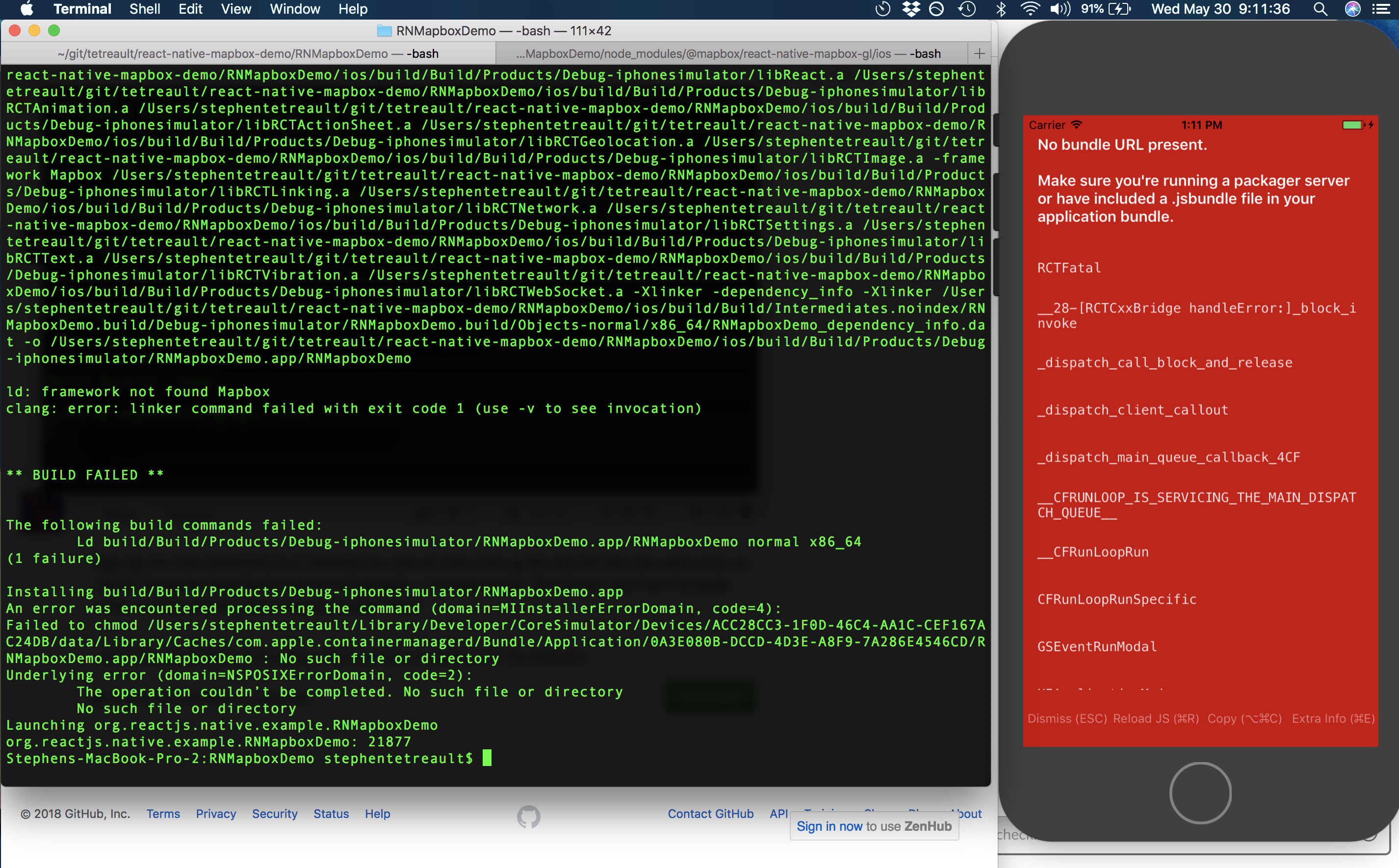
Misc Info:
"@mapbox/react-native-mapbox-gl": "^6.1.2-beta2",
"react": "16.3.1",
"react-native": "0.55.4"
 tetreault
on 30 May 2018
tetreault
on 30 May 2018
ignore the above! such a stupid mistake... to anyone reading this: after you do the cocoapods installation method, make sure you rebuild the project. The instructions specify it, but my brain is clearly having a tough day today!
tetreault
on 30 May 2018
HI Guys, anyone can help me solve this problem?

import React from 'react';
import {
View,
Text,
Platform,
Modal,
FlatList,
Image,
TouchableOpacity,
StatusBar,
StyleSheet,
} from 'react-native';
import MapboxGL from '@mapbox/react-native-mapbox-gl';
import StoreLocatorKit from '@mapbox/store-locator-react-native';
import LinearGradient from 'react-native-linear-gradient';
import Icon from 'react-native-vector-icons/MaterialIcons';
import places from '../../assets/places.json';
import {
purpleTheme,
blueTheme,
greenTheme,
grayTheme,
neutralTheme,
} from '../themes';
const IS_IOS = Platform.OS === 'ios';
const MAPBOX_ACCESS_TOKEN = 'pk.eyJ1IjoiZGVycmVuNzUzMiIsImEiOiJjam9iZmZldDcwOXdjM3hwNTdjMmdzM2M0In0.IkwKElTlrMPxQmLBtIO0Hg';
const ThemeList = [
{
name: 'Blue Theme',
theme: blueTheme,
// image: require('../assets/blue_button_image.png'),
},
{
name: 'Purple Theme',
theme: purpleTheme,
// image: require('../assets/purple_button_image.png'),
},
{
name: 'Green Theme',
theme: greenTheme,
// image: require('../assets/green_button_image.png'),
},
{
name: 'Gray Theme',
theme: grayTheme,
// image: require('../assets/gray_button_image.png'),
},
{
name: 'Neutral Theme',
theme: neutralTheme,
// image: require('../assets/neutral_button_image.png'),
},
];
const styles = StyleSheet.create({
matchParent: {
flex: 1,
},
mapHeader: {
position: 'absolute',
top: 0,
left: 0,
right: 0,
height: 120,
backgroundColor: 'transparent',
},
mapGradient: {
flex: 1,
height: 120,
},
mapHeaderText: {
fontSize: 24,
color: 'white',
alignSelf: 'center',
position: 'relative',
top: -60,
},
backArrow: {
position: 'absolute',
top: 32,
left: 24,
},
});
class App extends React.Component {
constructor (props) {
super(props);
this.state = {
  isGranted: IS_IOS,
  activeTheme: null,
  initialLocation: [-77.034084, 38.90],
};

this.onDismiss = this.onDismiss.bind(this);
this.renderThemeItem = this.renderThemeItem.bind(this);
}
async componentWillMount () {
if (!IS_IOS) {
const isGranted = await MapboxGL.requestAndroidLocationPermissions();
this.setState({ isGranted: isGranted });
}
MapboxGL.setAccessToken(MAPBOX_ACCESS_TOKEN);
}
onDismiss () {
StatusBar.setBarStyle('dark-content');
this.setState({ activeTheme: null });
}
renderThemeItem ({ item, index }) {
const marginTop = index === 0 ? 16 : 8;
const marginBottom = 8;
const style = {
  flex: 1,
  height: 120,
  marginTop: marginTop,
  marginBottom: marginBottom,
  alignItems: 'center',
  justifyContent: 'center',
  backgroundColor: item.theme.primaryColor,
};

return (
  <TouchableOpacity onPress={() => this.setState({ activeTheme: item.theme })}>
    <View style={style}>
      <Image source={item.image} style={{ width: 130, flex: 1 }} />
    </View>
  </TouchableOpacity>
);
}
renderThemeList () {
return (
keyExtractor={(item) => item.name}
renderItem={this.renderThemeItem} />
);
}
renderMap () {
if (!this.state.activeTheme) {
return null;
}
StatusBar.setBarStyle('light-content');

return (
  <Modal
    visible={!!this.state.activeTheme}
    animationType='slide'
    transparent
    onRequestClose={this.onDismiss}>
    <View style={styles.matchParent}>
      <StoreLocatorKit.MapView
        simulateUserLocation
        accessToken={MAPBOX_ACCESS_TOKEN}
        theme={this.state.activeTheme}
        centerCoordinate={this.state.initialLocation}
        featureCollection={places}
        zoomLevel={13}
        style={styles.matchParent} />

      <View style={styles.mapHeader}>
        <LinearGradient
          style={styles.mapGradient}
          colors={['black', 'transparent']} />

        <Icon
          name='keyboard-backspace'
          size={28}
          onPress={this.onDismiss}
          style={styles.backArrow}
          color='white' />

        <Text style={styles.mapHeaderText}>Store Locator</Text>
      </View>
    </View>
  </Modal>
);
}
render () {
if (!this.state.isGranted) {
return null;
}
return (
{this.renderMap()}
);
}
}
export default App;
 derren7532123
on 10 Nov 2018
derren7532123
on 10 Nov 2018
I have the same problem. Is there a clear answer how to fix this step by step for newbies?
 jt3k
on 16 Dec 2018
jt3k
on 16 Dec 2018
Same error for me, I'm using react native with expo, I can't seem to understand the installation procedure. How can I link it to expo?
 josepaulodelacruz
on 26 Dec 2018
josepaulodelacruz
on 26 Dec 2018
@josepaulodelacruz Searching for issues says that you won't be able to link with expo
jt3k
on 29 Dec 2018
I am having the same issue but Mapbox.GL is not involved in this project. I used it on a different project. Can anyone help with that?
 NathanNovak
on 29 Jan 2019
NathanNovak
on 29 Jan 2019
The CocoaPods installation doesn't work well.
Please follow the Manual Installation in the ReadMe. It works for me.
https://github.com/nitaliano/react-native-mapbox-gl/blob/master/ios/install.md
 0xMars
on 23 May 2019
0xMars
on 23 May 2019
Related issues
 Maxence-Machu
·
3Comments
Maxence-Machu
·
3Comments
 yaduc
·
3Comments
yaduc
·
3Comments
 lucasbento
·
3Comments
lucasbento
·
3Comments
 olofd
·
3Comments
olofd
·
3Comments
 Craytor
·
3Comments
Craytor
·
3Comments
Most helpful comment
I've done both manual linking and cocoapods method. cocoapods method produces the same error as OP. Manual linking produces a different error:
Misc Info:
"@mapbox/react-native-mapbox-gl": "^6.1.2-beta2",
"react": "16.3.1",
"react-native": "0.55.4"