React-native-keychain: Android: Wrapped error: User not authenticated
I get this error when trying to retrieve credentials stored in the keychain on Android devices. IMHO this is the effect of following exception being thrown: UserNotAuthenticatedException.
This is my code:
  useEffect(() => {
    if (!loginStarted) {
      return;
    }

    Keychain.getSupportedBiometryType()
      .then(data => {
        console.log('Supported biometry: ' + data);
        setBiometry(!!data);
        if (!!data) {
          // Try auto login
          Keychain.getGenericPassword({service: service})
            .then(credentials => {
              if (!credentials) {
                // no credentials stored, continue with normal login
                console.log('No saved credentials.');
                return;
              }

              // auto login with stored credentials
              if (credentials.username && credentials.password) {
                console.log('Trying auto login with saved credentials: ' + JSON.stringify(credentials));
                login(credentials.username, credentials.password);
              }
            })
            .catch(e => console.log('Error getting credentials: ' + e));
        }
      })
      .catch(e => console.log('Error getting biometry: ' + e));
  }, [loginStarted]);
The error is thrown at Keychain.getGenericPassword. On iOS the code works fine. Any idea or workaround for this?
 alphec
All 34 comments
I noticed similar behavior where the onAuthenticationSucceeded was being called (in KeychainModule.java but I was still getting the UserNotAuthenticatedException. Basically the decryption key's authentication was expiring before the cipher could get initialized. (probably since I was running in a debug environment, but could also happen with slower devices)
I was able to get it to work by extending the UserAuthenticationValidityDuration attribute of the key from 1 second to 5. In my case, it was using the RSA key, so the change was in the CipherStorageKeystoreRsaEcb.java file, around line 228
    return new KeyGenParameterSpec.Builder(alias, purposes)
      .setBlockModes(BLOCK_MODE_ECB)
      .setEncryptionPaddings(PADDING_PKCS1)
      .setRandomizedEncryptionRequired(true)
      .setUserAuthenticationRequired(true)
      .setUserAuthenticationValidityDurationSeconds(5)
      .setKeySize(ENCRYPTION_KEY_SIZE);
 skicson
on 1 Apr 2020
skicson
on 1 Apr 2020
I'm having the same problem with android Samsung s9.
I'm using this method to save credentials.
setInternetCredentials(server, username, password, {
    accessControl: ACCESS_CONTROL.BIOMETRY_ANY,
  });
When I'm using this method getInternetCredentials(server) to get credential, and using fingerprint option, I can get my username and password back. But when I use face Id option, even the faceId verified. I still can't get my username and password (undefined) , and it's showing in warn "Wrapped error: User not authenticated " .
 hoangcxa
on 3 Apr 2020
hoangcxa
on 3 Apr 2020
Any update for this issue?
I'm having the same problem after i updated for RN 0.62.x
 lucaashrq
on 7 Apr 2020
lucaashrq
on 7 Apr 2020
@skicson I tried your way but it's still doesn't work. When I'm using fingerprint , it works normal. But when I use Face Recognization of this device, it's still throw that error.
2020-04-10 11:14:43.034 5729-6663/com.awesomeproject V/myLog CipherStorageBase: failed:: User not authenticated
    android.security.keystore.UserNotAuthenticatedException: User not authenticated
        at android.security.KeyStore.getInvalidKeyException(KeyStore.java:1584)
        at android.security.KeyStore.getInvalidKeyException(KeyStore.java:1714)
        at android.security.keystore.KeyStoreCryptoOperationUtils.getInvalidKeyExceptionForInit(KeyStoreCryptoOperationUtils.java:54)
        at android.security.keystore.KeyStoreCryptoOperationUtils.getExceptionForCipherInit(KeyStoreCryptoOperationUtils.java:89)
        at android.security.keystore.AndroidKeyStoreCipherSpiBase.ensureKeystoreOperationInitialized(AndroidKeyStoreCipherSpiBase.java:265)
        at android.security.keystore.AndroidKeyStoreCipherSpiBase.engineInit(AndroidKeyStoreCipherSpiBase.java:109)
        at javax.crypto.Cipher.tryTransformWithProvider(Cipher.java:2984)
        at javax.crypto.Cipher.tryCombinations(Cipher.java:2891)
        at javax.crypto.Cipher$SpiAndProviderUpdater.updateAndGetSpiAndProvider(Cipher.java:2796)
        at javax.crypto.Cipher.chooseProvider(Cipher.java:773)
        at javax.crypto.Cipher.init(Cipher.java:1143)
        at javax.crypto.Cipher.init(Cipher.java:1084)
        at com.oblador.keychain.cipherStorage.CipherStorageBase$Defaults.lambda$static$1(CipherStorageBase.java:539)
        at com.oblador.keychain.cipherStorage.-$$Lambda$CipherStorageBase$Defaults$gUPKtklt7huSpCITAtk3nzsSgTY.initialize(Unknown Source:0)
        at com.oblador.keychain.cipherStorage.CipherStorageBase.decryptBytes(CipherStorageBase.java:393)
        at com.oblador.keychain.cipherStorage.CipherStorageBase.decryptBytes(CipherStorageBase.java:338)
        at com.oblador.keychain.KeychainModule$InteractiveBiometric.onAuthenticationSucceeded(KeychainModule.java:856)
        at androidx.biometric.BiometricFragment$2$2.run(BiometricFragment.java:140)
        at java.util.concurrent.ThreadPoolExecutor.runWorker(ThreadPoolExecutor.java:1167)
        at java.util.concurrent.ThreadPoolExecutor$Worker.run(ThreadPoolExecutor.java:641)
        at java.lang.Thread.run(Thread.java:919)
hoangcxa
on 10 Apr 2020
@skicson regarding to the stack above, the onAuthenticationSucceeded is being called . But then some how the public static final DecryptBytesHandler decrypt = (cipher, key, input) -> {
cipher.init(Cipher.DECRYPT_MODE, key);
}; failed with the android.security.KeyStore.getInvalidKeyException
hoangcxa
on 15 Apr 2020
+1
 krutkowski86
on 27 Apr 2020
krutkowski86
on 27 Apr 2020
I have not been able to test with a fingerprint enabled device, but I can confirm the same wrapped exception being thrown on a google pixel 4 with face recognition enabled. iOS works fine.
 huesforalice
on 27 Apr 2020
huesforalice
on 27 Apr 2020
same error here!
Pixel 3 fingerprint.
I tried...
setUserAuthenticationValidityDurationSeconds
and it didn't worked for me
 cold-briu
on 28 Apr 2020
cold-briu
on 28 Apr 2020
I'm also noticing this issue with Android. It works correctly until the device is restarted.
The weird thing is, setUserAuthenticationValidityDurationSeconds seems to be related to the time since the user authenticated from the lock screen. If I call getGenericPassword after unlocking the device within setUserAuthenticationValidityDurationSeconds value, it works.
 matthewyeager
on 8 May 2020
matthewyeager
on 8 May 2020
Hi guys, i am also experiencing this issue with Android 8. Fingerprint works fine, so does Iris authentication. Face ID fails every single time. It would be great if there was a setting to force which type of biometric to use to unlock keychain as on Android it falls back to whatever user selected in the preference.
 Sandi89
on 9 May 2020
Sandi89
on 9 May 2020
Has anyone found a workaround to get this to work on devices that have both Fingerprint as well as Face authentication? Currently I just have biometrics disabled on Android until I can figure out a way to either make Face work on Android or force only Fingerprint for the time being.
 crees1
on 4 Jun 2020
crees1
on 4 Jun 2020
I was getting the same error on a Pixel 3 emulator. So I went to Settings and removed the fingerprint, then set it up back again. After that, I got rid of the error. I know it's maybe too much to ask of your users (to remove then set up again the fingerprint in android settings), but it's a possible workaround.
 ericrguimaraes
on 24 Jul 2020
ericrguimaraes
on 24 Jul 2020
I was getting the same error on a Pixel 3 emulator. So I went to Settings and removed the fingerprint, then set it up back again. After that, I got rid of the error. I know it's maybe too much to ask of your users (to remove then set up again the fingerprint in android settings), but it's a possible workaround.
I just noticed that, after restarting the phone, the error comes back :/
ericrguimaraes
on 24 Jul 2020
hi folks, i have updated rn-key-chain package thought that its because im using expo and i have old keychain version, yet
im still getting Wrapped error: unknown key type passed to RSA error. FYI, IOS works well, and in android, without prompting any types it will successfully get the secret, so currently, im using rn-touchid for prompting biometrics in android and get data in my rn-keychain.
 calz10
on 27 Jul 2020
calz10
on 27 Jul 2020
Increasing setUserAuthenticationValidityDurationSeconds to a larger value fixes this for me. Note that you have to ensure you have this value set before you store the secret into the keychain.
With that in mind I think #339 is a reasonable fix for this.
 timxyz
on 13 Aug 2020
timxyz
on 13 Aug 2020
any update on this?
 whysetiawan
on 15 Aug 2020
whysetiawan
on 15 Aug 2020
I was able to get Face ID working consistently (on a Pixel 4) when I extended the setUserAuthenticationValidityDurationSeconds to 60. Logged out, killed the app, logged back in to set the password (and presumably the duration). For the Face ID, it seems the time between when the "confirm" dialog appears and when the user selects "confirm" has to be less than setUserAuthenticationValidityDurationSeconds for it to work.
skicson
on 18 Aug 2020
any update?
 vdino96
on 14 Sep 2020
vdino96
on 14 Sep 2020
This PR solves the issue https://github.com/oblador/react-native-keychain/pull/399
 Zo2m4bie
on 22 Sep 2020
Zo2m4bie
on 22 Sep 2020
Any updates ?
 ameenmattar
on 9 Oct 2020
ameenmattar
on 9 Oct 2020
@ameenmattar you can use my fork
Zo2m4bie
on 10 Oct 2020
Any update?
 AdriaRios
on 18 Nov 2020
AdriaRios
on 18 Nov 2020
So I've been doing a little digging on this issue for the Pixel 4 / Face scan only devices.
I agree with what @skicson said. The setUserAuthenticationValidityDurationSeconds time seems to start after the succesful Face scan. If the user doesn't select 'Confirm' before that countdown is over - they will get the User not authenticated error.
I know some people extended the time in the setUserAuthenticationValidityDurationSeconds call which can work but I wanted to see if there was another solution.
I found this PromptInfo.Builder method call setConfirmationRequired. This call removes the 'Confirm' button on Android 10+ but it's also only classed as a 'hint' to the vendor version of Android OS so I don't know how well it's supported.
E.g. As outlined in this blog post - Android - One Biometric API Over All.
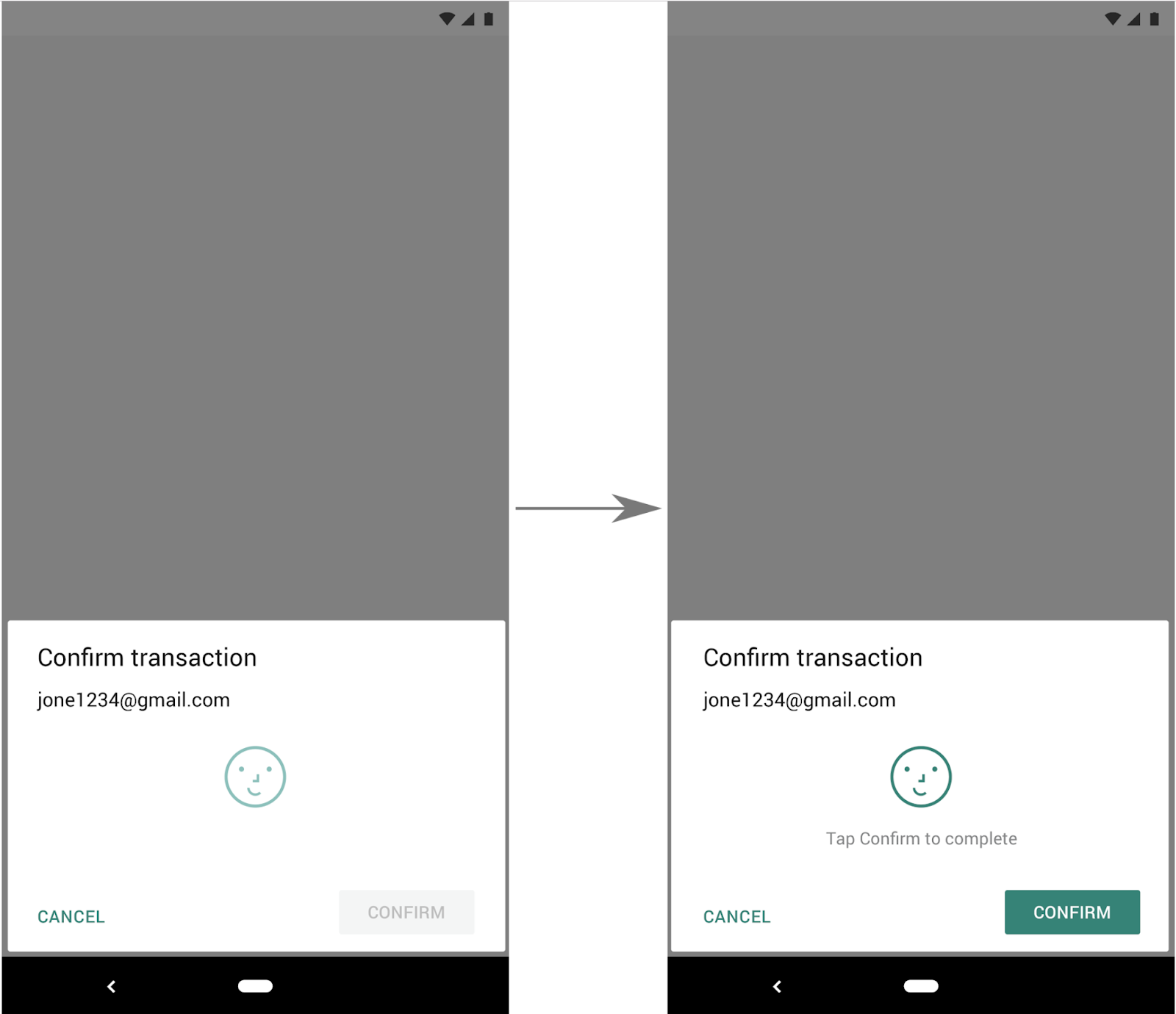
to
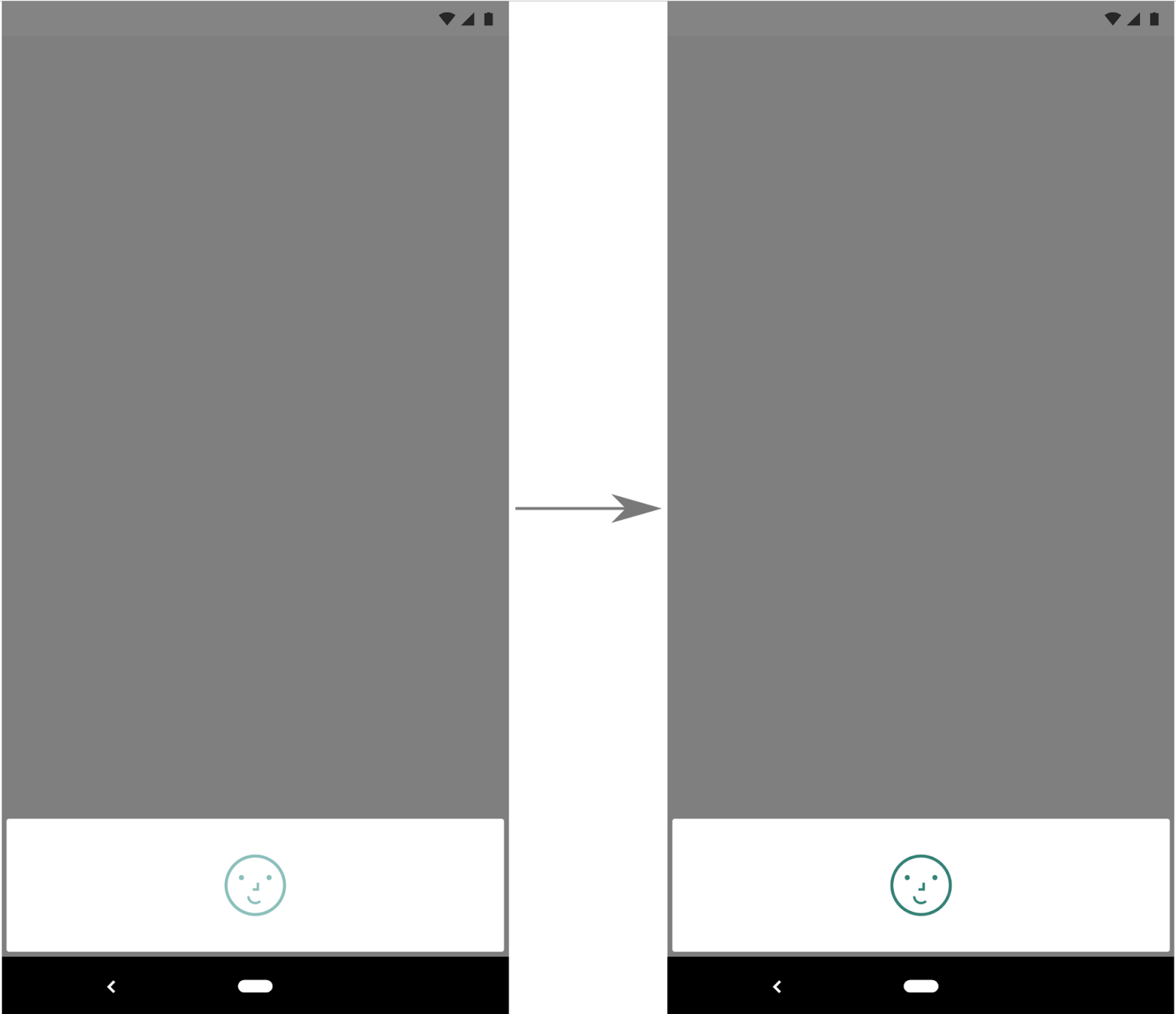
This could be worth investigating more. If this works fine I'll make a PR for the change.
 CWolfs
on 30 Nov 2020
CWolfs
on 30 Nov 2020
Seems to work fine on the Pixel 4 (need to test other devices) and it's actually more inline with the behaviour/experience seen on iOS with FaceID too.
CWolfs
on 30 Nov 2020
@CWolfs could you ping me here in this thread when your PR is ready? I will be able to check it on Samsung with FaceID
Zo2m4bie
on 1 Dec 2020
@Zo2m4bie sure, I'll try to do in the next few days - been bogged down with wrapping up a release but want to PR this soon. I only had a Pixel 4 to test so if you can test this on a Samsung that would be great to see if it works or not. I'll ping you when I'm ready.
CWolfs
on 1 Dec 2020
@Zo2m4bie Here you go.
https://github.com/oblador/react-native-keychain/pull/414
I'd be very interested to see if this works (or doesn't) with the Samsung phone you mentioned. What version of Samsung phone is it that has Face ID that works with app-unlocking? I know the Pixel 4 is meant to be the first device with app-unlocking biometrics on Android. I assumed Samsung had one too but couldn't find info on it yet.
CWolfs
on 1 Dec 2020
Hello @CWolfs Sorry for delay.
On Samsung it has the same problem as before. It proposes to use Face id to get data, however it returns "User not authenticated" error, because on Samsung face recognition isn't secure.
It happens because you don't pass Cipher when you ask an access permission. The system doesn't understand why you need it. In my solution you can see that I pass Cypher into permission modal that allow the system to recognize why it was asked for biometric. In this case Samsung devices show only fingerpint
https://github.com/Zo2m4bie/react-native-keychain/blob/ISSUE-318/android/src/main/java/com/oblador/keychain/cipherStorage/CipherStorageKeystoreAesCbcBiom.java#L145
Zo2m4bie
on 16 Dec 2020
@CWolfs thanks for your input! I've tried to apply this to Pixel 4 XL and it still produces same problem as well.
 poocart
on 8 Jan 2021
poocart
on 8 Jan 2021
Hey everyone, what's the status on this?
My team is trying to migrate from an existing in-house solution to react-native-keychain and this is a blocker. As @crees1 mentioned, only allowing Fingerprint on Android would be an ideal workaround for now. Still getting accustomed to the library, but I'm happy to help in any way I can.
 michaelgmcd
on 2 Feb 2021
michaelgmcd
on 2 Feb 2021
Hello @michaelgmcd right now the only available solution is using this fork. It has a bit different flow for Android and iOS, however it works for all devices
Zo2m4bie
on 2 Feb 2021
on a Huawei P8 Lite (Android 7, Api Level 24)
Fingerprint recognition fails with the same or other errors.
Sometimes this:
2021-02-11 14:05:47.661 29465-29565/? W/CipherStorageBase: User not authenticated
    android.security.keystore.UserNotAuthenticatedException: User not authenticated
        at android.security.KeyStore.getInvalidKeyException(KeyStore.java:718)
        at android.security.KeyStore.getInvalidKeyException(KeyStore.java:754)
        at android.security.keystore.KeyStoreCryptoOperationUtils.getInvalidKeyExceptionForInit(KeyStoreCryptoOperationUtils.java:54)
        at android.security.keystore.KeyStoreCryptoOperationUtils.getExceptionForCipherInit(KeyStoreCryptoOperationUtils.java:89)
        at android.security.keystore.AndroidKeyStoreCipherSpiBase.ensureKeystoreOperationInitialized(AndroidKeyStoreCipherSpiBase.java:265)
        at android.security.keystore.AndroidKeyStoreCipherSpiBase.engineInit(AndroidKeyStoreCipherSpiBase.java:109)
        at javax.crypto.Cipher.tryTransformWithProvider(Cipher.java:2977)
        at javax.crypto.Cipher.tryCombinations(Cipher.java:2884)
        at javax.crypto.Cipher$SpiAndProviderUpdater.updateAndGetSpiAndProvider(Cipher.java:2789)
        at javax.crypto.Cipher.chooseProvider(Cipher.java:956)
        at javax.crypto.Cipher.init(Cipher.java:1199)
        at javax.crypto.Cipher.init(Cipher.java:1143)
        at com.oblador.keychain.cipherStorage.CipherStorageBase$Defaults.lambda$static$1(CipherStorageBase.java:502)
        at com.oblador.keychain.cipherStorage.-$$Lambda$CipherStorageBase$Defaults$DeW6NXOzsQTAPQNNW0rqTXPHW4c.initialize(lambda)
        at com.oblador.keychain.cipherStorage.CipherStorageBase.decryptBytes(CipherStorageBase.java:360)
        at com.oblador.keychain.cipherStorage.CipherStorageBase.decryptBytes(CipherStorageBase.java:315)
        at com.oblador.keychain.cipherStorage.CipherStorageKeystoreRsaEcb.decrypt(CipherStorageKeystoreRsaEcb.java:126)
        at com.oblador.keychain.KeychainModule.decryptToResult(KeychainModule.java:623)
        at com.oblador.keychain.KeychainModule.decryptCredentials(KeychainModule.java:590)
        at com.oblador.keychain.KeychainModule.getGenericPassword(KeychainModule.java:295)
        at com.oblador.keychain.KeychainModule.getGenericPasswordForOptions(KeychainModule.java:323)
        at java.lang.reflect.Method.invoke(Native Method)
        at com.facebook.react.bridge.JavaMethodWrapper.invoke(JavaMethodWrapper.java:372)
        at com.facebook.react.bridge.JavaModuleWrapper.invoke(JavaModuleWrapper.java:151)
        at com.facebook.react.bridge.queue.NativeRunnable.run(Native Method)
        at android.os.Handler.handleCallback(Handler.java:761)
        at android.os.Handler.dispatchMessage(Handler.java:98)
        at com.facebook.react.bridge.queue.MessageQueueThreadHandler.dispatchMessage(MessageQueueThreadHandler.java:27)
        at android.os.Looper.loop(Looper.java:156)
        at com.facebook.react.bridge.queue.MessageQueueThreadImpl$4.run(MessageQueueThreadImpl.java:226)
        at java.lang.Thread.run(Thread.java:776)
2021-02-11 14:05:47.673 29465-29565/? I/RNKeychainManager: blocking thread. waiting for done UI operation.
sometimes this:
2021-02-11 14:53:43.752 545-545/? I/HisiKeyMaster: hisi_km_get_key_characteristics start
2021-02-11 14:53:43.754 1552-1552/? I/KeyguardUpdateMonitor: Ignore update FP: 0 false
2021-02-11 14:53:43.757 409-420/? I/gralloc: alloc_device_free:586: Free handle(0x7e64a33f00)
2021-02-11 14:53:43.757 409-420/? I/gralloc: alloc_device_free:586: Free handle(0x7e5cc34d00)
2021-02-11 14:53:43.771 2377-2456/? E/LogCollectService: illegal eventid
2021-02-11 14:53:43.771 545-545/? I/HisiKeyMaster: hisi_km_get_key_characteristics success
2021-02-11 14:53:43.771 545-545/? I/HisiKeyMaster: hisi_km_get_key_characteristics start
2021-02-11 14:53:43.775 545-545/? I/HisiKeyMaster: hisi_km_get_key_characteristics success
2021-02-11 14:53:43.775 545-545/? I/HisiKeyMaster: hisi_km_begin start
2021-02-11 14:53:43.784 545-545/? I/HisiKeyMaster: out_params_buffer_len = 4096
2021-02-11 14:53:43.784 545-545/? I/HisiKeyMaster: hisi_km_begin success
2021-02-11 14:53:43.787 545-545/? I/HisiKeyMaster: hisi_km_finish start
2021-02-11 14:53:43.907 545-545/? I/HisiKeyMaster: output data size=12
2021-02-11 14:53:43.907 545-545/? I/HisiKeyMaster: hisi_km_finish success
2021-02-11 14:53:43.908 545-545/? I/HisiKeyMaster: hisi_km_get_key_characteristics start
2021-02-11 14:53:43.911 545-545/? I/HisiKeyMaster: hisi_km_get_key_characteristics success
2021-02-11 14:53:43.911 545-545/? I/HisiKeyMaster: hisi_km_begin start
2021-02-11 14:53:43.915 545-545/? I/HisiKeyMaster: out_params_buffer_len = 4096
2021-02-11 14:53:43.915 545-545/? I/HisiKeyMaster: hisi_km_begin success
2021-02-11 14:53:43.916 545-545/? I/HisiKeyMaster: hisi_km_finish start
2021-02-11 14:53:43.919 545-545/? E/libteec: invoke cmd failed, code=0xfffffc18, origin=3
2021-02-11 14:53:43.919 545-545/? E/HisiKeyMaster: invoke km command failed, cmd = 10, ret = 0xfffffc18, ret_origin = 3
2021-02-11 14:53:43.919 545-545/? E/HisiKeyMaster: TEE_Finish failed, ret=0xfffffc18
2021-02-11 14:53:43.921 545-545/? I/HisiKeyMaster: hisi_km_get_key_characteristics start
2021-02-11 14:53:43.923 545-545/? I/HisiKeyMaster: hisi_km_get_key_characteristics success
2021-02-11 14:53:43.923 545-545/? I/HisiKeyMaster: hisi_km_get_key_characteristics start
2021-02-11 14:53:43.926 545-545/? I/HisiKeyMaster: hisi_km_get_key_characteristics success
2021-02-11 14:53:43.926 545-545/? I/HisiKeyMaster: hisi_km_begin start
2021-02-11 14:53:43.930 545-545/? I/HisiKeyMaster: out_params_buffer_len = 4096
2021-02-11 14:53:43.930 545-545/? I/HisiKeyMaster: hisi_km_begin success
2021-02-11 14:53:43.930 545-545/? I/HisiKeyMaster: hisi_km_finish start
2021-02-11 14:53:43.933 545-545/? E/libteec: invoke cmd failed, code=0xfffffc18, origin=3
2021-02-11 14:53:43.933 545-545/? E/HisiKeyMaster: invoke km command failed, cmd = 10, ret = 0xfffffc18, ret_origin = 3
2021-02-11 14:53:43.933 545-545/? E/HisiKeyMaster: TEE_Finish failed, ret=0xfffffc18
2021-02-11 14:53:43.934 1616-1808/? I/RNKeychainManager: unblocking thread.
This section on Android notes:
https://github.com/oblador/react-native-keychain#android-notes
Should mention that Biometrics on Android isn't stable.
 AlphaJuliettOmega
on 11 Feb 2021
AlphaJuliettOmega
on 11 Feb 2021
Hi folks. Any news related to this issue? Or is there a way to just use Fingerprint in Android?
 fedeerbes
on 7 Apr 2021
fedeerbes
on 7 Apr 2021
7.0.0 was just released with the support of strong bio by default. Please try it out. It should remove all User not authenticated errors.
 sgal
on 13 Apr 2021
sgal
on 13 Apr 2021
Related issues
 binkumar
·
6Comments
binkumar
·
6Comments
 johnnynanjiang
·
5Comments
johnnynanjiang
·
5Comments
 Mike-Van
·
3Comments
Mike-Van
·
3Comments
 HuiSF
·
6Comments
HuiSF
·
6Comments
 aDavidaIsNoOne
·
5Comments
aDavidaIsNoOne
·
5Comments
Most helpful comment
7.0.0 was just released with the support of strong bio by default. Please try it out. It should remove all
User not authenticatederrors.