react-native-google-places-autocomplete not working on React native 0.61
Hi,
I have added react-native-google-places-autocomplete with yarn in my react-native cli project but it is not working. Here are the issues I am facing at the moment.
the places drop down is not showing up on IOS, however the input text field allows me to enter a place name but the predictions list does not appear
onPress handler is not triggered at all on both IOS and android
The Text Input coming from react-native-google-places-autocomplete does not allow me to enter anything on ANDROID. It is like disabled all the time ( although the focus is set to true)
Note: all google location apis are enabled , google maps api, places api and geocode api are enabled and a valid api key is given.
I tried all possible solutions available including the following:
setting zIndex: 1000 a high value to avoid it being hidden behind some other view
Tried creating new RN App and added only this component to keep the project clean
- Regenerating the API and even using another api which works with previous versions of REACT NATIVE.
The logs don't show anything on both Xcode and Android Studio. Here is the code snippet:
                 <View style = {[{zIndex: 2, backgroundColor: 'white'}]}>
                <GooglePlacesAutocomplete
                    ref = {ref => setSearchTextRef(ref)}
                    placeholder='Search for gym'
                    styles={{
                        container: {backgroundColor: 'transparent'},
                        textInputContainer: styles.viewStyle,
                        textInput: styles.textInputStyle,
                    }}
                    keyboardShouldPersistTaps = {'handled'}
                    listUnderlayColor = {'transparent'}
                    textInputProps = {{
                        onFocus: () => focusInput(),
                        onBlur: () => blurInput(),
                        onChangeText: (text) => onChange(text)
                    }}
                    minLength={1} // minimum length of text to search
                    returnKeyType={'search'}
                    listViewDisplayed={'auto'}   // true/false/undefined
                    fetchDetails={true}
                    renderDescription={row => row.description} // custom description render
                    onPress={(data, details = null) => {
                        let coordinates = details.geometry.location;
                        sendCoordinates(coordinates, {data, details});
                    }}
                    getDefaultValue={() => ''}
                    query={{
                        key: googleAPIKey,
                        language: 'en', // language of the results
                        // types: '(cities)' // default: 'geocode'
                    }}
                    nearbyPlacesAPI='GooglePlacesSearch' // Which API to use: GoogleReverseGeocoding or GooglePlacesSearch
                    GooglePlacesSearchQuery={{
                        rankby: 'distance',
                        types: 'gym'
                    }}
                    filterReverseGeocodingByTypes={['locality', 'administrative_area_level_3']}
                    debounce={200}
                />
            </View>
Thank you in advance
 ahmadali9289
All 9 comments
I'm observing the same issue but only in some scenes in my app - I'm not 100% sure that's the cause but I suspect it won't work because it's inside a modal component. It works fine somewhere else in the app though.
Any thoughts?
 vrgimael
on 14 Feb 2020
vrgimael
on 14 Feb 2020
Actually just solved it by following the steps here
Either removing onBlur in the component or adding keyboardShouldPersistTaps works
vrgimael
on 14 Feb 2020
Im having this kind of problem too. unable to fetch search places
 josepaulodelacruz
on 21 Feb 2020
josepaulodelacruz
on 21 Feb 2020
This package is no longer maintained and simply not working. I tried on IOS with expo. I didn't even get a list of results. I found a other package that is working like a charm:
 jaing
on 6 Mar 2020
jaing
on 6 Mar 2020
Hi guys.
I had the same issue with this lib, and after trying for hours, I found a solution.
The problem was in the billing configuration on the google APIs.
Try to configure the project where you are using key and activate billings configurations, it solved my problem. Please let me know if it works for you.
P.S. I hope this can help you.
 devfilsk
on 10 Apr 2020
devfilsk
on 10 Apr 2020
Any solution?
 bfraiman
on 6 May 2020
bfraiman
on 6 May 2020
@ahmadali9289 using the code you provided, this works as expected for me.
textInputProps = {{
    onFocus: () => focusInput(),
  onBlur: () => blurInput(),
  onChangeText: (text) => onChange(text)
}}
You didn't indicate what these functions do, this could be the problem.
Another likely cause is that your component is wrapped within a ScrollView.
 bell-steven
on 19 May 2020
bell-steven
on 19 May 2020
I can't reproduce this, so i'm going to close this. If you encounter this, and this is still a problem for you, please open a new issue (please follow the issue template).
bell-steven
on 22 May 2020
Am not sure if anybody else had/have this issue.. I too got this error on searching I saw _onFail_ is available. onFail={error => console.log('error' + error)} this will give you error. If suppose the error is something like _This IP, site or mobile application is not authorized to use this API key. Request received from IP address $someipaddress, with empty referer_. Then do create a SERVER KEY instead of normal api key. Creating a server key is same like creating api key. Under the heading Application Restrictions select IP addresses instead of none. thus you are good. This was my trouble. Hope no one else will be stuck around this. Also make sure billing is enabled for your project.
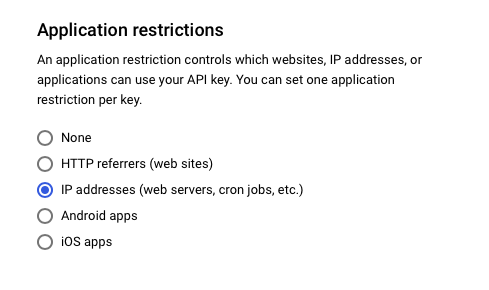
Hope this helps someone
 sujatha2016
on 1 Nov 2020
sujatha2016
on 1 Nov 2020
Related issues
 mbelgrader
·
4Comments
mbelgrader
·
4Comments
 nikohosn
·
3Comments
nikohosn
·
3Comments
 yashwanth15
·
3Comments
yashwanth15
·
3Comments
 diegothucao
·
3Comments
diegothucao
·
3Comments
 KhalilKhalaf
·
4Comments
KhalilKhalaf
·
4Comments
Most helpful comment
Hi guys.
I had the same issue with this lib, and after trying for hours, I found a solution.
The problem was in the billing configuration on the google APIs.
Try to configure the project where you are using key and activate billings configurations, it solved my problem. Please let me know if it works for you.
P.S. I hope this can help you.