React-native-google-places-autocomplete: Search results box does not close, when function call is included in the onPress
I am using GooglePlacesAutocomplete to set the state with location. However, when I include a functional call in the onPress, the results box does not close when I select a location. If I replace the functional call with a console.log, then the results box closes once I select a location. Please help. Thank you
Here is a screenshot of it not closing:

Here is my code:
onLocationSelect(data, details) {
console.log(data, details);
this.setState({
region: {
latitude: details.geometry.location.lat,
longitude: details.geometry.location.lng,
latitudeDelta: LATITUDE_DELTA,
longitudeDelta: LONGITUDE_DELTA,
}
})
}
.....
              <GooglePlacesAutocomplete
                placeholder='Search'
                minLength={2} // minimum length of text to search
                autoFocus={true}
                returnKeyType={'search'} // Can be left out for default return key https://facebook.github.io/react-native/docs/textinput.html#returnkeytype
                listViewDisplayed='auto'    // true/false/undefined
                fetchDetails={true}
                renderDescription={row => row.description} // custom description render
                onPress={(data, details = null) => { this.onLocationSelect(data, details) }}

                getDefaultValue={() => ''}

                query={{
                   // available options: https://developers.google.com/places/web-service/autocomplete
                   key: 'MY_KEY',
                   language: 'en', // language of the results
                 }}

                styles={{
                   textInputContainer: {
                     width: '100%'
                   },
                   description: {
                     fontWeight: 'bold'
                   },
                   predefinedPlacesDescription: {
                     color: '#1faadb'
                   }
                 }}

                currentLocation={false} // Will add a 'Current location' button at the top of the predefined places list
                currentLocationLabel="Current location"
                nearbyPlacesAPI='GooglePlacesSearch' // Which API to use: GoogleReverseGeocoding or GooglePlacesSearch
                GoogleReverseGeocodingQuery={{
                   // available options for GoogleReverseGeocoding API : https://developers.google.com/maps/documentation/geocoding/intro
                 }}
                GooglePlacesSearchQuery={{
                   // available options for GooglePlacesSearch API : https://developers.google.com/places/web-service/search
                   rankby: 'distance',
                   types: 'food'
                 }}

                filterReverseGeocodingByTypes={['locality', 'administrative_area_level_3']} // filter the reverse geocoding results by types - ['locality', 'administrative_area_level_3'] if you want to display only cities
                 // predefinedPlaces={[homePlace, workPlace]}
                enablePoweredByContainer={false}
                debounce={200} // debounce the requests in ms. Set to 0 to remove debounce. By default 0ms.
                 // renderLeftButton={()  => <Image source={require('../../icons/icon-left-arrow.png')} />}
                 // renderRightButton={() => <Text>Search</Text>}
               />
 ramluro1
All 25 comments
I'm not the only one having this problem then! It was driving me crazy until I opened the issues page and saw your message. It was working perfectly 1-2 weeks ago. I din't touch the autocomplete component, but after reinstalling the packages it has this problem.
 alexpopa-work
on 1 Aug 2018
alexpopa-work
on 1 Aug 2018
listViewDisplayed={false}
 PatricioBrass
on 1 Aug 2018
PatricioBrass
on 1 Aug 2018
Nice! Thanks a lot @PatricioBrass ! It would be nice to have a description for this parameter in the readme.
alexpopa-work
on 2 Aug 2018
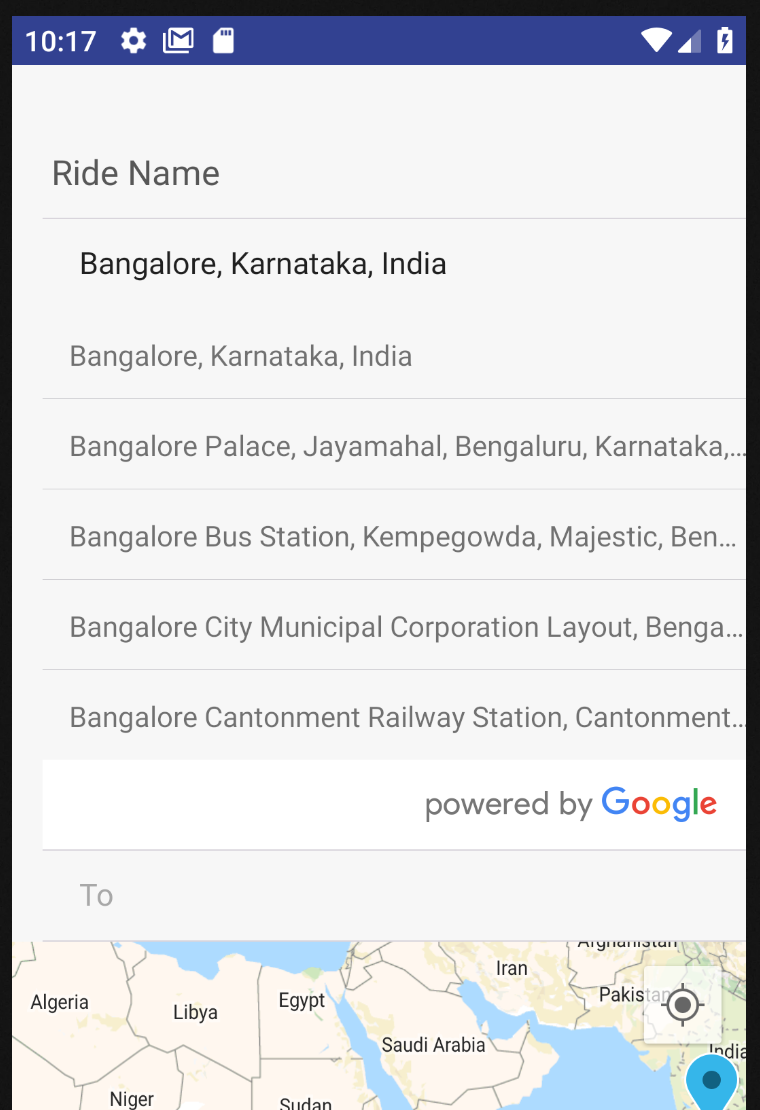
Its not closing for me, even after applying listViewDisplayed={false} in android nexus 5 emulator
 the-yadu
on 16 Aug 2018
the-yadu
on 16 Aug 2018
+1
List doesnot close if any function is called like setState ..
 gabber12
on 2 Sep 2018
gabber12
on 2 Sep 2018
I'm having this issue too, even after using listViewDisplayed={false} as suggested above.
This is the same on both a Nexus 5X simulator and iPhone X simulator.
 edant92
on 2 Sep 2018
edant92
on 2 Sep 2018
Scrollview container must has keyboardShouldPersistTaps='always'
listViewDisplayed={false} work for my in simulator Nexus 5X and iPhone X
PatricioBrass
on 4 Sep 2018
Issue fixed?
 SirPhemmiey
on 16 Sep 2018
SirPhemmiey
on 16 Sep 2018
The issue is fixed, It was very weird. I deleted the build folder and rebuild it. It was working. Might not be suitable for others.
the-yadu
on 16 Sep 2018
Oh well, i got it working by adding listViewDisplayed={false} . It was listViewDisplayed='auto' by default
SirPhemmiey
on 16 Sep 2018
@PatricioBrass That worked for me. Thanks!
edant92
on 16 Sep 2018
Had same issue. Fixed by adding listViewDisplayed={false} but autocomplete stopped working if I provide handler for onChangeText (Note that Autocomplete works if listViewDisplayed is 'auto'):
//CityPicker component
<GooglePlacesAutocomplete
  ...
  listViewDisplayed={false},
  textInputProps={{ onChangeText: (e: string) => this.handleChange(e) }}
  ...
/>

  public handleChange(text: string) {
    city.name = text;
    this.props.onChange(city); //autocomplete stops working when I access props
  }
Internally this.props.onChange handler calls redux dispatch to merge the city with other props
///Search component
<CityPicker city={this.props.settings.city} onChange={(e) => this.props.merge({ city: e })} />
...
const mapDispatchToProps = (dispatch: any) => ({
  merge: (settings: SearchSettingsModel) => dispatch(searchActions.merge(settings))
})
//Actions file
  merge(settings: SearchSettingsModel) {
    return (dispatch: any) => {
      dispatch({ type: MERGE_SEARCH_SETTINGS, settings });
    }
  }
 rusuly
on 23 Sep 2018
rusuly
on 23 Sep 2018
@rusuly I have the same issue when I have textInputProps and listViewDisplayer. How do you resolved?
 MauriPastorini
on 24 Sep 2018
MauriPastorini
on 24 Sep 2018
Hi @MauriPastorini I have not fixed it yet. Looks like it's a bug that needs to be fixed. It has nothing to do with Redux and same happens if I call for example setState() in parent component.
rusuly
on 24 Sep 2018
@rusuly @MauriPastorini insert code in the component GooglePlacesAutocomplete
textInputProps={{ ref: this.state.direction => this.textInput = this.state.direction }}
worked for me
PatricioBrass
on 24 Sep 2018
@PatricioBrass, @MauriPastorini, unfortunately that's not my case.
I need to call a method on props to clear city in parent component if user changes text instead of pressing on a city from the list.
<GooglePlacesAutocomplete
          ...
          //Here we select a city and pass it to the parent component
          onPress={(data: any, details: any = null) => {
            var city: { ... }
            this.props.onChangeCity(city);
          }}

          //If user manually changes text - we notify parent that the city is no longer selected in CityPicker
          textInputProps={{ onChangeText: (e) => this.props.onClearCity() }}
          ...
/>
What I found is that when I call those methods the componentWillReceiveProps method is called on GooglePlacesAutocomplete component which recalculates listViewDisplayed based on nextProps and ignoring its own state.
  //The method is called but it doesn't take into account listViewDisplayed from current state
  //So false is assigned to listViewDisplayed and FlatList becomes hidden
  componentWillReceiveProps(nextProps) {
    let listViewDisplayed = true;

    if (nextProps.listViewDisplayed !== 'auto') {
      listViewDisplayed = nextProps.listViewDisplayed;
    }

    if (typeof (nextProps.text) !== "undefined" && this.state.text !== nextProps.text) {
      this.setState({
          listViewDisplayed: listViewDisplayed
        },
        this._handleChangeText(nextProps.text));
    } else {
      this.setState({
        listViewDisplayed: listViewDisplayed
      });
    }
  }
The solution could include checking whether listViewDisplayed prop has changed but I'm not familiar with the lib very well so don't know all the cases:
    if (this.props.listViewDisplayed !== nextProps.listViewDisplayed) {
       //Get new listViewDisplayed value
    }
Hey, I'm having the same issue, I read all solutions and also implemented those, but my issue is still not fixed.
Requirement: User should search and select city or also can select current location, home or work.
Expected Behaviour: When a user searches and selects a city from the dropdown list it should fill the field and hide the ListView, and ListView should be hidden by default. Simple
Issue: Listview is not hidden by default. and
When I put a function inside onPress() to setState the city name, all works fine but the list doesn't hide,
when I remove that function and put simple console.log(), listView completely hides, even Search field.
If someone has solution please tell me. Thanks
here is my code.
<GooglePlacesAutocomplete
                placeholder="Your city"
                minLength={2}
                autoFocus={false}
                returnKeyType={'search'}
                listViewDisplayed="auto"
                fetchDetails={false}
                renderDescription={row => row.description}
                onPress={(data, details = null) => {
                  let cityName=data.main_text;
                  //this.setState({UserLocation:data.main_text});
                  //console.warn(data.main_text);
                  this.cityUpdate(cityName);
                }}
                getDefaultValue={() => {
                  return (this.state.UserLocation!=null) ? this.state.UserLocation : '';
                }}
                query={{
                  key: 'AIza**************',
                  language: 'en',
                  types: '(cities)',
                }}
                editable={true}
                styles={{
                  description: {
                    fontWeight: 'bold',
                  },
                  container:{
                    marginTop:25,
                    position:'absolute',
                    zIndex:1,
                  },
                  textInputContainer:styles.textInputContainer,
                  textInput:styles.textInput,
                  predefinedPlacesDescription: {
                    color: '#161fd1',
                  },
                  listView:{
                    backgroundColor:'#e0e0e0',
                    color:'#161fd1',
                  },
                }}
                currentLocation={true}
                currentLocationLabel="Current location"
                nearbyPlacesAPI="GooglePlacesSearch"
                GoogleReverseGeocodingQuery={{
                }}
                GooglePlacesSearchQuery={{
                  rankby: 'distance',
                  types: 'food',
                }}
                filterReverseGeocodingByTypes={[
                  'locality',
                  'administrative_area_level_3',
                ]}
                predefinedPlaces={[homePlace, workPlace]}
                predefinedPlacesAlwaysVisible={false}
                debounce={0}
              />

 Aqhamza
on 25 Sep 2018
Aqhamza
on 25 Sep 2018
I had been using an older version of this in my project 1.3.6, it is still working fine in that app, but when I tried including it in my current project instead of 1.3.9, it still was giving me the same problem. The listed places do not automatically close even after selecting a value, seems like its a combined problem of this package's updated version and React Native
So I tried a few hacks in and around, as listViewDisplayed={false}, listViewDisplayed={true}, etc., were not working, and as pointed out in the comments, apart from console.log() just any usage of setState is causing that problem.
So what I did was, I defined another state, say activeList and assigned it to listViewDisplayed. Initially kept it to be true but inside onPress function, I changed it's value to false and now it's behaving the way it should, the list disappears after a value is selected. I was able to use the details object in the onPress function, as in details.description etc., to use the address.
This is definitely a bug and this is a hacked solution, hope it works for you too, till this bug gets fixed here.
 harzkr
on 15 Oct 2018
harzkr
on 15 Oct 2018
I have chosen to set listViewDisplayed to false when onPress is triggered and reset it to auto on input focus. This seems to work nicely without any side effect so far.
 HadrienPierart
on 31 Oct 2018
HadrienPierart
on 31 Oct 2018
Work for me after adding listViewDisplayed={false} from 'auto'
 avinash-pnv
on 26 Nov 2018
avinash-pnv
on 26 Nov 2018
@ramluro1 @PatricioBrass @the-yadu @Aqhamza @harzkr
Hello, I am facing the same issue.
In case I use only console.log the pressed details, the result popup hides. But If I use setState in method, the result popup doesn't hide.
Now If I use listViewDisplayed={false} from 'auto' it doesn't even show the result.
onSelectAddress = (details) => {
        // console.log('location log=== ' + details.geometry.location.lat);
        // this.setState({ latVal: details.geometry.location.lat });
    }

<GooglePlacesAutocomplete
                                autoFocus={false}
                                returnKeyType={'default'}
                                listViewDisplayed='auto'
                                // listViewDisplayed={false}
                                fetchDetails={true}
                                renderDescription={row => row.description}
                                onPress={(data, details = null) => this.onSelectAddress(details)}
                                ref={component => this.newGoogleText = component}
                            // Other props
                            />
 vivekshah-zymr
on 27 Nov 2018
vivekshah-zymr
on 27 Nov 2018
I tried like this, I am able to close the search result box, when function call is included in the onPress.
constructor(props) {
super(props);
this.state = {
showListView : 'auto'
}
}
onPressFunction = () => {
this.setState({
listViewDisplayed: false}
})
}
onPress={this.onPressFunction}
/>
 gangadhartinmen
on 12 Jan 2019
gangadhartinmen
on 12 Jan 2019
@guilhermepontes Another issue closed with no explanation? Seems several people are facing this issue.
 antgel
on 31 Jan 2019
antgel
on 31 Jan 2019
listViewDisplayed={false} works for me as well. Thanks @PatricioBrass
 aftabaig
on 12 Oct 2019
aftabaig
on 12 Oct 2019
Hi Everyone! I just found a solution for my use case as collapsing ListView when the user picks a place. I have just used a variable
state = {
    searchFocused: false,
    isPlacePicked: false
  };
Here, isPlacePicked will be useful for our usecase, use this variable as follows -
Set listViewDisplayed={ this.state.isPlacePicked ? false : 'auto'} and make changes in onPress and textInputProps callbacks as -
        onPress={(data, details) => {
             this.props.notifyChange(details.geometry.location);
             this.setState({ searchFocused: false, isPlacePicked: true });
         }}
         textInputProps={{
            onFocus: () => {
                 this.setState({ searchFocused: true, isPlacePicked: true });
            },
            onBlur: () => {
                this.setState({ searchFocused: false, isPlacePicked: false });
            },
        }}
 RupinSahu
on 8 May 2020
RupinSahu
on 8 May 2020
Related issues
 GervaisYO
·
4Comments
GervaisYO
·
4Comments
 miguel-pm
·
3Comments
miguel-pm
·
3Comments
 tezahzulueta
·
3Comments
tezahzulueta
·
3Comments
 sohel-tech
·
3Comments
sohel-tech
·
3Comments
 DennisMuchiri
·
4Comments
DennisMuchiri
·
4Comments
Most helpful comment
listViewDisplayed={false}