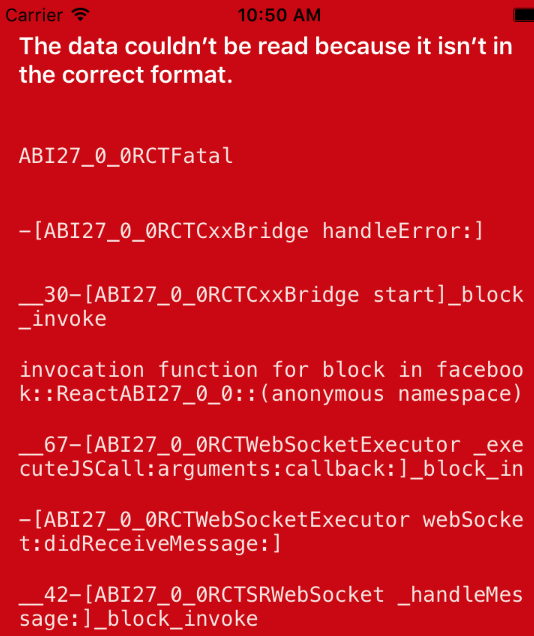
React-native-gesture-handler: Throws an error "The data couldn't be read because it isn't in the correct format" in Remote debug using Expo
I'm using the latest 1.0.7, I get an error an error "The data couldn't be read because it isn't in the correct format" in Remote debug mode using Expo without ejecting
This error only happens when I have "Debug Remote JS" enabled.
 qaiser110
All 11 comments
Related: https://github.com/kmagiera/react-native-gesture-handler/issues/46
RN 0.56 / RN 0.57
 ptmt
on 17 Sep 2018
ptmt
on 17 Sep 2018
@qaiser110
Could you share some context when it occurs?
 osdnk
on 18 Sep 2018
osdnk
on 18 Sep 2018
I'm using expo 27.1.1 (without ejecting) with react-native 0.55.2 (react 16.3.1)
Thanks @osdnk
qaiser110
on 19 Sep 2018
I mean could you attach some code?
osdnk
on 19 Sep 2018
What's more, could you please try with Expo 30.0.0?
osdnk
on 20 Sep 2018
Thanks @osdnk for your reply
I plan to update to Expo 30 soon, but I'm not able to a the moment. I will update how it goes.
qaiser110
on 7 Oct 2018
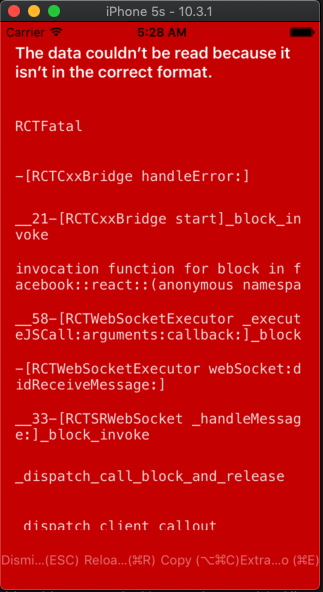
Same issue is happening in my application.
I'm using RN 0.57.1
It only happens with debugger mode on and iOS 10.3 and below. On higher iOS it's working fine.
 deepankarsandy
on 29 Mar 2019
deepankarsandy
on 29 Mar 2019
I had the same issue and 'resolved' it. In my case, we would only get the error if we had the remote debugger on and logging out a certain message (with emojis). To fix this, I changed that message to something else and I can now continue to use the debugger.
 khanguslee
on 14 Jun 2019
khanguslee
on 14 Jun 2019
Same issue here, on iOS 10.3 and 9.2, with no use of console.log. I noticed that it would work if renderLeftActions or renderRightActions returns either null, or a View with _width_ of 0. If height is more than 0 it is ok, but with width 1 or more the error will occur.
Edit: This is with 1.6.1 of react-native-gesture-handler and react-native 0.61.5.
 funkyfourier
on 30 Mar 2020
funkyfourier
on 30 Mar 2020
Please provide some reproduction example, stack traces don't mention Gesture Handler at all here.
 jakub-gonet
on 25 Jul 2020
jakub-gonet
on 25 Jul 2020
Closing until more info is provided.
jakub-gonet
on 30 Jul 2020
Related issues
 maopixin
·
3Comments
maopixin
·
3Comments
 muhaimincs
·
3Comments
muhaimincs
·
3Comments
 brentvatne
·
5Comments
brentvatne
·
4Comments
brentvatne
·
5Comments
brentvatne
·
4Comments
 enahum
·
4Comments
enahum
·
4Comments