React-native-gesture-handler: borderRadius on RectButton on Android
Setting borderRadius on RectButton does not actually round the corners. Current workaround is to wrap a RectButton with a View that has a borderRadius set.
 brentvatne
All 4 comments
The same with borderWidth and borderColor
 vpodolyan
on 30 Mar 2018
vpodolyan
on 30 Mar 2018
This issue has been reffered in one of PRs. As soon as it will have been merged, I suppose the problem will be solved.
I close the issue
 osdnk
on 25 Apr 2018
osdnk
on 25 Apr 2018
Why is this closed? I'm still unable to set borderRadius on RectButton.
Setting
borderRadiuson RectButton does not actually round the corners. Current workaround is to wrap a RectButton with a View that has a borderRadius set.
Didn't work either.
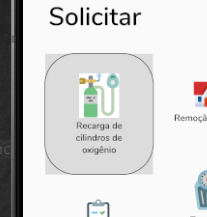
The border represents the view wrapping the RectButton and the grey area the RectButton itself.
Code:
<View style={style.borderRadiusOf50}>
  <RectButton>
    <View accessible style={[style.square, style.squareTypeOne]}>
      <Image
        resizeMode="center"
        source={oxygenLogo}
        style={style.logo}
      />
      <Text style={style.buttonLabel}>
        Recarga de cilindros de oxigênio
      </Text>
    </View>
  </RectButton>
</View>
Solution
I found out while writing this comment that RectButton needs backgroundColor for borderRadius to work. I also just checked the docs and there's nothing mentioning this requisite in there so it's kinda unintuitive.
 GoldenMaximo
on 6 Sep 2019
GoldenMaximo
on 6 Sep 2019
Why is this closed? I'm still unable to set
borderRadiuson RectButton.Setting
borderRadiuson RectButton does not actually round the corners. Current workaround is to wrap a RectButton with a View that has a borderRadius set.Didn't work either.
The border represents the view wrapping the RectButton and the grey area the RectButton itself.
Code:
<View style={style.borderRadiusOf50}>
  <RectButton>
    <View accessible style={[style.square, style.squareTypeOne]}>
      <Image
        resizeMode="center"
        source={oxygenLogo}
        style={style.logo}
      />
      <Text style={style.buttonLabel}>
        Recarga de cilindros de oxigênio
      </Text>
    </View>
  </RectButton>
</View>
Solution
I found out while writing this comment that RectButton needs
backgroundColorforborderRadiusto work. I also just checked the docs and there's nothing mentioning this requisite in there so it's kinda unintuitive.
Thanks! Setting backgroundColor helped
 kesha-antonov
on 25 Sep 2020
kesha-antonov
on 25 Sep 2020
Related issues
 brunolemos
·
3Comments
brunolemos
·
3Comments
 maopixin
·
3Comments
maopixin
·
3Comments
 tallen11
·
3Comments
tallen11
·
3Comments
 nguyenhose
·
4Comments
nguyenhose
·
4Comments
 jhalborg
·
5Comments
jhalborg
·
5Comments
Most helpful comment
Why is this closed? I'm still unable to set
borderRadiuson RectButton.Didn't work either.
The border represents the view wrapping the RectButton and the grey area the RectButton itself.
Code:
Solution
I found out while writing this comment that RectButton needs
backgroundColorforborderRadiusto work. I also just checked the docs and there's nothing mentioning this requisite in there so it's kinda unintuitive.